Buscar pacotes, repositórios e categorias de apps

Capa de stretchy_header
Detalhes do pacotev2.0.0

stretchy_header

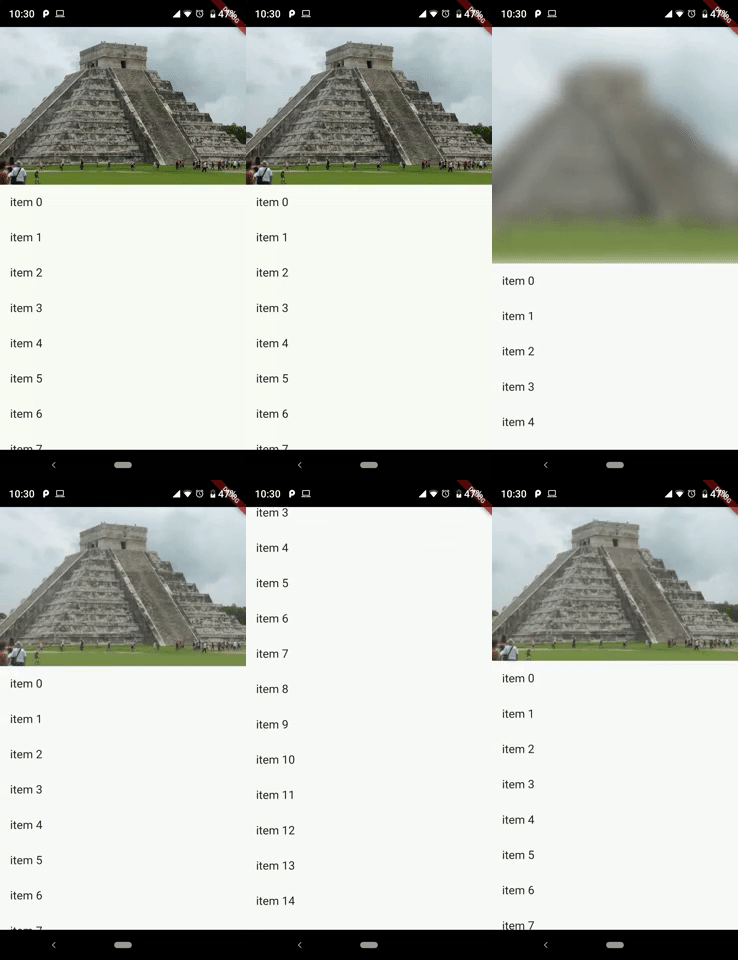
Este pacote permite criar um cabeçalho elástico, para obter um bom efeito ao rolar o widget.

AndroidiOSWebmacOSWindowsLinux
Downloads em 30 dias
236
Curtidas
98
Pontos Pub
140

Instalar pacote

flutter pub add stretchy_header

Visão geral do pacote

Orientação gerada a partir de informações públicas. Apenas para referência.

O pacote stretchy_header permite que desenvolvedores criem cabeçalhos elásticos ou esticáveis em aplicativos Flutter, aprimorando as interações de rolagem com um efeito visual dinâmico. Quando os usuários rodam para baixo, o cabeçalho se estica e anima suavemente, proporcionando uma experiência envolvente e imersiva. É ideal para aplicativos com layouts ricos em conteúdo onde os visuais do cabeçalho desempenham um papel fundamental na engajamento do usuário. O pacote oferece suporte a múltiplas plataformas, incluindo Android, iOS, Web, macOS, Windows e Linux, garantindo comportamento consistente entre dispositivos.

Casos de uso

  • Criando telas de inicialização animadas para aplicativos
  • Melhorando efeitos de rolagem em aplicativos de notícias ou mídia
  • Projetando cabeçalhos imersivos de perfil ou painel
  • Melhorar o engajamento do usuário em interfaces de mídia social
  • Criando experiências de onboarding visualmente atraentes

Principais recursos

  • Animação suave de estiramento elástico
  • Suporte para conteúdo de cabeçalho personalizado
  • Compatibilidade multiplataforma
  • Integração fácil com ListView ou ScrollController
  • Sensibilidade e duração de estiramento configuráveis

Indicado para

  • Desenvolvedores de interfaces interativas
  • Designers procurando efeitos dinâmicos de cabeçalho
  • Aplicativos com interfaces de rolagem intensivas em conteúdo
  • Projetos com foco em experiências de usuário refinadas

Considerações

  • Pode afetar o desempenho em dispositivos de baixa gama
  • Requer ajuste cuidadoso dos parâmetros de estiramento
  • Não adequado para cabeçalhos estáticos simples
  • Personalização limitada além das animações básicas
  • Melhor usado com conteúdo de cabeçalho leve

README original

Snapshot do README original do repositório-fonte vinculado. Consulte o repositório para o conteúdo mais recente.

Stretchy Header

pub package

This package allows us to create an elastic header, to give a good effect when you scroll down the widget.

Sample 1

Sample 2

Getting started

You should ensure that you add the router as a dependency in your flutter project.

dependencies:
  stretchy_header: "^1.0.8"

You should then run flutter packages upgrade or update your packages in IntelliJ.

Example Project

There is an example project in the example folder. Check it out. Otherwise, keep reading to get up and running.


Usage

Sample 1
import 'package:flutter/material.dart';
import 'package:stretchy_header/stretchy_header.dart';

class SampleListView extends StatelessWidget {
  @override
  Widget build(BuildContext context) {
    return Scaffold(
      body: StretchyHeader.listViewBuilder(
        headerData: HeaderData(
          headerHeight: 250,
          header: Image.asset(
            "images/chichen.jpg",
            fit: BoxFit.cover,
          ),
        ),
        itemCount: 15,
        itemBuilder: (context, index) {
          return ListTile(
            title: Text("item $index"),
            onTap: () {
              final snackBar = SnackBar(
                content: Text('item $index tapped'),
              );
              ScaffoldMessenger.of(context).showSnackBar(snackBar);
            },
          );
        },
      ),
    );
  }
}
Sample 2
import 'package:flutter/material.dart';
import 'package:stretchy_header/stretchy_header.dart';

class SampleCustomHeader extends StatelessWidget {
  @override
  Widget build(BuildContext context) {
    return Scaffold(
      body: StretchyHeader.singleChild(
        headerData: HeaderData(
          headerHeight: 200,
          backgroundColor: Colors.black54,
          blurColor: Colors.yellow,
          header: UserAccountsDrawerHeader(
            accountName: Text("Diego"),
            accountEmail: Text("twitter @diegoveloper"),
            currentAccountPicture: CircleAvatar(
              backgroundColor: Colors.red,
              child: Text("DV"),
            ),
            margin: EdgeInsets.zero,
          ),
          overlay: Align(
            alignment: Alignment.bottomRight,
            child: Material(
              color: Colors.transparent,
              child: InkResponse(
                onTap: () {
                  ScaffoldMessenger.of(context).showSnackBar(
                    SnackBar(
                      content: Text('onTap'),
                    ),
                  );
                },
                child: Padding(
                  padding: EdgeInsets.all(12),
                  child: Icon(
                    Icons.fullscreen,
                    color: Colors.white,
                  ),
                ),
              ),
            ),
          ),
        ),
        child: Padding(
          padding: const EdgeInsets.all(15),
          child: Text(
            "Hello World!",
            style: TextStyle(fontSize: 45, color: Colors.white),
          ),
        ),
      ),
    );
  }
}
Sample 3
class SampleBottomLabel extends StatelessWidget {
  @override
  Widget build(BuildContext context) {
    return Scaffold(
      body: StretchyHeader.singleChild(
        headerData: HeaderData(
          headerHeight: 250,
          header: Image.asset(
            "images/machu.jpg",
            fit: BoxFit.cover,
          ),
          highlightHeaderAlignment: HighlightHeaderAlignment.bottom,
          highlightHeader: Container(
            width: MediaQuery.of(context).size.width,
            decoration: BoxDecoration(
                gradient: LinearGradient(
                  colors: [
                    Colors.black54,
                    Colors.black54,
                    Colors.black26,
                    Colors.black12,
                    Colors.black12,
                  ],
                  begin: Alignment.bottomCenter,
                  end: Alignment.topCenter,
                )),
            child: Padding(
              padding: const EdgeInsets.all(15),
              child: Text(
                "Machu Picchu",
                style: TextStyle(color: Colors.white, fontSize: 22),
              ),
            ),
          ),
        ),
        child: Padding(
          padding: const EdgeInsets.all(15),
          child: Text(LONG_DESCRIPTION),
        ),
      ),
    );
  }
}
Sample 4
class SampleCenterWidget extends StatelessWidget {
  @override
  Widget build(BuildContext context) {
    return Scaffold(
      body: StretchyHeader.singleChild(
        headerData: HeaderData(
          headerHeight: 250,
          header: Image.asset(
            "images/machu.jpg",
            fit: BoxFit.cover,
          ),
          highlightHeaderAlignment: HighlightHeaderAlignment.center,
          highlightHeader: SizedBox(
            width: MediaQuery.of(context).size.width,
            child: GestureDetector(
              onTap: () {
                print("tap highlightHeader");
              },
              child: CircleAvatar(
                backgroundColor: Colors.red,
                child: Text("M"),
              ),
            ),
          ),
        ),
        child: Padding(
          padding: const EdgeInsets.all(15),
          child: Text(LONG_DESCRIPTION),
        ),
      ),
    );
  }
}

You can follow me on twitter @diegoveloper

Categorias

Repositório-fonte

Projetos que usam este pacote