Você tem tido problemas ao escrever código para requisições HTTP? Esse pacote pode ajudar. Ele possui todas as funcionalidades de geração de código HTTP e modelo que você estava procurando.
Orientação gerada a partir de informações públicas. Apenas para referência.
Um pacote Flutter/Dart que gera código de cliente HTTP e modelos de dados a partir de especificações OpenAPI/Swagger. Automatiza a criação de clientes de API seguros por tipo, reduzindo o código repetitivo e minimizando erros em solicitações de rede. Ideal para desenvolvedores que trabalham com APIs RESTful definidas por meio do Swagger ou OpenAPI, simplificando a integração ao gerar código Dart limpo e sustentável. O gerador oferece suporte a múltiplas plataformas, incluindo Android, iOS, Web, macOS, Windows e Linux.
Casos de uso
Automatizando a geração de clientes de API a partir de especificações OpenAPI
Reduzindo código de solicitação HTTP manual
Integrando APIs REST com segurança de tipo
Gerando modelos a partir de esquemas JSON
Simplificando a integração de backend em aplicativos Flutter
Principais recursos
Gera clientes HTTP a partir de especificações OpenAPI 2.0 e 3.0
Produz modelos Dart seguros por tipo
Suporta cabeçalhos personalizados e autenticação
Oferece estrutura de saída configurável
Integra-se com os sistemas de compilação do Flutter
Indicado para
Equipes Flutter usando APIs definidas pelo OpenAPI
Desenvolvedores procurando reduzir o tempo de integração da API
Projetos que exigem clientes de API consistentes e reutilizáveis
Equipes priorizando qualidade e manutenibilidade do código
Considerações
Requer especificação válida do OpenAPI/Swagger
Atualizações manuais necessárias quando a API mudar
Limitado à geração estática de código (sem flexibilidade em tempo de execução)
Melhor usado com especificações de API controladas por versão
Pode ser necessário configuração adicional para pontos de extremidade complexos
README original
Snapshot do README original do repositório-fonte vinculado. Consulte o repositório para o conteúdo mais recente.
:mega: Build dart types from Swagger/OpenAPI schemas :mega:
SwaggerDartCodeGenerator is a code generator that looks for *.swagger files and builds .swagger.dart files, based on the schema. Code generation based on Chopper and JsonAnnotation models and can be configured for your needs.
Overview
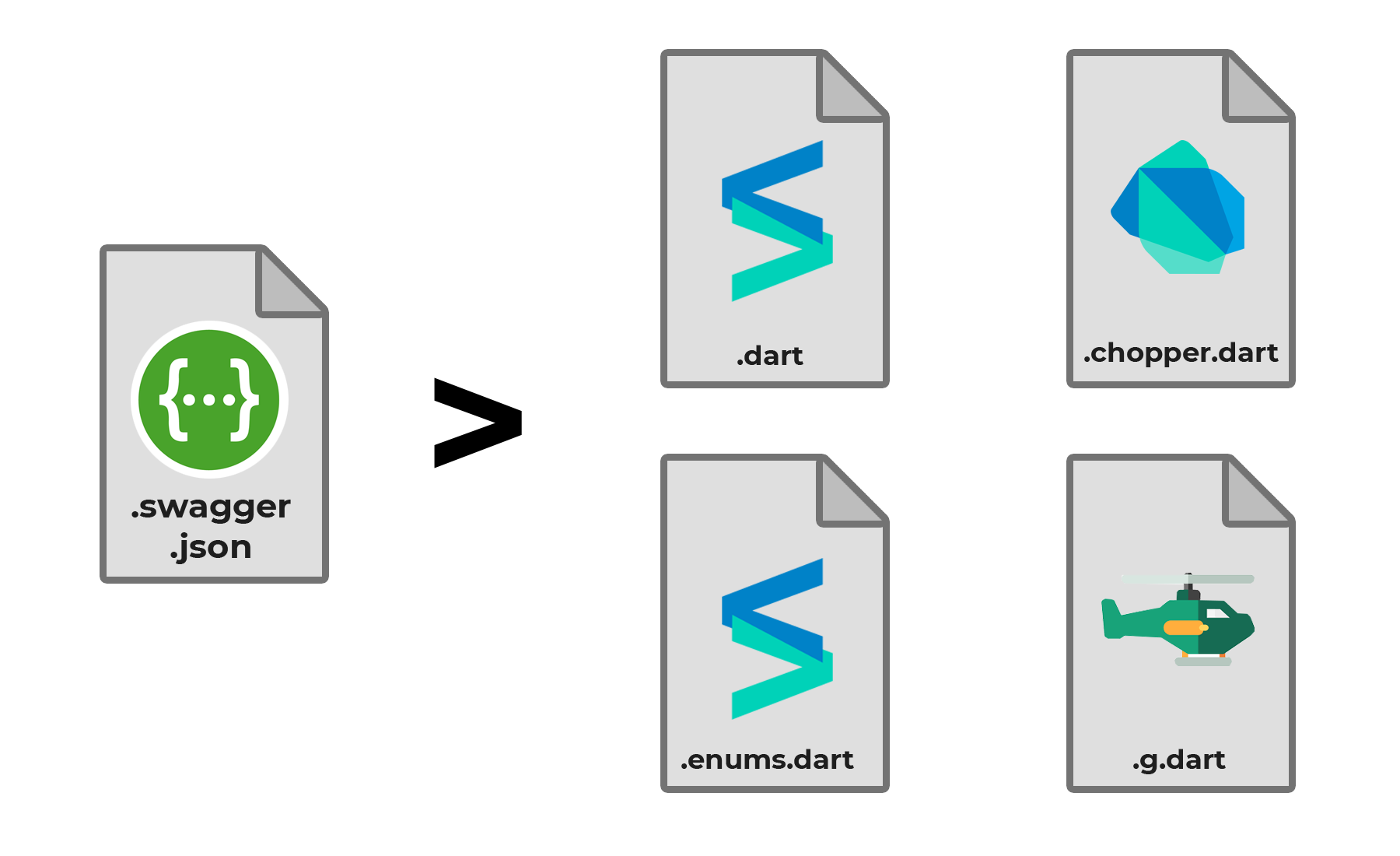
In general case for each .swagger file three outputs will be created. .dart generated by Swagger dart code generator, contains all models, requests, converters, etc.
[Since v1.2.0] .enums.dart generated by Swagger dart code generator, contains all enums and enums mappings. .chopper.dart - generated by chopper. .g.dart - generated by json_serializable.
Installation
The generated code uses the following packages in run-time:
dependencies:chopper:^8.0.3json_annotation:^4.9.0
Add the following to your pubspec.yaml file to be able to do code generation:
Path to folder with .swagger files (for ex. swagger_examples, or lib/swaggers).
output_folder
-
true
Path to output folder (for ex. lib/generated).
input_urls
[]
false
Here you can mention list of files to be downloaded from the internet. You can check example of usage.
with_base_url
true
false
If this option is false, generator will ignore base url in swagger file.
use_required_attribute_for_headers
true
false
If this option is false, generator will not add @required attribute to headers.
with_converter
true
false
If option is true, combination of all mappings will be generated.
ignore_headers
false
false
If option is true, headers will not be generated.
additional_headers
false
false
List of additional headers, not specified in Swagger. Example of usage: build.yaml
enums_case_sensitive
true
false
If value is false, 'enumValue' will be defined like Enum.enumValue even it's json key equals 'ENUMVALUE'
include_paths
[]
false
List of Regex If not empty - includes only paths matching reges
exclude_paths
[]
false
List of Regex If not empty -exclude paths matching reges
classes_with_nullabe_lists
[]
false
List of regex strings. If class name matches any of regex - list properties will have default value null. Otherwise it will be empty list. If you used use_default_null_for_lists: true, just set .* value for this property and result will be same. Check example for more details
build_only_models
false
false
If option is true, chopper classes will not be generated.
separate_models
false
false
If option true, generates models into separate file.
include_if_null
null
false
Sets includeIfNull JsonAnnotation feature and sets value for it. If null - not set anything.
default_values_map
[]
false
Contains map of types and theirs default values. See DefaultValueMap.
If your model names are long and contain a lot of duplicated words, for example DbUsersModelsV3GeneralUserModel, you can cut off duplicated part, using cut_from_model_names : DbUsersModelsV3. Also, you can use regex expressions in this parameter.
nullable_models
-
false
List of model names should have force-nullable properties. Example of usage in build.yaml.
override_equals_and_hashcode
-
true
If need to decrease app size - you can disable generation of hashcode and Equals method.
overriden_models
-
false
List of manually written models that will replace the generated one. Can be different for each file. See example here
use_path_for_request_names
true
false
Can be false only if all requests has unique operationId. It gives readable names for requests.
add_base_path_to_requests
false
false
Add swagger base path to all request path.
multipart_file_type
List<int>
false
Allow to override the generated class for multipart file (See #605).
override_to_string
bool
true
Overrides toString() method using jsonEncode(this)
generate_first_succeed_response
true
false
If request has multiple success responses, first one will be generated. Otherwice - dynamic
multipart_file_type
List<int>
false
Type if input parameter of Multipart request
scalars
-
{}
A map of custom types that are used for string properties with a given format. See example here
It's important to remember that, by default, build will follow Dart's package layout conventions, meaning that only some folders will be considered to parse the input files. So, if you want to reference files from a folder other than lib/, make sure you've included it on sources: