Buscar pacotes, repositórios e categorias de apps

Capa de sweetsheet
Detalhes do pacotev0.4.0

sweetsheet

Mostre rapidamente e facilmente uma bela folha inferior como diálogo de confirmação.

AndroidiOSWebmacOSWindowsLinux
Downloads em 30 dias
50
Curtidas
231
Pontos Pub
140

Instalar pacote

flutter pub add sweetsheet

Visão geral do pacote

Orientação gerada a partir de informações públicas. Apenas para referência.

Sweetsheet é um pacote Flutter que permite aos desenvolvedores exibir rapidamente e facilmente folhas inferiores atrativas como diálogos de confirmação. Simplifica o processo de criar folhas inferiores modais com código mínimo, oferecendo uma interface moderna e limpa por padrão. Projetado para integração perfeita em múltiplas plataformas, suporta Android, iOS, Web, macOS, Windows e Linux. O pacote melhora a experiência do usuário ao fornecer animações suaves e layouts personalizáveis, mantendo simplicidade e consistência no design.

Casos de uso

  • Diálogos de confirmação rápidos
  • Prompts de ação do usuário
  • Confirmações de envio de formulário
  • Navegação modal
  • Interfaces simples de pop-up

Principais recursos

  • API fácil de usar
  • Estilo padrão bonito
  • Suporte multiplataforma
  • Conteúdo personalizável
  • Animações suaves
  • Boilerplate mínimo

Indicado para

  • Desenvolvedores em busca de implementação rápida de bottom sheet
  • Projetos que precisam de diálogos de confirmação leves
  • Aplicativos com padrões de interface consistentes
  • Equipes que priorizam a velocidade de desenvolvimento
  • Iniciantes do Flutter explorando folhas inferiores

Considerações

  • Personalização limitada além da estilização básica
  • Não ideal para folhas interativas complexas
  • Depende de dependências externas para funcionalidade completa
  • Mais adequado para casos de uso simples, em vez de modais avançados

README original

Snapshot do README original do repositório-fonte vinculado. Consulte o repositório para o conteúdo mais recente.

sweetsheet

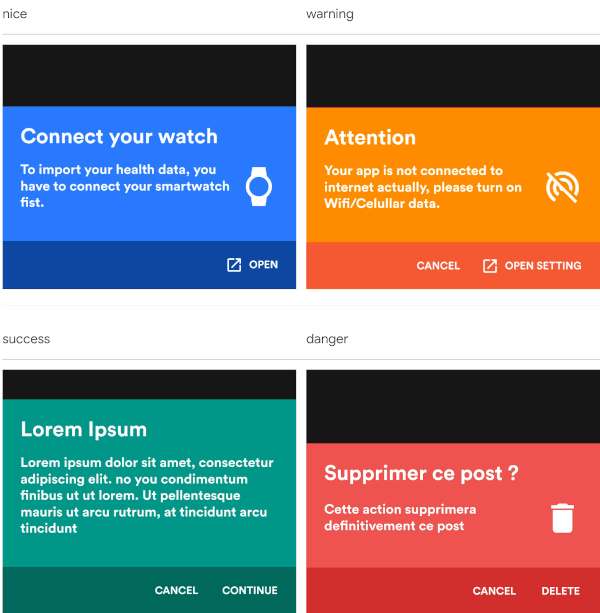
Show beautiful bottom sheet as confirmation dialog quickly and easily.

nice warning
nice warning
success danger
success danger

and since version 0.2.0 , it is fully customizable.

custom dark custom light
success danger

Getting Started

With increasingly large smartphones, it has become almost impossible to have good ergonomics in an application using confirmation dialogs. The SweetSheet package allows you to show beautiful bottoms sheets to replace your confirmation dialogs and maintain a good user experience.

How to use?

Add this to your package's pubspec.yaml file:

dependencies:
  sweetsheet: ^0.4.0

And import it:

import 'package:sweetsheet/sweetsheet.dart';

to start using the sheets, you have to create the instance of the SweetSheet class first.

final SweetSheet _sweetSheet = SweetSheet();

Now you can show the bottom sheet by calling the method show() on the instance. This is the signature of the show method

  show({
    required BuildContext context,
    Text? title,
    required Text description,
    required CustomSheetColor color,
    required SweetSheetAction positive,
    EdgeInsets? contentPadding = const EdgeInsets.symmetric(horizontal: 24.0, vertical: 24.0),
    EdgeInsets? actionPadding = const EdgeInsets.all(8.0),
    SweetSheetAction? negative,
    IconData? icon,
    bool useRootNavigator = false,
    bool isDismissible = true,
  }) {}

This is the signature of the SweetSheetAction widget.

class SweetSheetAction extends StatelessWidget {
  final String title;
  final VoidCallback onPressed;
  final IconData icon;
  final Color color;

  SweetSheetAction({
    @required this.title,
    @required this.onPressed,
    this.icon,
    this.color = Colors.white,
  });  
}

Attention : At least one action is required and the icons are IconData for uniformity purpose.

The SweetSheetColor is a class which have four static values and it determine the color of the sheet by creating a CustomSheetColor:

  • SweetSheetColor.SUCCESS (green)
  • SweetSheetColor.DANGER (red)
  • SweetSheetColor.WARNING (orange)
  • SweetSheetColor.NICE (blue)

Customisation

To customise, create a new instance of CustomSheetColor and pass it to the argument color when calling the method show. signature of CustomSheetColor:

class CustomSheetColor {
  Color main;
  Color accent;
  Color icon;

  CustomSheetColor({@required this.main, @required this.accent, this.icon});
}

To customise the action, pass a new color to color argument of SweetSheetAction.

Example:

Warning
_sweetSheet.show(
    context: context,
    title: Text("Attention"),
    description: Text(
        'Your app is not connected to internet actually, please turn on Wifi/Celullar data.'),
    color: SweetSheetColor.WARNING,
    icon: Icons.portable_wifi_off,
    positive: SweetSheetAction(
      onPressed: () {
        Navigator.of(context).pop();
      },
      title: 'OPEN SETTING',
      icon: Icons.open_in_new,
    ),
    negative: SweetSheetAction(
      onPressed: () {
        Navigator.of(context).pop();
      },
      title: 'CANCEL',
    ),
);
Custom Light
_sweetSheet.show(
    context: context,
    description: Text(
      'Place your order. Please confirm the placement of your order : Iphone X 128GB',
      style: TextStyle(color: Color(0xff2D3748)),
    ),
    color: CustomSheetColor(
      main: Colors.white,
      accent: Color(0xff5A67D8),
      icon: Color(0xff5A67D8),
    ),
    icon: Icons.local_shipping,
    positive: SweetSheetAction(
      onPressed: () {
        Navigator.of(context).pop();
      },
      title: 'CONTINUE',
    ),
    negative: SweetSheetAction(
      onPressed: () {
        Navigator.of(context).pop();
      },
      title: 'CANCEL',
  ),
);
That is all. Have fun!

Categorias

Repositório-fonte

Projetos que usam este pacote

Ainda não há dados.