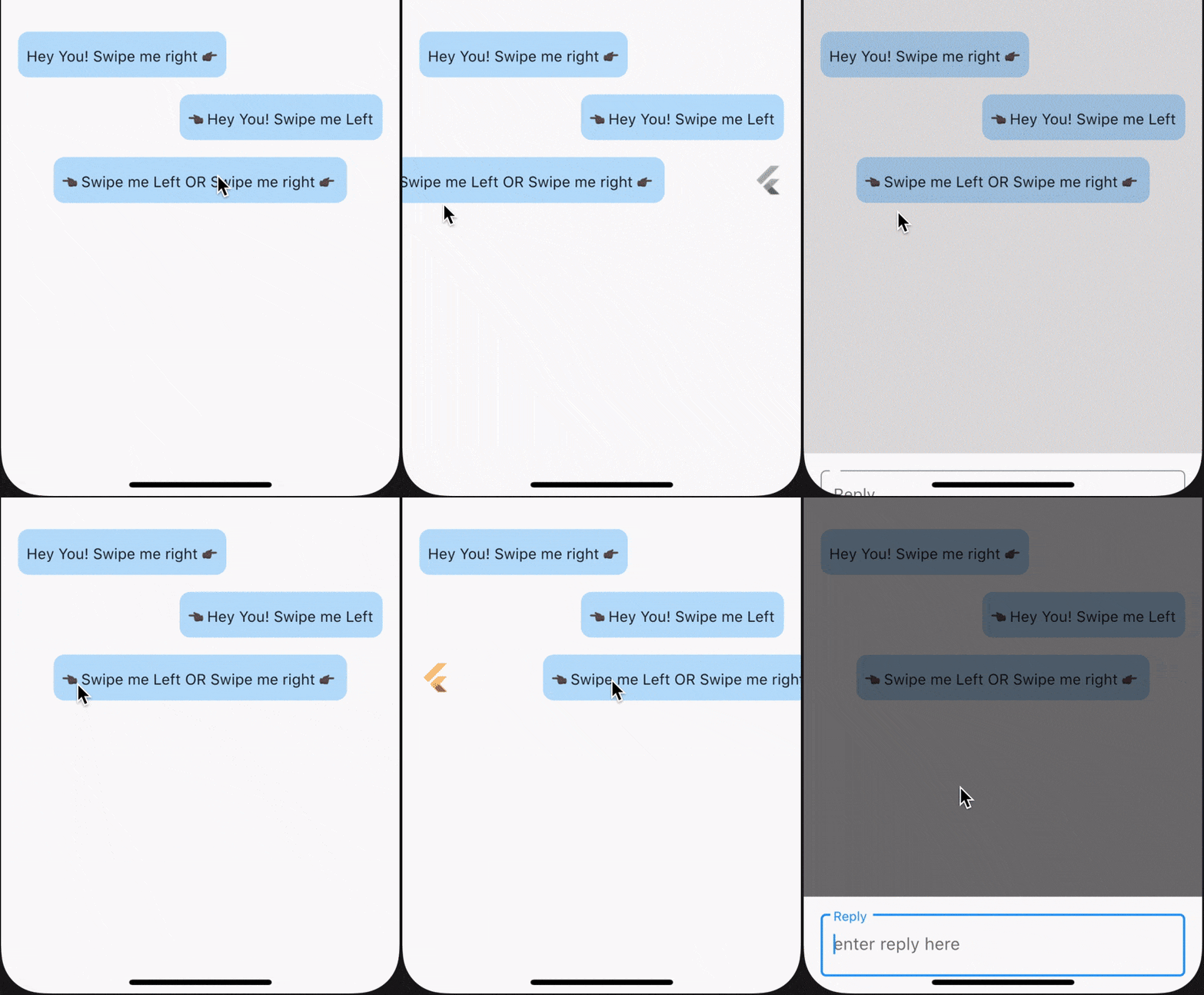
SwipeTo é um wrapper para um widget de visualização de chat que pode ser usado para iniciar um callback quando o usuário deslizar horizontalmente sobre ele.
Orientação gerada a partir de informações públicas. Apenas para referência.
SwipeTo é um pacote Flutter que envolve um widget de visualização de chat, permitindo que desenvolvedores acionem callbacks quando os usuários realizam deslizes horizontais. Foi projetado para interfaces de chat onde gestos de deslize podem iniciar ações como exclusão de mensagens ou respostas rápidas. O pacote suporta múltiplas plataformas, incluindo Android, iOS, Web, macOS, Windows e Linux, tornando-o versátil para aplicativos multiplataforma. Com uma API simples, integra-se perfeitamente em interfaces de chat existentes sem exigir configuração complexa. Ele melhora a interação do usuário ao adicionar funcionalidade baseada em gestos aos elementos de chat.
Casos de uso
Exclusão de mensagem de bate-papo
Ações de resposta rápida
Navegação baseada em gestos
Interfaces de bate-papo interativas
Mensagens de deslize para descartar
Engajamento aprimorado do usuário nos chats
Principais recursos
Detecção de deslize horizontal
O callback é acionado ao deslizar
Compatibilidade multiplataforma
Integração simples com widgets de chat
Suporta múltiplas plataformas
Leve e baixo custo operacional
Indicado para
Desenvolvedores construindo aplicativos de chat
Designers de interface procurando interações por gestos
Aplicativos que precisam de recursos de deslize para ação
Aplicativos móveis e web multiplataforma
Interfaces de mensagens interativas
Considerações
Requer configuração adequada de manipulação de gestos
Pode ser necessário personalizar comportamentos complexos de deslize
Limitado a deslizes horizontais apenas
Depende da estrutura subjacente do widget de bate-papo
Não adequado para cenários de deslize vertical
README original
Snapshot do README original do repositório-fonte vinculado. Consulte o repositório para o conteúdo mais recente.
swipe_to
SwipeTo is a wrapper for a chat view widget which can be used initiate callback when user horizontally swipe on it.
Getting Started
To use this packages, you just simply need to wrap your child component in SwipeTo widget and pass a VoidCallback that you can carry forward with your task.
In the pubspec.yaml of your flutter project, add the following dependency:
dependencies:...swipe_to:1.0.6
In your library add the following import:
import'package:swipe_to/swipe_to.dart';
Parameter Info
child : (@required) StateLess or StateFull flutter widget.
onRightSwipe : callback which will be initiated at the end of right swipe animation. If not passed right swipe will be disabled
onLeftSwipe : callback which will be initiated at the end of left swipe animation. If not passed left swipe will be disabled
iconOnRightSwipe : IconData that will be displayed on left beneath child widget when swiped right. If not specified default is Icons.reply
rightSwipeWidget : Widget that will be displayed beneath child widget when swipe right. If iconOnRightSwipe is defined this will have no effect.
iconOnLeftSwipe : IconData that will be displayed on right beneath child widget when swiped left. If not specified default is Icons.reply
leftSwipeWidget : Widget that will be displayed beneath child widget when swipe left. If iconOnLeftSwipe is defined this will have no effect.
iconSize : Double value defining size of displayed icon beneath child widget. If not specified default it will take 26
iconColor : Color value defining color of displayed icon beneath child widget. If not specified primaryColor from theme will be taken
offsetDx : Double dx value used in Offset() till which position of child widget will get animated. If not specified 0.3 default will be taken. onRightSwipe +dx value will be used and for onLeftSwipe -dx value will be used
animationDuration : Duration value to define animation duration. If not specified default is 150 milliseconds
swipeSensitivity : Swipe sensitivity integer value which will be in range of default min 5 to max 35. Crossing mentioned value of this parameter (+ve in right and -ve in left direction) will trigger swipe animation.
Major changes onwards [ver 0.0.1+5]
For a single child widget, we can now enable swipe for both left and right direction
swipeDirection parameter is removed. Now onLeftSwipe and onRightSwipe callback will enable swiping for a particular direction if passed
iconData is now split into two parameter, iconOnRightSwipe & iconOnLeftSwipe for future use
endOffset is now change to accept a double value only
callBack is now split into two parameter, onLeftSwipe & onRightSwipe
Using SwipeTo widget for ListView items
While using SwipeTo widget for ListView items, make sure to pass a Key() as key parameter of SwipeTo widget. Suggested to use UniqueKey() which will differentiate each individual widget in the Widget Tree. Check example below. To view example code click here.
swipeDirection : Enum value from [swipeToLeft, swipeToRight] only. Make sure to pass relative Offset value according to passed swipeDirection value. If not specified swipeToRight will be taken as default.
iconData : IconData that will be displayed beneath child widget. if not specified default is Icons.reply
endOffset : Offset value till which position of child widget will get animated. if not specified Offset(0.3, 0.0) default will be taken
callBack : (@required) callback which will be initiated at the end of swipe animation
Example : SwipeToRight
Wrap your desired widget with SwipeTo & pass a call to onRightSwipe parameter.
SwipeTo(
child: Container(
padding: constEdgeInsets.symmetric(vertical: 10.0, horizontal: 8.0),
child: Text('Hey You! Swipe me right 👉🏿'),
),
onRightSwipe: (details) {
print('Callback from Swipe To Right');
},
),
Example : SwipeToLeft
Wrap your desired widget with SwipeTo & pass a call to onLeftSwipe parameter.
SwipeTo(
child: Container(
padding: constEdgeInsets.symmetric(vertical: 10.0, horizontal: 8.0),
child: Text('👈🏿 Hey You! Swipe me Left'),
),
onLeftSwipe: (details) {
print('Callback from Swipe To Left');
},
),
Example : SwipeToLeft & SwipeToRight
Wrap your desired widget with SwipeTo & pass a call to onLeftSwipe & onRightSwipe parameters.
SwipeTo(
child: Container(
padding: constEdgeInsets.symmetric(vertical: 10.0, horizontal: 8.0),
child: Text('👈🏿 Swipe me Left | YOU |Swipe me right 👉🏿'),
),
onLeftSwipe: (details) {
print('Callback from Swipe To Left');
},
onRightSwipe: (details) {
print('Callback from Swipe To Right');
},
),