Banco de dados de vetores de IA distribuído e rápido e mecanismo de armazenamento local persistente. Armazenamento chave-valor de alto desempenho com suporte a SQL, NoSQL, cache offline e dados criptografados.
Orientação gerada a partir de informações públicas. Apenas para referência.
Tostore é um banco de dados vetorial de IA de alto desempenho e distribuído, além de um mecanismo de armazenamento local persistente projetado para aplicativos Flutter. Combina armazenamento rápido por chave-valor com suporte a consultas SQL e NoSQL, permitindo cache offline eficiente e gerenciamento de dados criptografados. Desenvolvido para uso multiplataforma, o Tostore funciona sem problemas em Android, iOS, Web, macOS, Windows e Linux. Ideal para aplicações que exigem manipulação escalonável, segura e de baixa latência de dados, especialmente aquelas que utilizam recursos impulsionados por IA, como busca vetorial. Sua integração via flutter pub add tostore garante instalação rápida e persistência robusta de dados entre dispositivos.
Casos de uso
Recursos de busca com inteligência artificial
Aplicativos móveis com foco em offline
Armazenamento local criptografado
Aplicativos colaborativos em tempo real
Buscas de similaridade de vetores
Sincronização de dados entre plataformas
Principais recursos
banco de dados vetorial distribuído
Armazenamento de dados criptografados
Suporte de consulta SQL e NoSQL
Cache offline persistente
Armazenamento de chave-valor de alto desempenho
Compatibilidade multiplataforma
Indicado para
Desenvolvedores Flutter construindo aplicativos com integração de IA
Aplicativos que precisam de persistência de dados locais seguros
Projetos que exigem funcionalidade off-line
Desenvolvedores usando embeddings vetoriais
Equipes direcionadas para múltiplas plataformas
Considerações
Requer conhecimento de bancos de dados vetoriais
Pode ser necessário configuração adicional do backend para distribuição completa
O desempenho depende dos recursos do dispositivo
Criptografia adiciona sobrecarga
Documentação disponível limitada
Mais adequado para usuários avançados
README original
Snapshot do README original do repositório-fonte vinculado. Consulte o repositório para o conteúdo mais recente.
ToStore is a modern data engine designed for the AGI era and edge intelligence scenarios. Built on a Self-Routing node architecture, it gives nodes high autonomy and elastic horizontal scalability while logically decoupling performance from data scale.
Runtime modeling and non-blocking execution paths keep architecture evolution always online and fully transparent to business operations—declarative schema changes, data encoding key rotation, and massive data refactoring all happen seamlessly online. Built for Agent and automated O&M, it underpins their autonomous evolution and continuous iteration without interrupting service.
A unified data engine natively supporting relational structured data, high-dimensional vectors, and unstructured data, with built-in hybrid retrieval and multi-way recall fusion, plus enterprise-grade database capabilities including ACID transactions, complex relational queries (JOINs, cascading foreign keys), table-level TTL, aggregations, as well as distributed primary key algorithms, atomic expressions, encryption, multi-space isolation, and self-healing recovery.
As computing continues shifting toward edge intelligence, devices are no longer just "content displays". They are intelligent nodes responsible for local generation, environmental awareness, real-time decision-making, and coordinated data flows. ToStore gives the edge distributed capabilities strong enough for massive datasets and complex local AI generation. Deep intelligent collaboration between edge and cloud nodes provides a reliable data foundation for multi-modal interaction, semantic vector hybrid retrieval, spatial modeling, edge autonomous collaboration, and similar scenarios.
Key Features
🤖 Runtime Evolution & Intelligent O&M
Declarative schema changes—automatic refactoring, no manual versioning
Time-slicing keeps UI animations smooth even under heavy load
🔐 Data Security & Isolation
Multi-space isolation with optional global sharing—multi-user / multi-tenant ready
Built-in ChaCha20-Poly1305 and AES-256-GCM encryption
Validated through multiple complex disaster recovery scenarios
Installation
[!IMPORTANT]
Upgrading from v2.x? Please read the v3.x Upgrade Guide for critical migration steps and breaking changes.
Add tostore to your pubspec.yaml:
dependencies:tostore:any# Please use the latest version
For AI Coding Assistants
When generating ToStore client code with an AI assistant, give it the single-file corpus llms-full.txt — for example @llms-full.txt in the IDE, upload/paste the file, or index its raw URL in the assistant's docs. That file carries API signatures, constraints, and anti-patterns so the model stays aligned with the real public surface. Discovery index: llms.txt.
Quick Start
[!TIP]
How should you choose a storage mode?
Key-Value Mode (KV): Best for configuration access, scattered state management, or JSON data storage. It is the fastest way to get started.
Structured Table Mode: Best for core business data that needs complex queries, constraint validation, or large-scale data governance. By pushing integrity logic into the engine, you can significantly reduce application-layer development and maintenance costs.
Memory Mode: Best for temporary computation, unit tests, or ultra-fast global state management. With global queries and watch listeners, you can reshape application interaction without maintaining a pile of global variables.
Key-Value Storage (KV)
This mode is suitable when you do not need predefined structured tables. It is simple, practical, and backed by a high-performance storage engine. Its efficient indexing architecture keeps query performance highly stable and extremely responsive even on ordinary mobile devices at very large data scales. Data in different Spaces is naturally isolated, while global sharing is also supported.
// Initialize the databasefinal db = awaitToStore.open();
// Set key-value pairs (supports String, int, bool, double, Map, List, Json, and more)await db.setValue('user_profile', {
'name': 'John',
'age': 25,
});
// Switch space - isolate data for different usersawait db.switchSpace(spaceName: 'user_123');
// Set a globally shared variable (isGlobal: true enables cross-space sharing, such as login state)await db.setValue('current_user', 'John', isGlobal: true);
// Automatic expiration cleanup (TTL)// Supports either a relative lifetime (ttl) or an absolute expiration time (expiresAt)await db.setValue('temp_config', 'value', ttl: Duration(hours: 2));
await db.setValue('session_token', 'abc', expiresAt: DateTime(2026, 2, 31));
// Read datafinal profile = await db.getValue('user_profile'); // Map<String, dynamic>// Listen for real-time value changes (useful for refreshing local UI without extra state frameworks)
db.watchValue('current_user', isGlobal: true).listen((value) {
print('Logged-in user changed to: $value');
});
// Listen to multiple keys at once
db.watchValues(['current_user', 'login_status']).listen((map) {
print('Multiple config values were updated: $map');
});
// Remove dataawait db.removeValue('current_user');
[!TIP]
Need more Key-Value features?
For advanced operations like type-safe getters (getInt, getBool), atomic increments, prefix-based discovery, chained paginated record queries (db.kv.query()), and key counting, see Advanced Key-Value Operations (db.kv).
Flutter UI Auto-Refresh Example
In Flutter, StreamBuilder plus watchValue gives you a very concise reactive refresh flow:
StreamBuilder(
// When listening to a global variable, remember to set isGlobal: true
stream: db.watchValue('current_user', isGlobal: true),
builder: (context, snapshot) {
// snapshot.data is the latest value of 'current_user' in KV storagefinal user = snapshot.data ?? 'Not logged in';
returnText('Current user: $user');
},
)
Structured Table Mode
CRUD on structured tables requires the schema to be created in advance (see Schema Definition). Recommended integration approaches for different scenarios:
Mobile/Desktop: For frequent startup scenarios, it is recommended to pass schemas during initialization.
Server/Agent: For long-running scenarios, it is recommended to create tables dynamically through createTables.
// 1. Initialize the databasefinal db = awaitToStore.open();
// 2. Insert data (prepare some base records)final result = await db.insert('users', {
'username': 'John',
'email': 'john@example.com',
'age': 25,
});
// Unified operation result model: DbResult// It is recommended to check hasErrorsif (!result.hasErrors) {
print('Insert succeeded, generated primary key ID: ${result.firstPrimaryKey}');
} else {
print('Insert failed: ${result.message}');
}
// Chained query (see [Query Operators](#query-operators); supports =, !=, >, <, LIKE, IN, and more)final users = await db.query('users')
.where('age', '>', 20)
.where('username', 'like', '%John%')
.orderByDesc('age')
.limit(20);
// Update and deleteawait db.update('users', {'age': 26}).where('username', '=', 'John');
await db.delete('users').where('username', '=', 'John');
// Real-time listening (see [Reactive Query](#reactive-query) for more details)
db.query('users').where('age', '>', 18).watch().listen((users) {
print('Users matching the condition have changed: $users');
});
// Pair with Flutter StreamBuilder for automatic local UI refreshStreamBuilder(
stream: db.query('users').where('age', '>', 18).watch(),
builder: (context, snapshot) {
final users = snapshot.data ?? [];
returnListView.builder(
itemCount: users.length,
itemBuilder: (context, index) => Text(users[index]['username']),
);
},
);
Memory Mode
For scenarios such as caching, temporary computation, or workloads that do not need persistence to disk, you can initialize a pure in-memory database via ToStore.memory(). In this mode, all data, including schemas, indexes, and key-value pairs, lives entirely in memory for maximum read/write performance.
💡 Also Works as Global State Management
You do not need a pile of global variables or a heavyweight state-management framework. By combining memory mode with watchValue or watch(), you can achieve fully automatic UI refresh across widgets and pages. It keeps the powerful retrieval abilities of a database while giving you a reactive experience far beyond ordinary variables, making it ideal for login state, live configuration, or global message counters.
[!CAUTION]
Note: Data created in pure memory mode is completely lost after the app is closed or restarted. Do not use it for core business data.
// Initialize a pure in-memory databasefinal memDb = awaitToStore.memory();
// Set a global state value (for example: unread message count)await memDb.setValue('unread_count', 5, isGlobal: true);
// Listen from anywhere in the UI without passing parameters around
memDb.watchValue<int>('unread_count', isGlobal: true).listen((count) {
print('UI automatically sensed the message count change: $count');
});
// All CRUD, KV access, and vector search run at in-memory speedawait memDb.insert('active_users', {'name': 'Marley', 'status': 'online'});
Schema Definition
Define once, and let the engine handle end-to-end automated governance so your application no longer carries heavy validation maintenance.
The following mobile, server-side, and agent examples all reuse appSchemas defined here.
TableSchema Overview
const userSchema = TableSchema(
  name: 'users', // Table name, required
  tableId: 'users', // Unique identifier of the table, optional
  primaryKeyConfig: PrimaryKeyConfig(
    name: 'id', // Primary key field name, defaults to id
    type: PrimaryKeyType.sequential, // Primary key auto-generation strategy
    sequentialConfig: SequentialIdConfig(
      initialValue: 1000, // Initial value for sequential IDs
      increment: 1, // Step size
      useRandomIncrement: false, // Whether to use random step sizes
    ),
  ),
  fields: [
    FieldSchema(
      name: 'username', // Field name, required
      type: DataType.text, // Field data type, required
      nullable: false, // Whether null is allowed
      minLength: 3, // Minimum length
      maxLength: 32, // Maximum length
      unique: true, // Whether it must be unique
      fieldId: 'username', // Stable field identifier, optional, used to detect field renames
      comment: 'Login name', // Optional comment
    ),
    FieldSchema(
      name: 'status',
      type: DataType.integer,
      minValue: 0, // Minimum numeric value
      maxValue: 150, // Maximum numeric value
      defaultValue: 0, // Static default value
      createIndex: true, // Shortcut for creating an index
    ),
    FieldSchema(
      name: 'created_at',
      type: DataType.datetime,
      nullable: false,
      defaultValueType: DefaultValueType.currentTimestamp, // Automatically fill with current time
      createIndex: true,
    ),
  ],
  indexes: const [
    IndexSchema(
      indexName: 'idx_users_status_created_at', // Optional index name
      fields: ['status', 'created_at'], // Composite index fields
      unique: false, // Whether it is a unique index
      type: IndexType.btree, // Index type: btree/vector
    ),
  ],
  foreignKeys: const [], // Optional foreign-key constraints; see "Foreign Keys & Cascading"
  isGlobal: false, // Whether this is a global table; true means it can be shared across spaces
  ttlConfig: null, // Optional table-level TTL; see "Table-level TTL"
);

const appSchemas = [userSchema];
Common DataType mappings:
Type
Corresponding Dart Type
Description
integer
int
Standard integer, suitable for IDs, counters, and similar data
bigInt
BigInt / String
Large integers; recommended when numbers exceed 18 digits to avoid precision loss
double
double
Floating-point number, suitable for prices, coordinates, and similar data
text
String
Text string with optional length constraints
blob
Uint8List
Raw binary data
boolean
bool
Boolean value
datetime
DateTime / String
Date/time; stored internally as ISO8601
array
List
List or array type
json
Map<String, dynamic>
JSON object, suitable for dynamic structured data
vector
VectorData / List<num>
High-dimensional vector data for AI semantic retrieval (embeddings)
PrimaryKeyType auto-generation strategies:
Strategy
Description
Characteristics
none
No automatic generation
You must manually provide the primary key during insertion
sequential
Sequential increment
Good for human-friendly IDs, but less suitable for distributed performance
timestampBased
Timestamp-based
Recommended for distributed environments
datePrefixed
Date-prefixed
Useful when date readability is important to the business
shortCode
Short-code primary key
Compact and suitable for external display
All primary keys are stored as text (String) by default.
Constraints & Auto-Validation
You can write common validation rules directly into FieldSchema, avoiding duplicated logic in application code:
nullable: false: non-null constraint
minLength / maxLength: text length constraints
minValue / maxValue: integer or floating-point range constraints
defaultValue / defaultValueType: static default values and dynamic default values
unique: unique constraint
createIndex: create indexes for high-frequency filtering, sorting, or relationships
fieldId / tableId: assist rename detection for fields and tables during migration
In addition, unique: true automatically creates a single-field unique index. createIndex: true and foreign keys automatically create single-field normal indexes. Use indexes when you need composite indexes, named indexes, or vector indexes.
Schema Evolution
The engine automatically detects structural changes (adding, removing, or renaming tables/fields, attribute updates, index changes, and more) and completes data migration—no manual database versioning or migration scripts. Declarative schemas evolve on ToStore.open(); runtime changes use updateSchema—transparent to business logic, with uninterrupted reads and writes.
Promote a Unique Field to Primary Key
Promote an existing unique, non-null field to primary key (optional rename; works with existing data; business-transparent). Do not combine with setPrimaryKeyConfig.
Mobile (declarative schemas): Detected automatically on ToStore.open(). The target primary key must use PrimaryKeyType.none (values come from the source unique field; other auto-generated PK types are not supported). Matching names are enough; for a rename, set fromFieldId to the source field's fieldId.
Server (runtime): Call updateSchema(...).promoteFieldToPrimaryKey(sourceFieldName: ..., targetPrimaryKeyName: ...). targetPrimaryKeyName is optional; omit it to keep the source field name.
Choosing an Integration Method
Mobile/Desktop: Best when passing appSchemas directly into ToStore.open(...)
Server/Agent: Best when dynamically creating schemas at runtime via createTables(appSchemas)
import'package:path/path.dart'as p;
import'package:path_provider/path_provider.dart';
// On Android/iOS, resolve the app's writable directory first, then pass dbPath explicitlyfinal docDir = awaitgetApplicationDocumentsDirectory();
final dbRoot = p.join(docDir.path, 'common');
// Reuse the appSchemas defined abovefinal db = awaitToStore.open(
dbPath: dbRoot,
schemas: appSchemas,
);
// Multi-space architecture - isolate data for different usersawait db.switchSpace(spaceName: 'user_123');
Tracking Startup Progress
Normal schema changes are transparent to business logic and never block startup. Only in rare edge cases specific to mobile apps that are frequently force-closed (e.g., brief data validation and crash recovery after an abnormal exit) may initialization take noticeable time — use onStartupProgress to show a splash screen or progress indicator:
final db = awaitToStore.open(
dbPath: dbRoot,
schemas: appSchemas,
onStartupProgress: (progress, stage) {
// progress: 0.0 – 1.0 | stage: opening → recovering → optimizing → readyprint('Startup ${(progress * 100).toStringAsFixed(0)}% [$stage]');
// Update splash screen / progress bar
},
);
// Database is fully ready here
Stages:
opening — Loading configuration and preparing the base engine
recovering — Security checks and crash recovery
optimizing — Internal engine tuning and structural optimization
ready — Initialization complete, ready for use
Keeping Login State & Logout (Active Space)
Multi-space is ideal for isolating user data: one space per user, switched on login. With Active Space and close options, you can keep the current user across app restarts and support clean logout behavior.
Keep login state: After switching a user into their own space, mark that space as active. Next launch can enter that space directly when opening the default instance, without a "default first, then switch" step.
Logout: When the user logs out, close the database with keepActiveSpace: false. The next launch will not automatically enter the previous user's space.
// After login: switch to the user's space and mark it activeawait db.switchSpace(spaceName: 'user_$userId', keepActive: true);
// Optional: strictly stay in default when needed (for example, login screen only)// final db = await ToStore.open(..., applyActiveSpaceOnDefault: false);// On logout: close and clear the active space so the next launch starts from defaultawait db.close(keepActiveSpace: false);
final db = awaitToStore.open();
// Create table structures while the process is runningawait db.createTables(appSchemas);
// Online schema updatesfinal result = await db.updateSchema('users')
.renameTable('users_new') // Rename table
.modifyField(
'username',
minLength: 5,
maxLength: 20,
unique: true
) // Modify field attributes
.renameField('old_name', 'new_name') // Rename field
.removeField('deprecated_field') // Remove field
.addField('created_at', type: DataType.datetime) // Add field
.removeIndex(fields: ['age']) // Remove index
.setPrimaryKeyConfig( // Change auto-generated PK strategy; avoid when the table already has dataconstPrimaryKeyConfig(type: PrimaryKeyType.shortCode)
);
// Promote a unique field to PK (see "Promote a Unique Field to Primary Key"; do not chain with the above):// await db.updateSchema('users').promoteFieldToPrimaryKey(// sourceFieldName: 'user_id',// targetPrimaryKeyName: 'uid', // optional; omit to keep the source field name// );// Monitor migration progressfinal taskId = result.taskId;
if (taskId != null) {
// Inspect migration metadataprint('Estimated duration: ${result.estimateDuration?.inMilliseconds} ms');
print('Migration write mode: ${result.writeMode}'); // e.g. MigrationWriteMode.indexOnlyfinal status = await db.queryMigrationTaskStatus(taskId);
print('Migration progress: ${status?.progressPercentage}%');
}
// Optional performance tuning for pure server workloads// yieldDurationMs controls how often long-running work yields time slices.// The default is tuned to 8ms to keep frontend UI animations smooth.// In environments without UI, 50ms is recommended for higher throughput.final dbServer = awaitToStore.open(
config: DataStoreConfig(yieldDurationMs: 50),
);
Advanced Usage
ToStore provides a rich set of advanced capabilities for complex business scenarios:
Advanced Key-Value Operations (db.kv)
For more complex Key-Value scenarios, it is recommended to use the db.kv namespace. It provides a complete set of APIs with space isolation, global sharing, multiple data types, and chained complex queries/filters (e.g. db.kv.query().prefix(...).orderBy...().limit(...) for pagination, sorting, expiry filtering, and more).
Basic Access
// Set value (supports String, int, bool, double, Map, List, etc.)await db.kv.set('key', 'value', ttl: Duration(hours: 1));
// Get raw dynamic valuedynamic val = await db.kv.get('key');
// Remove a single keyawait db.kv.remove('key');
Type-Safe Getters
Retrieve data directly in the target format without manual casting:
Atomic Counters
Safely increment or decrement numeric values in high-concurrency scenarios:
// Increment by 1 (default)await db.kv.setIncrement('view_count');
// Decrement by 5 (pass a negative amount)await db.kv.setIncrement('stock_count', amount: -5);
Chained record queries (db.kv.query)
Chainable API similar to db.query(), for querying key-value records (including decoded value) with pagination.
// First page: filter by prefix, newest updates first, 20 per pagefinal page = await db.kv.query()
.prefix('setting_')
.orderByUpdatedAtDesc() // or orderByKeyAsc / orderByKeyDesc / orderByUpdatedAtAsc
.limit(20);
for (final record in page.data) {
// record contains: key, value, updated_at, expires_atprint('${record['key']} = ${record['value']}');
}
// Recommended: page with next() / prev() (same as table queries; simplest)if (page.hasMore) {
final page2 = await page.next();
print('Next page: ${page2.data.length}');
if (page2.hasPrev) {
final back = await page2.prev();
print('Previous page: ${back.data.length}');
}
}
// Offset pagination (mutually exclusive with cursor; prefer next() above for deep pages)final byOffset = await db.kv.query()
.orderByKeyAsc()
.limit(20)
.offset(20);
// Total matching records (O(1) metadata count when no prefix)final total = await db.kv.query().prefix('setting_').count();
// First matching recordfinal first = await db.kv.query().prefix('setting_').orderByKeyAsc().first();
// Global KV spacefinal globalPage = await db.kv.query(isGlobal: true).limit(50);
// Expired records are filtered by default; include uncleared expired ones with:final withExpired = await db.kv.query()
.includeExpired()
.limit(20);
Common chain methods:
Method
Description
prefix(String)
Filter by key prefix
orderByKeyAsc / orderByKeyDesc
Sort by key (primary key)
orderByUpdatedAtAsc / orderByUpdatedAtDesc
Sort by updated_at
limit(n)
Max rows for this page (always specify explicitly)
offset(n)
Offset pagination (clears cursor)
cursor(token)
Special cases only: pass a pagination token across process/network
includeExpired([true])
Include expired records that have not been cleaned up yet
count()
Count matching records
first()
Return the first matching record (does not change the builder's limit)
Query result QueryResult: for everyday paging use hasMore / hasPrev + next() / prev(); nextCursorToken / prevCursorToken are only for cross-boundary transfer (same usage as table queries).
Discovery & Management
// Enumerate key names only (no values); optional prefix / limit / offsetfinal keys = await db.kv.getKeys(prefix: 'setting_');
final pageKeys = await db.kv.getKeys(
prefix: 'setting_',
limit: 100,
offset: 0,
);
// Count total keys in the current spacefinal count = await db.kv.count();
// Check if a key exists and is not expiredfinal exists = await db.kv.exists('config_cache');
// Memory probe (sync, in-memory only — see [Memory Probe and Sync Retrieval (peek)](#memory-probe-and-sync-retrieval-peek))final theme = db.kv.peekGet('theme') ?? await db.kv.get('theme');
if (db.kv.peekExists('config_cache')) { /* ... */ }
// Clear all KV data in the current spaceawait db.kv.clear();
Lifecycle Management (TTL)
Inspect or update expiration settings for existing keys:
// Get remaining durationDuration? ttl = await db.kv.getTtl('token');
// Update TTL for an existing key (expires in 7 days)await db.kv.setTtl('token', Duration(days: 7));
Reactive Watching
// Watch a single key
db.kv.watch<int>('unread_count').listen((count) => print(count));

// Watch a snapshot of multiple keys
db.kv.watchValues(['theme', 'font_size']).listen((map) => print(map));
Global Sharing (isGlobal)
All the above methods support the optional isGlobal parameter: true for global space (shared across all spaces), false (default) for the current isolated space.
Bulk Operations
ToStore provides specialized bulk processing interfaces optimized for large-scale data throughput. These interfaces utilize parallel task distribution and time-slicing to ensure UI responsiveness during heavy write operations.
Method
Core Purpose
Data Requirements
Characteristics
batchInsert
Insert new records in bulk
Must contain all non-nullable fields
Pure insert, highest performance
batchUpsert
Insert or update (upsert) in bulk
Must contain all non-nullable fields
Full synchronization, identified by Primary Key or Unique Field
Intelligent Bulk Synchronization (batchUpsert)
Automatically identifies "Insert" or "Update" based on Primary Key or Unique Fields. Common for full data synchronization.
[!IMPORTANT]
Data Requirements: Since an insert might be triggered, batchUpsert requires every record to contain all non-nullable (nullable: false) fields.
High-Performance Bulk Update (batchUpdate)
Specifically for updating existing records. Each record must include a Primary Key or Unique Field as the identifier, along with the fields to be modified.
[!TIP]
Partial Updates: batchUpdate only modifies the provided fields and does not require all non-nullable fields, making it ideal for incremental updates.
await db.batchUpdate('users', [
  {'username': 'john', 'age': 27}, // Identify by unique field 'username' and update 'age'
  {'id': '1002', 'status': 'active'}, // Can also use Primary Key directly
]);
[!TIP]
You can set allowPartialErrors: true to ensure that individual record failures (e.g., a single constraint violation) do not reject the entire batch operation.
Vector Fields, Vector Indexes, and Hybrid Retrieval
Vector retrieval uses the unified db.query(...).matchVector(...) query chain: it can be combined with structured predicates on the same chain, or fused with other recall branches. Scores and channel diagnostics are returned in QueryResult.retrieval, aligned 1:1 with data rows. Current examples focus on vector + structured paths; lexical, graph, and other channels will extend along the same chained hybrid retrieval model.
await db.createTables([
constTableSchema(
name: 'embeddings',
primaryKeyConfig: PrimaryKeyConfig(
name: 'id',
type: PrimaryKeyType.timestampBased,
),
fields: [
FieldSchema(
name: 'document_title',
type: DataType.text,
nullable: false,
),
FieldSchema(
name: 'category',
type: DataType.text,
nullable: false,
createIndex: true,
),
FieldSchema(
name: 'embedding',
type: DataType.vector, // Declare a vector field
nullable: false,
vectorConfig: VectorFieldConfig(
dimensions: 128, // Written and queried vectors must match this width
),
),
],
indexes: [
IndexSchema(
fields: ['embedding'], // Field to index
type: IndexType.vector, // Build a vector index
vectorConfig: VectorIndexConfig(
indexType: VectorIndexType.ngh, // ToStore built-in proprietary dense index
distanceMetric: VectorDistanceMetric.cosine, // Good for normalized embeddings
),
),
],
),
]);
final queryVector =
VectorData.fromList(List.generate(128, (i) => i * 0.01)); // Must match dimensions// 1) Recommended: chained hybrid retrieval (pure vector ANN)final result = await db
.query('embeddings')
.matchVector('embedding', queryVector) // default searchDepth = 50 (~95% recall intent)
.limit(5);
for (var i = 0; i < result.data.length; i++) {
final row = result.data[i];
final entry = result.retrieval?.entries[i];
final score = entry?.score;
final distance = entry?.meta?['distance'];
print('pk=${row['id']}, title=${row['document_title']}, ''score=$score, distance=$distance');
}
// 2) Structured filter + vector (AND hybrid)final filtered = await db
.query('embeddings')
.whereEqual('category', 'tech')
.matchVector('embedding', queryVector)
.limit(5);
// 3) Multi-way fused recall (vector + structured paths, engine-side RRF)final otherVector =
VectorData.fromList(List.generate(128, (i) => i * 0.012));
final fused = await db
.query('embeddings')
.matchVector('embedding', queryVector, weight: 1.0)
.orMatchVector('embedding', otherVector, weight: 0.6, minScore: 0.2)
.or()
.whereEqual('category', 'tech')
.limit(10);
print('fusion=${fused.retrieval?.fusionMethod}'); // Multi-way is typically rrf
Schema / vector index config (VectorFieldConfig, VectorIndexConfig):
dimensions: must match the actual embedding width you write
indexType: opaque dense algorithm id; currently ngh.
distanceMetric: index-side similarity metric used for insert and search; cosine is common for semantic embeddings, l2 suits Euclidean distance, and innerProduct suits dot-product search. Changing it after data exists requires rebuilding the vector index.
Chained retrieval parameters (matchVector / orMatchVector, plus limit on the query chain):
field / vector: target vector field and query vector (VectorData / List<num> / Float32List)
searchDepth: optional depth in [1, 100] mapped to recall intent[90%, 100%] via 0.90 + depth/1000 (depth 50 → ~95% production baseline, 80 → ~98%); engine picks a minimum-cost probe budget — best-effort ANN, not a guaranteed recall@K; omit → default 50
weight: fusion weight for this recall channel in multi-way retrieval; default 1.0
minScore: normalized similarity floor in [0.0 ~ 1.0]; candidates below it are dropped
distanceThreshold: distance ceiling; candidates beyond it are excluded
limit: number of results to return (equivalent to topK in typical ANN usage)
Result notes (QueryResult):
Business rows are in data; retrieval scores and channel info are in retrieval.entries, aligned 1:1 with data
entry.score: normalized similarity / fusion score, typically in 0 ~ 1; larger means more relevant
entry.meta['distance']: raw distance (common on the vector channel); for l2 / cosine, smaller usually means closer
retrieval.fusionMethod: usually single for one channel; multi-way fused recall is typically rrf (Reciprocal Rank Fusion)
Table-level TTL
For logs, telemetry, events, and other data that should expire over time, you can define table-level TTL through ttlConfig. The engine will clean up expired records in the background automatically:
constTableSchema(
name: 'event_logs',
fields: [
FieldSchema(
name: 'created_at',
type: DataType.datetime,
nullable: false,
createIndex: true,
defaultValueType: DefaultValueType.currentTimestamp,
),
],
ttlConfig: TableTtlConfig(
ttlMs: 7 * 24 * 60 * 60 * 1000, // Keep for 7 days// When sourceField is omitted, the engine creates the needed index automatically.// Optional custom sourceField requirements:// 1) type must be DataType.datetime// 2) nullable must be false// 3) defaultValueType must be DefaultValueType.currentTimestamp// sourceField: 'created_at',
),
);
Intelligent Storage (Upsert)
ToStore decides whether to update or insert based on the primary key or unique field included in data. where is not supported here; the conflict target is determined by the data itself.
// By primary keyfinal result = await db.upsert('users', {
'id': 1,
'username': 'john',
'email': 'john@example.com',
});
// By unique key (the record must contain all fields from a unique field plus required fields)await db.upsert('users', {
'username': 'john',
'email': 'john@example.com',
'age': 26,
});
// Batch upsert (supports atomic mode or partial-success mode)// allowPartialErrors: true means some rows may fail while others still succeedfinal batchResult = await db.batchUpsert('users', [
{'username': 'a', 'email': 'a@example.com'},
{'username': 'b', 'email': 'b@example.com'},
], allowPartialErrors: true);
Advanced Queries
ToStore provides a declarative chainable query API with flexible field handling and complex multi-table relationships.
1. Field Selection (select)
The select method specifies which fields are returned. If you do not call it, all fields are returned by default.
Aliases: supports field as alias syntax (case-insensitive) to rename keys in the result set
Table-qualified fields: in multi-table joins, table.field avoids naming conflicts
Aggregation mixing: Agg objects can be placed directly inside the select list
Supports standard join (inner join), leftJoin, and rightJoin.
3. Smart Foreign-Key-Based Joins (Recommended)
If foreignKeys are defined correctly in TableSchema, you do not need to handwrite join conditions. The engine can resolve reference relationships and generate the optimal JOIN path automatically.
joinReferencedTable(tableName): automatically joins the parent table referenced by the current table
joinReferencingTable(tableName): automatically joins child tables that reference the current table
// Assume posts defines a foreign key to usersfinal posts = await db.query('posts')
.joinReferencedTable('users') // Automatically resolves to ON posts.user_id = users.id
.select(['posts.title', 'users.username'])
.limit(20);
Aggregation Grouping and Statistics
1. Aggregation (Agg factory)
Aggregate functions compute statistics over a dataset. With the alias parameter, you can customize result field names.
Method
Purpose
Example
Agg.count(field)
Count non-null records
Agg.count('id', alias: 'total')
Agg.sum(field)
Sum values
Agg.sum('amount', alias: 'total_price')
Agg.avg(field)
Average value
Agg.avg('score', alias: 'average_score')
Agg.max(field)
Maximum value
Agg.max('age')
Agg.min(field)
Minimum value
Agg.min('price')
[!TIP]
Two common aggregation styles
Shortcut methods (recommended for single metrics): call directly on the chain and get the computed value back immediately.
num? totalAge = await db.query('users').sum('age');
Embedded in select (for multiple metrics or grouping): pass Agg objects into the select list.
final stats = await db.query('orders').select(['status', Agg.sum('amount')]).groupBy(['status']);
2. Grouping & Filtering (groupBy / having)
Use groupBy to categorize records, then having to filter aggregated results, similar to SQL's HAVING behavior.
final stats = await db.query('orders')
    .select([
      'status',
      Agg.sum('amount', alias: 'sum_amount'),
      Agg.count('id', alias: 'order_count')
    ])
    .groupBy(['status'])
    // having accepts a QueryCondition used to filter aggregated results
    .having(QueryCondition().where(Agg.sum('amount'), '>', 5000))
    .limit(10);
3. Helper Query Methods
exists() (high-performance): checks whether any record matches. Unlike count() > 0, it short-circuits as soon as one match is found, which is excellent for very large datasets.
count(): efficiently returns the number of matching records.
first(): a convenience method equivalent to limit(1) and returning the first row directly as a Map.
distinct([fields]): deduplicates results. If fields are provided, uniqueness is calculated based on those fields.
// Efficient existence checkif (await db.query('users').whereEqual('email', 'test@test.com').exists()) {
print('Email is already registered');
}
// Get a deduplicated city listfinal cities = await db.query('users').distinct(['city']);
Complex Logic with QueryCondition
QueryCondition is ToStore's core tool for nested logic and parenthesized query construction. When simple chained where calls are not enough for expressions like (A AND B) OR (C AND D), this is the tool to use.
condition(QueryCondition sub): opens an AND nested group
orCondition(QueryCondition sub): opens an OR nested group
or(): changes the next connector to OR (default is AND)
Example 1: Mixed OR Conditions
Equivalent SQL: WHERE is_active = true AND (role = 'admin' OR fans >= 1000)
final subGroup = QueryCondition()
    .whereEqual('role', 'admin')
    .or()
    .whereGreaterThanOrEqualTo('fans', 1000);

final results = await db.query('users')
    .whereEqual('is_active', true)
    .condition(subGroup);
Example 2: Reusable Condition Fragments
You can define reusable business logic fragments once and combine them in different queries:
final hotUser = QueryCondition().whereGreaterThan('fans', 5000);
final recentLogin = QueryCondition().whereGreaterThan('last_login', '2024-01-01');

final targetUsers = await db.query('users')
    .condition(hotUser)
    .condition(recentLogin);
Streaming Query
Suitable for very large datasets when you do not want to load everything into memory at once. Results can be processed as they are read.
db.streamQuery('users').listen((data) {
  print('Processing one record: $data');
});
Reactive Query
The watch() method lets you monitor query results in real time. It returns a Stream and automatically re-runs the query whenever matching data changes in the target table.
Automatic debounce: built-in intelligent debouncing avoids redundant bursts of queries
UI sync: works naturally with Flutter StreamBuilder for live-updating lists
// Simple listener
db.query('users').whereEqual('is_online', true).watch().listen((users) {
print('Online user count changed: ${users.length}');
});
// Flutter StreamBuilder integration example// Local UI refreshes automatically when data changesStreamBuilder<List<Map<String, dynamic>>>(
stream: db.query('messages').orderByDesc('id').limit(50).watch(),
builder: (context, snapshot) {
if (snapshot.hasData) {
returnListView.builder(
itemCount: snapshot.data!.length,
itemBuilder: (context, index) => MessageTile(snapshot.data![index]),
);
}
returnCircularProgressIndicator();
},
)
Manual Query Result Caching
[!IMPORTANT]
ToStore already includes an efficient multi-level intelligent LRU cache internally.Routine manual cache management is not recommended. Consider it only in special cases:
Expensive full scans on unindexed data that rarely changes
Persistent ultra-low-latency requirements even for non-hot queries
useQueryCache([Duration? expiry]): enable cache and optionally set an expiration
noQueryCache(): explicitly disable cache for this query
clearQueryCache(): manually invalidate the cache for this query pattern
final results = await db.query('heavy_table')
.where('non_indexed_field', '=', 'value')
.useQueryCache(constDuration(minutes: 10)); // Manual acceleration for a heavy query only
Query and Efficient Pagination
[!TIP]
Explicitly specify limit as the page size: It is strongly recommended to always specify limit in your queries. If omitted, the engine defaults to 1000 records to prevent querying too much data at once.
ToStore provides dual-mode pagination support. For list scrolling or infinite loading, we highly recommend using the built-in seamless cursor pagination; for specific page jumping, basic pagination is sufficient:
1. Basic Pagination (Offset Mode)
Suitable for scenarios where the data volume is small (e.g., under 10k) or when you need to jump to a specific page precisely.
final result = await db.query('users')
    .orderByDesc('created_at')
    .offset(40) // Skip the first 40 rows
    .limit(20); // Take 20 rows
[!TIP]
When offset becomes very large, the database must scan and discard a large number of records, and performance degrades linearly. For deep pagination or larger datasets, it is recommended to use Cursor Mode.
2. Cursor Pagination (Cursor Mode - Recommended)
Ideal for massive datasets and infinite scrolling. By recording the starting position of the current page's data stream, it seeks directly to that position during pagination, avoiding scanning and discarding historical data, and keeping deep pagination speed constant.
Automatic Management: Set a limit for the page size, and simply call next() or prev() for subsequent pages to achieve excellent pagination performance, simply and quickly.
Start Position Offsets: Supports combining with .offset(N) in the initial query to locate the starting window, after which calling next() directly fetches the subsequent pages.
// 1. Initiate initial queryfinal page1 = await db.query('users')
.orderByDesc('id')
.limit(20);
// 2. Fetch the next pageif (page1.hasMore) {
final page2 = await page1.next();
print('Next page items count: ${page2.data.length}');
// 3. Fetch the previous pageif (page2.hasPrev) {
final prevPage = await page2.prev();
print('Previous page data: ${prevPage.data}');
}
}
For everyday in-app paging, prefer next() / prev() above. Use cursor tokens only for client-server APIs or when serializing pagination state across processes/networks:
The initial query returns nextCursorToken and prevCursorToken strings.
The subsequent query passes the token via .cursor(token) to seek.
Note: cursor and offset are mutually exclusive; setting one clears the other.
// Initial query (e.g., on API server-side)final page1 = await db.query('users')
.orderByDesc('id')
.limit(20);
finalString? nextToken = page1.nextCursorToken; // Serialize and return this token to the client// When the client requests the next page with the token:if (nextToken != null) {
final page2 = await db.query('users')
.orderByDesc('id')
.limit(20)
.cursor(nextToken); // Pass token to seek and read precisely
}
Feature
Offset Mode
Cursor Mode
Query Performance
Degrades as page count increases
Constant speed for deep paging
Best for
Small datasets, exact page jumping
Massive datasets, infinite scrolling
Consistency under changes
Data changes can cause skipped/duplicate rows
Avoids duplicates and omissions caused by data changes
Memory Probe and Sync Retrieval (peek)
For scenarios with extreme throughput and latency requirements, ToStore provides the peek series of purely synchronous in-memory retrievals, absorbing burst hot-read traffic directly in-process: edge devices can sustain millions of read requests per second; servers on stronger hardware can reach tens of millions per machine (see Benchmarks).
[!NOTE]
In-memory cache only: peek is a zero-scheduling, pure in-memory bypass. On cache miss it immediately returns empty/null; the engine performs no synchronous file I/O (avoiding event-loop blocking under high concurrency). For full persistent results, use await query() in application code.
Peek API Methods
Method
Return Type
Description
peekFirst()
Map<String, dynamic>?
Single record; returns null on cache miss
peek()
QueryResult<T>
QueryResult with data list and pagination metadata (hasMore, cursors, etc.); populated only on cache hit
peekExists()
bool
Synchronously checks whether a matching record exists in memory cache
peekCount()
int
Synchronously counts matching records in memory cache
result.peekNext()
QueryResult<T>
Synchronous next page when pagination result is cached
result.peekPrev()
QueryResult<T>
Synchronous previous page when pagination result is cached
Best Practice: Memory Probe First (Peek-Through)
// Single-record probe: memory probe first, then standard async query on missfinal q = db.query('users').where('id', '=', userId);
final user = q.peekFirst() ?? await q.first();
// Paginated probe queryfinal listQ = db.query('users').orderByDesc('id').limit(20);
var page = listQ.peek();
if (page.data.isEmpty) page = await listQ;
if (page.hasMore) {
final next = page.peekNext(); // cache hit: synchronous page turnif (next.data.isEmpty) await page.next();
}
KV peek (db.kv)
Method
Async counterpart
Description
peekGet(key)
get(key)
Sync in-memory value probe; expired keys return null
peekExists(key)
exists(key)
Sync in-memory existence check
db.kv.query().peek()
await db.kv.query()
Paginated sync probe (prefix / sort / limit)
db.kv.query().peekFirst()
await db.kv.query().first()
First matching record sync probe
// Point lookup: probe first, fall back to async on missfinal theme = db.kv.peekGet('theme', isGlobal: true) ?? await db.kv.get('theme', isGlobal: true);
// Paginated KV probevar page = db.kv.query().prefix('setting_').limit(20).peek();
if (page.data.isEmpty) page = await db.kv.query().prefix('setting_').limit(20);
[!TIP]
Recommendation: Standard async queries (await query()) use event scheduling for long-term stability and fair multi-tasking; 100k+ QPS is sufficient for most workloads. The peek series is designed for single-machine extreme hot-read peak shaving at millions/tens of millions of QPS.
Foreign Keys and Cascading
Foreign keys guarantee referential integrity and allow you to configure cascading updates and deletes. Relationships are validated on write and update. If cascade policies are enabled, related data is updated automatically, reducing consistency work in application code.
await db.createTables([
constTableSchema(
name: 'users',
primaryKeyConfig: PrimaryKeyConfig(name: 'id'),
fields: [
FieldSchema(name: 'username', type: DataType.text, nullable: false),
],
),
TableSchema(
name: 'posts',
primaryKeyConfig: constPrimaryKeyConfig(name: 'id'),
fields: [
constFieldSchema(name: 'title', type: DataType.text, nullable: false),
constFieldSchema(name: 'user_id', type: DataType.integer, nullable: false),
constFieldSchema(name: 'content', type: DataType.text),
],
foreignKeys: [
ForeignKeySchema(
name: 'fk_posts_user',
fields: ['user_id'], // Field in the current table
referencedTable: 'users', // Referenced table
referencedFields: ['id'], // Referenced field
onDelete: ForeignKeyCascadeAction.cascade, // Delete posts automatically when the user is deleted
onUpdate: ForeignKeyCascadeAction.cascade, // Cascade updates
),
],
),
]);
Query Operators
All where(field, operator, value) conditions support the following operators (case-insensitive):
Operator
Description
Example / Performance
=
Equal
where('status', '=', 'val') — [Recommended] Index Seek
!=, <>
Not equal
where('role', '!=', 'val') — [Caution] Full Table Scan
> , >=, <, <=
Comparison
where('age', '>', 18) — [Recommended] Index Scan
IN
In list
where('id', 'IN', [...]) — [Recommended] Index Seek
NOT IN
Not in list
where('status', 'NOT IN', [...]) — [Caution] Full Table Scan
BETWEEN
Range
where('age', 'BETWEEN', [18, 65]) — [Recommended] Index Scan
LIKE
Pattern match (% = any chars, _ = single char)
where('name', 'LIKE', 'John%') — [Caution] See note below
NOT LIKE
Pattern mismatch
where('email', 'NOT LIKE', '...') — [Caution] Full Table Scan
IS
Is null
where('deleted_at', 'IS', null) — [Recommended] Index Seek
IS NOT
Is not null
where('email', 'IS NOT', null) — [Caution] Full Table Scan
Semantic Query Methods (Recommended)
Recommended for avoiding hand-written operator strings and for getting better IDE assistance.
1. Comparison
Used for direct numeric or string comparisons.
db.query('users').whereEqual('username', 'John');           // Equal
db.query('users').whereNotEqual('role', 'guest');          // Not equal
db.query('users').whereGreaterThan('age', 18);             // Greater than
db.query('users').whereGreaterThanOrEqualTo('score', 60);  // Greater than or equal
db.query('users').whereLessThan('price', 100);             // Less than
db.query('users').whereLessThanOrEqualTo('quantity', 10);  // Less than or equal
db.query('users').whereTrue('is_active');                  // Is true
db.query('users').whereFalse('is_banned');                 // Is false
2. Collection & Range
Used to test whether a field falls inside a set or a range.
db.query('users').whereIn('id', ['id1', 'id2']);                 // In list
db.query('users').whereNotIn('status', ['banned', 'pending']);   // Not in list
db.query('users').whereBetween('age', 18, 65);                   // In range (inclusive)
3. Null Check
Used to test whether a field has a value.
db.query('users').whereNull('deleted_at');    // Is null
db.query('users').whereNotNull('email');      // Is not null
db.query('users').whereEmpty('nickname');     // Is null or empty string
db.query('users').whereNotEmpty('bio');       // Is not null and not empty
4. Pattern Matching
Supports SQL-style wildcard search (% matches any number of characters, _ matches a single character).
db.query('users').whereLike('name', 'John%');                        // SQL-style pattern match
db.query('users').whereContains('bio', 'flutter');                   // Contains match (LIKE '%value%')
db.query('users').whereStartsWith('name', 'Admin');                  // Prefix match (LIKE 'value%')
db.query('users').whereEndsWith('email', '.com');                    // Suffix match (LIKE '%value')
db.query('users').whereContainsAny('tags', ['dart', 'flutter']);     // Fuzzy match against any item in the list
Operators: =, >, <, >=, <=, IN, BETWEEN, IS null, LIKE 'prefix%'.
Explanation: These operations achieve ultra-fast positioning via indexes. For whereStartsWith / LIKE 'abc%', the index can still perform a prefix range scan.
Explanation: The above operations usually require traversing the entire data storage area even if an index is built. While the impact is minimal on mobile or small datasets, in distributed or ultra-large data analysis scenarios, they should be used cautiously, combined with other index conditions (e.g., narrow down data by ID or time range) and the limit clause.
Distributed Architecture
// Configure distributed nodesfinal db = awaitToStore.open(
config: DataStoreConfig(
distributedNodeConfig: constDistributedNodeConfig(
enableDistributed: true, // Enable distributed mode
clusterId: 1, // Cluster ID
centralServerUrl: 'https://127.0.0.1:8080',
accessToken: 'b7628a4f9b4d269b98649129'
)
)
);
// Batch insertawait db.batchInsert('vector_data', [
{'vector_name': 'face_2365', 'timestamp': DateTime.now()},
{'vector_name': 'face_2366', 'timestamp': DateTime.now()},
// ... efficient one-shot insertion of vector records
]);
// Stream and process large datasetsawaitfor (final record in db.streamQuery('vector_data')
.where('vector_name', '=', 'face_2366')
.where('timestamp', '>=', DateTime.now().subtract(Duration(days: 30)))
.stream) {
// Process each result incrementally to avoid loading everything at onceprint(record);
}
Primary Key Examples
ToStore provides multiple distributed primary key algorithms for different business scenarios:
// Sequential primary key configuration exampleawait db.createTables([
constTableSchema(
name: 'users',
primaryKeyConfig: PrimaryKeyConfig(
type: PrimaryKeyType.sequential,
sequentialConfig: SequentialIdConfig(
initialValue: 10000, // Starting value
increment: 50, // Step size
useRandomIncrement: true, // Random step size to hide business volume
),
),
fields: [/* field definitions */]
),
]);
Atomic Expressions
The expression system provides type-safe atomic field updates. All calculations are executed atomically at the database layer, avoiding concurrent conflicts:
Conditional expressions (for example, differentiating update vs insert in an upsert): use Expr.isUpdate() / Expr.isInsert() together with Expr.ifElse or Expr.when so the expression is evaluated only on update or only on insert.
// Upsert: increment on update, set to 1 on insert// The insert branch can use a plain literal; expressions are only evaluated on the update pathawait db.upsert('counters', {
'key': 'visits',
'count': Expr.ifElse(
Expr.isUpdate(),
Expr.field('count') + Expr.value(1),
1,
),
});
// Use Expr.when (single branch, otherwise null)await db.upsert('orders', {
'id': orderId,
'updatedAt': Expr.when(Expr.isUpdate(), Expr.now(), otherwise: Expr.now()),
});
Transactions
Transactions ensure atomicity across multiple operations: either everything succeeds or everything is rolled back, preserving data consistency.
Transaction characteristics
multiple operations either all succeed or all roll back
unfinished work is automatically recovered after crashes
successful operations are safely persisted
// Basic transaction - atomically commit multiple operationsfinal txResult = await db.transaction(() async {
// Insert a userawait db.insert('users', {
'username': 'john',
'email': 'john@example.com',
'fans': 100,
});
// Atomic update using an expressionawait db.update('users', {
'fans': Expr.field('fans') + Expr.value(50),
}).where('username', '=', 'john');
// If any operation fails, all changes are rolled back automatically
});
if (!txResult.hasErrors) {
print('Transaction committed successfully');
} else {
print('Transaction rolled back due to:');
for (final status in txResult.statuses) {
if (status.type != ResultType.success) {
print(' - [$status.codeKey}] $status.message}');
}
}
}
// Automatic rollback on errorfinal txResult2 = await db.transaction(() async {
await db.insert('users', {
'username': 'jane',
'email': 'jane@example.com',
});
throwException('Business logic error'); // Trigger rollback
}, rollbackOnError: true);
Administration and Maintenance
The following APIs cover database administration, diagnostics, and maintenance for plugin-style development, admin panels, and operational scenarios:
Table Management
createTable(schema): create a single table manually; useful for module loading or on-demand runtime table creation
getTableSchema(tableName): retrieve the defined schema information; useful for automated validation or UI model generation
getTableNames({isGlobal}): list table names in the global schema inventory (user tables). Optional isGlobal: true = global only, false = non-global only, omitted = both. Non-global schemas are shared across spaces; only data is space-isolated.
getTableInfo(tableName): retrieve runtime table statistics (totalRecordCount, totalTableDataSizeBytes, totalIndexDataSizeBytes, indexCount, creation time, whether the table is global)
clear(tableName): clear all table data while safely retaining schema, indexes, and internal/external key constraints
dropTable(tableName): completely destroy a table and its schema; not reversible
Space Management
currentSpaceName: get the current active space in real time
listSpaces(): list all allocated spaces in the current database instance
getSpaceInfo(useCache: true): space-local aggregates (totalRecordCount, table/index data size). Use useCache: false to reconcile from meta.
deleteSpace(spaceName): delete a specific space and all of its data, except default and the current active space
Instance Discovery
config: inspect the final effective DataStoreConfig snapshot for the instance
instancePath: locate the physical storage directory precisely
getVersion() / setVersion(version): business-defined version control for application-level migration decisions (not the engine version)
Maintenance
flush(flushStorage: true): force pending data to disk; if flushStorage: true, the system is also asked to flush lower-level storage buffers
deleteDatabase(): remove all physical files and metadata for the current instance; use with care
Diagnostics
db.status.memory(): inspect cache hit ratios, index-page usage, and overall heap allocation
db.status.space() / db.status.table(tableName): inspect live statistics and health information for spaces and tables
db.status.config(): inspect the current runtime configuration snapshot
db.status.migration(taskId): track asynchronous migration progress in real time
final spaces = await db.listSpaces();
final tableNames = await db.getTableNames();
final spaceInfo = await db.getSpaceInfo(useCache: false);
final tableSchema = await db.getTableSchema('users');
final tableInfo = await db.getTableInfo('users');

print('spaces: $spaces');
print('tables: $tableNames');
print(spaceInfo.toJson());
print(tableSchema?.toJson());
print(tableInfo?.toJson());

await db.flush();

final memoryInfo = await db.status.memory();
final configInfo = await db.status.config();
print(memoryInfo.toJson());
print(configInfo.toJson());
Backup & Restore
Especially useful for single-user local import/export, large offline data migration, and system rollback after failure:
Backup (backup)
compress: whether to enable compression; recommended and enabled by default
scope: controls the backup range
BackupScope.database: backs up the entire database instance, including all spaces and global tables
BackupScope.currentSpace: backs up only the current active space, excluding global tables
BackupScope.currentSpaceWithGlobal: backs up the current space plus its related global tables, ideal for single-tenant or single-user migration
Restore (restore)
backupPath: physical path to the backup package
cleanupBeforeRestore: whether to silently wipe related current data before restore; true is recommended to avoid mixed logical states
deleteAfterRestore: automatically delete the backup source file after successful restore
// Example: export the full data package for the current userfinal backupPath = await db.backup(
compress: true,
scope: BackupScope.currentSpaceWithGlobal,
);
// Example: restore from a backup package and clean up the source file automaticallyfinal restored = await db.restore(
backupPath,
cleanupBeforeRestore: true,
deleteAfterRestore: true,
);
Status Codes and Error Handling
There are two channels for error and exception feedback in ToStore:
[!NOTE]
Unified Diagnosis Foundation: Whether returned via the response result model (statuses in DbResult/QueryResult) or thrown via fatal exceptions (statuses in DbException), all diagnostic states are uniformly based on the structured ResultStatus system and share the same status codes, ensuring consistency.
Response Result Model (Result-based Response)
For daily operations such as insert, update, delete, query, transactions, and runtime schema creation/modification. These operations will not throw exceptions when encountering constraint violations, validation failures, or invalid arguments. Instead, ToStore wraps the results using DbResult or QueryResult, recording all diagnosis information in the status list. This guarantees that ordinary business logical errors do not interrupt the database.
hasErrors: Indicates if there are any errors in the current operation. In batch operations or transactions, if at least one error is present, this property is true.
statuses: A detailed list of all ResultStatus diagnoses for the operation. It supports 1:1 order-matching, which is very useful for batch operations.
firstPrimaryKey: Read the physically generated primary key directly during a single insert/write operation without parsing statuses manually.
ResultType: Enum for the category of state, convenient for branch handling and checks (e.g. isBusinessError, isDeveloperError).
Exception Throwing (Exception-based Throwing)
For fatal errors caused by developer oversight or design flaws (e.g. schema verification failure during ToStore.open, engine version mismatch, fatal data migration corruption, etc.). In these cases, ToStore throws DbException to halt execution, urging the developer to rectify it.
[!WARNING]
Development Guidelines: Ordinary business errors must not throw exceptions; they should be returned in the response result model to avoid disrupting application runtime.
Error and Exception Examples
1. Single Write Response Handling
final result = await db.insert('users', {
'username': 'john',
'email': 'john@example.com',
});
if (result.hasErrors) {
// Get the first error type and descriptionprint('Operation failed: [\${result.firstType.codeKey}] \${result.message}');
} else {
print('Write succeeded, primary key is: \${result.firstPrimaryKey}');
}
ToStore can route database lifecycle logs back to the business layer through ToStore.setLogConfig(...).
onLog callback receives all LogRecord instances that pass the current enableLog and logLevel filters.
LogLevel.error: Localized errors that do not affect normal execution.
LogLevel.critical: Global disaster-level errors (such as disk full, out of memory, critical migration failure, etc.) that require manual intervention. Triggering alarms or notifications at this level is recommended.
Call ToStore.setLogConfig(...) before initialization so logs generated during initialization and automatic migration are also captured.
// Configure log parameters or callbackToStore.setLogConfig(
enableLog: true,
logLevel: debugMode ? LogLevel.debug : LogLevel.warn,
logLabel: 'my_app_db', // Light gray header label to distinguish apps or database instances
onLog: (log) {
// In production, warn/error/critical can be reported to your backend or logging platform// log.level corresponds to log levels (LogLevel.debug, info, warn, error, critical)// log.message corresponds to the formatted log message// log.status corresponds to the underlying ResultStatus diagnosis status (containing code and codeKey)if (!debugMode && (log.level == LogLevel.warn || log.level == LogLevel.error || log.level == LogLevel.critical)) {
developer.log(log.message, name: 'my_app_db', time: log.timestamp);
}
},
);
final db = awaitToStore.open();
Security Configuration
[!WARNING]
Key management
Key
Role
How to change
Full data rewrite?
encodingKey
Data encryption key
Set new value and open again
Yes (slow)
encryptionKey
Security key; protects encodingKey
Call db.rotateEncryptionKey at runtime
No (fast)
Never hardcode sensitive keys. To bind secrets to a device, store encryptionKey in the OS Keychain / Keystore / secure enclave and pass it into the engine.
final db = awaitToStore.open(
config: DataStoreConfig(
encryptionConfig: EncryptionConfig(
// Supported: none, xorObfuscation, chacha20Poly1305, aes256Gcm
encryptionType: EncryptionType.chacha20Poly1305,
// Data encryption key: encrypts table/index/log data; changing it triggers a background rewrite
encodingKey: 'Your-Encoding-Key...',
// Security key: protects encodingKey; rotate online via db.rotateEncryptionKey
encryptionKey: 'Your-Secure-Encryption-Key...',
// standard: critical table data, B-tree indexes, and log payloads// full: encrypts the entire engine files
encryptionScope: EncryptionScope.standard,
),
// Enable crash recovery logging (Write-Ahead Logging), enabled by default
enableJournal: true,
// Whether transactions force data to disk on commit; set false to reduce sync overhead
persistRecoveryOnCommit: true,
),
);
Changing encodingKey: set the new value in EncryptionConfig and open again. The engine detects the change and migrates encrypted data automatically in the background.
Rotating encryptionKey (periodic security/compliance rotation): no data rewrite; run online.
// If encryptionKey was never set explicitly, oldKey can be omittedfinal result = await db.rotateEncryptionKey(newKey: 'new-secure-key');
// Or: await db.rotateEncryptionKey(oldKey: 'old-key', newKey: 'new-key');if (result.hasErrors) {
// Handle failure (wrong old key, encodingKey migration in progress, etc.)return;
}
// Success: pass the latest encryptionKey on the next ToStore.open
Value-Level Encryption (ToCrypto)
Full-database encryption secures all table and index data, but may affect overall performance. If you only need to protect a few sensitive values, use ToCrypto instead. It is decoupled from the database, requires no db instance, and lets your application encode/decode values before write or after read. Output is Base64, which fits naturally in JSON or TEXT columns.
key (required): String or Uint8List. If it is not 32 bytes, SHA-256 is used to derive a 32-byte key.
type (optional): encryption type from ToCryptoType, such as ToCryptoType.chacha20Poly1305 or ToCryptoType.aes256Gcm. Defaults to ToCryptoType.chacha20Poly1305.
aad (optional): additional authenticated data of type Uint8List. If provided during encoding, the exact same bytes must be provided during decoding as well.
const key = 'my-secret-key';
// Encode: plaintext -> Base64 ciphertext (can be stored in DB or JSON)final cipher = ToCrypto.encode('sensitive data', key: key);
// Decode when readingfinal plain = ToCrypto.decode(cipher, key: key);
// Optional: bind contextual data with aad (must match during decode)final aad = Uint8List.fromList(utf8.encode('users:id_number'));
final cipher2 = ToCrypto.encode('secret', key: key, aad: aad);
final plain2 = ToCrypto.decode(cipher2, key: key, aad: aad);
[!TIP]
Zero Config intelligence
ToStore automatically senses the platform, performance characteristics, available memory, and I/O behavior to optimize parameters such as concurrency, shard size, and cache budget. In 99% of common business scenarios, you do not need to fine-tune DataStoreConfig manually. The defaults already provide excellent performance for the current platform.
Parameter
Default
Purpose & Recommendation
yieldDurationMs
8ms
Core recommendation. The time slice used when long tasks yield. 8ms aligns well with 120fps/60fps rendering and helps keep UI smooth during large queries or migrations.
maxQueryOffset
10000
Query protection. When offset exceeds this threshold, an error is raised. This prevents pathological I/O from deep offset pagination.
defaultQueryLimit
1000
Resource guardrail. Applied when a query does not specify limit, preventing accidental loading of massive result sets and potential OOM issues.
cacheMemoryBudgetMB
(auto)
Fine-grained memory management. Total cache memory budget. The engine uses it to drive LRU reclamation automatically.
enableJournal
true
Crash self-healing. When enabled, the engine can recover automatically after crashes or power failures.
persistRecoveryOnCommit
true
Strong durability guarantee. When true, committed transactions are synced to physical storage. When false, flushing is done asynchronously in the background for better speed, with a small risk of losing a tiny amount of data in extreme crashes.
ttlCleanupIntervalMs
300000
Global TTL polling. The background interval for scanning expired data when the engine is not idle. Lower values delete expired data sooner but cost more overhead.
maxConcurrency
(auto)
Compute concurrency control. Sets the maximum parallel worker count for intensive tasks such as vector computation and encryption/decryption. Keeping it automatic is usually best.
final db = awaitToStore.open(
config: DataStoreConfig(
yieldDurationMs: 8, // Excellent for frontend UI smoothness; for servers, 50ms is often better
defaultQueryLimit: 50, // Force a maximum result-set size
enableJournal: true, // Ensure crash self-healing
),
);
Performance and Experience
Benchmarks
Highlights from the 100K suite and 1e9-record edge validation (3 rounds, 2026-08-29):
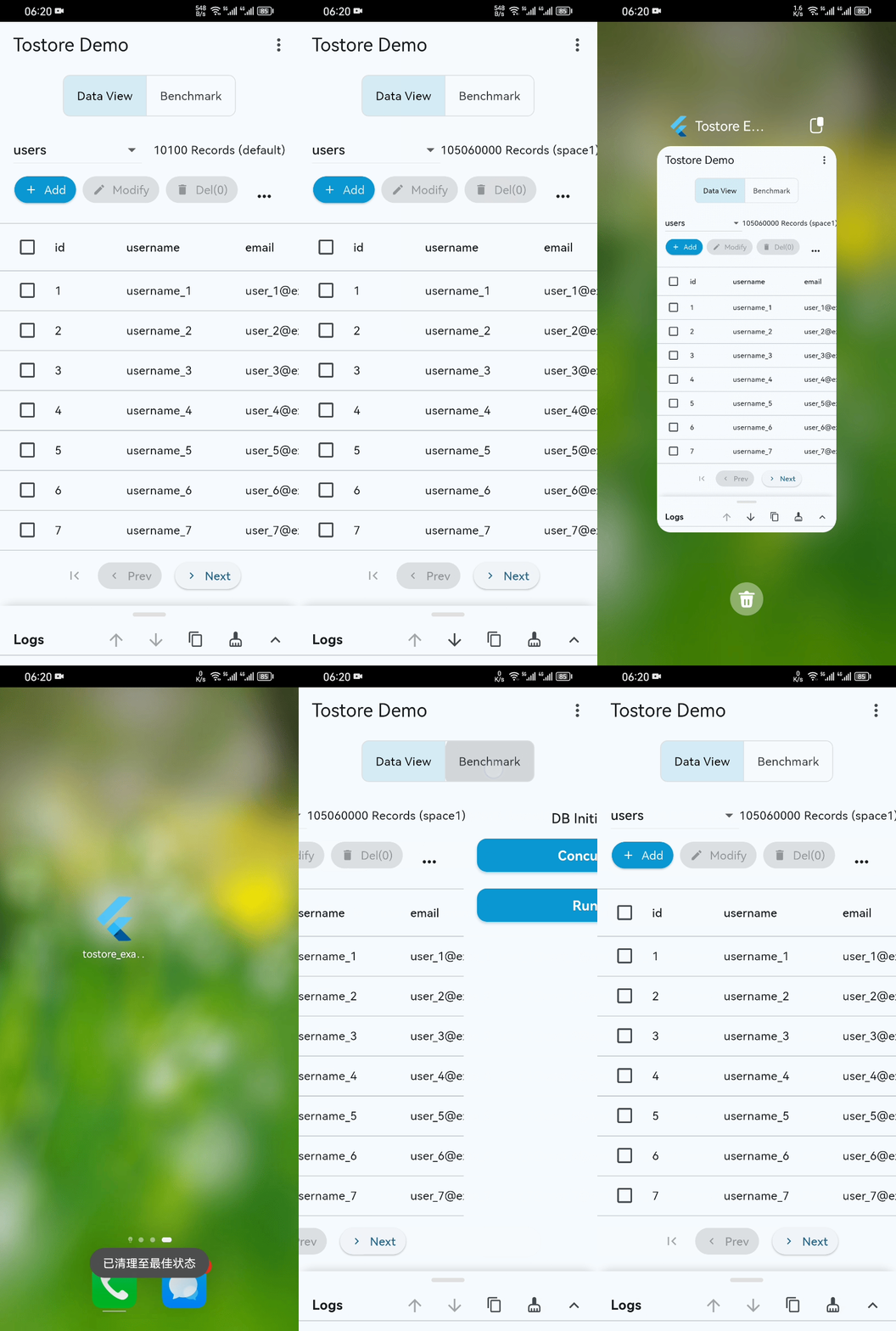
Basic performance demo (basic-demo.mp4): even on ordinary mobile devices, startup, paging, and retrieval stay smooth past 100 million records.
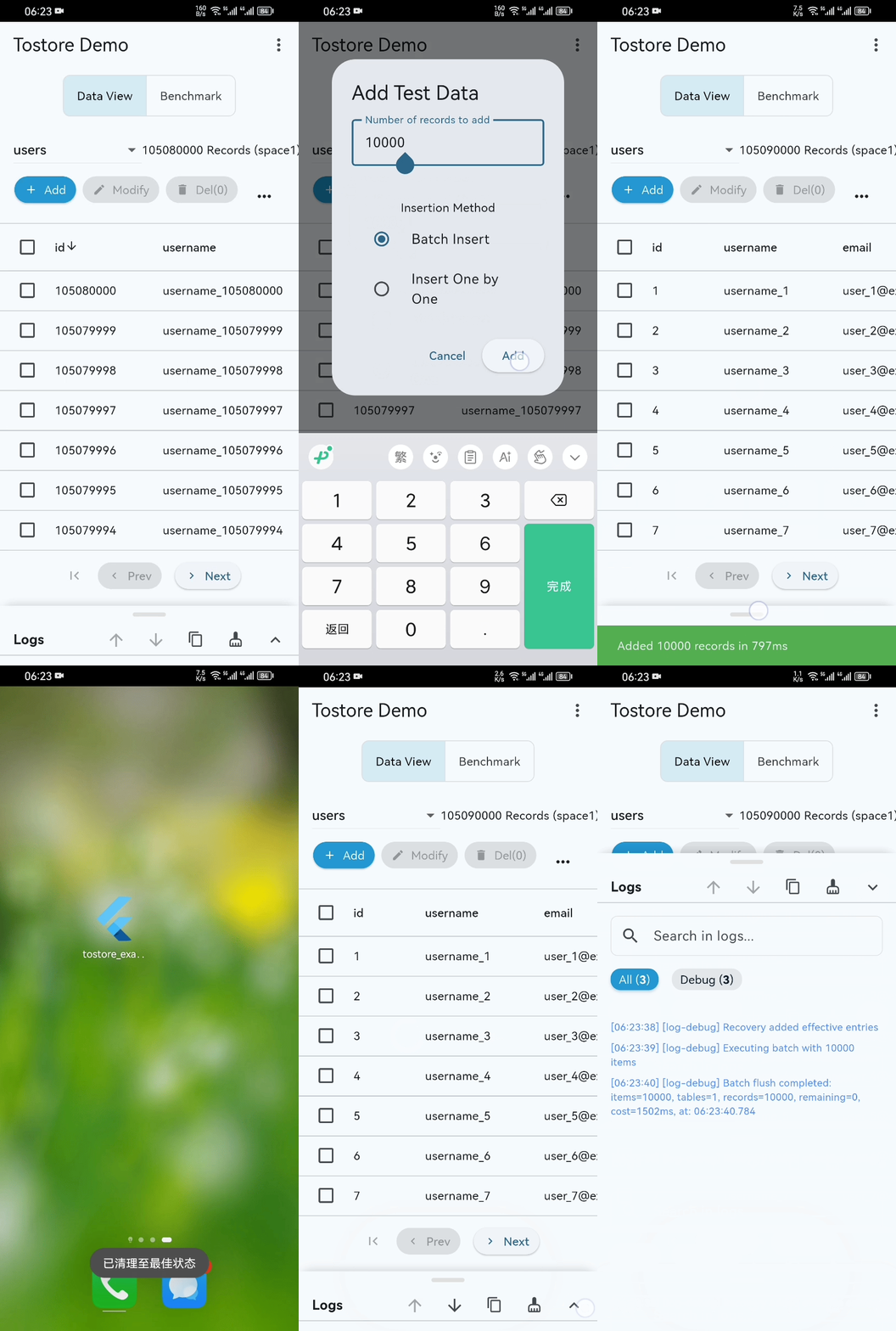
Disaster recovery stress test (disaster-recovery.mp4): under high-frequency writes, intentional crash/power-loss interruptions still recover quickly.
Experience Tips
📱 Example project: the example directory includes a complete Flutter application
🚀 Production builds: package and test in release mode; release performance is far beyond debug mode
✅ Standard tests: core capabilities are covered by standardized tests
If ToStore helps you, please give us a ⭐️ — it is one of the best ways to support the project. Thank you very much!
Contributing
ToStore is a continuously evolving modern data engine, and we warmly welcome community contributions.
Whether it's fixing bugs, improving documentation, refining architecture, or proposing new ideas, you can participate via PR: