Buscar pacotes, repositórios e categorias de apps

Capa de unity_ads_plugin
Detalhes do pacotev0.5.0

unity_ads_plugin

Plugin Unity Ads para aplicativos Flutter. Este plugin é capaz de exibir anúncios Unity Banner e Unity Video.

AndroidiOS
Downloads em 30 dias
5,8 mil
Curtidas
176
Pontos Pub
160

Instalar pacote

flutter pub add unity_ads_plugin

Visão geral do pacote

Orientação gerada a partir de informações públicas. Apenas para referência.

O unity_ads_plugin permite que aplicativos Flutter integrem os anúncios da Unity, suportando formatos de anúncio em banner e vídeo no Android e no iOS. Ele fornece uma interface simples para carregar e exibir anúncios dentro dos aplicativos, ajudando desenvolvedores a monetizar seus projetos por meio da plataforma de publicidade da Unity. O plugin foi projetado para funcionar de forma integrada com as capacidades nativas do Flutter, permitindo renderização suave de anúncios sem exigir conhecimento profundo sobre plataformas específicas. É ideal para aplicativos que buscam soluções confiáveis de publicidade dentro do aplicativo com configuração mínima.

Casos de uso

  • Monetização de jogos móveis
  • Exibindo anúncios de banner em aplicativos
  • Executando anúncios de vídeo recompensados
  • Integrando a rede de anúncios da Unity
  • Aumentando a receita do aplicativo com anúncios dentro do aplicativo

Principais recursos

  • Suporte a anúncios de banner do Unity
  • Suporte a anúncios de vídeo do Unity
  • Multiplataforma (Android e iOS)
  • Integração simples com o Flutter
  • Carregamento e exibição de anúncios em tempo real

Indicado para

  • Desenvolvedores Flutter usando Unity Ads
  • Desenvolvedores de jogos móveis procurando monetização
  • Aplicativos que precisam de anúncios de vídeo recompensados
  • Desenvolvedores direcionados para Android e iOS
  • Projetos que exigem integração leve de anúncios

Considerações

  • Requer configuração da conta do Unity Ads
  • Depende da versão do Unity Ads SDK
  • Pode ser necessário permissões adicionais no Android
  • A disponibilidade de anúncios depende da região e do estoque
  • Impacto no desempenho causado por atrasos no carregamento de anúncios

README original

Snapshot do README original do repositório-fonte vinculado. Consulte o repositório para o conteúdo mais recente.

Unity Ads Plugin

Pub License Pub likes Monthly downloads Pub points Flutter platform

Buy Me A Coffee PayPal

📢 Follow for updates: t.me/pavelzaichyk_dev

A Flutter plugin for integrating Unity Ads into your mobile applications. Easily display Unity Banner Ads and Unity Video Ads (Rewarded & Interstitial) with simple Dart APIs.


Features

  • Display Unity Banner, Rewarded, and Interstitial Video Ads
  • Simple initialization and ad loading
  • Server-to-server reward callback support
  • Privacy consent management
  • Firebase Test Lab support (Android)
  • Null safety

Table of Contents


Installation

Add the plugin to your pubspec.yaml:

dependencies:
  unity_ads_plugin: ^<latest_version>

Then run:

flutter pub get

Usage Example

Here is a minimal example of using the plugin:

import 'package:unity_ads_plugin/unity_ads_plugin.dart';

void main() {
  UnityAds.init(
    gameId: 'YOUR_GAME_ID',
    testMode: true,
    onComplete: () => print('Unity Ads Initialized'),
    onFailed: (error, message) => print('Unity Ads Initialization Failed: $error $message'),
  );
}

For more detailed usage, see the Getting Started section.


Getting Started

1. Initialization
UnityAds.init(
  gameId: 'PROJECT_GAME_ID',
  onComplete: () => print('Initialization Complete'),
  onFailed: (error, message) => print('Initialization Failed: $error $message'),
);

Set your Game ID. For testing purposes, set testMode to true.

UnityAds.isInitialized() can be used to check if the SDK has initialized successfully.


Android only: To change ad behavior in Firebase Test Lab, use the firebaseTestLabMode parameter. Possible values:

Mode Description
disableAds Ads are not displayed in Firebase Test Lab (default)
showAdsInTestMode Ads are displayed in test mode.
showAds Real ads are displayed if testMode is false.
2. Show Rewarded/Interstitial Video Ad

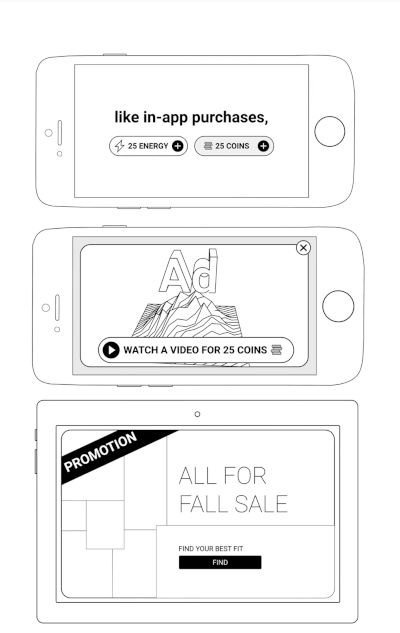
Rewarded Video Ad Interstitial Video Ad

Load a video ad before showing it.

UnityAds.load(
  placementId: 'PLACEMENT_ID',
  onComplete: (placementId) => print('Load Complete $placementId'),
  onFailed: (placementId, error, message) => print('Load Failed $placementId: $error $message'),
);

Show a loaded ad.

UnityAds.showVideoAd(
  placementId: 'PLACEMENT_ID',
  onStart: (placementId) => print('Video Ad $placementId started'),
  onClick: (placementId) => print('Video Ad $placementId click'),
  onSkipped: (placementId) => print('Video Ad $placementId skipped'),
  onComplete: (placementId) => print('Video Ad $placementId completed'),
  onFailed: (placementId, error, message) => print('Video Ad $placementId failed: $error $message'),
);
Server-to-server Redeem Callbacks

UnityAds.showVideoAd has a serverId parameter. To use server-to-server callbacks, set this parameter. Read more at docs.unity.com.

3. Show Banner Ad

Banner Ad

Place the UnityBannerAd widget in your app.

UnityBannerAd(
  placementId: 'PLACEMENT_ID',
  onLoad: (placementId) => print('Banner loaded: $placementId'),
  onClick: (placementId) => print('Banner clicked: $placementId'),
  onShown: (placementId) => print('Banner shown: $placementId'),
  onFailed: (placementId, error, message) => print('Banner Ad $placementId failed: $error $message'),
)
Privacy Consent

Read more about privacy consent in the Unity Ads documentation.

Use the following code to pass the appropriate consent flags to the Unity Ads SDK:

UnityAds.setPrivacyConsent(<Privacy Consent type>, true)

Troubleshooting

Android: the ad shows up as a separate app in Recent Apps

Symptom. While a fullscreen ad is playing, Recent Apps shows two cards for your app — your app and the ad. Users can swipe the ad away before it completes, so the impression is lost.

Fix. Remove one line from your app's android/app/src/main/AndroidManifest.xml:

<activity
    android:name=".MainActivity"
    android:taskAffinity=""     <!-- remove this line -->
    ...>

Flutter's template adds that blank affinity; Unity's ad screen keeps the default one. Android puts screens with different affinities in different tasks — hence the second card. Removing it puts the ad back in your app's task.

Trade-off. The attribute guards against task hijacking (flutter#144018), which Android patches at the OS level from API 30. On minSdk 30+ removing it costs nothing; below that, users on Android 7–10 lose partial protection — raising minSdk to 30 fixes both concerns at once.

Adding excludeFromRecents to Unity's ad activity does not work as an alternative. See issue #70.


Donate

If you find this package helpful and would like to support its continued development, please consider making a donation. Your contributions are greatly appreciated and motivate the further enhancement of this and other plugins.

Donate Buy Me A Coffee PayPal

Your support helps maintain and improve this package, ensuring it remains up-to-date and useful for the community.

Thank you for your generosity!

Categorias

Repositório-fonte

Projetos que usam este pacote