Buscar pacotes, repositórios e categorias de apps

Capa de waveform_recorder
Detalhes do pacotev2.0.0

waveform_recorder

Um pacote Flutter para gravação de áudio com visualização em tempo real da onda, ideal para mensagens de voz e recursos de gravação de áudio em aplicativos de bate-papo.

AndroidiOSWebmacOSWindowsLinux
Downloads em 30 dias
16,8 mil
Curtidas
53
Pontos Pub
160

Instalar pacote

flutter pub add waveform_recorder

Visão geral do pacote

Orientação gerada a partir de informações públicas. Apenas para referência.

Um pacote Flutter que permite gravação de áudio com visualização em tempo real da onda sonora, projetado para aplicações que exigem mensagens de voz ou recursos de entrada de áudio. Ele suporta múltiplas plataformas, incluindo Android, iOS, Web, macOS, Windows e Linux, proporcionando uma experiência do usuário suave com feedback visual durante a gravação. O pacote se integra perfeitamente em aplicativos de chat ou comunicação, permitindo que os usuários vejam suas ondas de voz enquanto falam. Construído com desempenho e consistência entre plataformas em mente, simplifica a implementação da funcionalidade de gravação de áudio com configuração mínima.

Casos de uso

  • Mensagens de voz em aplicativos de bate-papo
  • Gravação de áudio de anotações
  • Feedback de voz em tempo real
  • Interfaces de gravação de podcast
  • jogos interativos baseados em voz
  • Pré-visualizações de transmissão ao vivo de áudio

Principais recursos

  • Visualização em tempo real de ondas
  • Suporte multiplataforma
  • API simples para gravação
  • Feedback visual durante a gravação
  • processamento de áudio de baixa latência
  • Controles de reprodução embutidos

Indicado para

  • Desenvolvedores construindo aplicativos de chat
  • Criadores de ferramentas com recursos de voz
  • Aplicativos educacionais com entrada de áudio
  • protótipos de gravação de áudio
  • Aplicativos que exigem interface de áudio intuitiva

Considerações

  • Requer permissões de microfone em todas as plataformas
  • O suporte web pode ter limitações de navegador
  • Gravações grandes podem afetar o uso de memória
  • O desempenho varia em dispositivos de baixa potência
  • Personalização limitada da aparência da onda
  • Depende das APIs de áudio da plataforma subjacente

README original

Snapshot do README original do repositório-fonte vinculado. Consulte o repositório para o conteúdo mais recente.

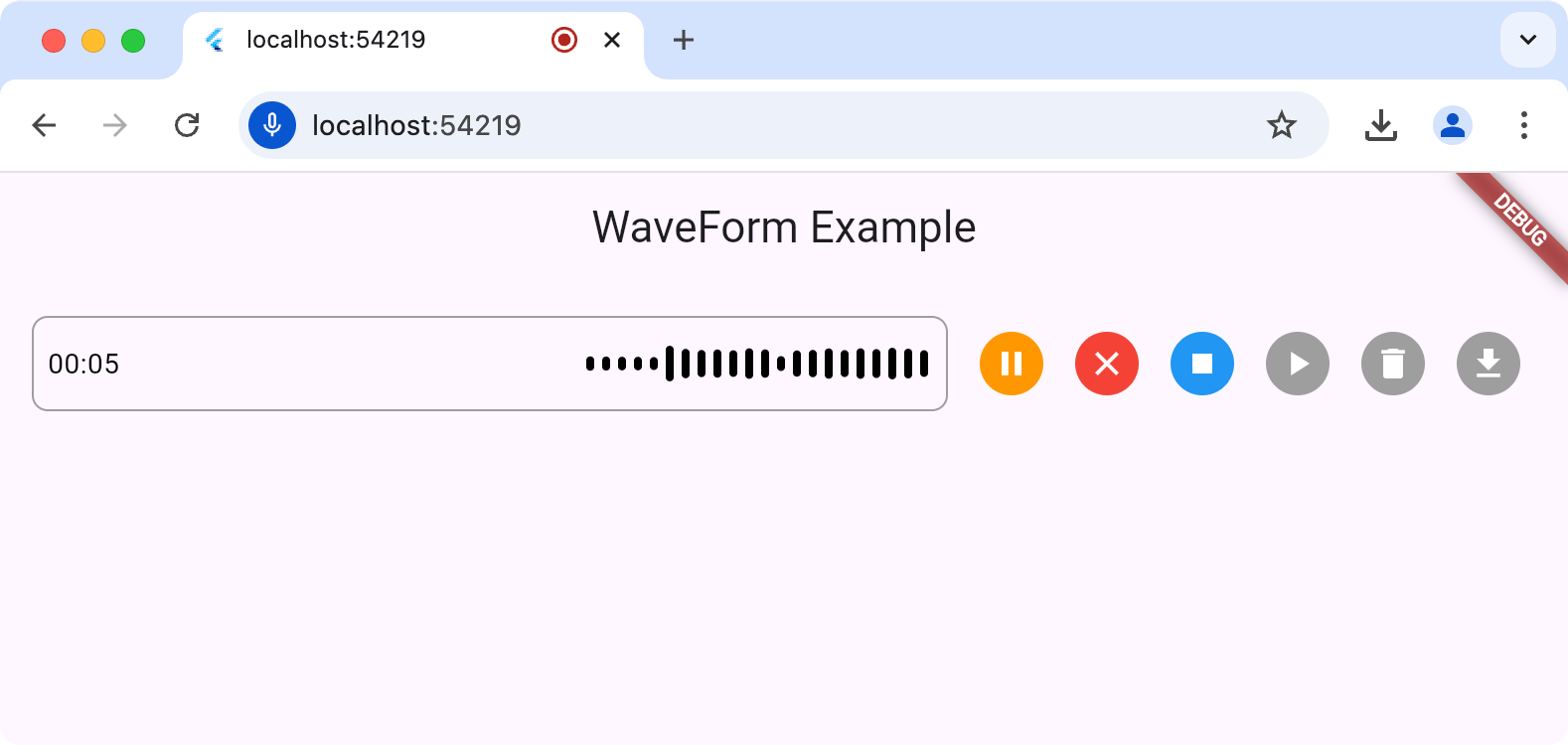
The waveform_recorder package provides a widget to show a waveform as an audio stream is being recorded in the style of recent AI chat packages.

Screenshot of waveform_recorder in
action

Setup

For this package to work, you'll need to set up the underlying record package according to the setup and permission instructions.

Usage

The main entry point for this package is the WaveformRecorder widget, which requires an instance of the WaveformRecorderController to start/stop recording. Here's an example of using the recorder to record audio and then allowing the user to play it back:

import 'dart:async';

import 'package:audioplayers/audioplayers.dart';
import 'package:flutter/foundation.dart';
import 'package:flutter/material.dart';
import 'package:gap/gap.dart';
import 'package:waveform_recorder/waveform_recorder.dart';

void main() => runApp(const MyApp());

class MyApp extends StatefulWidget {
  const MyApp({super.key});

  @override
  State<MyApp> createState() => _MyAppState();
}

class _MyAppState extends State<MyApp> {
  final _textController = TextEditingController();
  final _waveController = WaveformRecorderController();

  @override
  void dispose() {
    _textController.dispose();
    _waveController.dispose();
    super.dispose();
  }

  @override
  Widget build(BuildContext context) => MaterialApp(
        home: Scaffold(
          appBar: AppBar(title: const Text('WaveForm Example')),
          body: ListenableBuilder(
            listenable: _waveController,
            builder: (context, _) => Column(
              children: [
                Expanded(
                  child: Center(
                    child: OutlinedButton(
                      onPressed: !_waveController.isRecording &&
                              _waveController.file != null
                          ? _playRecording
                          : null,
                      child: const Text('Play'),
                    ),
                  ),
                ),
                Padding(
                  padding: const EdgeInsets.all(16),
                  child: Row(
                    children: [
                      Expanded(
                        child: DecoratedBox(
                          decoration: BoxDecoration(
                            border: Border.all(color: Colors.grey),
                            borderRadius: BorderRadius.circular(8),
                          ),
                          child: _waveController.isRecording
                              ? WaveformRecorder(
                                  height: 48,
                                  controller: _waveController,
                                  onRecordingStopped: _onRecordingStopped,
                                )
                              : TextField(
                                  controller: _textController,
                                  maxLines: 1,
                                  decoration: const InputDecoration(
                                    border: InputBorder.none,
                                    contentPadding: EdgeInsets.symmetric(
                                      horizontal: 8,
                                    ),
                                  ),
                                ),
                        ),
                      ),
                      const Gap(8),
                      IconButton(
                        icon: Icon(
                          _waveController.isRecording ? Icons.stop : Icons.mic,
                        ),
                        onPressed: _toggleRecording,
                      ),
                    ],
                  ),
                ),
              ],
            ),
          ),
        ),
      );

  Future<void> _toggleRecording() => switch (_waveController.isRecording) {
        true => _waveController.stopRecording(),
        false => _waveController.startRecording(),
      };

  Future<void> _onRecordingStopped() async {
    final file = _waveController.file;
    if (file == null) return;

    _textController.text = ''
        '${file.name}: '
        '${_waveController.length.inMilliseconds / 1000} seconds';

    debugPrint('XFile properties:');
    debugPrint('  path: ${file.path}');
    debugPrint('  name: ${file.name}');
    debugPrint('  mimeType: ${file.mimeType}');
  }

  Future<void> _playRecording() async {
    final file = _waveController.file;
    if (file == null) return;
    final source = kIsWeb ? UrlSource(file.path) : DeviceFileSource(file.path);
    await AudioPlayer().play(source);
  }
}
Usage Considerations

For all platforms except the web, the output of a record operation is a file on your hard drive; it's your app's responsibility to remove this temp file when it's done with it. When executing on the web, the file (an instance of the XFile type from the cross_file package) of the recorded audio will contain a path to a blob URL but otherwise, it will be a file in the file system. You can get the path to that file from WaveformRecorderController.file.path, e.g.

  Future<void> _deleteRecording() async {
    final file = _waveController.file;
    if (file == null) return;
    if (!kIsWeb) await File(file.path).delete();
  }

Feedback

Your feedback via issues or PRs is welcome!

Categorias

Dependências

Lista de dependências 6 itens

Repositório-fonte

Projetos que usam este pacote