搜尋分類、套件與程式碼儲存庫

awesome_dropdown 封面
套件詳情v0.0.4

awesome_dropdown

一個簡單的下拉庫,支援自訂樣式並控制所有觸控事件。

近 30 天下載
661
喜歡數
116
Pub 分數
70

安裝套件

flutter pub add awesome_dropdown

套件介紹

根據套件公開資料產生的選型評估,僅供參考。

Awesome Dropdown 是一個 Flutter 套件,提供可自訂的下拉選單組件,完全控制觸控事件與樣式。它讓開發者能輕鬆建立美觀且具互動性的下拉選單,支援自訂主題、動畫與響應式行為。此套件設計簡潔彈性,非常適合表單、過濾器與選擇介面。無平台限制,可在行動裝置、Web 與桌面端順暢運作。其輕量特性確保快速效能,同時不犧牲功能。

適用情境

  • 表單輸入
  • 篩選選擇
  • 可自定義的 UI 組件
  • 使用者偏好選擇器
  • 動態資料選擇
  • 行動與網頁介面

主要特色

  • 完全可自定樣式
  • 觸控事件控制
  • 輕量且高效
  • 跨平台相容性
  • 輕鬆整合
  • 支援動畫

適合對象

  • 尋求簡單下拉選單的開發者
  • 想要自定控件的UI設計師
  • 需要觸控事件處理的專案
  • 表單密集型工作流程的應用程式
  • 優先考慮快速實施的團隊

使用建議

  • 無內建驗證
  • 僅限基本下拉功能
  • 需要手動處理狀態
  • 無國際化支援
  • 依賴外部樣式知識
  • 無進階篩選選項

原始 README

以下為關聯原始碼儲存庫的 README 原文快照,最新內容請造訪原始碼儲存庫。

Awesome DropDown

A customizable drop-down library that handles all the touch and clicks events, including iOS and mobile back-pressed callbacks.

Installation

Add following dependency in pubspec.yaml file. And add this import to your file.

awesome_dropdown:^0.0.4

import 'package:awesome_dropdown/awesome_dropdown.dart';

Quick Start

Add AwesomeDropdown to the widget tree

AwesomeDropDown(
                  isPanDown: _isPanDown,
                  dropDownList: _list,
                  dropDownIcon: Icon(Icons.arrow_drop_down, color: Colors.grey, size: 23,),
                  selectedItem: _selectedItem,
                  onDropDownItemClick: (selectedItem) {
                    _selectedItem = selectedItem;
                  },
                  dropStateChanged: (isOpened) {
                    _isDropDownOpened = isOpened;
                    if (!isOpened) {
                      _isBackPressedOrTouchedOutSide = false;                    }
                  },
                ),                ​

Custom Body


AwesomeDropDown(
                   ​isPanDown: _isPanDown,
                   ​isBackPressedOrTouchedOutSide:
                   ​_isBackPressedOrTouchedOutSide,
                   ​dropDownBGColor: Colors.white,
                    dropDownOverlayBGColor: Colors.transparent,
                   ​padding: 8,
                   ​dropDownIcon: Icon(Icons.arrow_drop_down, color: Colors.grey, size: 23,),
                   ​elevation: 5,
                   ​dropDownBorderRadius: 10,
                   ​dropDownTopBorderRadius: 50,
                   ​dropDownBottomBorderRadius: 50,
                   ​dropDownIconBGColor: Colors.transparent,
                   ​dropDownList: _list,
                   ​selectedItem: _selectedItem,
                   ​numOfListItemToShow: 4,
                   ​selectedItemTextStyle: TextStyle(
                       ​color: Colors.black,
                       ​fontSize: 16,
                       ​fontWeight: FontWeight.normal),
                   ​dropDownListTextStyle: TextStyle(
                       ​color: Colors.grey,
                       ​fontSize: 15,
                       ​backgroundColor: Colors.transparent),
                   ​onDropDownItemClick: (selectedItem) {
                     ​_selectedItem = selectedItem;
                   ​},
                   ​dropStateChanged: (isOpened) {
                     ​_isDropDownOpened = isOpened;
                     ​if (!isOpened) {
                       ​_isBackPressedOrTouchedOutSide = false;
                     ​}
                   ​},
                 ​),

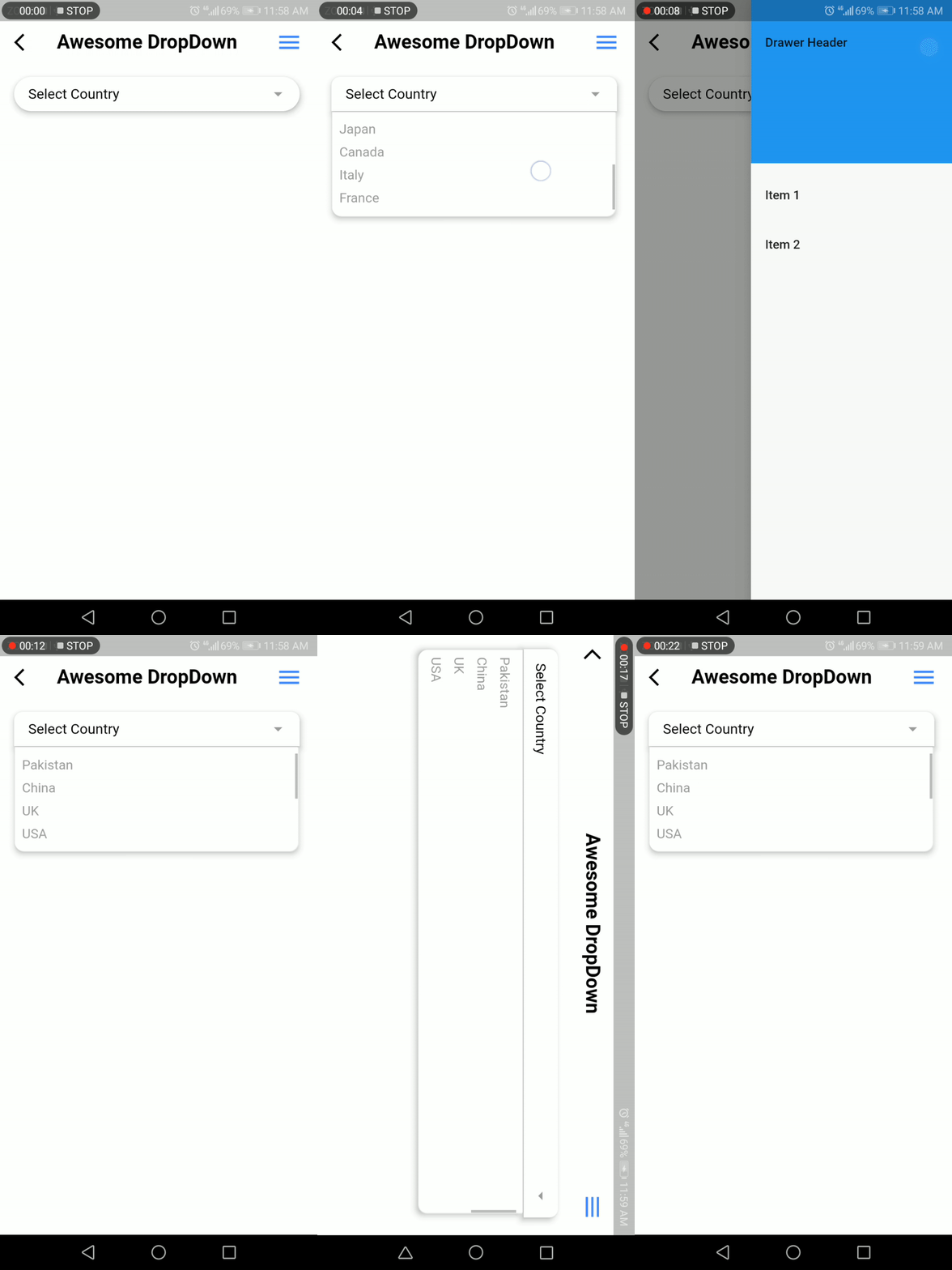
Screenshot

Developer Team

Faiza Farooqui & my team members (Hina Hussain, Kamran Khan, Abdul Sattar)

License

MIT

所屬分類

原始碼儲存庫

使用此套件的專案

暫無相關資料。