Flutter Auto Form 是一個專為簡化 Flutter 應用程式中使用者友好的表單建立而設計的套件。它透過根據資料模型自動產生表單欄位來減少重複程式碼,進而提升開發速度與一致性。內建驗證、錯誤處理以及可自訂元件,能有效提升開發者體驗與最終使用者互動。此套件支援所有主要平台,非常適合跨平台表單實作。
適用情境
從資料模型建構動態表單
減少重複的表單代碼
跨平台建立一致的使用者介面
輕鬆實現表單驗證
輸入畫面的快速原型設計
主要特色
自動表單欄位產生
內建驗證支援
可自訂的表單元件
跨平台相容性
所需的樣板程式碼最少
適合對象
尋求更快表單建立的開發者
需要一致表單設計的專案
跨平台 Flutter 應用
需要快速表單實現的原型
重視可維護表單代碼的團隊
使用建議
對高度複雜的表單支援有限的自訂
可能需要額外設定以進行進階驗證
不適合具有獨特、非標準佈局的表單
取決於模型結構以進行自動生成
新用戶對自動表單模式不熟悉時的學習曲線
原始 README
以下為關聯原始碼儲存庫的 README 原文快照,最新內容請造訪原始碼儲存庫。
Flutter Auto Form
The easiest way to create fully customizable forms with only a tiny amount of code.
Introduction
Are you tired of writing endless lines of code to create forms in your Flutter apps? Look no further! Our Flutter Auto
Form package is here to revolutionize your form-building experience.
Our primary goal is to significantly reduce the amount of code required to create forms in Flutter. We achieve this by
embracing a clear separation of concerns between form logic and form display.
With Flutter Auto Form, you write the form logic in pure Dart, without any direct mention of widgets. Instead, we
introduce the AFWidget, which dynamically renders all the necessary widgets based on a straightforward form
declaration—a simple Dart class that extends the TemplateForm class.
But that's not all! Our package empowers you to design your custom fields and linked widgets, making nearly any form
conceivable. Whether you're working on basic forms or tackling complex ones, Flutter Auto Form has got you covered.
The true magic of Flutter Auto Form shines when you're dealing with multiple forms, especially complex ones. All your
validators are automatically called when you submit a form, and you can even create sub-forms that cascade into one
another.
Dynamic form generation is also feasible but still in experimental mode. It is accessible through the
JsonSchemaForm class.
dependencies:flutter:sdk:flutter# Your other packages ...flutter_auto_form:^1.0.6
Support
Platforms: All platforms currently supported
Autofill hints: Automatic support through AFTextFieldType
Validators: Email, Url, Hex colour, Not null, Minimum string length, Same as another field, Alphanumeric.
Fields: Password (auto obscure toggle), Text, Number, Model (built-in support for search through an api),
Boolean, Sub-form (cascading forms), Select (dropdown field allowing only predefined values)
Custom code: You can customize and create new fields, validators, widgets as you please without even touching the
source code of this package !
Usage
The first step in creating a form with Flutter Auto Form is to create a class inheriting from the TemplateForm class.
The second & (already) last step is to add the AFWidget wherever you would like to display a form.
AFWidget<RegistrationForm>(
formBuilder: () => RegistrationForm(),
submitButton: (Function({bool showLoadingDialog}) submit) => Padding(
padding: constEdgeInsets.only(top: 32),
child: MaterialButton(
child: Text('Submit'),
onPressed: () => submit(showLoadingDialog: true),
),
),
onSubmitted: (RegistrationForm form) {
// do whatever you want when the form is submittedprint(form.toMap());
},
);
Example
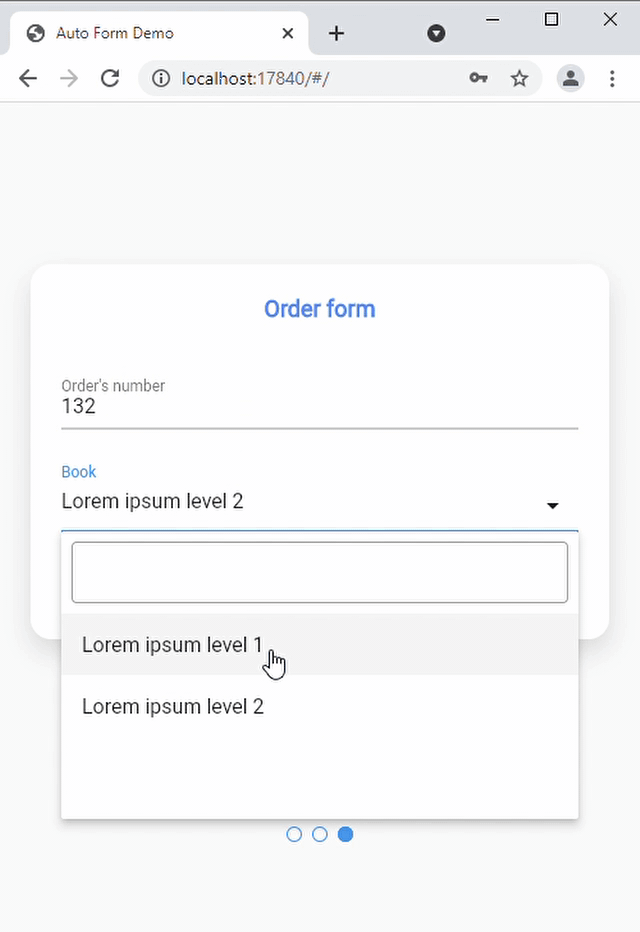
A demo video can be found here. The
four forms displayed in the video are all created with Flutter Auto Form, even the model search field.
The source code is located in the example folder.
Advanced usage
If you need to create your own field (color field, image field, ...) you can always create it by overriding the Field
class. Then to display a custom widget, create a stateful widget that extends the FieldStatefulWidget, and of which the
state extends the FieldState class.
This package is still under construction ! Do not hesitate to create an issue on the GitHub page if you find any bug
or if you would like to see a new type of validator, field !