搜尋套件、儲存庫與 APP 分類

套件詳情v1.6.0

flutter_dynamic_icon_plus

一個用於動態變更應用程式圖示的小工具,支援 iOS 版本 > 10.3 和 Android

AndroidiOS
近 30 天下載
3.4萬
喜歡數
71
Pub 分數
150

安裝套件

flutter pub add flutter_dynamic_icon_plus

套件介紹

根據套件公開資料產生的選型評估,僅供參考。

一個 Flutter 插件,可在 Android 和 iOS(版本 > 10.3)上實現動態應用圖示變更。它允許使用者在執行時切換不同的應用圖示,增強個人化與品牌彈性。該套件可無縫整合至 Flutter 項目中,並支援兩大主要行動平台。開發者可程式設計更新應用圖示,無需重新安裝。適合希望根據使用者偏好或事件提供主題式或情境特定圖示的應用程式。

適用情境

  • 根據用戶偏好更換應用程式圖示
  • 支援季節性或活動主題圖示
  • 啟用應用品牌自訂
  • 根據應用狀態動態更新圖示
  • 個性化應用體驗

主要特色

  • 執行時期圖示切換
  • 支援 Android 與 iOS > 10.3
  • 簡單的 API 結合
  • 無需重新安裝應用程式
  • 跨平台相容性

適合對象

  • 需要圖示個性化的應用
  • 品牌和行銷活動
  • 主題應用
  • 使用者驅動的UI自訂
  • 基於事件的應用體驗

使用建議

  • 需要平台特定的設定
  • iOS 支援僅限於版本 10.3+
  • 可能需要應用商店審核才能變更圖示
  • 限於預定義的圖示集
  • 圖標重新載入期間可能產生的效能影響

原始 README

以下為關聯原始碼儲存庫的 README 原文快照,最新內容請造訪原始碼儲存庫。

flutter_dynamic_icon_plus

A flutter plugin for dynamically changing app icon and app icon batch number (iOS only) in the mobile platform. Supports only iOS (with version > 10.3).

Usage

To use this plugin, add flutter_dynamic_icon_plus as a dependency in your pubspec.yaml file.

Getting Started

Check out the example directory for a sample app using flutter_dynamic_icon_plus.

Android Integration
Blacklist

Based on discussion on stackoverflow found issue when call onTaskRemoved on several devices. So, we add an approach to blacklist these devices via:

  • blacklistBrands
  • blacklistManufactures
  • blacklistModels
Add Service

Add service under application in your manifest

    <application...>

        <service
            android:name="com.solusibejo.flutter_dynamic_icon_plus.FlutterDynamicIconPlusService"
            android:stopWithTask="false"/>

        <activity.../>
Add Activity Alias

Update android/src/main/AndroidManifest.xml as follows:

    <application ...>
        <activity
            android:name=".MainActivity"
            android:launchMode="singleTop"
            android:theme="@style/LaunchTheme"
            android:configChanges="orientation|keyboardHidden|keyboard|screenSize|smallestScreenSize|locale|layoutDirection|fontScale|screenLayout|density|uiMode"
            android:hardwareAccelerated="true"
            android:windowSoftInputMode="adjustResize"
            android:enabled="true">
				
            <meta-data
                android:name="io.flutter.embedding.android.NormalTheme"
                android:resource="@style/NormalTheme"
                />

            <intent-filter>
                <action android:name="android.intent.action.MAIN" />
                <category android:name="android.intent.category.LAUNCHER" />
            </intent-filter>
        </activity>

        <!-- The activity-alias are your alternatives icons and name of your app, the default one must be enabled (and the others disabled) and the name must be ".DEFAULT". All the names of your activity-alias' name must begin with a dot. -->

        <!-- FOR NOW USE "icon_1" AS ALTERNATIVE ICON NAME -->

        <activity-alias
            android:label="Your app"
            android:icon="@mipmap/ic_launcher_1"
            android:roundIcon="@mipmap/ic_launcher_1"
            android:name=".icon_1"
            android:exported="true"
            android:enabled="false"
            android:targetActivity=".MainActivity">

            <meta-data
                android:name="io.flutter.embedding.android.NormalTheme"
                android:resource="@style/NormalTheme"
                />

            <intent-filter>
                <action android:name="android.intent.action.MAIN" />
                <category android:name="android.intent.category.LAUNCHER" />
            </intent-filter>

        </activity-alias>

        <activity-alias
            android:label="Your app"
            android:icon="@mipmap/ic_launcher_2"
            android:roundIcon="@mipmap/ic_launcher_2"
            android:name=".icon_2"
            android:exported="true"
            android:enabled="false"
            android:targetActivity=".MainActivity">

            <meta-data
                android:name="io.flutter.embedding.android.NormalTheme"
                android:resource="@style/NormalTheme"
                />

            <intent-filter>
                <action android:name="android.intent.action.MAIN" />
                <category android:name="android.intent.category.LAUNCHER" />
            </intent-filter>

        </activity-alias>
    </application>
Include applicationIdSuffix

If your app contains applicationIdSuffix please add applicationId on your activity-alias name for example

	<activity-alias
            android:label="Your app"
            android:icon="@mipmap/ic_launcher_1"
            android:roundIcon="@mipmap/ic_launcher_1"
            android:name="${applicationId}.icon_1"
            android:exported="true"
            android:enabled="false"
            android:targetActivity=".MainActivity">

            <meta-data
                android:name="io.flutter.embedding.android.NormalTheme"
                android:resource="@style/NormalTheme"
                />

            <intent-filter>
                <action android:name="android.intent.action.MAIN" />
                <category android:name="android.intent.category.LAUNCHER" />
            </intent-filter>

        </activity-alias>

Known Issues
  • Each android version will have different behavior, with Android 8 it may take a few seconds before we can notice the change
  • Due to Splash screen problems of newest Android versions, please consider to remove the below code in your activivy and activity-alias tags:
  <meta-data
                android:name="io.flutter.embedding.android.SplashScreenDrawable"
                android:resource="@drawable/launch_background"
                />
iOS Integration
Index
  • 2x - 120px x 120px
  • 3x - 180px x 180px

To integrate your plugin into the iOS part of your app, follow these steps

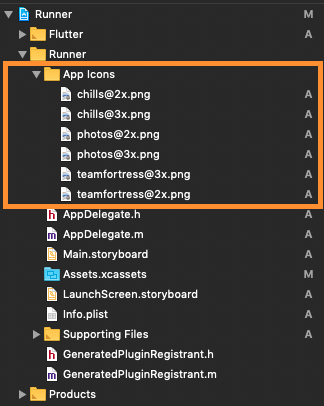
  1. First let us put a few images for app icons, they are
    • teamfortress@2x.png, teamfortress@3x.png
    • photos@2x.png, photos@3x.png,
    • chills@2x.png, chills@3x.png,
  2. These icons shouldn't be kept in Assets.xcassets folder, but outside. When copying to Xcode, you can select 'create folder references' or 'create groups', if not you will get and error when uploading the build to the AppStore saying: (Thanks to @nohli for this observation) TMS-90032: Invalid Image Path - - No image found at the path referenced under key 'CFBundleAlternateIcons':...

Here is my directory structure:

directory_structure

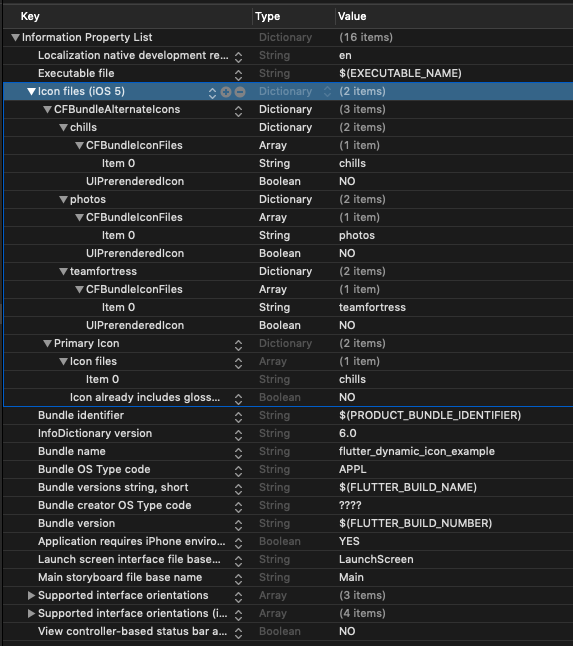
  1. Next, we need to setup the Info.plist
    1. Add Icon files (iOS 5) to the Information Property List
    2. Add CFBundleAlternateIcons as a dictionary, it is used for alternative icons
    3. Set 3 dictionaries under CFBundleAlternateIcons, they are correspond to teamfortress, photos, and chills
    4. For each dictionary, two properties — UIPrerenderedIcon and CFBundleIconFiles need to be configured
    5. If the sub-property UINewsstandIcon is showing under Icon files (iOS 5) and you don't plan on using it (it is intended for use with Newstand features), erase it or the app will get rejected upon submission on the App Store

Note that if you need it work for iPads, You need to add these icon declarations in CFBundleIcons~ipad as well. See here for more details.

Here is my Info.plist after adding Alternate Icons

Screenshot

info.plist

Raw
<?xml version="1.0" encoding="UTF-8"?>
<!DOCTYPE plist PUBLIC "-//Apple//DTD PLIST 1.0//EN" "http://www.apple.com/DTDs/PropertyList-1.0.dtd">
<plist version="1.0">
<dict>
	<key>CFBundleDevelopmentRegion</key>
	<string>en</string>
	<key>CFBundleExecutable</key>
	<string>$(EXECUTABLE_NAME)</string>
	<key>CFBundleIcons</key>
	<dict>
		<key>CFBundleAlternateIcons</key>
		<dict>
			<key>chills</key>
			<dict>
				<key>CFBundleIconFiles</key>
				<array>
					<string>chills</string>
				</array>
				<key>UIPrerenderedIcon</key>
				<false/>
			</dict>
			<key>photos</key>
			<dict>
				<key>CFBundleIconFiles</key>
				<array>
					<string>photos</string>
				</array>
				<key>UIPrerenderedIcon</key>
				<false/>
			</dict>
			<key>teamfortress</key>
			<dict>
				<key>CFBundleIconFiles</key>
				<array>
					<string>teamfortress</string>
				</array>
				<key>UIPrerenderedIcon</key>
				<false/>
			</dict>
		</dict>
	</dict>
	<key>CFBundleIdentifier</key>
	<string>$(PRODUCT_BUNDLE_IDENTIFIER)</string>
	<key>CFBundleInfoDictionaryVersion</key>
	<string>6.0</string>
	<key>CFBundleName</key>
	<string>flutter_dynamic_icon_example</string>
	<key>CFBundlePackageType</key>
	<string>APPL</string>
	<key>CFBundleShortVersionString</key>
	<string>$(FLUTTER_BUILD_NAME)</string>
	<key>CFBundleSignature</key>
	<string>????</string>
	<key>CFBundleVersion</key>
	<string>$(FLUTTER_BUILD_NUMBER)</string>
	<key>LSRequiresIPhoneOS</key>
	<true/>
	<key>UILaunchStoryboardName</key>
	<string>LaunchScreen</string>
	<key>UIMainStoryboardFile</key>
	<string>Main</string>
	<key>UISupportedInterfaceOrientations</key>
	<array>
		<string>UIInterfaceOrientationPortrait</string>
		<string>UIInterfaceOrientationLandscapeLeft</string>
		<string>UIInterfaceOrientationLandscapeRight</string>
	</array>
	<key>UISupportedInterfaceOrientations~ipad</key>
	<array>
		<string>UIInterfaceOrientationPortrait</string>
		<string>UIInterfaceOrientationPortraitUpsideDown</string>
		<string>UIInterfaceOrientationLandscapeLeft</string>
		<string>UIInterfaceOrientationLandscapeRight</string>
	</array>
	<key>UIViewControllerBasedStatusBarAppearance</key>
	<false/>
</dict>
</plist>

Now, you can call FlutterDynamicIconPlus.setAlternateIconName with the CFBundleAlternateIcons key as the argument to set that icon.

Dart/Flutter Integration

From your Dart code, you need to import the plugin and use it's static methods:

import 'package:flutter_dynamic_icon_plus/flutter_dynamic_icon_plus.dart';

try {
  if (await FlutterDynamicIconPlus.supportsAlternateIcons) {
    await FlutterDynamicIconPlus.setAlternateIconName(
        iconName: "icon_name",
        blacklistBrands: ['Redmi'],
        blacklistManufactures: ['Xiaomi'],
        blacklistModels: ['Redmi 200A'],
    );
    print("App icon change successful");
    return;
  }
} on PlatformException {} catch (e) {}
print("Failed to change app icon");

...

// get currently icon
final currentIcon = await FlutterDynamicIconPlus.alternateIconName;

// set batch number
try {
    if (Platform.isIOS) {
	    await FlutterDynamicIconPlus.setApplicationIconBadgeNumber(9399);
    }
} on PlatformException {} catch (e) {}

// gets currently set batch number
if (Platform.isIOS) {
    int batchNumber = FlutterDynamicIconPlus.getApplicationIconBadgeNumber();
}
Available methods
Method Type Description
supportsAlternateIcons bool To check this app support alternate app icons or not
alternateIconName String To get currently active app icon
setAlternateIconName(iconName,blacklistBrands,blacklistManufactures,blacklistModels) Nullable String params To update app icon, set iconName with specific value. To restore default app icon fill with null. Fill blacklistBrands, blacklistManufactures, and/or blacklistModels to use old approach (force restart), this property just work on Android only.
applicationIconBadgeNumber int To get app icon badge, number of push notification received. This method just work on iOS only.
setApplicationIconBadgeNumber(batchIconNumber) int params To set app icon badge just work on iOS only.

Check out the example app for more details

Screenrecord

Showing App Icon change Android

https://github.com/chandrabezzo/flutter_dynamic_icon_plus/assets/16184998/6644c2ca-9de3-4c75-b9c1-7e279022bc14

Showing App Icon change iOS

https://github.com/chandrabezzo/flutter_dynamic_icon_plus/assets/16184998/519e94a4-9643-462b-bb66-f92714e1c56e

Showing Batch number on app icon

https://github.com/chandrabezzo/flutter_dynamic_icon_plus/assets/16184998/4d63a167-6905-4a1c-b8cf-049cc2f1d12d

Reference

This was made possible because this blog. I borrowed a lot of words from this blog. https://medium.com/ios-os-x-development/dynamically-change-the-app-icon-7d4bece820d2

This plugin inspired from another existing plugin. I copy a lot of code from these plugin. https://pub.dev/packages/flutter_dynamic_icon

https://pub.dev/packages/dynamic_icon_flutter

所屬分類

依賴

依賴清單 1 項

  • plugin_platform_interface^2.0.2

原始碼儲存庫

使用此套件的專案