搜尋套件、儲存庫與 APP 分類

flutter_grid_button 封面
套件詳情v2.3.1

flutter_grid_button

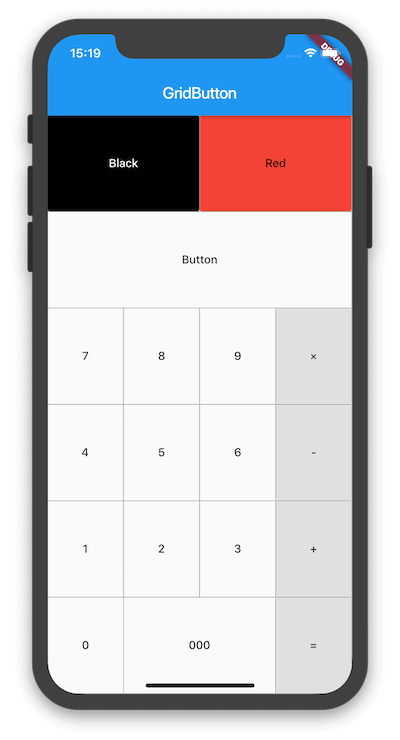
一個將按鈕排列成網格的 Flutter 小部件。它適用於製作數字鍵盤、計算器等。

AndroidiOSWebmacOSWindowsLinux
近 30 天下載
3870
喜歡數
30
Pub 分數
160

安裝套件

flutter pub add flutter_grid_button

套件介紹

根據套件公開資料產生的選型評估,僅供參考。

一個 Flutter 小部件,可將按鈕排列成可自訂的網格佈局。非常適合建立數字鍵盤、計算機或任何基於網格的按鈕系統。它簡化了在多個平台創建響應式且視覺一致的按鈕網格的過程。該套件支援各種間距、對齊和按鈕樣式的設定,使其能靈活滿足不同的 UI 需求。設計時著重於簡單性和可重用性,可無縫整合至現有的 Flutter 專案中。

適用情境

  • 建立計算機介面
  • 設計數字輸入墊
  • 構建遊戲控制面板
  • 使用分組操作開發表單佈局
  • 實現類似鍵盤的按鈕排列

主要特色

  • 基於網格的按鈕排列
  • 可自訂的間距與對齊方式
  • 跨平台的響應式設計
  • 與 Flutter 的輕鬆整合
  • 對平台特定渲染的支援

適合對象

  • 開發計算器應用的開發者
  • 需要網格按鈕佈局的UI設計師
  • 需要一致按鈕網格的專案
  • 跨平台行動與Web應用
  • 具有數值或基於動作的輸入系統的應用

使用建議

  • 僅限按鈕網格使用案例
  • 需要手動處理按鈕點擊邏輯
  • 無內建的複雜動畫支援
  • 最適合靜態或簡單互動的網格
  • 可能需要額外的樣式才能實現進階視覺效果

原始 README

以下為關聯原始碼儲存庫的 README 原文快照,最新內容請造訪原始碼儲存庫。

flutter_grid_button

Flutter widget that arrange buttons in a grid. It is useful for making a number pad, calculator, and so on.

pub package

Getting Started

To use this plugin, add flutter_grid_button as a dependency in your pubspec.yaml file.

dependencies:
 flutter_grid_button: 

Import the library in your file.

import 'package:flutter_grid_button/flutter_grid_button.dart';

See the example directory for a complete sample app using GridButton. Or use the GridButton like below.

GridButton(
  onPressed: (String value) {
    /*...*/
  },
  items: [
    [
      GridButtonItem(title: "1"),
      GridButtonItem(child: Text("2")),
      GridButtonItem(title: "3", flex: 2),
    ],
    [
      GridButtonItem(title: "a", value: "100", longPressValue: "long"),
      GridButtonItem(title: "b", color: Colors.lightBlue)
    ],
  ],
)

所屬分類

原始碼儲存庫

使用此套件的專案