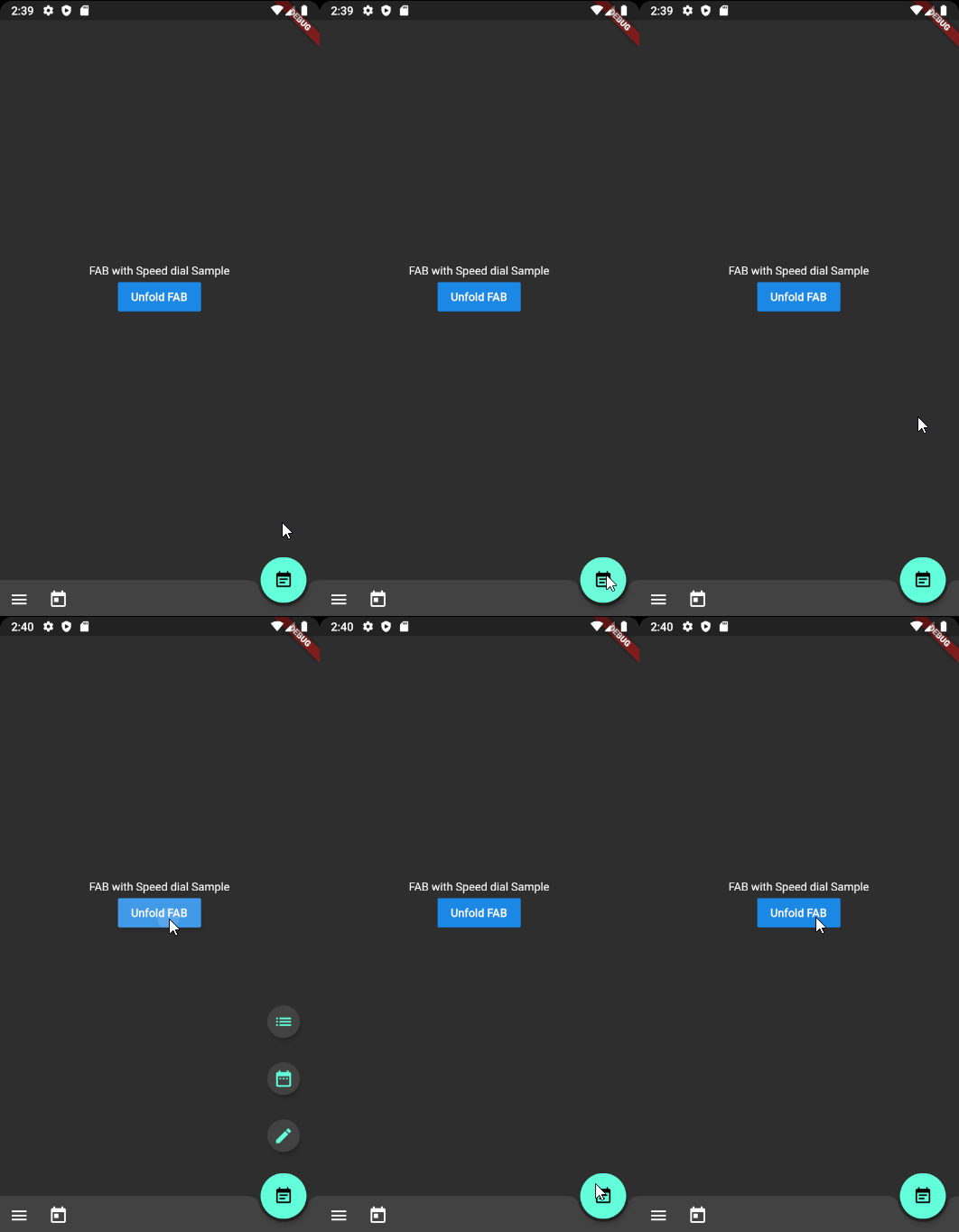
一個 Flutter 插件,實現了 Material Design 速度撥號,即帶有可展開選單選項的浮動操作按鈕。它遵循 Material Design 的轉場和互動指南,讓使用者能從單一 FAB 訪問多個操作。該套件支援自訂圖示、標籤和動畫樣式,非常適合提升行動應用程式的使用者介面效率。它可輕鬆整合至現有的 Flutter 專案中,設定簡單。
適用情境
在移動應用中添加快速存取操作菜單
增強任務導向型介面中的導航
透過 Material Design 標準提升 UI 一致性
建立緊湊但功能豐富的浮動按鈕
在乾淨的版面中簡化對次要動作的存取
主要特色
符合 Material Design 的動畫
可自訂的選單項目和圖示
對標籤和工具提示的支援
與現有 Flutter widget 的輕鬆整合
可設定的展開方向與速度
適合對象
開發 Material Design 應用的開發者
需要快速操作訪問的以使用者介面為重點的應用程式
致力於打造精緻、現代介面的專案
尋找可重複使用的 FAB 組件的行動應用開發者
遵循 Google 設計指南的團隊
使用建議
有限的平台特定自訂
可能需要額外的樣式設定以適配非 Material 主題
未針對非常大的選單集合進行優化
動畫效能可能在舊裝置上有所差異
無內建的鍵盤導航支援
原始 README
以下為關聯原始碼儲存庫的 README 原文快照,最新內容請造訪原始碼儲存庫。
Flutter Speed dial of Material Design style
Flutter package which applies Material design Speed dial
Preview
There are several packages that provide fancy speed dial.
However, as most of those do not work properly on docked FAB using notch, I referenced Andrea Bizzoto and Matt Carroll's idea/code specified here to make it work fine with notch as well.
Truly appreciate to Andrea and Matt for sharing such an awesome idea and codes.
Usage
Basic usage
Widgetbuild(BuildContext context) {
returnScaffold(
body: SafeArea(child: _buildBody()),
floatingActionButton: _buildFloatingActionButton(),
floatingActionButtonLocation: FloatingActionButtonLocation.endDocked,
bottomNavigationBar: _buildBottomBar(),
);
}
Widget_buildFloatingActionButton() {
final icons = [
SpeedDialAction(child: Icon(Icons.mode_edit)),
SpeedDialAction(child: Icon(Icons.date_range)),
SpeedDialAction(child: Icon(Icons.list)),
];
returnSpeedDialFloatingActionButton(
actions: icons,
// Make sure one of child widget has Key value to have fade transition if widgets are same type.
childOnFold: Icon(Icons.event_note, Key: UniqueKey()),
childOnUnfold: Icon(Icons.add),
useRotateAnimation: true,
onAction: _onSpeedDialAction,
);
}
_onSpeedDialAction(int selectedActionIndex) {
print('$selectedActionIndex Selected');
}
Using controller
SpeedDialController _controller = SpeedDialController();

SpeedDialFloatingActionButton(
      controller: _controller,
      ...
    );

// Use anywhere to mannually unfold
_controller.unfold();
Fade Transition animation between child widgets
In order to apply fade transition between [childOnFold] and [childOnUnfold], make sure one of those has Key field. (eg. ValueKey(value) or UniqueKey()).
As we using AnimatedSwitcher for transition animation, no key with same type of child will perform no animation. It is AnimatedSwitcher's behaviour.
TO-DOs
[ ] Ability to display/hide speed dial when it is needed. (ex. hiding on scroll)
[X] Unfold function to force close the dial
[ ] Providing option for modal background with color parameter
[X] Text labels on each action widgets (Thanks to @CarlosHJuniior)
Contributing
Any pull requests for implementing To-Do functions are always welcome!
If the package was useful or saved your time, please do not hesitate to buy me a cup of coffee! ;)
The more caffeine I get, the more useful projects I can make in the future.