flutter_time_range 
A fully customizable flutter widget that allowing users to choose time range (from - to)
Showcase
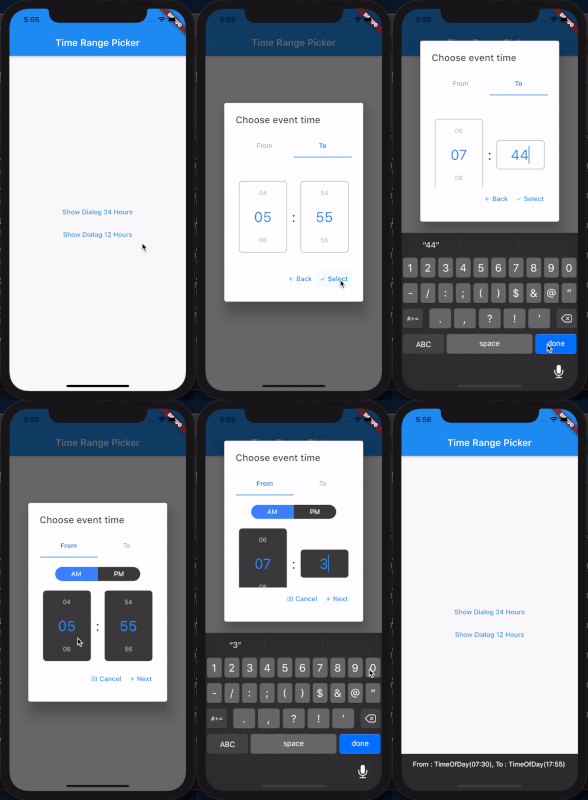
Example
(See example for more detail)
@override
Widget build(BuildContext context) {
return MaterialApp(
navigatorKey: _navigatorKey,
scaffoldMessengerKey: _messangerKey,
title: 'Test Time Range Picker',
home: Scaffold(
appBar: AppBar(
title: Text("Time Range Picker"),
),
body: TextButton(
child: Text("Show Dialog"),
onPressed: () {
showTimeRangePicker(_navigatorKey.currentState.overlay.context);
},
),
));
}
Future<void> showTimeRangePicker(BuildContext context) {
return showDialog(
context: context,
builder: (BuildContext context) {
return AlertDialog(
title: Text("Choose event time"),
content: TimeRangePicker(
initialFromHour: DateTime.now().hour,
initialFromMinutes: DateTime.now().minute,
initialToHour: DateTime.now().hour,
initialToMinutes: DateTime.now().minute,
backText: "Back",
nextText: "Next",
cancelText: "Cancel",
selectText: "Select",
editable: true,
is24Format: true,
disableTabInteraction: true,
iconCancel: Icon(Icons.cancel_presentation, size: 12),
iconNext: Icon(Icons.arrow_forward, size: 12),
iconBack: Icon(Icons.arrow_back, size: 12),
iconSelect: Icon(Icons.check, size: 12),
separatorStyle: TextStyle(color: Colors.grey[900], fontSize: 30),
onSelect: (from, to) {
_messangerKey.currentState.showSnackBar(
SnackBar(content: Text("From : $from, To : $to")));
Navigator.pop(context);
},
onCancel: () => Navigator.pop(context),
),
);
});
}
Future<void> showTimeRangePicker12Hour(BuildContext context) {
return showDialog(
context: context,
builder: (BuildContext context) {
return AlertDialog(
title: Text("Choose event time"),
content: TimeRangePicker(
initialFromHour: DateTime.now().hour,
initialFromMinutes: DateTime.now().minute,
initialToHour: DateTime.now().hour,
initialToMinutes: DateTime.now().minute,
backText: "Back",
nextText: "Next",
cancelText: "Cancel",
selectText: "Select",
editable: true,
is24Format: false,
disableTabInteraction: true,
iconCancel: Icon(Icons.cancel_presentation, size: 12),
iconNext: Icon(Icons.arrow_forward, size: 12),
iconBack: Icon(Icons.arrow_back, size: 12),
iconSelect: Icon(Icons.check, size: 12),
inactiveBgColor: Colors.grey[800],
timeContainerStyle: BoxDecoration(
color: Colors.grey[800],
borderRadius: BorderRadius.circular(7)),
separatorStyle: TextStyle(color: Colors.grey[900], fontSize: 30),
onSelect: (from, to) {
_messangerKey.currentState.showSnackBar(
SnackBar(content: Text("From : $from, To : $to")));
Navigator.pop(context);
},
onCancel: () => Navigator.pop(context),
),
);
});
}
TODOS
need feedback
