搜尋套件、儲存庫與 APP 分類

套件詳情v1.0.0

fulde_keyboard

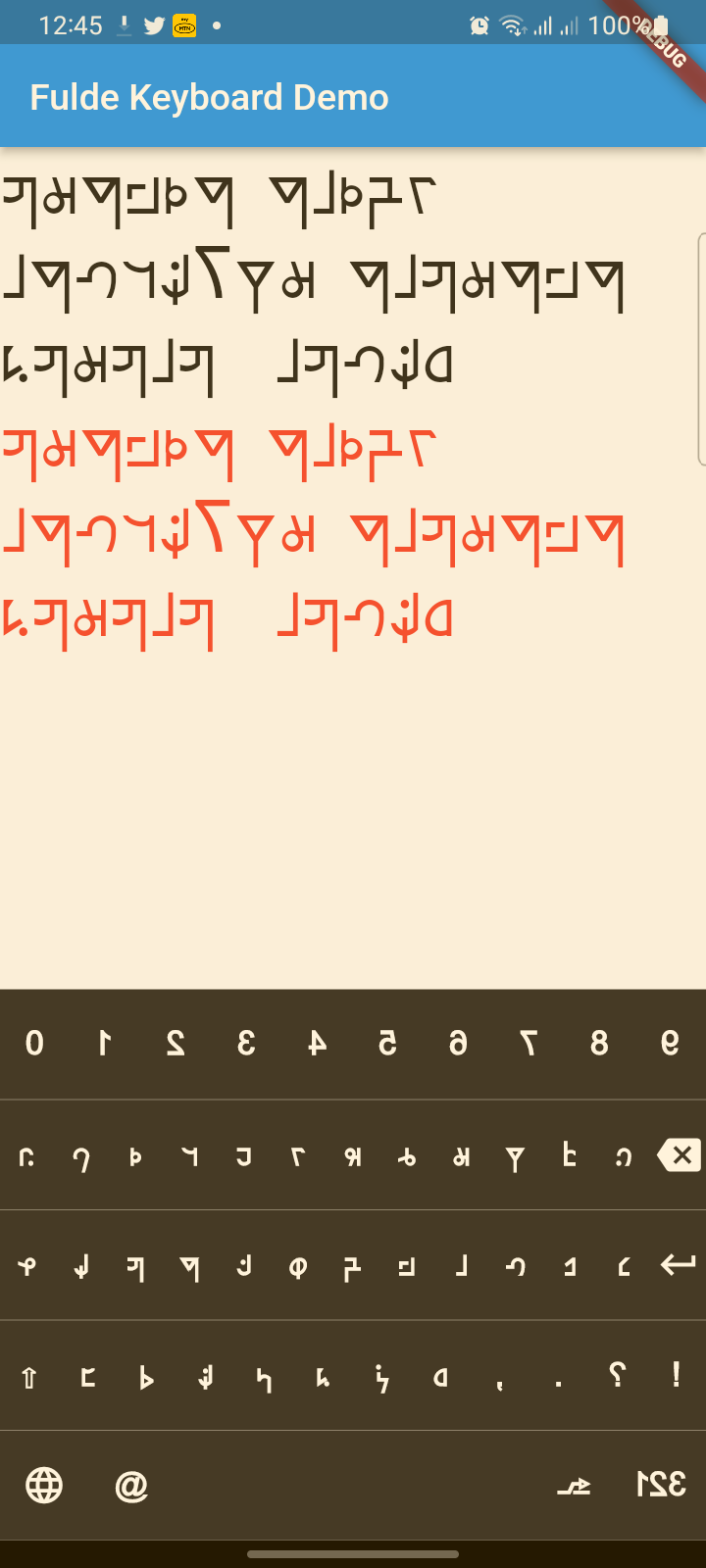
一個現代化、美觀的虛擬鍵盤套件,支援富爾德語(Fulde)、拉丁語和英語等多種語言。具備現代UI設計、觸覺反饋、無障礙支援與流暢動畫。

AndroidiOSWebmacOSWindowsLinux
近 30 天下載
42
喜歡數
7
Pub 分數
140

安裝套件

flutter pub add fulde_keyboard

套件介紹

根據套件公開資料產生的選型評估,僅供參考。

Fulde Keyboard 是一個現代且視覺上吸引人的虛擬鍵盤套件,專為 Fulde 語言設計,全面支援 Fulde、拉丁字母與英語字形。它具備簡潔的使用者介面、觸覺反饋、無障礙功能增強,以及跨平台的流暢動畫。基於 Flutter 建構,可輕鬆整合至針對多元語言需求的應用程式中,同時在 Android、iOS、Web、macOS、Windows 與 Linux 上維持效能與易用性。

適用情境

  • 多語言輸入的富爾德語應用程式
  • 面向可存取性的文字輸入
  • 需要自定鍵盤的行動和桌面應用程式
  • 福爾德語學習的教育工具
  • 支援多種書寫系統的應用程式

主要特色

  • 支援 Fulde、拉丁語和英語
  • 現代的、帶有動畫效果的使用者介面
  • 按鍵的觸覺反饋
  • 內建的可存取性功能
  • 跨平台相容性

適合對象

  • 開發 Fulde 語言應用程式的開發者
  • 教育軟體創作者
  • 需要多語言輸入的應用程式
  • 注重設計的 Flutter 項目
  • 以可存取性為先的應用開發

使用建議

  • 需要與 Flutter 的文字輸入系統整合
  • 可能需要針對非標準佈局進行自訂
  • 效能取決於裝置功能
  • 除非擴展,否則僅限支援的語言
  • Web 支援可能具有瀏覽器特定的限制

原始 README

以下為關聯原始碼儲存庫的 README 原文快照,最新內容請造訪原始碼儲存庫。

fulde_keyboard

About

A modern, beautiful virtual keyboard package for Fulde language with multi-language support (Fulde, Latin, English). Features modern UI design, haptic feedback, accessibility support, and smooth animations. Perfect for kiosks, ATMs, and mobile applications.

This project has evolved from a simple virtual keyboard to a comprehensive, production-ready keyboard solution with modern design principles and accessibility features.

✨ Features

🎨 Modern Design

  • Beautiful UI: Modern gradients, shadows, and rounded corners
  • Smooth Animations: Key press animations and smooth transitions
  • Material 3 Design: Latest Material Design principles
  • Dark/Light Theme: Automatic theme switching support

🌍 Multi-Language Support

  • Fulde Language: Native Fulde keyboard layout
  • Latin Script: Latin character support
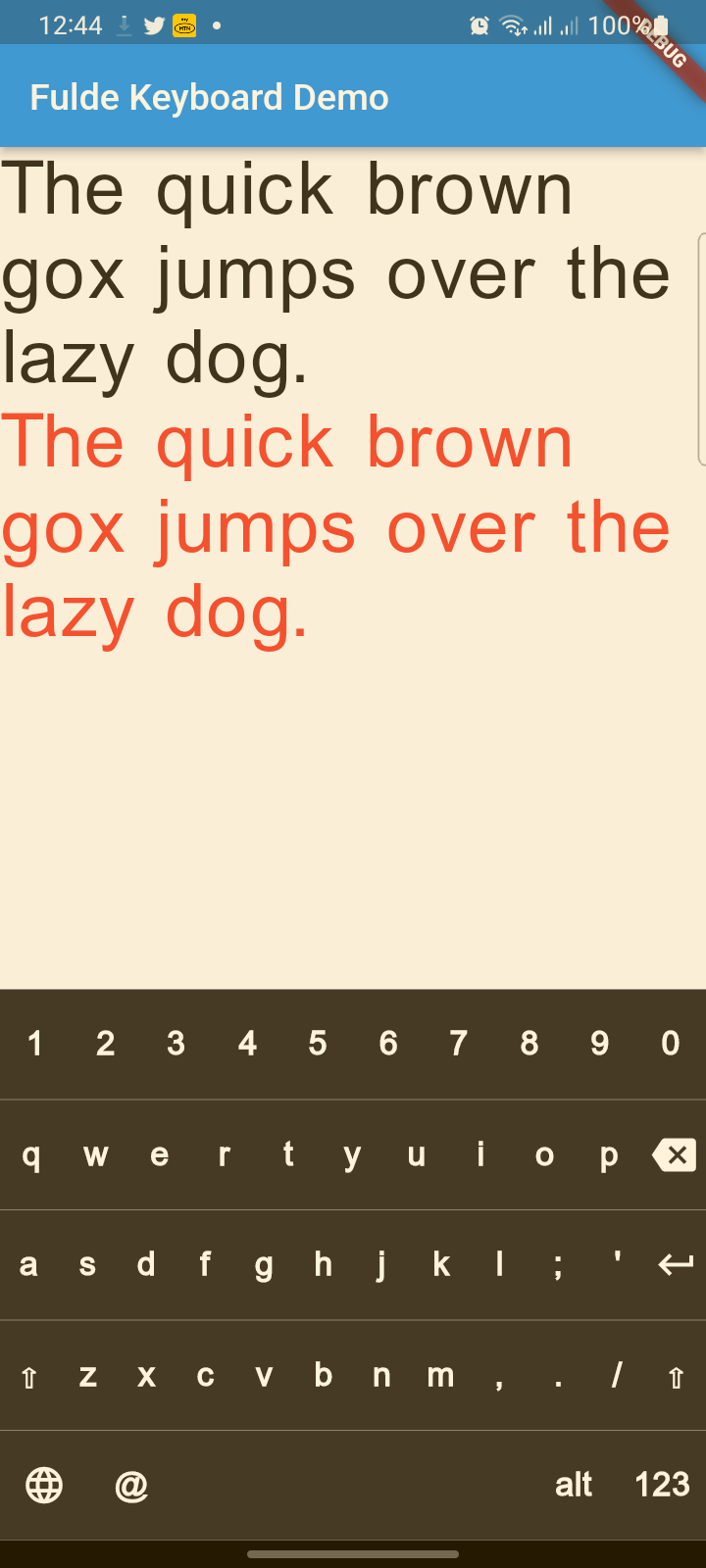
  • English: Full English QWERTY layout
  • Easy Language Switching: Animated language selector with visual indicators

♿ Accessibility & UX

  • Haptic Feedback: Tactile feedback on key presses
  • Screen Reader Support: Semantic labels for accessibility
  • Responsive Design: Works on all screen sizes
  • Touch Optimized: Proper touch targets and visual feedback

🔧 Technical Features

  • No Native Dependencies: Pure Dart implementation
  • Customizable Layouts: Easy to modify and extend
  • Performance Optimized: Smooth rendering and minimal overhead
  • Flutter 3.x Compatible: Latest Flutter support

📋 TODO List

  • (ToDo) Adding Arabic and Hausa keyboards (Rabi'at font)
  • (ToDo) Adding input result viewer and event handling
  • (ToDo) Adding spell checker
  • (ToDo) Voice input integration

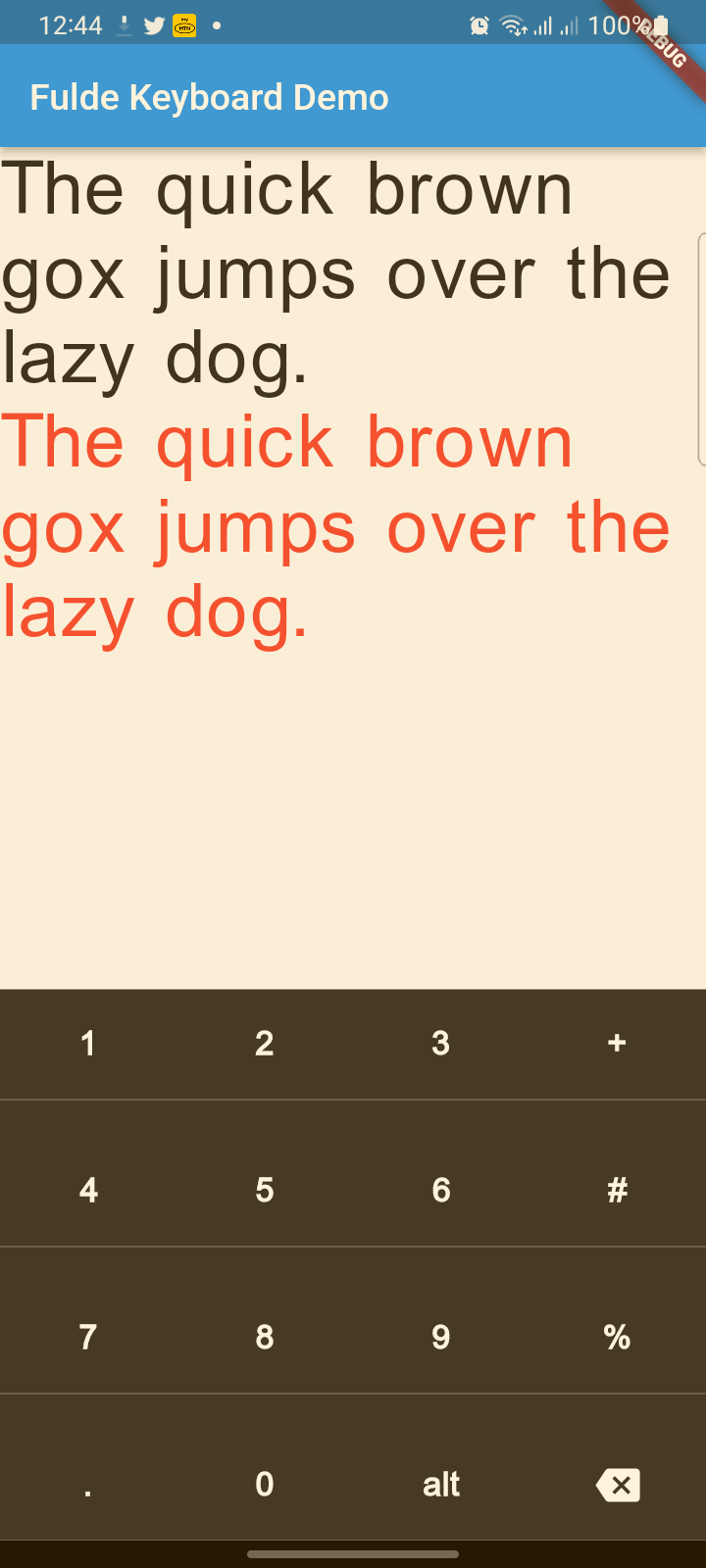
screenshot


screenshot


screenshot


Reference

FuldeKeyboard

Flutter widget to show virtual keyboards.

// Keyboard Type: Can be Numeric or Alphanumeric.
FuldeKeyboardType type
// Callback for Key press event. Called with pressed `Key` object.
Function onKeyPress;
// Virtual keyboard height. Default is 300.
double height;
/// Virtual keyboard height. Default is full screen width
  double width;
// Color for key texts and icons.
Color textColor;
// Font size for keyboard keys.
double fontSize;;
// Only Caps letters enabled.
bool alwaysCaps;;
/// the custom layout for multi or single language
FuldeKeyboardLayoutKeys customLayoutKeys;
/// used for multi-languages with default layouts, the default is English only
/// will be ignored if customLayoutKeys is not null
List<FuldeKeyboardDefaultLayouts> defaultLayouts;
/// inverse the layout to fix the issues with right to left languages, default is false.
bool reverseLayout;
FuldeKeyboardType

enum of Available Virtual Keyboard Types.

// Numeric only.
FuldeKeyboardType.Numeric
// Alphanumeric: letters`[A-Z]` + numbers`[0-9]` + `@` + `.`.
FuldeKeyboardType.Alphanumeric
FuldeKeyboardKey

Virtual Keyboard key.

// The text of the key.
String text
// The capitalized text of the key.
String capsText;
// Action or String
FuldeKeyboardKeyType keyType;
// Action of the key.
FuldeKeyboardKeyAction action;
FuldeKeyboardKeyType

Type for virtual keyboard key.

// Can be an action key - Return, Backspace, etc.
FuldeKeyboardKeyType.Action
// Keys that have text values - letters, numbers, comma ...
FuldeKeyboardKeyType.String
FuldeKeyboardKeyAction
/// Virtual keyboard actions.
enum FuldeKeyboardKeyAction { Backspace, Return, Shift, Space }

Usage

Show Alphanumeric keyboard with default view
// Wrap the keyboard with Container to set background color.
Container(
            // Keyboard is transparent
            color: Colors.deepPurple,
            child: FuldeKeyboard(
                // Default height is 300
                height: 350,
                // Default height is will screen width
                width: 600,
                // Default is black
                textColor: Colors.white,
                // Default 14
                fontSize: 20,
                // the layouts supported
                defaultLayouts = [FuldeKeyboardDefaultLayouts.English],
                // [A-Z, 0-9]
                type: FuldeKeyboardType.Alphanumeric,
                // Callback for key press event
                onKeyPress: _onKeyPress),
          )
Show Numeric keyboard with default view
Container(
            // Keyboard is transparent
            color: Colors.red,
            child: FuldeKeyboard(
                // [0-9] + .
                type: FuldeKeyboardType.Numeric,
                // Callback for key press event
                onKeyPress: (key) => print(key.text)),
          )
Show Alphanumeric keyboard with customized keys
 Container(
            color: Colors.deepPurple,
            child: FuldeKeyboard(
                height: keyboardHeight,
                textColor: Colors.white,
                fontSize: 20,
                builder: _builder,
                type: FuldeKeyboardType.Numeric,
                onKeyPress: _onKeyPress),
          )

  /// Builder for keyboard keys.
  Widget _builder(BuildContext context, FuldeKeyboardKey key) {
    Widget keyWidget;

    switch (key.keyType) {
      case FuldeKeyboardKeyType.String:
        // Draw String key.
        keyWidget = _keyboardDefaultKey(key);
        break;
      case FuldeKeyboardKeyType.Action:
        // Draw action key.
        keyWidget = _keyboardDefaultActionKey(key);
        break;
    }

    return keyWidget;
  }
onKeyPressed event basic ussage example
// Just local variable. Use Text widget or similar to show in UI.
String text;

  /// Fired when the virtual keyboard key is pressed.
_onKeyPress(FuldeKeyboardKey key) {
if (key.keyType == FuldeKeyboardKeyType.String) {
    text = text + (shiftEnabled ? key.capsText : key.text);
} else if (key.keyType == FuldeKeyboardKeyType.Action) {
    switch (key.action) {
    case FuldeKeyboardKeyAction.Backspace:
        if (text.length == 0) return;
        text = text.substring(0, text.length - 1);
        break;
    case FuldeKeyboardKeyAction.Return:
        text = text + '\n';
        break;
    case FuldeKeyboardKeyAction.Space:
        text = text + key.text;
        break;
    case FuldeKeyboardKeyAction.Shift:
        shiftEnabled = !shiftEnabled;
        break;
    default:
    }
}
// Update the screen
setState(() {});
}

所屬分類

原始碼儲存庫

使用此套件的專案

暫無相關資料。