搜尋套件、儲存庫與 APP 分類

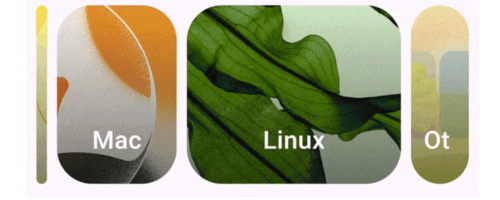
m3_carousel 封面
套件詳情v2.1.5

m3_carousel

Material Design 3 輪播圖(https://m3.material.io/components/carousel/overview)的 Flutter 實作。

AndroidiOSWebmacOSWindowsLinux
近 30 天下載
940
喜歡數
45
Pub 分數
160

安裝套件

flutter pub add m3_carousel

套件介紹

根據套件公開資料產生的選型評估,僅供參考。

一個 Flutter 套件,實作 Material Design 3 輪播圖,提供一種現代、互動且視覺上吸引人的水平捲動版面內容顯示方式。受到官方 M3 指南啟發,支援流暢動畫、響應式設計以及跨所有主要平台的直觀使用者互動。此輪播圖非常適合展示具有深度與動態效果的圖片、卡片或產品清單。它能無縫整合至 Flutter 應用中,並遵循 Material Design 3 原則,確保一致性與可存取性。

適用情境

  • 顯示圖像畫廊
  • 展示產品亮點
  • 展示精選內容
  • 建立互動式入門畫面
  • 建構基於卡片的動態介面

主要特色

  • 符合 Material Design 3
  • 平滑的水平滾動
  • 深度和動態效果
  • 響應式佈局
  • 平台無關的支援
  • 可自定義物品外觀

適合對象

  • 需要現代 UI 組件的應用程式
  • 遵循 M3 指南的設計人員
  • 開發媒體豐富介面的開發者
  • 跨平台移動和網頁應用
  • 強調視覺吸引力的專案

使用建議

  • 可能需要對大型數據集進行性能調優
  • 非 M3 樣式自訂有限
  • 最適合中等大小的內容清單
  • 需要對小螢幕上的觸控手勢進行仔細處理
  • 未針對垂直輪播圖優化

原始 README

以下為關聯原始碼儲存庫的 README 原文快照,最新內容請造訪原始碼儲存庫。

M3_Carousel

A flutter implementation of the Material Design 3 carousel. Built on the CarouselView.

Feature Highlights

  • Hero carousel with support for "left", "center" and "right" alignments.

  • Contained carousel. Extended view inclusive.

  • Uncontained carousel.

  • Horizontal or vertical scrolling via axis.

Installing

In your pubspec.yaml

dependencies:
  m3_carousel: ^2.1.4 # requires Dart => ^3.12.0, Flutter >=3.38.0

Usage

import "package:m3_carousel/m3_carousel.dart";

M3Carousel(
    type: CarouselType.hero,
    heroAlignment: HeroAlignment.center,
    axis: Axis.horizontal,
    onTap: (int tapIndex) => log(tapIndex.toString()),
    children: List<Widget>.generate(10, (int index) {
        return ColoredBox(
            color: Colors.primaries[index % Colors.primaries.length]
                .withValues(alpha: 0.8),
            child: const SizedBox.expand(),
        );
    }),
),

See example/lib/main.dart for complete examples.

Reference

Use of CarouselView is govern by the Flutter Authors LICENSE

License

MIT license

所屬分類

依賴

依賴清單 3 項

原始碼儲存庫

使用此套件的專案

暫無相關資料。