搜尋套件、儲存庫與 APP 分類

native_video_player 封面
套件詳情v4.0.1

native_video_player

一個 Flutter 小部件,使用原生實作在 iOS 與 Android 上播放影片。

AndroidiOSmacOS
近 30 天下載
8740
喜歡數
89
Pub 分數
140

安裝套件

flutter pub add native_video_player

套件介紹

根據套件公開資料產生的選型評估,僅供參考。

一個 Flutter 套件,可在 iOS、Android 和 macOS 上使用原生平台實作進行影片播放。它透過利用每個操作系統的原生影片播放器,為 Flutter 應用程式提供可靠且高效能的影片內容整合方式。這確保了對各種影片格式和硬體加速有更好的相容性。此套件專為尋求無縫影片播放而不需依賴跨平台抽象的開發者設計。

適用情境

  • 播放本機影片檔案
  • 從URL串流影片
  • 在媒體豐富的應用程式中整合影片
  • 支援全螢幕影片播放
  • 使用原生性能構建影片播放器介面

主要特色

  • 在 iOS 和 Android 上使用原生影片播放器
  • 支援影片串流和本機檔案
  • 硬體加速播放
  • 跨平台相容性(iOS、Android、macOS)
  • 與 Flutter 小部件的簡單整合

適合對象

  • 需要高效率影片播放的開發人員
  • 需要原生影片功能的應用
  • 媒體或教育應用
  • 針對多個平台且影片行為一致的專案

使用建議

  • 僅限 iOS、Android 和 macOS
  • 無網頁支援
  • 需要原生平台設定以啟用進階功能
  • 依賴於平台特定的影片格式支援

原始 README

以下為關聯原始碼儲存庫的 README 原文快照,最新內容請造訪原始碼儲存庫。

native_video_player

Pub

A Flutter widget to play videos on iOS, macOS and Android using a native implementation.

Perfect for building video-centric apps like TikTok, Instagram Reels, or YouTube Shorts, as well as general video playback needs.

Android iOS macOS
Support 16+ 9.0+ 10.11+
Implementation

Usage

Loading a video
@override
Widget build(BuildContext context) {
  return NativeVideoPlayerView(
    onViewReady: (controller) async {
      await controller.loadVideo(
        VideoSource(
          path: 'path/to/file',
          type: VideoSourceType.asset,
        ),
      );
    },
  );
}
Listen to events
StreamSubscription<void>? _eventsSubscription;

_eventsSubscription = controller.events.listen((event) {
  switch (event) {
    case PlaybackStatusChangedEvent():
      // Emitted when playback status changes (playing, paused, or stopped)
      final playbackStatus = controller.playbackStatus;
    case PlaybackPositionChangedEvent():
      // Emitted when playback position changes
      final position = controller.playbackPosition;
    case PlaybackReadyEvent():
      // Emitted when video is loaded and ready to play
      final height = controller.videoInfo?.height;
      final width = controller.videoInfo?.width;
      final duration = controller.videoInfo?.duration;
    case PlaybackEndedEvent():
      // Emitted when video playback ends
    case PlaybackSpeedChangedEvent():
      // Emitted when playback speed changes
    case VolumeChangedEvent():
      // Emitted when volume changes
    case PlaybackErrorEvent():
      // Emitted when an error occurs
      print('Playback error: ${event.errorMessage}');
  }
});

// Don't forget to dispose the subscription
@override
void dispose() {
  _eventsSubscription?.cancel();
  super.dispose();
}
Autoplay
bool isAutoplayEnabled = false;

Future<void> _loadVideoSource() async {
  await controller.loadVideo(videoSource);
  if (isAutoplayEnabled) {
    await controller.play();
  }
}
Playback loop
bool isPlaybackLoopEnabled = false;

void _onPlaybackEnded() {
  if (isPlaybackLoopEnabled) {
    controller.stop();
    controller.play();
  }
}

// Set up event listener
_eventsSubscription = controller.events.listen((event) {
  switch (event) {
    case PlaybackEndedEvent():
      _onPlaybackEnded();
    // ... handle other events ...
  }
});
Controller disposal
class VideoPlayerState extends State<VideoPlayer> {
  NativeVideoPlayerController? _controller;
  StreamSubscription<void>? _eventsSubscription;

  Future<void> _initController(NativeVideoPlayerController controller) async {
    _controller = controller;
    _eventsSubscription = _controller?.events.listen((event) {
      // ... handle events ...
    });
  }

  @override
  void dispose() {
    // Cancel any event subscriptions
    _eventsSubscription?.cancel();
    // Dispose of the controller
    _controller?.dispose();
    _controller = null;
    super.dispose();
  }
}

It's important to properly dispose of both the controller and any event subscriptions when you're done with them to prevent memory leaks. This typically happens in the dispose() method of your widget's State.

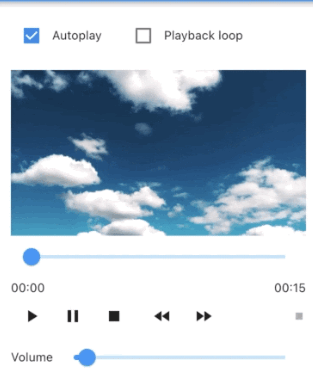
Advanced usage

See the example app for a complete usage example.

Support this project

Sponsors:

Thank you to all sponsors for supporting this project! ❤️

Other projects

All my projects

Credits

Created by @albemala (Twitter)

所屬分類

依賴

依賴清單 2 項

原始碼儲存庫

使用此套件的專案