搜尋套件、儲存庫與 APP 分類

positioned_scroll_observer 封面
套件詳情v2.2.3

positioned_scroll_observer

一個優雅的滾動觀察器,支援大多數滾動視圖,可在不破壞目前組件的情況下跳轉/動畫至指定索引。

AndroidiOSWebmacOSWindowsLinux
近 30 天下載
2060
喜歡數
28
Pub 分數
160

安裝套件

flutter pub add positioned_scroll_observer

套件介紹

根據套件公開資料產生的選型評估,僅供參考。

PositionedScrollObserver 是一個專為 Flutter 設計的套件,旨在優雅地觀察和管理各種可滾動組件中的滾動位置。它能在不破壞現有組件狀態的情況下,實現平滑跳轉或動畫至滾動視圖中的特定索引。適用於清單、網格和自訂可滾動元件,在導航過程中保持 UI 一致性。該套件支援所有主要平台,並與 Flutter 的滾動系統無縫整合。

適用情境

  • 透過程式設計方式捲動到特定清單項目
  • 在動態內容更新期間保持滾動狀態
  • 在長清單中建立基於索引的導航
  • 在滾動視圖中實現平滑的動畫跳躍
  • 同步多個可捲動組件

主要特色

  • 支援所有標準滾動檢視
  • 在捲動跳躍期間保留元件狀態
  • 平滑的動畫索引過渡
  • 跨平台相容性
  • 最小化樣板程式碼整合
  • 與自定義滾動控制器搭配使用

適合對象

  • 開發複雜可捲動介面的開發者
  • 需要基於索引導航的應用程式
  • 具有動態或頻繁更新清單的專案
  • 重視流暢使用者體驗的團隊
  • Flutter 應用程式針對多個平台

使用建議

  • 需要相容的滾動視圖設定
  • 可能需要為嵌套的滾動視圖添加額外邏輯
  • 最佳搭配穩定的滾動控制器參考使用
  • 不適用於不可捲動的元件
  • 性能影響取決於滾動檢視的複雜性

原始 README

以下為關聯原始碼儲存庫的 README 原文快照,最新內容請造訪原始碼儲存庫。

pub package GitHub Repo stars

Features

  1. Using jumpToIndex and animateToIndex to scroll to the specific index

  2. Jumping/animating to the position by specifying a ratio in a scroll view. See how to align the render object. That would be very useful if you want to quickly jump to the top, middle or end of a list/grid.

  3. Using PositionRetainedScrollPhysics to retain the old offset to avoid scrolling when adding new items into the top of ListView. See retain old scroll offset.

  4. Check if the specific index is visible on the screen. See check visibility.

  5. Check which items are visible in the viewport. See get visible items

  6. Check the visible ratio of the observed RenderObject in a viewport. See how to use it in a GroupList

  7. No breaking for your current sliver widgets, e.g., ListView/GridView, SliverList/SliverGrid/SliverAppBar, just wrapping your item widgets using ObserverProxy. Supported:

  • [x] ListView
  • [x] GridView
  • [x] CustomScrollView
  • [x] SingleChildScrollView
  • [x] ListWheelScrollView
  • [ ] NestedScrollView (waiting testing)

Getting started

  1. First, creating and binding the observer to all items. (See box scroll observer and sliver scroll observer)

  2. then, using the observer like:

    _observer.jumpToIndex(
        index,
        position: _controller.position,
    );
    
    _observer.animateToIndex(
        index,
        position: _controller.position,
        duration: const Duration(milliseconds: 200),
        curve: Curves.fastLinearToSlowEaseIn,
    );
    
Usage for scroll views that do not rely on RenderSliver, e.g., SingleChildScrollView and ListWheelScrollView
  1. create a BoxScrollObserver for observing the box with multi children.

      final ScrollController _controller = ScrollController();
      late final _observer = ScrollObserver.boxMulti(
        axis: _axis,
        itemCount: 30,
      );
    
  2. bind the observer to the box's children. (Using ObserverProxy to wrap each item).

    SingleChildScrollView(
      controller: _controller,
      scrollDirection: _axis,
      child: Column(
        children: [
          for (int i = 0; i < 30; i++)
            ObserverProxy(
              observer: _observer,
              child: DecoratedBox(
                decoration: BoxDecoration(border: Border.all()),
                child: SizedBox(
                  height: 100,
                  width: 100,
                  child: Center(
                    child: Text("Column item $i"),
                  ),
                ),
              ),
            ),
          ],
        ),
      );
    
Usage for slivers widgets.
  1. create a SliverScrollObserver for observing the sliver with multi children.

      final ScrollController _controller = ScrollController();
      late final _observer = ScrollObserver.sliverMulti(itemCount: 30);
    
  2. bind the observer to each item for the sliver.

        ListView.builder(
          controller: _controller,
          itemBuilder: (context, index) => ObserverProxy(
            observer: _observer,
            child: ListTile(
              key: ValueKey<int>(index),
              leading: const CircleAvatar(
                child: Text("L"),
              ),
              title: Text("Positioned List Example $index"),
            ),
          ),
          itemCount: _itemCount,
        );
    

For ListView.custom and GridView.custom, you could also use PositionedChildListDelegate and PositionedChildBuilderDelegate for wrapping items in ObserverProxy conveniently

Usage

For observing slivers:
  1. observing a sliver with single child, using ScrollObserver.sliverSingle to create.
  2. observing a sliver with multi children, using ScrollObserver.sliverMulti to create.
For observing other scroll views that have no sliver descendants.
  1. observing a box with single child, using ScrollObserver.boxSingle to create. (rare cases and need more testing)
  2. observing a box with multi children, using ScrollObserver.boxMulti to create.
Checking index is visible on the screen
get visible items

More details, see API reference.

Using PositionRetainedScrollPhysics for retaining the old scroll offset
ListView.builder(
  controller: _controller,
  reverse: true,
  physics: const PositionRetainedScrollPhysics(),
  itemBuilder: (context, index) => _items[index],
  itemCount: _itemCount,
);
Jump/animate to a ratio position in a viewport
_observer.showInViewport(
  _controller.position,
  alignment: 0.5,
);

By setting different alignment, you could jump/animate to the position according to the ratio: alignment.

  1. for alignment = 0.0, it would align the render object' leading to the leading of the viewport's main axis extent.
  2. for alignment = 0.5, it would align the render object's center to the center of the viewport;s main axis extent.
  3. for alignment = 1.0, it would align the render object's trailing to the trailing of the viewport's main axis extent.

you could also specify alignment as the number between [0, 1]

Pay attention
  • The item widget/builder must be wrapped using ObserverProxy
  • All observers would normalizeIndex to ensure the index is in a valid range determined by itemCount of observers, so developers should also update observers' itemCount when the scroll views' item count changes.
  • Items that have the same RenderObject observed by an observer should share the same observer instance, instead of creating different observers for each item.
  • When using ScrollObserver.boxMulti, axis is required so that the observer could estimate the scroll offset along the correct main axis.

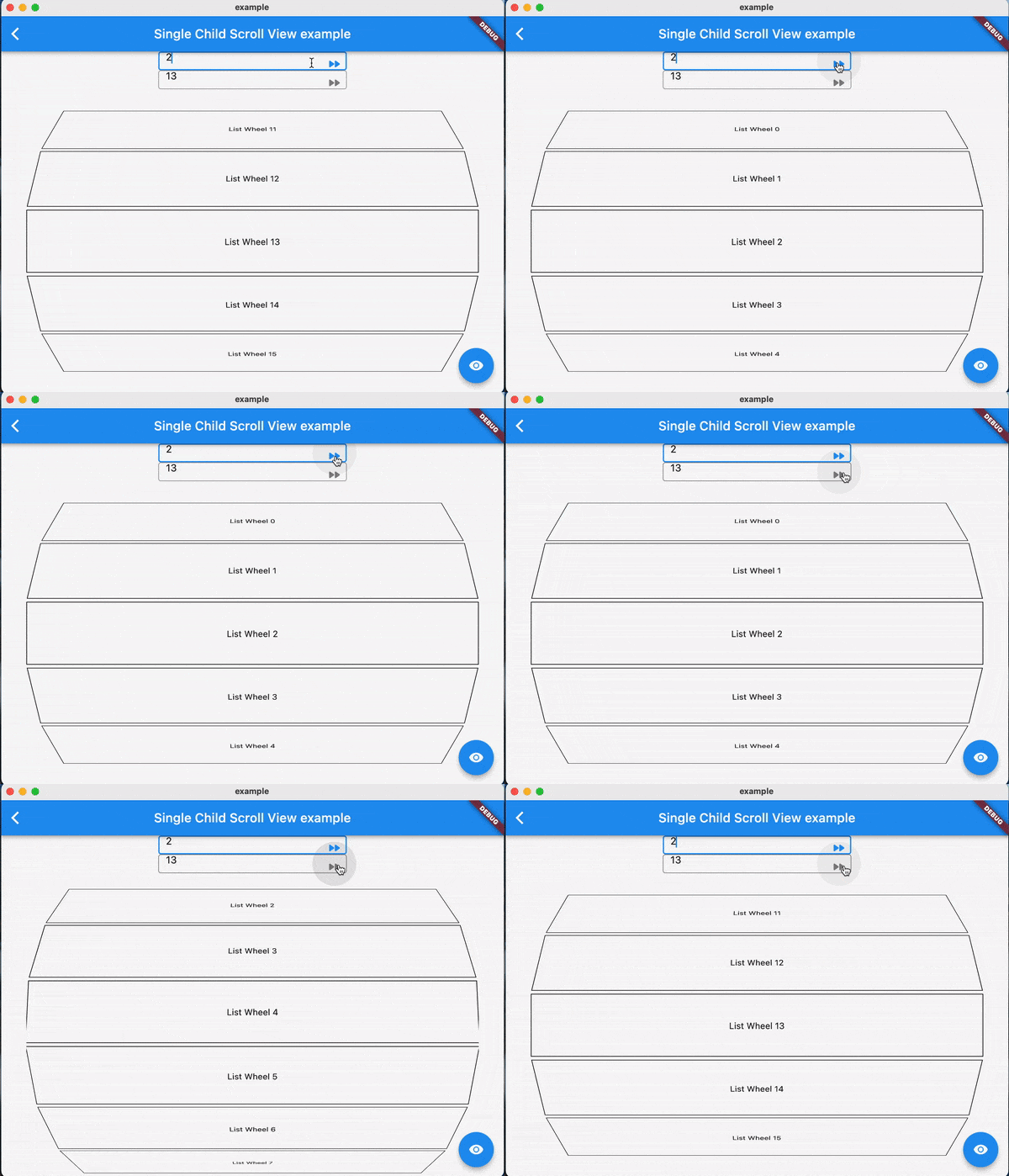
Examples:

FAQ

TODO

Contributions

Feel free to contribute to this project.

If you find a bug or want a feature, but don't know how to fix/implement it, please fill an issue.

If you fixed a bug or implemented a feature, please send a pull request

所屬分類

原始碼儲存庫

使用此套件的專案

暫無相關資料。