搜尋套件、儲存庫與 APP 分類

select_searchable_list 封面
套件詳情v0.2.13

select_searchable_list

一個非常有用的 Flutter 小部件,可用於從下拉式選單中搜尋單一或多個選項。

AndroidiOSWebmacOSWindowsLinux
近 30 天下載
397
喜歡數
24
Pub 分數
140

安裝套件

flutter pub add select_searchable_list

套件介紹

根據套件公開資料產生的選型評估,僅供參考。

一個 Flutter 小部件,旨在簡化在下拉清單中搜尋單一或多個選項的過程。它提供直覺且可搜尋的介面,當從大型資料集進行選擇時,能提升使用者體驗。此小部件高度可自訂,並支援 Android、iOS、Web、macOS、Windows 及 Linux 等多種平台。非常適合需要高效過濾與選擇的表單及資料輸入介面。

適用情境

  • 具有大量選項列表的表單輸入
  • 管理員儀表板中的動態篩選
  • 使用者資料設定與類別選擇
  • 可搜尋的多選下拉選單
  • 具有廣泛選擇的資料輸入應用程式

主要特色

  • 即時搜尋篩選
  • 支援單選和多選
  • 跨平台相容性
  • 可自定義的使用者介面和樣式
  • 與現有表單輕鬆整合
  • 輕量且高效

適合對象

  • 開發資料密集型應用的開發者
  • 需要響應式搜尋介面的團隊
  • 需要多選下拉列表的專案
  • 以UI/UX為重點的Flutter應用
  • 針對多個作業系統的應用程式

使用建議

  • 可能需要為複雜主題添加額外的樣式
  • 有限的內建驗證功能
  • 性能取決於數據集大小
  • 未針對沒有分頁的超大資料集進行優化
  • 需要手動處理選擇回調

原始 README

以下為關聯原始碼儲存庫的 README 原文快照,最新內容請造訪原始碼儲存庫。

Dropdown Searchable List Choices

A very useful widget for searching through single or multiple options from a drop-down list.

Platforms

This plugin has been successfully tested on iOS, Android & web.

Examples

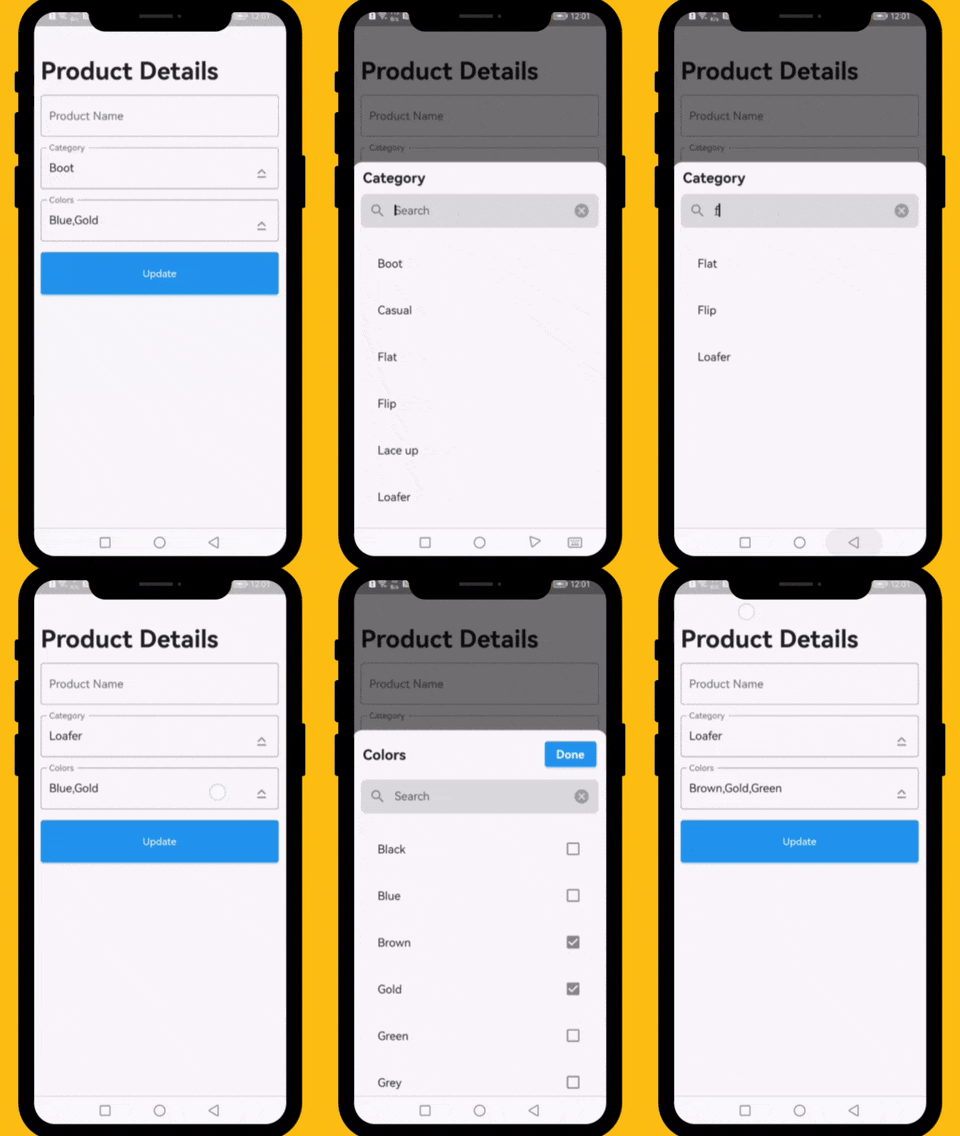
The following examples are extracted from the example project available in the repository. More examples are available in this project.

Demo of Dropdown Searchable list with choices

drop-down-list

How to Use

          // ####### Data Sample (API Response)
          // Data value Api
          final Map<int, String> _listCategories = {1:'Boot', 2: 'Casual', 3: 'Flat', 4: 'Flip',  5: 'Lace up', 6: 'Loafer', 7: 'Slip-on', 8: 'Moccasins'};
          // Default value
          final List<int> _selectedCategory = [1];
          // Data value Api
          final Map<int, String> _listColors = {1:'Black', 2: 'Blue', 3: 'Brown', 4: 'Gold',  5: 'Green', 6: 'Grey', 7: 'Orange', 8: 'Pink', 9: 'Purple', 10: 'Red'};
          // Default value
          final List<int> _selectedColors = [2,4];
  
          // ####### Category Select List
          DropDownTextField(
            textEditingController: _categoryTextEditingController,
            title: 'Category',
            hint: 'Select Category',
            options: _listCategories,
            selectedOptions: _selectedCategory,
            onChanged: (selectedIds) {
              // setState(() => selectedIds);
            },
          ),

          // ####### Colors Select List
          DropDownTextField(
            textEditingController: _colorsTextEditingController,
            title: 'Colors',
            hint: 'Select Colors',
            options: _listColors,
            selectedOptions: _selectedColors,
            onChanged: (selectedIds) {
              // setState(() => selectedIds);
            },
            multiple: true,
          ),
Required parameters
data:

This property takes List as a parameter and it is useful to display items in drop down list.

Optional parameters
listBuilder:

This property takes int value as a parameter. This is use to set the initial segment from [segmentNames].

enableMultipleSelection:

This property takes Color value as a parameter. You can change the background color of animated segment.

bottomSheetTitle:

This gives the bottom sheet title.

submitButtonChild:

You can set your custom submit button when the multiple selection is enabled.

selectedItems:

This will give the call back to the selected items from list.

dropDownBackgroundColor:

This will set the background color to the Dropdown Searchable.

searchWidget:

This property takes TextFormField value as a parameter. [searchWidget] is use to show the text box for the searching. If you are passing your own widget then you must have to add [TextEditingController] for the [TextFormField].

isSearchVisible:

This property takes bool value as a parameter. [isSearchVisible] is use to manage the search widget visibility. by default it is [True] so widget will be visible.

LICENSE!

Dropdown Searchable list is MIT-licensed.

Additional information

    init_number=0; build_number=$(($(git rev-list HEAD --count) + init_number)); major=$((build_number / 2000)); minor=$(( (build_number / 20) % 10 )); patch=$((build_number % 20)); patch=$(printf "%02d" $patch); version="$major.$minor.$patch"; echo "version: $version+$build_number"

    dart fix --apply && flutter analyze

    flutter pub publish --dry-run

    flutter pub publish --force

Let us know!

I would be happy if you send us feedback on your projects where you use our component. Just email amir.email@gmail.com and let me know if you have any questions or suggestions about my work.

所屬分類

依賴

依賴清單 1 項

原始碼儲存庫

使用此套件的專案

暫無相關資料。