Search packages, repositories and app categories

dropdown_search cover
Package detailsv8.1.0

dropdown_search

Simple, reactive and highly customizable Flutter Dropdown with a lot of features (search, popups platform, async/sync,...) with multi mode like menu, dialog, bottomSheet and etc.

AndroidiOSWebmacOSWindowsLinux
30-day downloads
235K
Likes
2K
Pub points
150

Install package

flutter pub add dropdown_search

Package Overview

Package selection guidance compiled from public package information, community data, and project usage.

DropdownSearch is a versatile, reactive Flutter package that provides a customizable dropdown widget with advanced features such as search functionality, support for async and sync data sources, and multiple display modes including menus, dialogs, and bottom sheets. It adapts to different platforms and offers a seamless user experience across Android, iOS, Web, macOS, Windows, and Linux. The package emphasizes flexibility and ease of integration, making it ideal for forms and selection interfaces requiring dynamic filtering and responsive design.

Use cases

  • Form inputs with searchable options
  • Dynamic data loading from APIs
  • Multi-platform dropdowns
  • Customizable selection interfaces
  • Filtering large datasets in real time

Key features

  • Searchable dropdown with live filtering
  • Support for async and sync data sources
  • Multiple display modes (menu, dialog, bottom sheet)
  • Platform-adaptive UI components
  • Highly customizable appearance and behavior
  • Reactive state management

Suitable for

  • Developers building forms with complex selection needs
  • Apps requiring searchable dropdowns on multiple platforms
  • Projects needing flexible and reusable dropdown components
  • Teams prioritizing cross-platform consistency
  • Users seeking lightweight yet powerful dropdown solutions

Considerations

  • May require additional styling for complex themes
  • Performance impact with very large datasets if not optimized
  • Limited built-in validation beyond basic selection
  • Requires careful handling of async data streams
  • Not suitable for non-interactive dropdown use cases

Original README

Original README snapshot from the linked source repository. Visit the repository for the latest content.

Flutter DropdownSearch

Simple and highly customizable Flutter Dropdown with a lot of features (search, adaptive, async/sync values, ...) with multi mode like menu, modal, dialog, bottomSheet and etc.

Build

Key Features • Examples • License

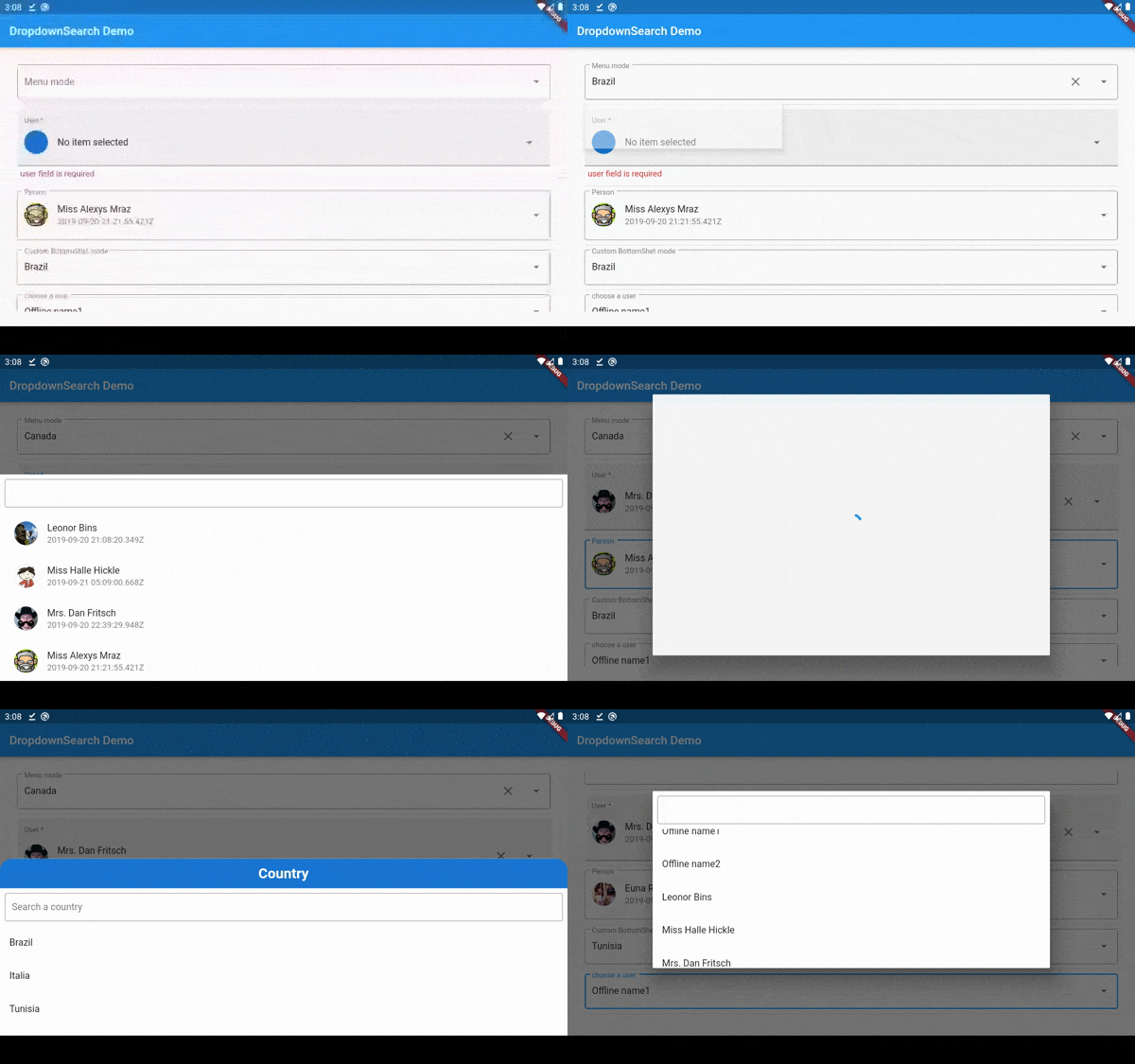
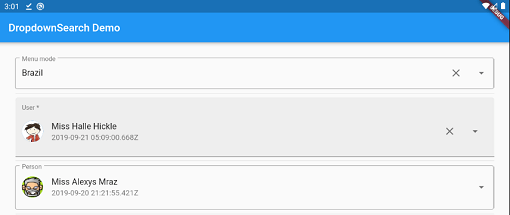
Dropdown search

Key Features

  • Reactive widget
  • Infinite list (lazy loading)
  • Sync and/or Async items (online, offline, DB, ...)
  • Searchable dropdown
  • Support multi level items
  • Five dropdown modes: Menu / BottomSheet / ModalBottomSheet / Dialog / autocomplete
  • Single & multi selection
  • Adaptive platform UI : Material, Adaptive, Cupertino
  • Easy customizable UI - No Boilerplate

Dropdown search

Dropdown search
Dropdown search
Dropdown search Dropdown search

Dropdown search

pubspec.yaml

dropdown_search: <lastest version>

Import

import 'package:dropdown_search/dropdown_search.dart';

Adaptive Platform UI

  • To use Material ui (by default) use DropdownSearch<T>(...) or DropdownSearch<T>.multiSelection(...)

  • for the cupertino mode use CupertinoDropdownSearch<T>(...) or CupertinoDropdownSearch<T>.multiSelection(...)

  • To let the package pick the suitable platform UI based on the used platform, use AdaptiveDropdownSearch<T>(...) or AdaptiveDropdownSearch<T>.multiSelection(...)

  • Bonus Tip: with adaptive platform ui you can use different PopupMode depending on platform type:

AdaptiveDropdownSearch<T>(
    popupProps: AdaptivePopupProps(
        cupertinoProps: CupertinoPopupProps.bottomSheet(),
        materialProps: PopupProps.dialog()
    ),
)

Infinite Scroll

To enable infinite scroll all you have to do is to declare infiniteScrollProps and of course don't forget to pass loadProps to your API like this:

DropdownSearch<T>(
    items: (filter, loadProps) => _getDataFromAPI(filter, loadProps!.skip, loadProps!.take),
    popupProps: PopupProps.dialog(
        infiniteScrollProps: InfiniteScrollProps(
            loadProps: LoadProps(skip: 0, take: 10),
        ),
    ),
)

Simple implementation

See here
DropdownSearch<String>(
  items: (f, cs) => ["Item 1", 'Item 2', 'Item 3', 'Item 4'],
  popupProps: PopupProps.menu(
    disabledItemFn: (item) => item == 'Item 3',
    fit: FlexFit.loose
  ),
),
Dropdown search
DropdownSearch<String>.multiSelection(
  mode: Mode.CUSTOM,
  items: (f, cs) => ["Monday", 'Tuesday', 'Wednesday', 'Thursday', 'Friday', 'Saturday', 'Sunday'],
  dropdownBuilder: (ctx, selectedItem) => Icon(Icons.calendar_month_outlined, size: 54),
),
Dropdown search
DropdownSearch<(String, Color)>(
  clickProps: ClickProps(borderRadius: BorderRadius.circular(20)),
  mode: Mode.CUSTOM,
  items: (f, cs) => [
    ("Red", Colors.red),
    ("Black", Colors.black),
    ("Yellow", Colors.yellow),
    ('Blue', Colors.blue),
  ],
  compareFn: (item1, item2) => item1.$1 == item2.$1,
  popupProps: PopupProps.menu(
  menuProps: MenuProps(align: MenuAlign.bottomCenter),
    fit: FlexFit.loose,
    itemBuilder: (context, item, isDisabled, isSelected) => Padding(
      padding: const EdgeInsets.all(8.0),
      child: Text(item.$1, style: TextStyle(color: item.$2, fontSize: 16)),
    ),
  ),
  dropdownBuilder: (ctx, selectedItem) => Icon(Icons.face, color: selectedItem?.$2, size: 54),
),
Dropdown search
DropdownSearch<(IconData, String)>(
  selectedItem: (Icons.person, 'Your Profile'),
  compareFn: (item1, item2) => item1.$1 == item2.$2,
  items: (f, cs) => [
    (Icons.person, 'Your Profile'),
    (Icons.settings, 'Setting'),
    (Icons.lock_open_rounded, 'Change Password'),
    (Icons.power_settings_new_rounded, 'Logout'),
  ],
  decoratorProps: DropDownDecoratorProps(
    decoration: InputDecoration(
      contentPadding: EdgeInsets.symmetric(vertical: 6),
      filled: true,
      fillColor: Color(0xFF1eb98f),
      border: OutlineInputBorder(
        borderSide: BorderSide(color: Colors.transparent),
        borderRadius: BorderRadius.circular(8),
      ),
      focusedBorder: OutlineInputBorder(
        borderSide: BorderSide(color: Colors.transparent),
        borderRadius: BorderRadius.circular(8),
      ),
      enabledBorder: OutlineInputBorder(
        borderSide: BorderSide(color: Colors.transparent),
        borderRadius: BorderRadius.circular(8),
      ),
    ),
  ),
  dropdownBuilder: (context, selectedItem) {
    return ListTile(
      leading: Icon(selectedItem!.$1, color: Colors.white),
      title: Text(
        selectedItem.$2,
        style: TextStyle(color: Colors.white, fontSize: 18, fontWeight: FontWeight.bold),
      ),
    );
  },
  popupProps: PopupProps.menu(
    itemBuilder: (context, item, isDisabled, isSelected) {
      return ListTile(
        contentPadding: EdgeInsets.symmetric(vertical: 8, horizontal: 12),
        leading: Icon(item.$1, color: Colors.white),
        title: Text(
          item.$2,
          style: TextStyle(color: Colors.white, fontSize: 18, fontWeight: FontWeight.bold),
        ),
      );
    },
    fit: FlexFit.loose,
    menuProps: MenuProps(
      backgroundColor: Colors.transparent,
      elevation: 0,
      margin: EdgeInsets.only(top: 16),
    ),
    containerBuilder: (ctx, popupWidget) {
      return Column(
        mainAxisSize: MainAxisSize.min,
        crossAxisAlignment: CrossAxisAlignment.end,
        children: [
          Padding(
            padding: const EdgeInsets.only(right: 12),
            child: Image.asset(
              'assets/images/arrow-up.png',
              color: Color(0xFF1eb98f),
              height: 14,
            ),
          ),
          Flexible(
            child: Container(
              decoration: BoxDecoration(
                color: Color(0xFF1eb98f),
                shape: BoxShape.rectangle,
                borderRadius: BorderRadius.circular(8),
              ),
              child: popupWidget,
            ),
          ),
        ],
      );
    },
  ),
),
Dropdown search
DropdownSearch<String>(
  items: (filter, infiniteScrollProps) => ['Item 1', 'Item 2', 'Item 3'],
  suffixProps: DropdownSuffixProps(
    dropdownButtonProps: DropdownButtonProps(
      iconClosed: Icon(Icons.keyboard_arrow_down),
      iconOpened: Icon(Icons.keyboard_arrow_up),
    ),
  ),
  decoratorProps: DropDownDecoratorProps(
    textAlign: TextAlign.center,
    decoration: InputDecoration(
      contentPadding: EdgeInsets.symmetric(vertical: 20),
      filled: true,
      fillColor: Colors.white,
      border: OutlineInputBorder(
        borderSide: BorderSide(color: Colors.transparent),
        borderRadius: BorderRadius.circular(12),
      ),
      focusedBorder: OutlineInputBorder(
        borderSide: BorderSide(color: Colors.transparent),
        borderRadius: BorderRadius.circular(12),
      ),
      enabledBorder: OutlineInputBorder(
        borderSide: BorderSide(color: Colors.transparent),
        borderRadius: BorderRadius.circular(12),
      ),
      hintText: 'Please select...',
      hintStyle: TextStyle(fontWeight: FontWeight.bold, fontSize: 18, color: Colors.grey),
    ),
  ),
  popupProps: PopupProps.menu(
    itemBuilder: (context, item, isDisabled, isSelected) {
      return Padding(
        padding: const EdgeInsets.symmetric(vertical: 12.0),
        child: Text(
          item,
          style: TextStyle(fontWeight: FontWeight.bold, fontSize: 18),
          textAlign: TextAlign.center,
        ),
      );
    },
    constraints: BoxConstraints(maxHeight: 160),
    menuProps: MenuProps(
      margin: EdgeInsets.only(top: 12),
      shape: const RoundedRectangleBorder(borderRadius: BorderRadius.all(Radius.circular(12))),
    ),
  ),
),
Dropdown search
DropdownSearch<UserModel>.multiSelection(
  items: (filter, s) => getData(filter),
  compareFn: (i, s) => i.isEqual(s),
  popupProps: PopupPropsMultiSelection.bottomSheet(
    bottomSheetProps: BottomSheetProps(backgroundColor: Colors.blueGrey[50]),
    showSearchBox: true,
    itemBuilder: userModelPopupItem,
    suggestedItemProps: SuggestedItemProps(
      showSuggestedItems: true,
      suggestedItems: (us) {
        return us.where((e) => e.name.contains("Mrs")).toList();
      },
    ),
  ),
),
Dropdown search
DropdownSearch<int>(
  items: (f, cs) => List.generate(30, (i) => i + 1),
  decoratorProps: DropDownDecoratorProps(
    decoration: InputDecoration(labelText: "Dialog with title", hintText: "Select an Int"),
  ),
  popupProps: PopupProps.dialog(
    title: Container(
      decoration: BoxDecoration(color: Colors.deepPurple),
      alignment: Alignment.center,
      padding: EdgeInsets.symmetric(vertical: 16),
      child: Text(
        'Numbers 1..30',
        style: TextStyle(fontSize: 21, fontWeight: FontWeight.bold, color: Colors.white70),
      ),
    ),
    dialogProps: DialogProps(
      clipBehavior: Clip.antiAlias,
      shape: OutlineInputBorder(
        borderSide: BorderSide(width: 0),
        borderRadius: BorderRadius.circular(25),
      ),
    ),
  ),
),
Dropdown search

Layout customization

You can customize the layout of the DropdownSearch and its items. click here for more examples.

Full documentation here

DropdownSearch Anatomy Dropdown search

Support

If this plugin was useful to you, helped you to deliver your app, saved you a lot of time, or you just want to support the project, I would be very grateful if you buy me a cup of coffee.

Buy Me A Coffee

License

MIT

Categories

Dependencies

Dependency list 3 items

Source repository

Projects using this package