
Shiori
您需要的原神应用

- 星标
- 201
- 复刻
- 45
- 最近推送(UTC)
- 2026年9月14日
- 项目状态
- 未归档
原始 README
以下为英文项目原文快照,最新内容请访问 GitHub。
Shiori

A Genshin Impact database kinda app
This app is not affiliated with or endorsed by miHoYo. Shiori is just a database app for the Genshin Impact game


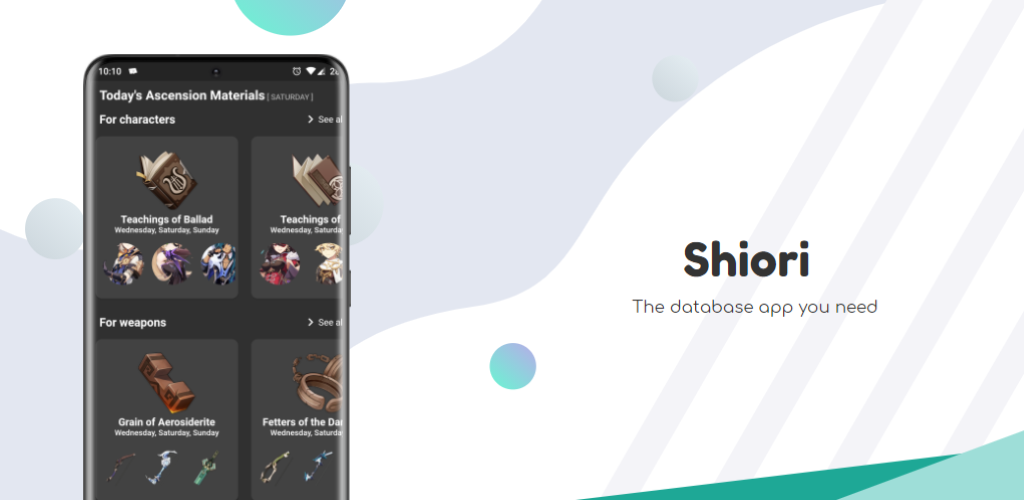



Features
- Artifacts
- Characters
- Weapons
- Materials
- And many more to come
Discord

Contributing
Before contributing, please ask me if whatever you are planning to do / add / improve is valid for this project.
To run the server:
- Install the .net 6 runtime HERE
- Download and extract the server.zip
- Open a terminal and run one of the following commands (depending on the OS / shell the command may
vary)
dotnet ShioriAssets.dll./ShioriAssets
- After running the command you should see an output like this:
info: Microsoft.Hosting.Lifetime[14]
Now listening on: http://localhost:5000
info: Microsoft.Hosting.Lifetime[14]
Now listening on: https://localhost:5001
info: Microsoft.Hosting.Lifetime[0]
Application started. Press Ctrl+C to shut down.
info: Microsoft.Hosting.Lifetime[0]
Hosting environment: Production
- Take note of the url's port, since you will need it later
- Copy the url and open it in your browser, you should see an
It works!text
To run the app:
- Clone this repository
- Checkout the develop branch
- Create a .env.common file with the following content, the values can be anything:
ANDROID_PURCHASES_KEY = yyyyy
IOS_PURCHASES_KEY = yyyyy
COMMON_HEADER_NAME = header
API_HEADER_NAME = key
PUBLIC_KEY = xxxzzzzz
PRIVATE_KEY = xxxxzzz
LETS_ENCRYPT_KEY = xxxzzzzxxx
- Create a .env.dev and a copy named .env.prod with the following content (The url is the one used for the server, should work if you are using an android emulator)
API_BASE_URL = https://10.0.2.2:5001
ASSETS_BASE_URL = https://10.0.2.2:5001
API_HEADER_VALUE = value
- Install the
Flutter Intl extension(It is available in Vs Code and Android Studio) - Run the
flutter intl initializecommand from your IDE - Comment the lines 19 to 30 in the
infrastructure/api_service.dartand add the following behind line 31httpClient.badCertificateCallback = (X509Certificate cert, String host, int port) => true; - If you have fvm configured, run the script
sh run_clean.sh, otherwise manually run each sentence without the fvm prefix - Follow the steps to setup firebase from here
- Profit
Translations
If you want to help me with translations, I encourage you to check the following file:
- The general one (where common strings are stored [not related specifically to the game]): General
To translate the general one is very simple, create a copy of the file, keeping the keys and translate the values: E.g (in spanish) : "dark" :"Oscuro"
Special Thanks
- To Uzair Ashraf for his wish simulator
- To the Genshin Helper Team for their builds
- The folk(s) that developed the Map
- And the folks from Honey Impact , Fandom Wiki , Genshin.in, Genshin.Center that provide useful data
- And to JetBrains who provides an Open Source License for this project.
Translators
Translating the app to other languages won't have been possible without the following contributors
| Chinese | Russian | Portuguese | Italian | Japanese | Vietnamese | Indonesian | Ukrainian |
|---|---|---|---|---|---|---|---|
| 2O48#9733 | SipTik#8026 | Brunoff#0261 | Reniel [Skidex ツ]#7982 | 𝕽𝖚𝖗𝖎#3080 | Ren Toky#5263 | Arctara#7162 | VALLER1Y#4726 |
| KKTS#8567 | DanPS#4336 | F | |||||
| pill#0039. | |||||||
| Avantel#8880 | |||||||
| чебилин#5968 | |||||||
| Anixty#3279 |

Efrain Bastidas ↗
分类
使用的依赖
依赖清单 67 项
- bloc_concurrency
^0.3.0 - darq
^2.1.0 - device_info_plus
^12.4.0 - devicelocale
^0.8.2 - envied
^1.3.4 - file_picker
^10.3.10 - firebase_core
^4.6.0 - firebase_messaging
^16.1.3 - fl_chart
^1.2.0 - flutter
{"sdk":"flutter"} - flutter_bloc
^9.1.1 - flutter_colorpicker
^1.1.0 - flutter_inappwebview
^6.1.5 - flutter_local_notifications
^19.5.0 - flutter_localizations
{"sdk":"flutter"} - flutter_markdown_plus
^1.0.7 - flutter_slidable
^4.0.3 - flutter_timezone
^5.0.2 - fluttertoast
^8.2.12 - freezed_annotation
^3.1.0 - get_it
^9.2.1 - grouped_list
^6.0.0 - hive_ce
^2.19.3 - hive_ce_flutter
^2.3.4 - http
^1.6.0 - image_gallery_saver_plus
^4.0.1 - infinite_listview
^1.1.0 - internet_connection_checker_plus
^2.9.1+2 - intl
^0.20.2 - json_annotation
^4.11.0 - logger
^2.7.0 - open_file
^3.5.11 - package_info_plus
^9.0.1 - path
^1.9.1 - path_provider
^2.1.5 - permission_handler
^12.0.1 - pull_to_refresh
^2.0.0 - purchases_flutter
^9.16.1 - rate_my_app
^2.3.2 - responsive_builder
^0.7.1 - responsive_grid
^2.4.4 - screenshot
^3.0.0 - share_plus
^12.0.2 - shared_preferences
^2.5.5 - sprintf
^7.0.0 - store_checker
^1.8.0 - synchronized
^3.4.0 - transparent_image
^2.0.1 - two_dimensional_scrollables
^0.4.2 - url_launcher
^6.3.2 - version
^3.0.0 - version_tracker
^3.0.0 - wakelock_plus
^1.5.1 - window_size
{"git":{"url":"https://github.com/google/flutter-desktop-embedding","path":"plugins/window_size"}} - bloc_test开发依赖
^10.0.0 - build_runner开发依赖
— - envied_generator开发依赖
^1.3.4 - flutter_launcher_icons开发依赖
^0.14.4 - flutter_test开发依赖
{"sdk":"flutter"} - freezed开发依赖
^3.2.5 - hive_ce_generator开发依赖
^1.11.1 - integration_test开发依赖
{"sdk":"flutter"} - intl_utils开发依赖
^2.8.14 - json_serializable开发依赖
^6.13.1 - lint开发依赖
^2.8.0 - mockito开发依赖
^5.6.4 - msix开发依赖
^3.16.13
所在榜单
如何选择适合项目的代码仓?
先按使用场景筛选,再比较项目活跃情况,最后到原始仓库核对使用要求。
- 通过仓库名、作者或描述搜索,再按技术分类缩小范围。
- 结合星标、复刻与最近推送比较项目;星标反映社区关注,不代表质量保证。
- 使用前在 GitHub 核对 README、许可证与 Issues。
来源与维护
“A repository is the most basic element of GitHub.”
GitHub Docs — About repositories ↗