v3.4.3
hooks_riverpod
반응형 캐싱 및 데이터 바인딩 프레임워크입니다. Riverpod은 비동기 코드 작업을 쉽게 만듭니다.
931좋아요 65.9만30일 다운로드150Pub 점수
AndroidiOSmacOSWindowsLinux
Tachidesk-Server 인스턴스에서 만화를 읽을 수 있는 무료이고 오픈소스 만화 리더 앱입니다.

아래는 영문 원문 스냅샷입니다. 최신 내용은 GitHub에서 확인하세요.







A free and open source manga reader based on Flutter to read manga from a Suwayomi-Server instance.
Sorayomi need to connect with an already hosted server.
Sorayomi supports Linux, Windows, MacOS, Web, iOS and Android.
Here is a list of current features for interaction with Sorayomi:
Note: Keep in mind that Sorayomi and Suwayomi-Server are alpha software, so it can have issues. See Support and help if it happens.
These are the versions of Suwayomi-Server that Sorayomi supports.
Download *-android-all.apk file from latest release the releases section.
Download the latest .msi file from the releases section.
if you use WINGET, you can run
winget install tachidesk-sorayomi
if you use HomeBrew, you can run
brew install --cask tachidesk-sorayomi
Download the latest deb release from the releases section.
Download the latest release from the aur.
If you use yay, you can run
yay -S tachidesk-sorayomi-bin
inside a terminal window.
Download the latest web.zip file from the releases section.
Navigation bar > more screen > Server URL.These instructions will get you a copy of the project up and running on your local machine for development and testing purposes.
You can install Flutter & Dart from Official website
  $ git clone https://github.com/Suwayomi/Tachidesk-Sorayomi.git
  $ cd Tachidesk-Sorayomi/
$ flutter pub get
$ flutter run
$ flutter gen-l10n
git config --local core.hooksPath .githooksFlutter is an open source framework by Google for building beautiful, natively compiled, multi-platform applications from a single codebase.
Flutter Riverpod - A simple way to access state while robust and testable.
Riverpod Architecture - File architecture developed by @bizz84
Find other dependencies in pubspec.yaml
The Suwayomi-server project is developed by @AriaMoradi and contributors,
The Tachidesk-Sorayomi project is developed by @DattatreyaReddy and contributors,
CI-CD for Tachidesk-Sorayomi is developed by @mahor1221 and contributors.
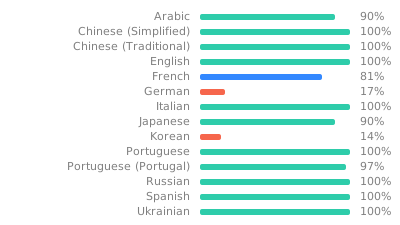
Feel free to translate the project on Weblate
A link for Tachidesk is provided here and is licensed under Mozilla Public License v2.0.
You can obtain a copy of Mozilla Public License v2.0 from https://mozilla.org/MPL/2.0/
Copyright (C) Contributors to the Suwayomi project

This Source Code Form is subject to the terms of the Mozilla Public
License, v. 2.0. If a copy of the MPL was not distributed with this
file, You can obtain one at http://mozilla.org/MPL/2.0/.
반응형 캐싱 및 데이터 바인딩 프레임워크입니다. Riverpod은 비동기 코드 작업을 쉽게 만듭니다.
riverpod_generator용 주석을 노출하는 패키지
Riverpod용 코드 생성기입니다. 이는 문법을 단순화하고 상태 기반 핫 리로드와 같은 기능을 강화합니다.
package:go_router용 생성된 강력한 타입의 라우트 헬퍼를 지원하는 빌더
순수한 Dart로 작성된 가볍고 빠른 키-값 데이터베이스. AES-256를 사용하여 강력하게 암호화됨.
Hive용 확장입니다. Flutter 앱에서 Hive를 사용하는 것을 더 쉽게 만듭니다.
React hooks의 플러터 구현입니다. 개선된 코드 재사용 기능을 갖춘 새로운 유형의 위젯을 추가합니다.
Dart용 독립형 GraphQL 클라이언트로 현대적인 GraphQL 클라이언트의 모든 기능을 사용하기 쉬운 패키지에 통합했습니다.
Flutter용 GraphQL 클라이언트로, 최신 GraphQL 클라이언트의 모든 기능을 사용하기 쉬운 패키지 하나에 담았습니다.
네트워크 정보(예: Wi-Fi 세부 정보)를 탐색하기 위한 Flutter 플러그인입니다.
패키지는 Flutter 프로젝트에 샤이머 효과를 쉽게 추가할 수 있는 방법을 제공합니다
자산, 폰트, 색상 등에 대한 플러터 코드 생성기 — 모든 문자열 기반 API를 제거하세요.
의존성 목록 55 개
^5.1.1^3.2.2^4.0.0^1.0.5^1.0.10^8.0.0+1^8.2.0{"sdk":"flutter"}{"git":"https://github.com/DattatreyaReddy/flutter_android_volume_keydown"}^3.3.0^0.20.0{"sdk":"flutter"}^0.7.1^8.1.1^10.2.1^2.2.0^3.0.1^14.0.2^1.0.1-alpha+1730759315362^1.0.1+1^5.2.0-beta.10^5.2.0-beta.8^2.2.3^1.1.0^2.1.1^1.2.0^4.0.0^0.20.2^4.9.0^2.5.0^6.0.0^8.0.0^1.8.3^2.0.11^11.0.0^2.1.2^3.1.0+2^2.0.0^0.3.5^2.0.15^3.0.0^6.1.6^3.0.0^2.4.14^5.1.0+1^0.14.1^5.0.0^2.2.14{"sdk":"flutter"}^2.2.1^2.0.0^1.1.1^6.5.4^5.0.0^2.0.0사용 목적에 따라 검색하고 개발 활동을 비교한 뒤 원본 저장소에서 요구 사항을 확인하세요.
“A repository is the most basic element of GitHub.”
GitHub Docs — About repositories ↗