Buscar pacotes, repositórios e categorias de apps

Detalhes do pacotev7.0.0

date_field

Um widget de campo de formulário para selecionar valores DateTime usando seletores de data e hora adaptativos do Material e Cupertino. Ele também fornece funções globais para fornecer os seletores.

AndroidiOSWebmacOSWindowsLinux
Downloads em 30 dias
2,2 mil
Curtidas
139
Pontos Pub
160

Instalar pacote

flutter pub add date_field

Visão geral do pacote

Orientação gerada a partir de informações públicas. Apenas para referência.

date_field é um pacote Flutter que fornece um widget de campo de formulário para seleção de valores DateTime com seletores adaptáveis ao plataforma — Design Material para Android e Web, e Cupertino para iOS. Ele suporta todas as principais plataformas, incluindo macOS, Windows e Linux. O pacote inclui funções globais para invocar facilmente seletores de data e hora em qualquer parte do aplicativo, simplificando a integração em formulários e fluxos de trabalho do usuário. Garante uma experiência de usuário consistente entre plataformas, mantendo o senso nativo.

Casos de uso

  • Campos de formulário que exigem seleção de data
  • Aplicativos de rastreamento de tempo
  • Interfaces de agendamento de eventos
  • Configuração do perfil do usuário com datas de nascimento
  • Entrada de dados baseada em calendário

Principais recursos

  • Seletor adaptativo Material e Cupertino
  • funções de invocação do seletor global
  • Suporte multiplataforma (Android, iOS, Web, macOS, Windows, Linux)
  • Integração fácil com widgets Form
  • Formatos de data/hora personalizáveis

Indicado para

  • Desenvolvedores criando aplicativos multiplataforma com entradas de data
  • Aplicativos que precisam de seletores de data semelhantes aos nativos
  • Aplicações com muitos formulários e dados relacionados ao tempo
  • Equipes que priorizam a consistência da interface do usuário específica da plataforma

Considerações

  • Requer Flutter SDK 2.5 ou superior
  • Pode ser necessário configurar localização adicional para idiomas não ingleses
  • Personalização limitada da aparência do seletor além das opções básicas
  • Depende do comportamento específico da plataforma para renderização

README original

Snapshot do README original do repositório-fonte vinculado. Consulte o repositório para o conteúdo mais recente.

Welcome to the Date Field package! 📅

pub package

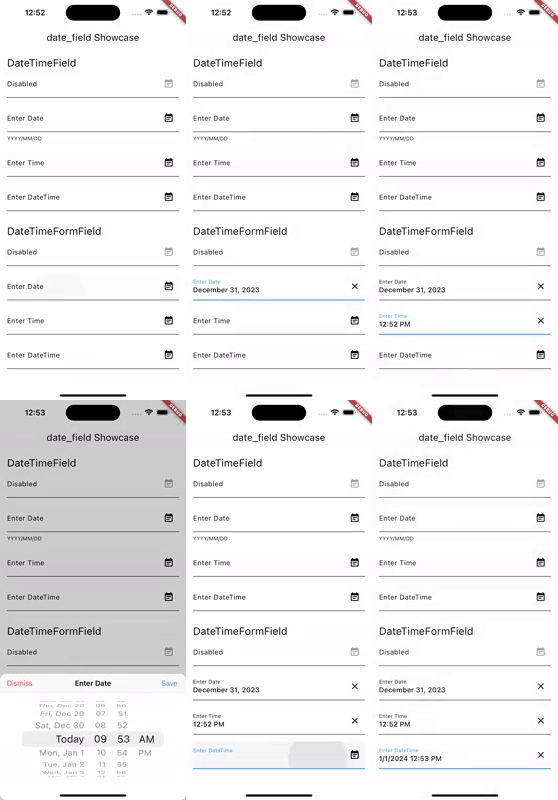
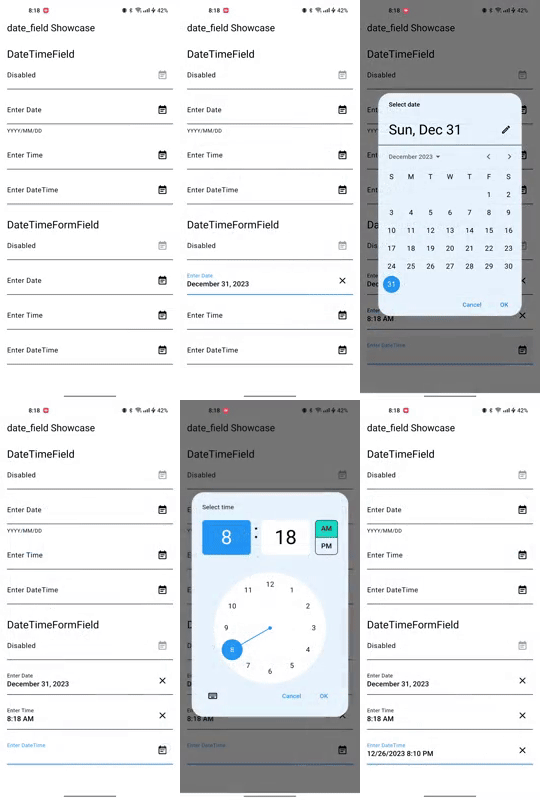
This package provides two widgets, DateTimeField and DateTimeFormField, which allow users to pick a date and/or time from an input field. You can customize the appearance of the widgets using the decoration argument, and specify whether to ask for a date, a time, or both using the mode parameter. You can further customize the picker by configuring dialog properties.

iOS Android
Date field picker package gif on an iOS device Date field picker package gif on an Android device

Getting Started 🚀

  1. Add date_field package to your dependencies in pubspec.yaml.

    dependencies:
      ...
      date_field: ^6.0.0
    
  2. Run flutter pub get to install the package.

  3. Initialize your systems locale. If not, users might see AM/PM even when they configured their system to use 24h format. Add the following code to your main function:

    import 'package:intl/intl_standalone.dart' if (dart.library.html) 'package:intl/intl_browser.dart';
    
    Future<void> main() async {
      WidgetsFlutterBinding.ensureInitialized();
      await findSystemLocale();
      runApp(const MyApp());
    }
    
  4. Import the package in your Dart code.

    import 'package:date_field/date_field.dart';
    
  5. Use the Widget. Example:

    DateTimeFormField(
      decoration: const InputDecoration(
        labelText: 'Enter Date',
      ),
      firstDate: DateTime.now().add(const Duration(days: 10)),
      lastDate: DateTime.now().add(const Duration(days: 40)),
      initialPickerDateTime: DateTime.now().add(const Duration(days: 20)),
      onChanged: (DateTime? value) {
        selectedDate = value;
      },
    ),
    
  6. To display the adaptive dialog without the field widget, you can directly use the showAdaptiveDateTimePicker.

     final DateTime? result = await showAdaptiveDateTimePicker(
       context: context,
       mode: DateTimeFieldPickerMode.dateAndTime,
     );
    

Note that you can also use the showMaterialDateTimePicker and showCupertinoDateTimePicker functions to show the Material and Cupertino pickers directly.

Features 🎨

  • DateTimeField: A widget that allows users to pick a date and/or time from an input field.
  • DateTimeFormField: A FormField that contains a DateTimeField.
  • showAdaptiveDateTimePicker: A function that shows a date and/or time picker dialog based on the platform, with the ability to customize the dialog properties.
  • showCupertinoDateTimePicker: A function that shows a Cupertino date and/or time picker dialog.
  • showMaterialDateTimePicker: A function that shows a Material date picker dialog.

Migration to 4.0.0 🚀

Version 4.0.0 contains breaking changes. Use dart fix to migrate to the latest version.

Known Issues 🐛

  • The pickers and formatted DateTimes adjust only on iOS and Android to the Device Systems Region. On all other platforms, the pickers adjust to the locale. See 32006

License 📜

This package is released under the MIT license.

Contributing 🤝

Contributions to this package are welcome! If you find a bug or have a feature request, please create an issue on the GitHub repository. If you'd like to contribute code, please create a pull request with your changes.

Before submitting a pull request, please make sure to run the tests and ensure they all pass. Additionally, please follow the existing coding style and make sure your code is well-documented.

Thank you for your contributions!

Maintainers 👷

Categorias

Dependências

Lista de dependências 3 itens

Repositório-fonte

Projetos que usam este pacote