Orientação gerada a partir de informações públicas. Apenas para referência.
GetStorage é uma solução leve e síncrona de armazenamento chave-valor construída inteiramente em Dart, projetada para persistência de dados rápida e eficiente em múltiplas plataformas. Oferece uma API simples para armazenar e recuperar tipos de dados básicos como strings, números, booleanos e listas sem exigir operações assíncronas. Ideal para gerenciamento de estado de aplicativos em pequena escala ou cache, funciona perfeitamente em Android, iOS, Web, macOS, Windows e Linux. Seu baixo impacto e facilidade de uso tornam-no adequado para desenvolvedores que buscam uma alternativa direta a bancos de dados mais complexos.
Casos de uso
Armazenando preferências do usuário
Armazenar em cache conjuntos de dados pequenos
Persistindo configurações do aplicativo
Gerenciando dados de sessão
Gerenciamento simples de estado local
Principais recursos
Operações síncronas
Leve e rápido
Suporta múltiplas plataformas
API fácil de usar
Sem dependências externas
Indicado para
Aplicativos pequenos a médios
Prototipagem rápida
Necessidades simples de persistência de dados
Desenvolvimento multiplataforma
Aplicativos evitando configurações complexas de banco de dados
Considerações
Não adequado para grandes conjuntos de dados
Capacidades limitadas de consulta
Nenhuma criptografia embutida
Dados armazenados em texto simples
Melhor para pares chave-valor simples apenas
README original
Snapshot do README original do repositório-fonte vinculado. Consulte o repositório para o conteúdo mais recente.
get_storage
A fast, extra light and synchronous key-value in memory, which backs up data to disk at each operation.
It is written entirely in Dart and easily integrates with Get framework of Flutter.
Supports Android, iOS, Web, Mac, Linux, and fuchsia and Windows**.
Can store String, int, double, Map and List
If you subscribe to events, be sure to dispose them when using:
disposeListen?.call();
To listen changes on key you can use listenKey:
box.listenKey('key', (value){
  print('new key is $value');
});
To erase your container:
box.erase();
If you want to create different containers, simply give it a name. You can listen to specific containers, and also delete them.
GetStorage g = GetStorage('MyStorage');
To initialize specific container:
awaitGetStorage.init('MyStorage');
SharedPreferences Implementation
classMyPref{
staticfinal _otherBox = () => GetStorage('MyPref');
final username = ''.val('username');
final age = 0.val('age');
final price = 1000.val('price', getBox: _otherBox);
// orfinal username2 = ReadWriteValue('username', '');
final age2 = ReadWriteValue('age', 0);
final price2 = ReadWriteValue('price', '', _otherBox);
}
...
voidupdateAge() {
final age = 0.val('age');
// or final age = ReadWriteValue('age', 0, () => box);
// or final age = Get.find<MyPref>().age;
age.val = 1; // will save to boxfinal realAge = age.val; // will read from box
}
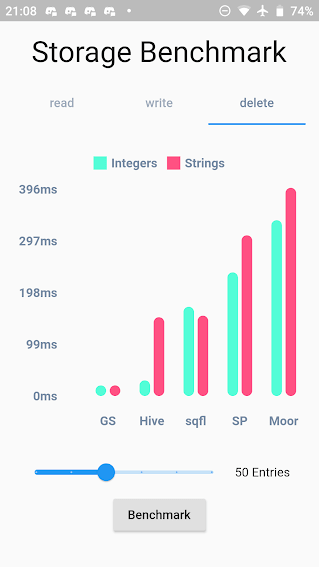
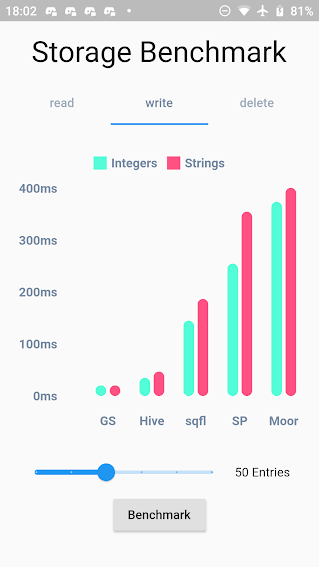
Benchmark Result:
GetStorage is not fast, it is absurdly fast for being memory-based. All of his operations are instantaneous. A backup of each operation is placed in a Container on the disk. Each container has its own file.
What GetStorage is:
Persistent key/value storage for Android, iOS, Web, Linux, Mac and Fuchsia and Windows, that combines fast memory access with persistent storage.
What GetStorage is NOT:
A database. Get is super compact to offer you a solution ultra-light, high-speed read/write storage to work synchronously. If you want to store data persistently on disk with immediate memory access, use it, if you want a database, with indexing and specific disk storage tools, there are incredible solutions that are already available, like Hive and Sqflite/Moor.
As soon as you declare "write" the file is immediately written in memory and can now be accessed immediately with box.read(). You can also wait for the callback that it was written to disk using await box.write().
When to use GetStorage:
simple Maps storage.
cache of http requests
storage of simple user information.
simple and persistent state storage
any situation you currently use sharedPreferences.
When not to use GetStorage:
you need indexes.
when you need to always check if the file was written to the storage disk before starting another operation (storage in memory is done instantly and can be read instantly with box.read(), and the backup to disk is done in the background. To make sure the backup is complete, you can use await, but if you need to call await all the time, it makes no sense you are using memory storage).
You can use this lib even as a modest persistent state manager using Getx SimpleBuilder