Orientação gerada a partir de informações públicas. Apenas para referência.
Um pacote leve do Flutter que determina se um rosto capturado por câmera é vivo ou uma foto. Ele utiliza aprendizado de máquina para analisar características faciais e detectar sinais de vida, como micro-movimentos e pistas de profundidade. Projetado para integração rápida em aplicativos que exigem verificação de vivacidade facial, suporta tanto plataformas Android quanto iOS. O pacote fornece uma interface de função única, facilitando sua implementação em sistemas de verificação de identidade, autenticação segura ou anti-falsificação.
Casos de uso
Detecção de vida facial na autenticação
Evitando spoofing de fotos em verificações de identidade
Login seguro com verificação em tempo real facial
Verificação biométrica em aplicativos móveis
Melhorando a segurança no onboarding digital
Principais recursos
API de função única
Suporte multiplataforma (Android e iOS)
detecção baseada em aprendizado de máquina
Leve e rápido
Configuração mínima necessária
Indicado para
Desenvolvedores de aplicativos que precisam de verificação de vida facial
Aplicações focadas em segurança
Serviços de verificação de identidade
Aplicativos móveis com login biométrico
Startups construindo onboarding de usuário seguro
Considerações
Requer permissão de acesso à câmera
O desempenho pode variar em dispositivos mais antigos
Depende da precisão do modelo de ML subjacente
Limitado à detecção de vida facial apenas
Modo offline não mencionado
README original
Snapshot do README original do repositório-fonte vinculado. Consulte o repositório para o conteúdo mais recente.
live_photo_detector
A Flutter package to detect livelyness of a face. This package is extension of m7_livelyness_detection. This package was no longer maintained so I have updated the package.
Liveness detection for face recognition in biometrics is a technique where an algorithm detects if the person in front of the camera is alive and real. The algorithm is able to recognize a live person from presentation attacks - where a bad actor, or fraud perpetrator, uses someone else's physical characteristics or biometric data (known as "spoofs") for impersonation.
Spoofing attempts using printed photos, recordings, deep fake pictures, and 3D masks poses a serious threat. Facial Liveness Detection incorporates specialized features to identify biometric spoofing attacks, which could be an imitation emulating a person’s unique biometrics scanned through the biometric detector to deceive or bypass the identification and authentication steps provided by the system. Even though face recognition can reliably answer the question, “Is this the right person?” but not the question, “Is this a live person?” This is where liveness detection technology plays a significant role in fraud detection and mitigation. Face biometric matching must be able to detect spoofs in order to be trusted, and to maintain the integrity of biometric data.
Platform Support
iOS
Android
MacOS
Web
Linux
Windows
✔️
✔️
Installation
First, we have to install the package on flutter.
Flutter Setup
Add live_photo_detector to your pubspec.yaml dependencies.
Using command-line
flutter pub add live_photo_detector
Native Setup
Next comes the native setup on both android and iOS
iOS
iOS Setup
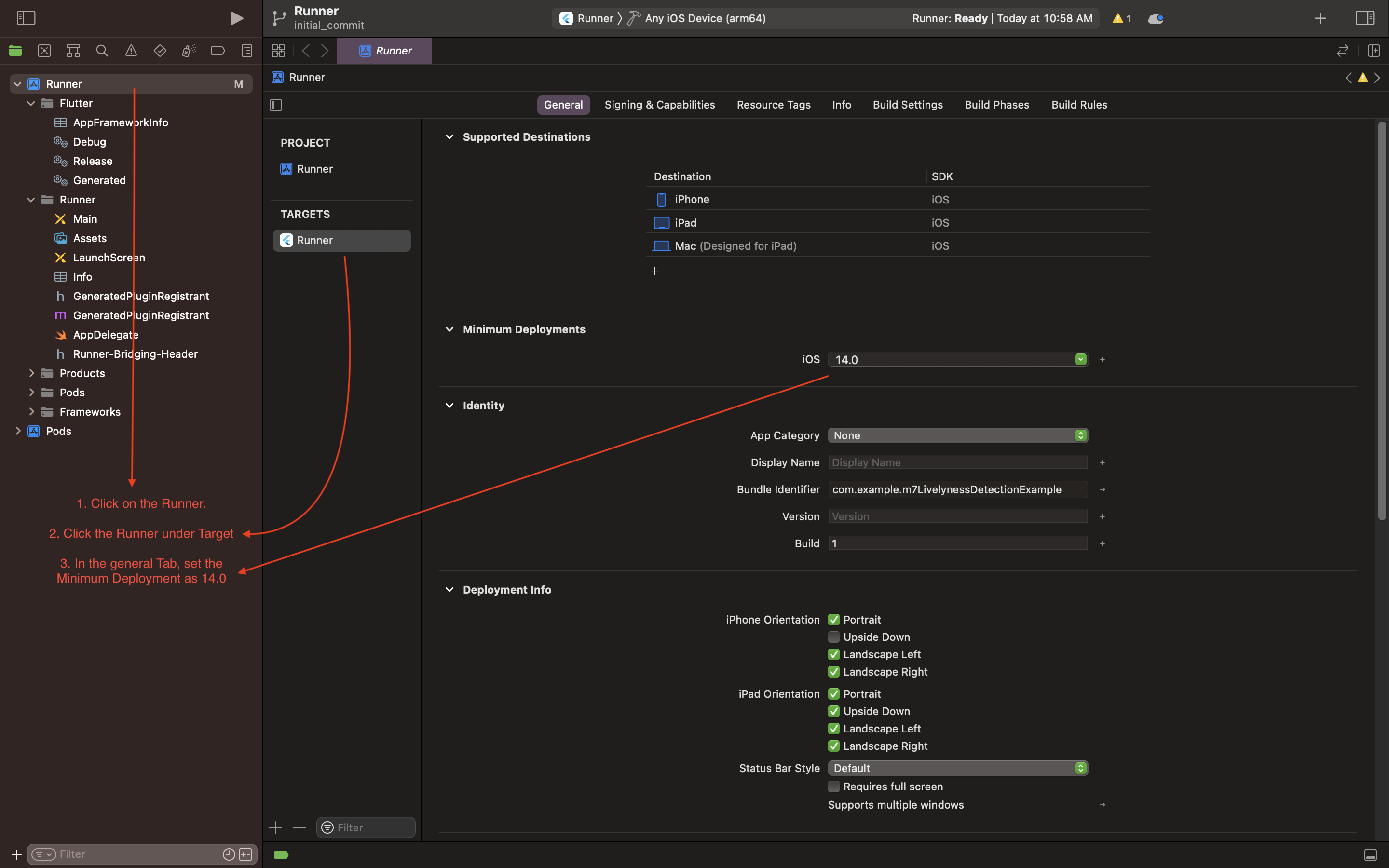
Open the project in Xcode and set the deployment
Open the ios/Runner/Info.plist file as Source Code.
Add the below-mentioned code inside the <dict> tag.
<key>NSCameraUsageDescription</key><string>Camera Access for Scanning</string><key>NSMicrophoneUsageDescription</key><string>Microphone for playing instructions audio.</string>
Open the ios/Runner/Podfile and uncomment the second line.
platform:ios,'14.0'# <---------- Uncomment this line
Set the deployment target in the Xcode project
Android
Android Setup
Open the example/android/app/build.gradle file and set the minSdkVersion as 21.
Example
A call to a single line function will return a temporary path to the captured image.