Buscar pacotes, repositórios e categorias de apps

Capa de markdown_widget
Detalhes do pacotev2.3.2+8

markdown_widget

Um novo pacote de markdown. Ele suporta função de TOC, realce de código e é compatível com todas as plataformas.

AndroidiOSWebmacOSWindowsLinux
Downloads em 30 dias
10,3 mil
Curtidas
411
Pontos Pub
160

Instalar pacote

flutter pub add markdown_widget

Visão geral do pacote

Orientação gerada a partir de informações públicas. Apenas para referência.

Um pacote de renderização de markdown multiplataforma para Flutter que suporta geração de tabela de conteúdos, realce de sintaxe para blocos de código e integração perfeita em Android, iOS, Web, macOS, Windows e Linux. Desenvolvido com simplicidade e desempenho em mente, permite aos desenvolvedores exibir conteúdo rico em markdown com mínima configuração. O pacote é ativamente mantido e projetado para uso em aplicativos que exigem renderização dinâmica de texto a partir de fontes de markdown.

Casos de uso

  • Documentação de renderização dentro dos aplicativos
  • Exibindo conteúdo gerado pelo usuário
  • Criando seções de ajuda ou Perguntas Frequentes
  • Gerando postagens dinâmicas de blog
  • Construindo interfaces de base de conhecimento

Principais recursos

  • Suporte de tabela de conteúdos
  • destaque de sintaxe
  • Compatibilidade multiplataforma
  • Renderização leve e rápida
  • Estilo personalizável
  • Suporta todas as principais plataformas

Indicado para

  • Aplicativos de documentação
  • Ferramentas educacionais
  • aplicações com conteúdo intensivo
  • Ferramentas para desenvolvedores
  • Aplicativos Flutter para web e desktop

Considerações

  • Requer formatação de origem em markdown
  • Limitado a renderização básica de HTML
  • Pode ser necessário ajustes personalizados no tema
  • Não adequado para layouts complexos
  • O desempenho depende do tamanho do conteúdo
  • Sem suporte embutido para carregamento de imagem

README original

Snapshot do README original do repositório-fonte vinculado. Consulte o repositório para o conteúdo mais recente.

Language:简体中文 | English | 日本語

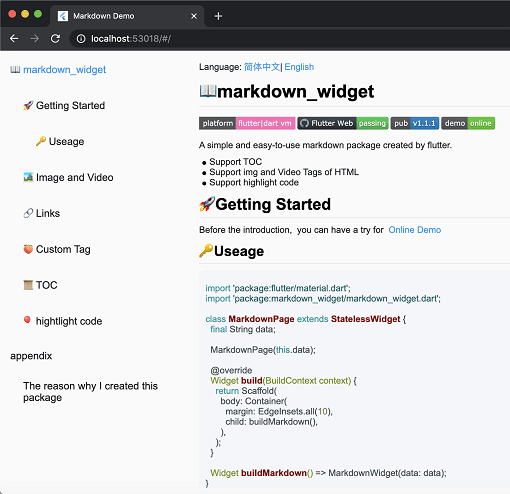
screen

📖markdown_widget

Coverage Status pub package demo

A simple and easy-to-use markdown rendering component.

  • Supports TOC (Table of Contents) function for quick location through Headings
  • Supports code highlighting
  • Supports all platforms

🚀Usage

Before starting, you can try out the online demo by clicking demo

import 'package:flutter/material.dart';
import 'package:markdown_widget/markdown_widget.dart';

class MarkdownPage extends StatelessWidget {
  final String data;

  MarkdownPage(this.data);

  @override
  Widget build(BuildContext context) => Scaffold(body: buildMarkdown());

  Widget buildMarkdown() => MarkdownWidget(data: data);
}

If you want to use your own Column or other list widget, you can use MarkdownGenerator

  Widget buildMarkdown() =>
      Column(children: MarkdownGenerator().buildWidgets(data));

Or use MarkdownBlock

  Widget buildMarkdown() =>
      SingleChildScrollView(child: MarkdownBlock(data: data));

📁 More Examples

For advanced usage examples, check out the example/lib/markdown_custom folder in the repository:

  • video.dart - Custom video tag support
  • latex.dart - LaTeX math formula rendering
  • mermaid.dart - Mermaid diagram support (flowcharts, sequence diagrams, etc.)
  • html_support.dart - HTML tag extension
  • custom_node.dart - Custom node implementation examples

These examples demonstrate how to extend the package with custom tags and features.

🌠Night mode

markdown_widget supports night mode by default. Simply use a different MarkdownConfig to enable it.

  Widget buildMarkdown(BuildContext context) {
    final isDark = Theme.of(context).brightness == Brightness.dark;
    final config = isDark
        ? MarkdownConfig.darkConfig
        : MarkdownConfig.defaultConfig;
    final codeWrapper = (child, text, language) =>
        CodeWrapperWidget(child, text, language);
    return MarkdownWidget(
        data: data,
        config: config.copy(configs: [
        isDark
        ? PreConfig.darkConfig.copy(wrapper: codeWrapper)
        : PreConfig().copy(wrapper: codeWrapper)
    ]));
  }
Default mode Night mode

🔗Link

You can customize the style and click events of links, like this

  Widget buildMarkdown() => MarkdownWidget(
      data: data,
      config: MarkdownConfig(configs: [
        LinkConfig(
          style: TextStyle(
            color: Colors.red,
            decoration: TextDecoration.underline,
          ),
          onTap: (url) {
            ///TODO:on tap
          },
        )
      ]));

📜TOC (Table of Contents) feature

Using the TOC is very simple

  final tocController = TocController();

  Widget buildTocWidget() => TocWidget(controller: tocController);

  Widget buildMarkdown() => MarkdownWidget(data: data, tocController: tocController);

  @override
  Widget build(BuildContext context) {
    return Scaffold(
        body: Row(
          children: <Widget>[
            Expanded(child: buildTocWidget()),
            Expanded(child: buildMarkdown(), flex: 3)
          ],
        ));
  }

🎈Highlighting code

Highlighting code supports multiple themes.

import 'package:flutter_highlight/themes/a11y-light.dart';

  Widget buildMarkdown() => MarkdownWidget(
      data: data,
      config: MarkdownConfig(configs: [
        PreConfig(theme: a11yLightTheme),
      ]));

🧬Select All and Copy

Cross-platform support for Select All and Copy function.

image

🌐Html tag

As the current package only implements the conversion of Markdown tags, it does not support the conversion of HTML tags by default. However, this functionality can be supported through extension. You can refer to the usage in html_support.dart for more details.

Here is the online HTML demo showcase

🧮Latex support

The example also includes simple support for LaTeX, which can be implemented by referring to the implementation in latex.dart

Here is the online latex demo showcase

🔷Mermaid diagram support

The example includes support for Mermaid diagrams, which can render flowcharts, sequence diagrams, state diagrams, and more. Refer to the implementation in mermaid.dart

Features:

  • Multiple diagram types (flowchart, sequence diagram, state diagram, ER diagram, etc.)
  • Theme support (auto light/dark mode)
  • Interactive display modes (code only, diagram only, or both)
  • Fullscreen viewer with pan & zoom support
  • Independent horizontal scrolling for wide diagrams
  • Smart caching and debouncing for optimal performance

Here is the online Mermaid demo showcase

import 'package:markdown_widget/markdown_widget.dart';
import 'markdown_custom/mermaid.dart';

// Basic usage
final isDark = Theme.of(context).brightness == Brightness.dark;
final preConfig = PreConfig(
  wrapper: createMermaidWrapper(
    config: const MermaidConfig(),
    isDark: isDark,
    preConfig: preConfig,
  ),
);

MarkdownWidget(
  data: markdown,
  config: config.copy(configs: [preConfig]),
)

// With custom configuration
final preConfig = PreConfig(
  wrapper: createMermaidWrapper(
    config: MermaidConfig(
      displayMode: MermaidDisplayMode.codeAndDiagram,
      diagramPadding: EdgeInsets.all(16.0),
      showLoadingIndicator: true,
    ),
    isDark: isDark,
    preConfig: preConfig,
  ),
);

🍑Custom tag implementation

By passing a SpanNodeGeneratorWithTag to MarkdownGeneratorConfig, you can add new tags and the corresponding SpanNodes for those tags. You can also use existing tags to override the corresponding SpanNodes.

You can also customize the parsing rules for Markdown strings using InlineSyntax and BlockSyntax, and generate new tags.

You can refer to this issue to learn how to implement a custom tag.

If you have any good ideas or suggestions, or have any issues using this package, please feel free to open a pull request or issue.

🧾Appendix

Here are the other libraries used in markdown_widget

Packages Descriptions
markdown Parsing markdown data
flutter_highlight Code highlighting
highlight Code highlighting
url_launcher Opening links
visibility_detector Listening for visibility of a widget;
scroll_to_index Enabling ListView to jump to an index.

Categorias

Dependências

Lista de dependências 6 itens

Repositório-fonte

Projetos que usam este pacote