Buscar pacotes, repositórios e categorias de apps

Capa de onboarding_animation
Detalhes do pacotev0.0.4

onboarding_animation

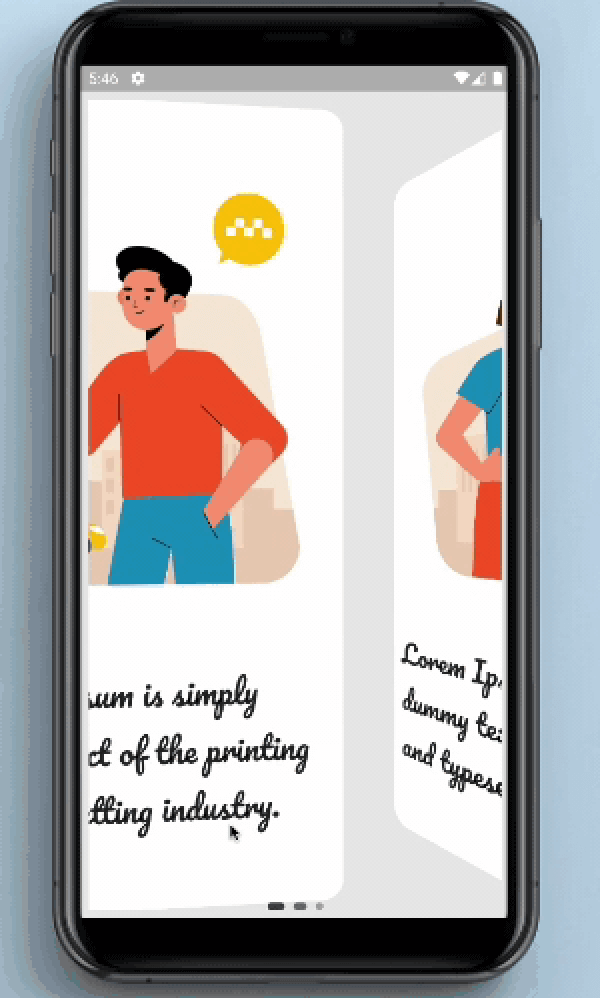
Este pacote fornece animação de tipo de página para telas de introdução e fornece indicador.

AndroidiOSWebmacOSWindowsLinux
Downloads em 30 dias
193
Curtidas
73
Pontos Pub
150

Instalar pacote

flutter pub add onboarding_animation

Visão geral do pacote

Orientação gerada a partir de informações públicas. Apenas para referência.

O pacote onboarding_animation oferece animações personalizáveis de transição de página para telas de introdução em aplicativos Flutter. Ele melhora a experiência do usuário com efeitos suaves e visualmente atraentes de deslize entre as telas de introdução e inclui um indicador integrado para mostrar o progresso. Projetado para simplicidade e flexibilidade, suporta múltiplas plataformas, incluindo Android, iOS, Web, macOS, Windows e Linux. O pacote é ideal para aplicativos que buscam criar fluxos de introdução envolventes com configuração mínima. Os desenvolvedores podem integrá-lo facilmente com um único comando e personalizar as animações para corresponder à linguagem de design do seu aplicativo.

Casos de uso

  • Telas de onboarding para aplicativos móveis e web
  • Tutoriais de onboarding de usuário
  • Percursos do produto
  • Fluxos de introdução do aplicativo
  • Experiências envolventes para usuários pela primeira vez

Principais recursos

  • Animações suaves de transição de página
  • Indicador de progresso embutido
  • Suporte multiplataforma
  • Integração fácil por meio do pub add
  • Estilos de animação personalizáveis
  • Configuração mínima necessária

Indicado para

  • Desenvolvedores de aplicativos móveis
  • Criadores de aplicativos web
  • designers focados em UX
  • Startups construindo fluxos de onboarding
  • Desenvolvedores procurando soluções de onboarding rápido

Considerações

  • Limitado a casos de uso específicos de onboarding
  • Pode exigir estilos adicionais para interfaces de usuário complexas
  • O desempenho da animação depende das capacidades do dispositivo
  • Não adequado para fluxos de navegação não de onboarding
  • As opções de personalização podem ser limitadas pelos temas padrão

README original

Snapshot do README original do repositório-fonte vinculado. Consulte o repositório para o conteúdo mais recente.

OnBoarding Animation


OnBoarding Animation provides page like animation to the onBoarding screens with the page indicator.


Screenshots and Screen recording

OnBoarding Animation


Usage

Installation

Add onboarding_animation: any to your pubspec.yaml dependencies. And import it:

import 'package:onboarding_animation/onboarding_animation.dart';
Example
OnBoardingAnimation(
          pages: [
           Container(),
           Container(),
           Container(),
          ],
          indicatorDotHeight: 7.0,
          indicatorDotWidth: 7.0,
          indicatorType: IndicatorType.expandingDots,
          indicatorPosition: IndicatorPosition.bottomCenter,
        ),

Parameters

Required Parameters
pages:
  • Need to pass the List of Widgets for providing the content of onBoarding cards.

Optional Parameters
controller:
  • This parameter is use to set the page controller.
indicatorOffset:
  • This parameter is used to set the offset of the indicator.
indicatorDotWidth:
  • Set the width of the the indicator's dot.
indicatorDotHeight:
  • Set the height of indicator's dot.
indicatorDotSpacing:
  • Using this parameter user can define the space between the dots of indicator.
indicatorDotRadius:
  • This is use to set the radius of the circle shown in the indicator.
indicatorInActiveDotColor:
  • This is use to set the color of the inactive(unselected) dot color.
indicatorActiveDotColor:
  • This is use to set the color of the active(selected) dot color.
indicatorStrokeWidth:
  • indicatorStrokeWidth is use to set the width of the stroke if the PaintStyle is selected to the stroke.
indicatorType:
  • This is an enum which is use to select the type of an indicator.
indicatorPosition:
  • This is an enum which is use to select the position of an indicator.
indicatorColorTransitionActiveStrokeWidth:
  • Need to pass the List of Widgets for the providing the content of the onBoarding cards.
indicatorExpansionFactor:
  • indicatorExpansionFactor is multiplied by indicatorDotWidth to resolve the width of the expanded dot.
indicatorJumpScale:
  • The maximum scale the dot will hit while jumping.
indicatorVerticalOffset:
  • The vertical offset of the jumping dot.
indicatorPaintStyle:
  • indicatorPaintStyle is use to select between the fill and the stroke style.
indicatorWormType:
  • indicatorWormType helps to select the form of the WormType between normal and thin.
indicatorSwapType:
  • indicatorSwapType helps to select the form of the SwapType between normal, yRotation and zRotation.
indicatorActivePaintStyle:
  • Inactive dots paint style (fill/stroke) defaults to fill.
indicatorActiveStrokeWidth:
  • This is ignored if indicatorActivePaintStyle is PaintStyle.fill.
indicatorScale:
  • indicatorScale is multiplied by indicatorDotWidth to resolve active dot scaling.
indicatorActiveDotScale:
  • indicatorActiveDotScale is multiplied by indicatorDotWidth to resolve active dot scaling.
indicatorMaxVisibleDots:
  • The max number of dots to display at a time if count is <= maxVisibleDots indicatorMaxVisibleDots = countmust be an odd number that's >= 5.
indicatorFixedCenter:
  • If True the old center dot style will be used.
indicatorInActiveDotDecoration:
  • indicatorInActiveDotDecoration is used to set the inactive dot decoration if indicatorType is selected to custom.
indicatorActiveDotDecoration:
  • indicatorActiveDotDecoration is used to set the active dot decoration if indicatorType is selected to custom.
indicatorActiveColorOverride:
  • This parameter is use to override the existing active colors.
indicatorInActiveColorOverride:
  • This parameter is use to override the existing inactive colors.

Guideline for contributors

Contribution towards our repository is always welcome, we request contributors to create a pull request to the development branch only.


Guideline to report an issue/feature request

It would be great for us if the reporter can share the below things to understand the root cause of the issue.

  • Library version
  • Code snippet
  • Logs if applicable
  • Device specification like (Manufacturer, OS version, etc)
  • Screenshot/video with steps to reproduce the issue

Library used


LICENSE!

OnBoarding Animation is MIT-licensed.


Let us know!

We’d be really happy if you send us links to your projects where you use our component. Just send an email to sales@mindinventory.com And do let us know if you have any questions or suggestion regarding our work.

Categorias

Dependências

Lista de dependências 1 itens

Repositório-fonte

Projetos que usam este pacote

Ainda não há dados.