Buscar pacotes, repositórios e categorias de apps

Capa de scrollable_clean_calendar
Detalhes do pacotev1.5.0

scrollable_clean_calendar

Um widget de calendário limpo com rolagem vertical, localização e seleção de intervalo de datas

AndroidiOSWebmacOSWindowsLinux
Downloads em 30 dias
10 mil
Curtidas
178
Pontos Pub
150

Instalar pacote

flutter pub add scrollable_clean_calendar

Visão geral do pacote

Orientação gerada a partir de informações públicas. Apenas para referência.

Um widget de calendário limpo e com rolagem vertical para o Flutter que suporta personalização de localidade e seleção de intervalo de datas. Projetado para simplicidade e usabilidade, permite aos usuários navegar pelos meses com rolagem suave e selecionar intervalos de datas de forma intuitiva. O pacote é compatível com todas as principais plataformas, incluindo Android, iOS, Web, macOS, Windows e Linux. Ideal para aplicativos que exigem uma interface de calendário minimalista, mas funcional, com suporte a internacionalização.

Casos de uso

  • Seleção de intervalo de datas em aplicativos de reserva
  • Visualizações de calendário em ferramentas de gerenciamento de tarefas
  • Interfaces de agendamento orientadas por localidade
  • Aplicativos de planejamento de viagem ou evento
  • formulários de entrada de data do perfil do usuário

Principais recursos

  • Navegação de rolagem vertical
  • Suporte de localidade
  • Seleção de intervalo de datas
  • Design minimalista
  • Compatibilidade multiplataforma
  • Estilo personalizável

Indicado para

  • Desenvolvedores construindo recursos de agendamento ou reserva
  • Aplicativos que precisam de seletores de data internacionalizados
  • Projetos com foco em design de interface limpo
  • Aplicativos Flutter direcionados a múltiplas plataformas
  • Usuários em busca de soluções leves de calendário

Considerações

  • Limitado apenas ao rolagem vertical
  • Sem controles de seleção de mês/ano embutidos
  • Requer manipulação manual da lógica de intervalo de datas
  • Não otimizado para grandes intervalos de datas
  • Pode ser necessário estilos adicionais para temas complexos

README original

Snapshot do README original do repositório-fonte vinculado. Consulte o repositório para o conteúdo mais recente.

Pub GitHub contributors

Scrollable Clean Calendar

A clean calendar widget with vertical scroll, locale and range selection date.

Contributors


Rodrigo Dobbin Fellows

Eduardo Natale

Fabio Fiuza

Filippo Pizzicola

Lucian Risso Correia

Installation

Add

scrollable_clean_calendar: 1.5.0

to your pubspec.yaml and run

flutter pub get

in the project's main folder.

Parameters

ScrollableCleanCalendar
Parameter Type Default Description
calendarController CleanCalendarController required The controller of ScrollableCleanCalendar
locale String en The language locale
scrollController ScrollController null Scroll controller, if you use this controller the Parameter initialFocusDate and the Functions scrollToMonth and jumpToMonth won't work since this override the scrollable list controller. Do not use them together or you will receive a nullPointer Exception
showWeekdays bool true If is to show or not the weekdays in calendar
layout Layout null What layout (design) is going to be used. Important: layout is required if you don't use all the layout builders
spaceBetweenMonthAndCalendar double 24 The space between month and calendar
spaceBetweenCalendars double 24 The space between calendars
initialFocusDate DateTime null Initial date that the calendar scroll should focus when open
scrollToMonth Function({required DateTime date, double alignment = 0, required Duration duration, Curve curve = Curves.linear, List<double> opacityAnimationWeights = const [40, 20, 40]}) null Animate the list over duration using the given curve such that the item at index ends up with its leading edge at the given alignment.
jumpToMonth Function ({required DateTime date, double alignment = 0}) null Immediately, without animation, reconfigure the list so that the item at index's leading edge is at the given alignment.
calendarCrossAxisSpacing double 4 The horizontal space in the calendar dates
calendarMainAxisSpacing double 4 The vertical space in the calendar dates
padding EdgeInsetsGeometry EdgeInsets.symmetric(horizontal: 16, vertical: 32) The parent padding
monthTextStyle TextStyle Theme.of(context).textTheme.headline6 The label text style of month
monthTextAlign TextAlign TextAlign.left The label text align of month
weekdayTextStyle TextStyle Theme.of(context).textTheme.bodyText1 The label text align of month
weekdayAspectRatio double 1.0 The aspect ratio of weekday items
dayTextStyle TextStyle Theme.of(context).textTheme.bodyText1 The label text style of day
dayAspectRatio double 1.0 The aspect ratio of day items
daySelectedBackgroundColor Color Theme.of(context).colorScheme.primary The day selected background color
dayBackgroundColor Color Theme.of(context).colorScheme.surface The day background color
daySelectedBackgroundColorBetween Color Theme.of(context).colorScheme.primary.withOpacity(.3) The day selected background color that is between day selected edges
dayDisableBackgroundColor Color Theme.of(context).colorScheme.surface.withOpacity(.4) The day disable background color
dayDisableColor Color Theme.of(context).colorScheme.onSurface.withOpacity(.5) The day disable color
dayRadius double 6 The radius of day items
monthBuilder Widget Function(BuildContext context, String month) null A builder to make a customized month
weekdayBuilder Widget Function(BuildContext context, String weekday) null A builder to make a customized weekday
dayBuilder Widget Function(BuildContext context, DayValues values) null A builder to make a customized day of calendar
CleanCalendarController
Parameter Type Default Description
minDate DateTime required Obrigatory: The mininimum date to show
maxDate DateTime required Obrigatory: The maximum date to show
initialDateSelected DateTime null An initial selected date
endDateSelected DateTime null The end of selected range
weekdayStart int DateTime.monday In what weekday position the calendar is going to start
onDayTapped Function(DateTime date) null Function when a day is tapped
onRangeSelected Function(DateTime minDate, DateTime? maxDate) null Function when a range is selected
onPreviousMinDateTapped Function(DateTime date) null When a date before the min date is tapped
onAfterMaxDateTapped Function(DateTime date) null When a date after max date is tapped
rangeMode bool true If the range is enabled
readOnly bool false If the Calendar Widget is on read-only mode

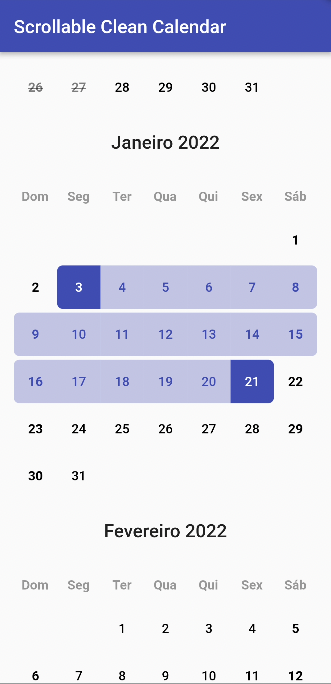
Layout.DEFAULT

ScrollableCleanCalendar(
  calendarController: calendarController,
  layout: Layout.DEFAULT,
),

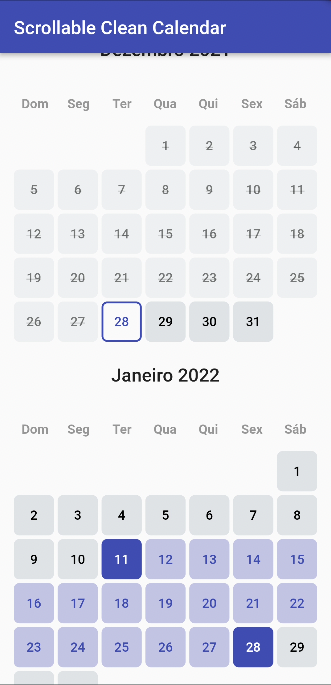
Layout.BEAUTY

ScrollableCleanCalendar(
  calendarController: calendarController,
  layout: Layout.BEAUTY,
  calendarCrossAxisSpacing: 0,
),

Categorias

Dependências

Lista de dependências 2 itens

Repositório-fonte

Projetos que usam este pacote