
Suwayomi-Tsumiru
用於您 Suwayomi 伺服器的漫畫與網路漫畫閱讀器

- 星標
- 104
- 分支
- 22
- 最近推送(UTC)
- 2026年10月30日
- 專案狀態
- 未封存
原始 README
以下為英文專案原文快照,最新內容請造訪 GitHub。

Tsumiru





A manga and webtoon reader for your Suwayomi server
Tsumiru (積みる) takes the 積, "pile up", from tsundoku (積ん読), the Japanese habit of buying books faster than you can read them. It swaps the "read" for miru, "to look".
About
Tsumiru is a client for Suwayomi-Server, so you'll need a server running first. Your library and reading progress are stored on the server, and Tsumiru reads them on Android, iOS, Linux, Windows, macOS or the web. Guides and the FAQ are at tsumiru.app.
Screenshots
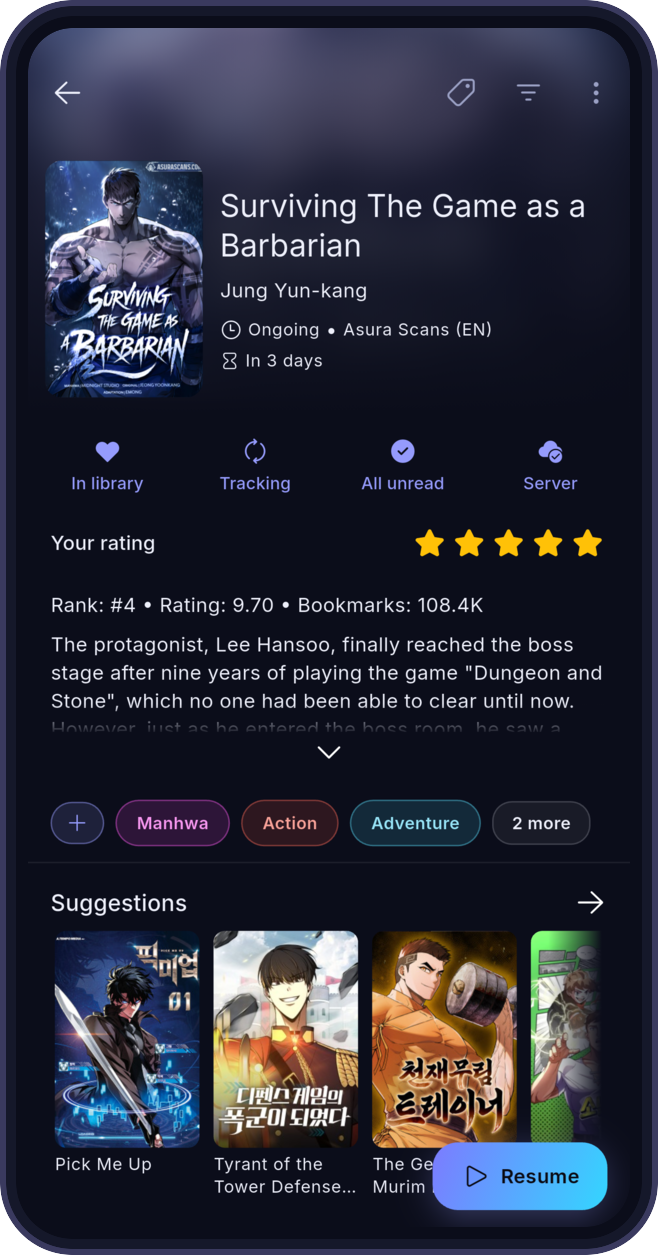
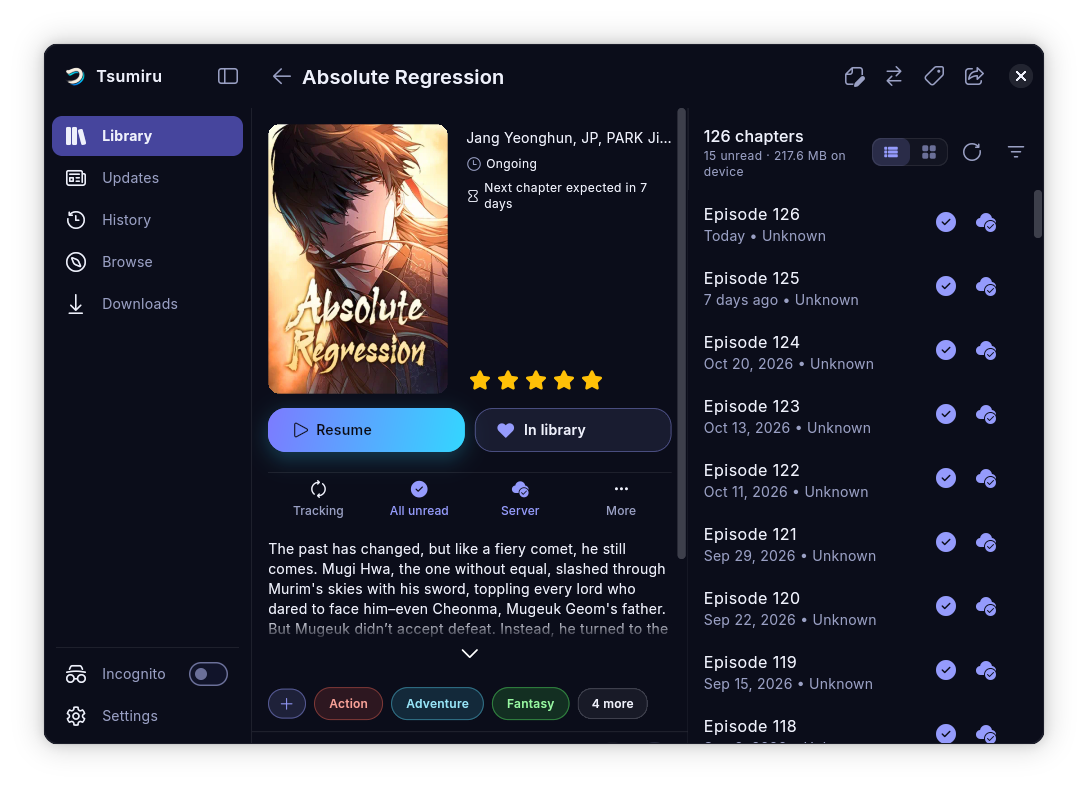
Features
- Offline reading. Download chapters to your device and read them without a connection. When the server is unreachable, Tsumiru opens the copies on your device.
- Webtoon reader. Chapters scroll into each other, and pinch-to-zoom keeps working mid-scroll.
- Guided setup. The first launch looks for your server on the local network and connects to it.
- Incognito mode. Read without adding to your history. Library categories can be hidden too.
- Themes. 13 built-in themes, a custom accent colour and a pure black mode for OLED screens.
- Server login. Supports the server's
simple_loginandui_loginmodes and keeps credentials in the device's secure storage. - Library tools. Sort by last read, latest chapter or chapter count, filter by status and bookmarks, and download chapter ranges in bulk.
Download
You need a running Suwayomi-Server that your device can reach. The download page has install steps for each platform.
Android


Obtainium installs new releases straight from GitHub. Or grab the APK from Releases.
iOS



The build is unsigned, so it has to be sideloaded. Each badge adds the Tsumiru source to that app, so new releases show up there. For TrollStore, grab the .ipa from Releases. See the iOS guide.
Linux
flatpak remote-add --if-not-exists tsumiru https://flatpak.tsumiru.app/index.flatpakrepo
flatpak install tsumiru app.tsumiru.Tsumiru
The Flatpak updates itself. Existing installs keep receiving updates under io.github.aaronbamblett.tsumiru. An AppImage is also on Releases.
Windows, macOS and web
Download the build for your platform from Releases.
Translations
Tsumiru is translated on Hosted Weblate. Pick your language there to fix or add translations; changes come back to this repo as pull requests.

Contributing
Pull requests are welcome. For larger changes, open an issue first so we can talk it through. Build steps are in the contributing guide.
Related projects
- Suwayomi-Server: the server Tsumiru connects to. It runs the sources and extensions and stores your library.
- Suwayomi-Server-docker: the official Docker image, the quickest way to run the server on a home server or NAS.
Contributors
Thank you to everyone who has contributed to Tsumiru and to Tachidesk-Sorayomi before it.
Disclaimer
Tsumiru hosts no content and has no affiliation with any content provider. It shows what your own Suwayomi server provides.
Credits and license
Tsumiru started as a fork of Tachidesk-Sorayomi and depends on Suwayomi-Server. Thanks to everyone who built and maintains both.
The app typeface is Inter by Rasmus Andersson, bundled (Regular, Medium, SemiBold) under the SIL Open Font License 1.1. See assets/fonts/inter/OFL.txt. It is also registered with the app's licence list at startup, like the Font Awesome licence.
Licensed under the Mozilla Public License 2.0. Source files keep their MPL-2.0 headers.

Suwayomi ↗
分類
使用的依賴
依賴清單 77 項
- app_links
^7.2.1 - collection
^1.19.0 - cached_network_image
^3.2.2 - cached_network_image_platform_interface
^4.0.0 - connectivity_plus
^7.0.0 - connectivity_plus_linux_portal
^0.0.4 - wakelock_plus
^1.7.0 - diacritic
^0.1.6 - drift
^2.32.0 - ffi
^2.2.0 - file
^7.0.0 - file_picker
^13.1.0 - flex_color_picker
3.8.0 - fluentui_system_icons
^1.1.273 - flutter
{"sdk":"flutter"} - flutter_android_volume_keydown
{"git":{"url":"https://github.com/DattatreyaReddy/flutter_android_volume_keydown","ref":"9db2306fd2b4f804f5b9fbf69b97b211f47f527c"}} - flutter_cache_manager
^3.3.0 - flutter_foreground_task
^11.0.1 - flutter_hooks
^0.21.0 - flutter_localizations
{"sdk":"flutter"} - flutter_markdown_plus
^1.0.12 - flutter_secure_storage
^11.2.0 - flutter_staggered_grid_view
^0.7.0 - fluttertoast
^10.0.0 - freezed_annotation
^3.0.0 - gap
^3.0.1 - go_router
^17.0.0 - gql
^1.0.1 - graphql
^5.2.4 - hooks_riverpod
^3.0.0 - http
^1.2.0 - infinite_scroll_pagination
^5.1.1 - intl
^0.20.2 - json_annotation
^4.9.0 - logger
^2.5.0 - material_color_utilities
^0.13.0 - network_info_plus
^8.2.1 - package_info_plus
^10.2.1 - path
^1.8.3 - path_provider
^2.0.11 - pub_semver
^2.1.2 - queue
^3.1.0+2 - riverpod_annotation
^4.0.0 - scrollable_positioned_list
{"git":{"url":"https://github.com/yakagami/scrollable_positioned_list","ref":"4641e83"}} - shared_preferences
^2.0.15 - sqlite3
^3.0.0 - shimmer
^4.0.0 - url_launcher
^6.1.6 - screen_brightness
^2.1.11 - share_plus
^13.3.0 - gal
^2.3.2 - image
^4.8.0 - window_manager
^0.5.2 - flutter_local_notifications
^22.1.0 - workmanager
^0.10.9 - battery_plus
^7.1.1 - uuid
^4.6.0 - pointycastle
^4.0.0 - web
^1.1.0 - build_runner開發依賴
^2.4.14 - drift_dev開發依賴
^2.32.0 - fake_async開發依賴
^1.3.3 - flutter_launcher_icons開發依賴
^0.14.1 - flutter_lints開發依賴
^6.0.0 - flutter_native_splash開發依賴
^2.2.14 - flutter_riverpod開發依賴
^3.3.2 - flutter_test開發依賴
{"sdk":"flutter"} - freezed開發依賴
^4.0.1 - go_router_builder開發依賴
^4.0.0 - graphql_codegen開發依賴
^3.0.0 - json_serializable開發依賴
^6.5.4 - lints開發依賴
^6.1.0 - riverpod_generator開發依賴
^4.0.4 - unorm_dart開發依賴
0.3.3 - vector_math開發依賴
^2.4.2 - workmanager_android開發依賴
^0.10.8 - path_provider_platform_interface開發依賴
^2.1.3
所在榜單
如何選擇適合專案的儲存庫?
先依使用情境篩選,再比較專案活躍情況,最後到原始儲存庫確認使用要求。
- 透過儲存庫名稱、作者或描述搜尋,再依技術分類縮小範圍。
- 綜合星標、分支與最近推送比較專案;星標反映社群關注,不保證品質。
- 使用前在 GitHub 確認 README、授權條款與 Issues。
來源與維護
“A repository is the most basic element of GitHub.”
GitHub Docs — About repositories ↗