搜尋套件、儲存庫與 APP 分類

套件詳情v5.1.1

infinite_scroll_pagination

當使用者向下捲動螢幕時,延遲載入並顯示項目頁面。

AndroidiOSWebmacOSWindowsLinux
近 30 天下載
48.1萬
喜歡數
4050
Pub 分數
150

安裝套件

flutter pub add infinite_scroll_pagination

套件介紹

根據套件公開資料產生的選型評估,僅供參考。

一個 Flutter 套件,可在使用者滾動時啟用分頁內容的延遲載入,透過逐步取得資料來改善效能與使用者體驗。它能無縫整合至 ListView 及其他可捲動元件,當接近目前內容末端時自動觸發頁面請求。適用於顯示長清單的應用程式,例如社群動態、搜尋結果或產品目錄。此套件以最少的樣板程式碼處理載入狀態、錯誤復原與空狀態。

適用情境

  • 社交媒體動態滾動
  • 搜尋結果分頁
  • 電子商務產品清單
  • 長篇文章顯示
  • 儀表板中的無限內容加載

主要特色

  • 滾動時自動加載頁面
  • 內建的載入與錯誤狀態
  • 對多個可滾動組件的支援
  • 可自訂的頁面請求邏輯
  • 透過延遲載入實現高效記憶體使用

適合對象

  • 大型資料集的應用程式
  • 可滾動列表介面
  • 對效能敏感的UI
  • 尋求最小化設定的開發者
  • 需要流暢無限滾動的專案

使用建議

  • 需要正確處理異步數據來源
  • 可能需要自定緩存策略
  • 不適合小型靜態清單
  • 依賴於頁面令牌或偏移邏輯的正確實現
  • 如果未仔細設定,有過度取得資料的潛在風險

原始 README

以下為關聯原始碼儲存庫的 README 原文快照,最新內容請造訪原始碼儲存庫。

Package Logo with Flutter Favorite Badge

Chosen as a Flutter Favorite by the Flutter Ecosystem Committee

Pub.dev Badge GitHub Build Badge Code Coverage Badge Gitter Badge Effective Dart Badge MIT License Badge Flutter Platform Badge


Infinite Scroll Pagination

Unopinionated, extensible and highly customizable package to help you lazily load and display small chunks of items as the user scrolls down the screen – known as infinite scrolling pagination, endless scrolling pagination, auto-pagination, lazy loading pagination, progressive loading pagination, etc.

Designed to feel like part of the Flutter framework.

Example Project

Tutorial

By raywenderlich.com (step-by-step, hands-on, in-depth, and illustrated).

Usage

class ListViewScreen extends StatefulWidget {
  const ListViewScreen({super.key});

  @override
  State<ListViewScreen> createState() => _ListViewScreenState();
}

class _ListViewScreenState extends State<ListViewScreen> {
  late final _pagingController = PagingController<int, Photo>(
    getNextPageKey: (state) => state.lastPageIsEmpty ? null : state.nextIntPageKey,
    fetchPage: (pageKey) => RemoteApi.getPhotos(pageKey),
  );

  @override
  void dispose() {
    _pagingController.dispose();
    super.dispose();
  }

  @override
  Widget build(BuildContext context) => PagingListener(
    controller: _pagingController,
    builder: (context, state, fetchNextPage) => PagedListView<int, Photo>(
      state: state,
      fetchNextPage: fetchNextPage,
      builderDelegate: PagedChildBuilderDelegate(
        itemBuilder: (context, item, index) => ImageListTile(item: item),
      ),
    ),
  );
}

For more usage examples, please take a look at our cookbook or check out the example project.

Features

Migration

if you are upgrading the package, please check the migration guide for instructions on how to update your code.


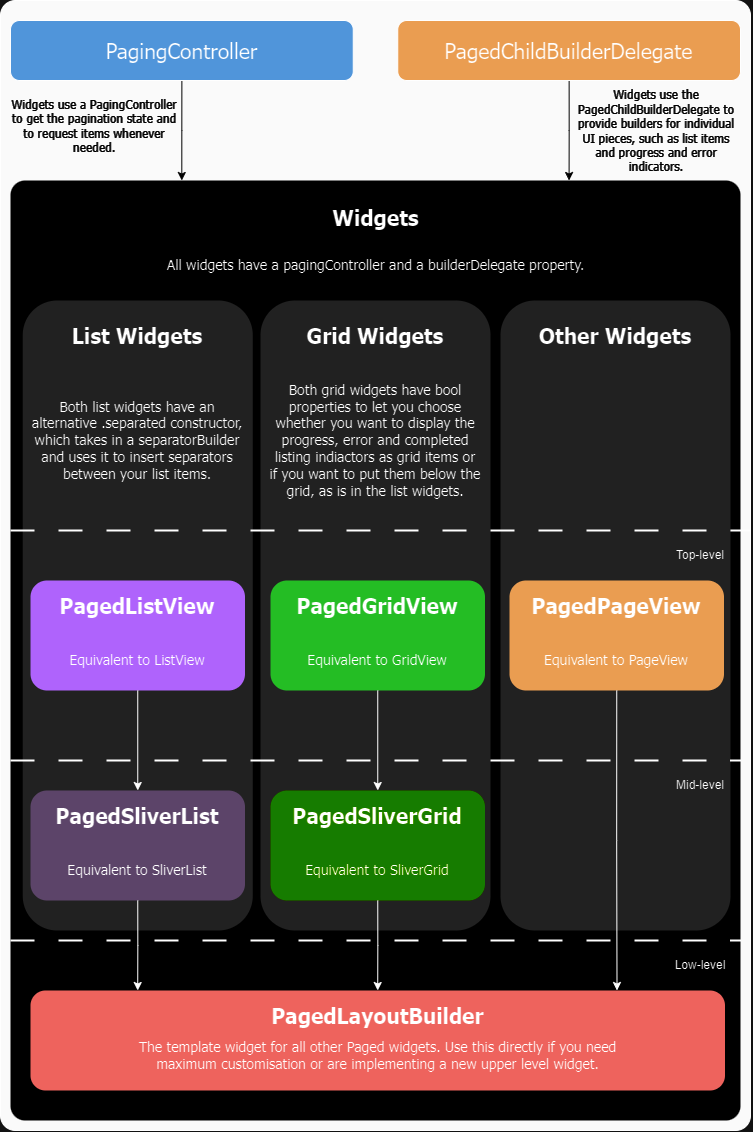
API Overview

API Diagram

所屬分類

依賴

依賴清單 4 項

原始碼儲存庫

使用此套件的專案

所在榜單