Original README snapshot from the linked source repository. Visit the repository for the latest content.
receive_sharing_intent

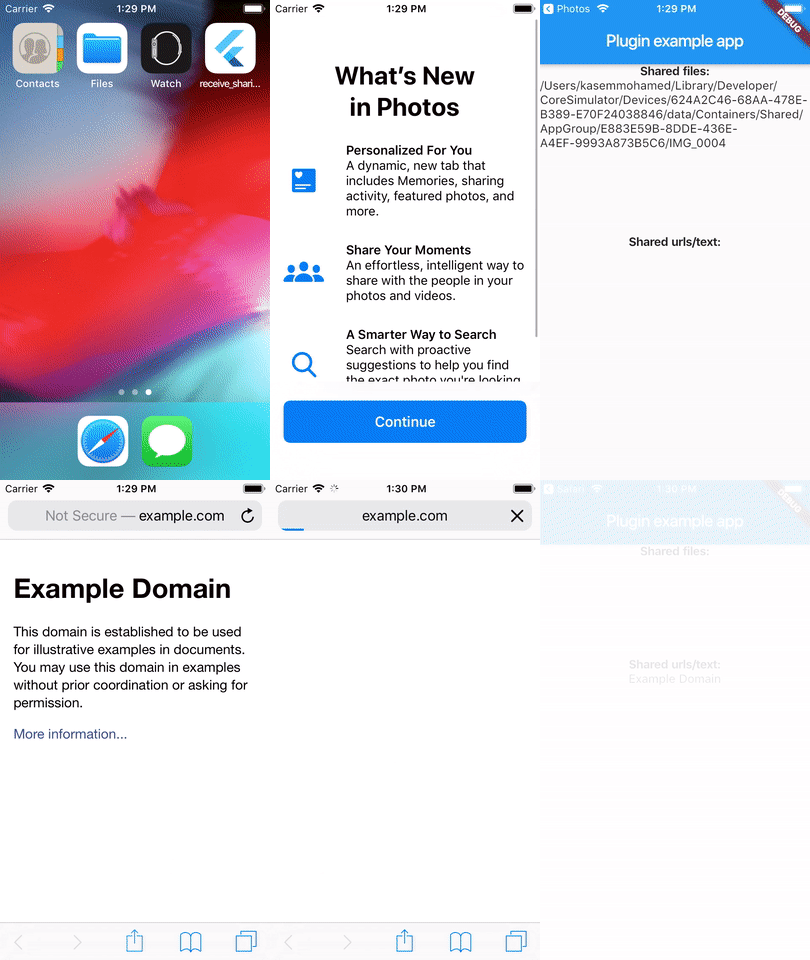
A Flutter plugin that enables flutter apps to receive sharing photos, videos, text, urls or any other file types from another app.
Also, supports iOS Share extension and launching the host app automatically.
Check the provided example for more info.
|
Android |
iOS |
| Support |
SDK 21+ (Kotlin 2.4.0) |
13.0+ (Swift 5.0) |
Usage
To use this plugin, add receive_sharing_intent as a dependency in your pubspec.yaml file. For example:
dependencies:
  receive_sharing_intent: ^latest
Android
Add the following filters to your android/app/src/main/AndroidManifest.xml:
<manifest xmlns:android="http://schemas.android.com/apk/res/android"
.....
<uses-permission android:name="android.permission.READ_EXTERNAL_STORAGE"/>
<application
android:name="io.flutter.app.FlutterApplication"
...
>
<activity
android:name=".MainActivity"
android:launchMode="singleTask"
android:theme="@style/LaunchTheme"
android:configChanges="orientation|keyboardHidden|keyboard|screenSize|locale|layoutDirection|fontScale|screenLayout|density|uiMode"
android:hardwareAccelerated="true"
android:windowSoftInputMode="adjustResize">
<intent-filter>
<action android:name="android.intent.action.VIEW" />
<category android:name="android.intent.category.DEFAULT" />
<category android:name="android.intent.category.BROWSABLE" />
<data
android:scheme="https"
android:host="example.com"
android:pathPrefix="/invite"/>
</intent-filter>
<intent-filter>
<action android:name="android.intent.action.VIEW" />
<category android:name="android.intent.category.DEFAULT" />
<data
android:mimeType="*/*"
android:scheme="content" />
</intent-filter>
<intent-filter>
<action android:name="android.intent.action.SEND" />
<category android:name="android.intent.category.DEFAULT" />
<data android:mimeType="text/*" />
</intent-filter>
<intent-filter>
<action android:name="android.intent.action.SEND" />
<category android:name="android.intent.category.DEFAULT" />
<data android:mimeType="image/*" />
</intent-filter>
<intent-filter>
<action android:name="android.intent.action.SEND_MULTIPLE" />
<category android:name="android.intent.category.DEFAULT" />
<data android:mimeType="image/*" />
</intent-filter>
<intent-filter>
<action android:name="android.intent.action.SEND" />
<category android:name="android.intent.category.DEFAULT" />
<data android:mimeType="video/*" />
</intent-filter>
<intent-filter>
<action android:name="android.intent.action.SEND_MULTIPLE" />
<category android:name="android.intent.category.DEFAULT" />
<data android:mimeType="video/*" />
</intent-filter>
<intent-filter>
<action android:name="android.intent.action.SEND" />
<category android:name="android.intent.category.DEFAULT" />
<data android:mimeType="*/*" />
</intent-filter>
<intent-filter>
<action android:name="android.intent.action.SEND_MULTIPLE" />
<category android:name="android.intent.category.DEFAULT" />
<data android:mimeType="*/*" />
</intent-filter>
</activity>
</application>
</manifest>
....
iOS
1. Create Share Extension
- Using Xcode, go to File/New/Target and Choose "Share Extension".
- Give it a name, i.e., "Share Extension".
Make sure the deployment target for Runner.app and the share extension is the same.
<?xml version="1.0" encoding="UTF-8"?>
<!DOCTYPE plist PUBLIC "-//Apple//DTD PLIST 1.0//EN" "http://www.apple.com/DTDs/PropertyList-1.0.dtd">
<plist version="1.0">
<dict>
<key>AppGroupId</key>
<string>$(CUSTOM_GROUP_ID)</string>
<key>CFBundleVersion</key>
<string>$(FLUTTER_BUILD_NUMBER)</string>
<key>NSExtension</key>
<dict>
<key>NSExtensionAttributes</key>
<dict>
<key>PHSupportedMediaTypes</key>
<array>
<string>Video</string>
<string>Image</string>
</array>
<key>NSExtensionActivationRule</key>
<dict>
<key>NSExtensionActivationSupportsText</key>
<true/>
<key>NSExtensionActivationSupportsWebURLWithMaxCount</key>
<integer>1</integer>
<key>NSExtensionActivationSupportsImageWithMaxCount</key>
<integer>100</integer>
<key>NSExtensionActivationSupportsMovieWithMaxCount</key>
<integer>100</integer>
<key>NSExtensionActivationSupportsFileWithMaxCount</key>
<integer>1</integer>
</dict>
</dict>
<key>NSExtensionMainStoryboard</key>
<string>MainInterface</string>
<key>NSExtensionPointIdentifier</key>
<string>com.apple.share-services</string>
</dict>
</dict>
</plist>
...
<key>AppGroupId</key>
<string>$(CUSTOM_GROUP_ID)</string>
<key>CFBundleURLTypes</key>
	<array>
		<dict>
			<key>CFBundleTypeRole</key>
			<string>Editor</string>
			<key>CFBundleURLSchemes</key>
			<array>
				<string>ShareMedia-$(PRODUCT_BUNDLE_IDENTIFIER)</string>
			</array>
		</dict>
	</array>

<key>NSPhotoLibraryUsageDescription</key>
<string>To upload photos, please allow permission to access your photo library.</string>
...
....
<key>com.apple.developer.associated-domains</key>
<array>
<string>applinks:example.com</string>
</array>
....
5. Make the plugin available to the Share Extension (Swift Package Manager)
This plugin is distributed as a Swift Package (SPM only — there is no CocoaPods
podspec). Make sure Swift Package Manager is enabled for your project:
flutter config --enable-swift-package-manager
Flutter automatically adds the plugin to your Runner target. Your Share
Extension target also needs access to the receive_sharing_intent module
(it provides RSIShareViewController). Add it in Xcode:
- Select the Share Extension target → General tab.
- Under Frameworks and Libraries, click +.
- Choose the
FlutterGeneratedPluginSwiftPackage library from the
receive_sharing_intent Swift package and add it.
If you previously used CocoaPods, remove the ios/Podfile and run
pod deintegrate in the ios/ directory, then remove the
#include "Pods/..." lines from ios/Flutter/Debug.xcconfig,
ios/Flutter/Release.xcconfig and any references to
receive-sharing-intent in project.pbxproj. See the
example project for a fully SPM-only setup.
6. Add Runner and Share Extension in the same group
- Go to
Signing & Capabilities tab and add App Groups capability in BOTH Targets: Runner and Share Extension
- Add a new container with the name of your choice. For example
group.MyContainer in the example project its group.com.kasem.ShareExtention
- Add User-defined(
Build Settings -> +) string CUSTOM_GROUP_ID in BOTH Targets: Runner and Share Extension and set value to group id created above. You can use different group ids depends on your flavor schemes
7. Go to Build Phases of your Runner target and move Embed Foundation Extension to the top of Thin Binary.
// If you get no such module 'receive_sharing_intent' error.
// Go to Build Phases of your Runner target and
// move `Embed Foundation Extension` to the top of `Thin Binary`.
import receive_sharing_intent

class ShareViewController: RSIShareViewController {

    // Use this method to return false if you don't want to redirect to host app automatically.
    // Default is true
    override func shouldAutoRedirect() -> Bool {
        return false
    }

}
<key>NSExtensionPrincipalClass</key>
<string>$(PRODUCT_MODULE_NAME).ShareViewController</string>
The example's Action Extension ("Share to RSI") demonstrates this direct-open
mode; the Share Extension demonstrates the compose-dialog mode.
Auto-redirect vs. the built-in compose UI
RSIShareViewController is a plain UIViewController (it no longer subclasses
the deprecated SLComposeServiceViewController). Its behaviour depends on
shouldAutoRedirect():
true (default) — no UI is shown. The shared content is processed and the
extension immediately redirects into your host app. There is no white compose
card and no dimmed system sheet behind it.false — a built-in compose sheet is shown: a bottom card with a circular
close button, a "Send" button, an auto-focused message field (the keyboard
comes up automatically), and a thumbnail preview of the first shared item.
Tapping the dimmed background cancels the share.
You can customise the built-in compose UI by overriding these open members:
class ShareViewController: RSIShareViewController {

    override func shouldAutoRedirect() -> Bool { false }

    // Placeholder shown in the empty message field.
    override var placeholder: String { "Add a caption…" }

    // Title of the confirm button (can be a long label).
    override var sendButtonTitle: String { "Send to Example" }

    // Gate the Send button on your own validation. Default: always valid.
    override func isContentValid() -> Bool { !contentText.isEmpty }

    // Called when the user taps Send. Default saves the message and redirects.
    override func didSelectPost() { saveAndRedirect(message: contentText) }

    // Called when the user taps Cancel / taps the dimmed background.
    // Default cancels the extension request.
    override func didSelectCancel() { cancel() }
}
The typed message is available via contentText and is forwarded to your Flutter
app as a shared text item.
Migration note: the compose UI previously came from the system
SLComposeServiceViewController. That API is deprecated, so the plugin now
ships its own equivalent UI (implemented in RSIComposeView). The
contentText, isContentValid() and didSelectPost() hooks are preserved.
The old navigationTitle and characterLimit overrides were removed.
9. Adopt UISceneDelegate (required for upcoming iOS versions)
Newer iOS versions deliver lifecycle events (including shared URLs) through a
UISceneDelegate instead of the AppDelegate. This plugin already adopts the
scene lifecycle (it conforms to FlutterSceneLifeCycleDelegate and registers
itself with addSceneDelegate), so it keeps working automatically once your app
adopts a scene delegate. Follow Flutter's official
UISceneDelegate migration guide,
summarized below.
b. Add a SceneDelegate that subclasses FlutterSceneDelegate (see
example/ios/Runner/SceneDelegate.swift).
For a typical app this can be empty — the plugin handles the shared URLs itself.
Only override scene(_:openURLContexts:) if your app uses multiple libraries
that handle incoming URLs and you need to disambiguate between them:
import Flutter
import UIKit
import receive_sharing_intent

class SceneDelegate: FlutterSceneDelegate {
    // Optional - only needed when multiple libraries handle incoming URLs.
    // Called on a cold start when the scene connects. The shared URL (if any)
    // is delivered here via connectionOptions instead of the launchOptions.
    override func scene(
        _ scene: UIScene,
        willConnectTo session: UISceneSession,
        options connectionOptions: UIScene.ConnectionOptions
    ) {
        // Work-around to prevent other libraries like flutter_branch_sdk from absorbing links meant to be handled by receive_sharing_intent.
        _ = ReceiveSharingIntentPlugin.instance.scene(scene, willConnectTo: session, options: connectionOptions)
        super.scene(scene, willConnectTo: session, options: connectionOptions)
    }

    // Called while the app is already running (warm start).
    override func scene(_ scene: UIScene, openURLContexts URLContexts: Set<UIOpenURLContext>) {
        // Work-around to prevent other libraries like flutter_branch_sdk from absorbing links meant to be handled by receive_sharing_intent.
        if ReceiveSharingIntentPlugin.instance.scene(scene, openURLContexts: URLContexts) {
            return
        }
        // Proceed url handling for other Flutter libraries like uni_links
        super.scene(scene, openURLContexts: URLContexts)
    }
}
This plugin is distributed via Swift Package Manager only, so make sure SPM is
enabled (flutter config --enable-swift-package-manager).
Compiling issues and their fixes
-
Error: No such module 'receive_sharing_intent' (in the Share Extension)
- Fix: Add the
receive-sharing-intent library to the Share Extension target under
General → Frameworks and Libraries (see step 5).
-
Error: Unable to resolve module dependency: 'receive_sharing_intent'
- Fix: Ensure Swift Package Manager is enabled and the Share Extension target links the
receive-sharing-intent Swift package product (see step 5).
-
Error: Invalid Bundle. The bundle at 'Runner.app/Plugins/Sharing Extension.appex' contains disallowed file 'Frameworks'
- Fix: https://stackoverflow.com/a/25789145/2061365
Full Example
main.dart
import 'package:flutter/material.dart';
import 'dart:async';
import 'package:receive_sharing_intent/receive_sharing_intent.dart';
void main() => runApp(MyApp());
class MyApp extends StatefulWidget {
@override
_MyAppState createState() => _MyAppState();
}
class _MyAppState extends State<MyApp> {
late StreamSubscription _intentSub;
final _sharedFiles = <SharedMediaFile>[];
@override
void initState() {
super.initState();
_intentSub = ReceiveSharingIntent.instance.getMediaStream().listen((value) {
setState(() {
_sharedFiles.clear();
_sharedFiles.addAll(value);
print(_sharedFiles.map((f) => f.toMap()));
});
}, onError: (err) {
print("getIntentDataStream error: $err");
});
ReceiveSharingIntent.instance.getInitialMedia().then((value) {
setState(() {
_sharedFiles.clear();
_sharedFiles.addAll(value);
print(_sharedFiles.map((f) => f.toMap()));
ReceiveSharingIntent.instance.reset();
});
});
}
@override
void dispose() {
_intentSub.cancel();
super.dispose();
}
@override
Widget build(BuildContext context) {
const textStyleBold = const TextStyle(fontWeight: FontWeight.bold);
return MaterialApp(
home: Scaffold(
appBar: AppBar(
title: const Text('Plugin example app'),
),
body: Center(
child: Column(
children: <Widget>[
Text("Shared files:", style: textStyleBold),
Text(_sharedFiles
.map((f) => f.toMap())
.join(",\n****************\n")),
],
),
),
),
);
}
}

