Orientação gerada a partir de informações públicas. Apenas para referência.
File Saver é um pacote cross-platform do Flutter que permite salvar arquivos a partir de bytes, caminhos de arquivos, fluxos ou URLs para o armazenamento do dispositivo. Ele suporta todas as principais plataformas, incluindo Android, iOS, Web, macOS, Windows e Linux, tornando-o ideal para aplicativos que exigem funcionalidades de exportação ou download de arquivos. O pacote simplifica o manuseio de arquivos com uma API consistente em todas as plataformas, garantindo persistência confiável de arquivos independentemente do ambiente-alvo. É particularmente útil em aplicativos que geram ou processam documentos, imagens ou outros arquivos de dados.
Casos de uso
Exportando documentos gerados
Salvar imagens ou arquivos de mídia
Baixando arquivos de URLs
Manipulação de fluxos de arquivos
Persistência de arquivos multiplataforma
Principais recursos
Suporta múltiplos tipos de entrada (bytes, caminhos, streams, URLs)
Compatibilidade multiplataforma
API simples e consistente
Funciona em dispositivos móveis, desktop e web
Gerencia codificação de arquivos e tipos MIME
Tratamento de erro embutido
Indicado para
Aplicativos que precisam de exportação de arquivos
Aplicações orientadas por dados
Ferramentas de gerenciamento de mídia ou documento
Aplicativos Flutter para web e desktop
Desenvolvedores direcionados para múltiplas plataformas
Considerações
Requer permissões específicas da plataforma no Android/iOS
Pode ser necessário configuração adicional para a web
Os limites de tamanho de arquivo dependem da plataforma
Não adequado para operações em grande escala com arquivos
Personalização limitada para nome de arquivo ou localização
README original
Snapshot do README original do repositório-fonte vinculado. Consulte o repositório para o conteúdo mais recente.
FileSaver
Huge Shoutout to all the contributors and the people who are using this package, I'm really grateful to all of you. Thank you for your support.
This plugin package primarily focuses on one task: saving files on Android, iOS, Web, Windows, MacOS, and Linux.
It might not have a plethora of features, but it does this job well.
This package depends on path_provider for Android and iOS, browser download APIs for Web, and platform file APIs for desktop. The main reason I built this plugin was to
avoid using HTML just for downloading files. The plugin is pretty simple and saves the file in Downloads folder in
Windows, MacOS, Linux and directly downloads the file in Web, in iOS, the file is Saved in Application
Documents Directory, and in Android it is saved in the applications files directory Android/data/your.package.name/file/your_file.extension.
Getting Started
The plugin itself is pretty easy to use. Just call the method saveFile() with respective arguments.
String name which takes the name of the file, Uint8List bytes which will be your actual encoded file,
Or File file which will be your file in the File object (from dart:io)
Or Stirng filePath which will be your file path
Or LinkDetails link which will provide the link, header, request methid and body to your file. LinkDetails can be used as
Out of these parameters, you will have to use atleast one
String fileExtension this will be your file extension. bool includeExtension this controls whether to include the extension in the saved file name. Set to false to save files without extension (e.g., "myfile" instead of "myfile.txt"). Defaults to true.
Another parameter is MimeType type Specifically for Web, which will be your file
type
String customMimeType this will be your custom mime type, if you want to use your own mime type, you can use this parameter
Dio dioClient this will be your dio client, if you want to use dio for downloading the file, you can use this parameter
Uint8List Function(Uint8List) transformDioResponse this will be your function to transform the response, if you want to transform the response as per your requirement, you can use this parameter
MimeType is also included in my Package, I've included types for Sheets, Presentation, Word, Plain Text, PDF,
MP3, MP4 and many other common formats
or you can call saveAs() available for Android, iOS, macOS, Windows, and Web
All the parameters in this method is same as the saveFile() method.
For very large direct URL downloads, prefer handing the URL to the browser on
web or Android DownloadManager so the app does not fetch the full file into
memory:
downloadLink is a browser/system handoff. On Web it cannot attach custom
headers such as Authorization. Browser-managed cookies may be sent only if the
URL and cookie policy allow it. On Android, downloadLink uses
DownloadManager and can pass request headers.
For authenticated large downloads on Web, use saveLinkAsStream. It uses
fetch, so request headers and browser-managed credentials can be included,
then it streams the response into a user-selected file:
This Web path requires the File System Access API and CORS permission from the
server. JavaScript cannot manually set the Cookie header; use normal browser
session cookies, a signed URL, or an Authorization header instead.
For native platforms, prefer filePath/file or saveAsStream for large
generated content so the final save step can stream/copy from disk. On Web,
saveAsStream uses the File System Access API where the browser supports it:
Web has different behavior depending on where the data comes from:
Use case
Recommended API
Memory behavior
Browser support
Direct public/signed URL
downloadLink
Browser handles the download; the Flutter app does not hold the full file
Chrome, Edge, Firefox, Safari
Direct URL with request headers
saveLinkAsStream
Fetch streams the response into a user-selected file
Chrome/Edge and other browsers that implement the File System Access API
Already have Uint8List bytes
saveFile / saveAs
Creates a Blob, so the full file is held in browser memory
Chrome, Edge, Firefox, Safari
App-generated stream
saveAsStream
Writes chunks to a user-selected file without creating a giant Blob
Chrome/Edge and other browsers that implement the File System Access API
Local file path
Not supported on Web
Browsers do not expose real local file paths to web apps
Not available
Firefox/Mozilla and Safari do not currently provide the writable File System
Access API needed by saveAsStream. For very large files in those browsers,
use downloadLink with a direct server/CDN/S3 URL so the browser download
manager streams the file to disk. Avoid passing multi-GB Uint8List values to
saveFile/saveAs on Web because that path must create a Blob in memory.
Note: customMimeType can only be used when mimeType is set to MimeType.custom
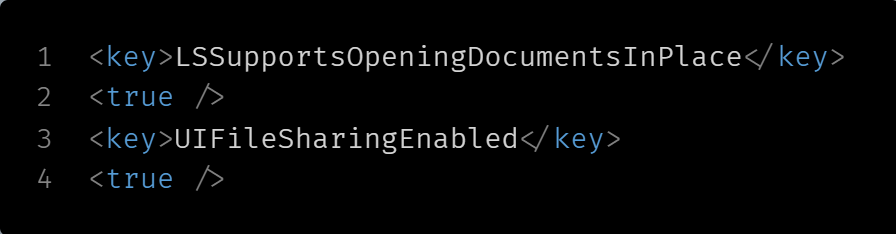
These Settings are optional for iOS, as in iOS the file will be saved in application documents directory but will not be visible in Files application, to make your file visible in iOS Files application, make the changes mentioned below.
iOS:
Go to your project folder, ios/Runner/info.plist and Add these keys:
Open Your Project in XCode (Open XCode -> Open a project or file -> Your_Project_Folder/macos/Runner.xcworkspace)
Open your entitlement file (DebugProfile.entitlements & 'YOUR_PROJECT_NAME'Profile.entitlements)
Add these rows:
and if you get Client Socket Exception while saving files in MacOS from link,
you have to add this key in the DebugProfile.entitlements and Release.entitlements of your macOS application and set the value to true