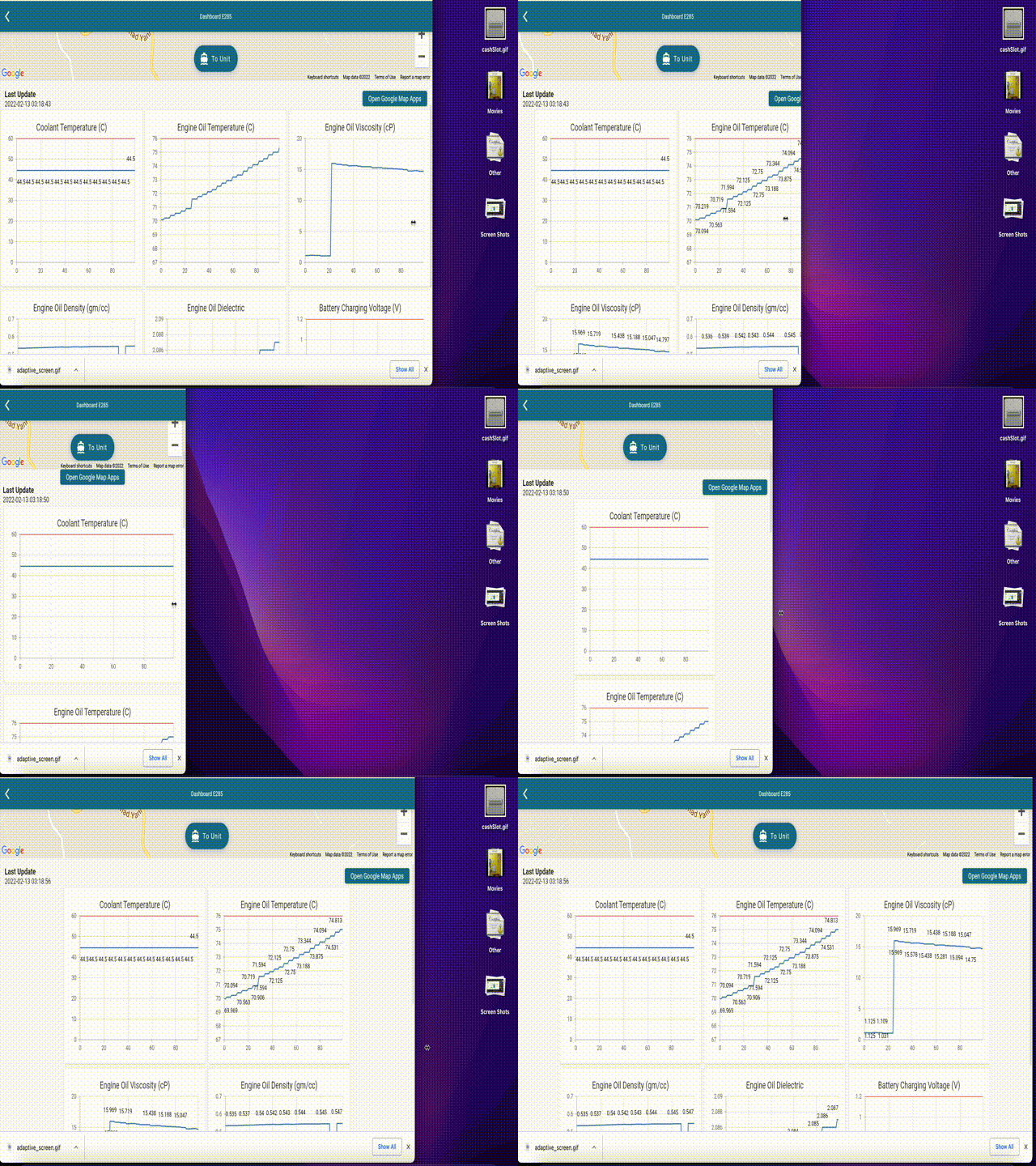
AdaptiveScreenFlutter은 모바일, 태블릿 및 웹 플랫폼에서 다양한 화면 크기에 대해 레이아웃을 자동으로 조정할 수 있는 반응형 UI 패키지입니다. 디바이스 유형과 화면 치수를 감지함으로써 복잡한 조건부 로직을 작성하지 않고도 적응형 동작을 정의할 수 있도록 하여 유연한 디자인을 만드는 것을 단순화합니다. 이 패키지는 Flutter의 위젯 시스템과 원활하게 통합되며, Android, iOS, Web, macOS, Windows, Linux 등 모든 주요 플랫폼을 지원합니다. 다양한 기기에서 일관된 사용자 경험을 제공해야 하는 앱에 이상적입니다.
사용 사례
반응형 레이아웃을 사용하여 크로스 플랫폼 앱 만들기
태블릿과 데스크톱용 적응형 인터페이스 만들기
모바일 및 웹을 위한 통합 UI 설계
다양한 화면 크기에 맞는 UI 최적화
확장 가능한 대시보드 인터페이스 개발
다중 장치 앱 배포 지원
주요 기능
자동 화면 크기 감지
플랫폼에 관계없는 반응형 디자인
모바일, 태블릿 및 웹용 내장 브레이크포인트
기존 Flutter 프로젝트와의 간편한 통합
모든 플러터 대상 플랫폼 지원
유연한 레이아웃 구성
적합한 대상
다양한 플랫폼을 대상으로 하는 개발자
반응형 대시보드를 구축하는 팀
태블릿 및 웹 지원이 필요한 앱
최소한의 반응형 보일러플레이트가 필요한 프로젝트
프론트엔드 중심의 플러터 팀
고려 사항
여러 기기 유형에서 테스트를 수행해야 할 수 있습니다
레이아웃 로직은 신중하게 구조화되어야 합니다
매우 동적 또는 사용자 정의 렌더링 요구 사항에 적합하지 않습니다
정확한 화면 치수 감지에 의존함
잘 정리된 위젯 트리와 함께 사용할 때 가장 효과적입니다
원본 README
연결된 소스 저장소의 README 원문 스냅샷입니다. 최신 내용은 저장소에서 확인하세요.
Hi Flutter dev, this package helps you to build UI with adaptive screen based on mobile, tablet and web.
Example
Getting started
You can customize the brakepoint of the screen width or just use the default of
this package for the screen width.
Usage
The defaut brake point of tablet is 600.0 and 950 for the web.
OR
If you want to custom the brake point,
you can set init brake point in main method like this
voidmain(){
// here for setting mobile to tablet brakepointScreenInit.setTabletBrakePoint(650.0);
// here for setting tablet to web brakepointScreenInit.setWebBrakePoint(1000.0);
runApp(MyApp());
}
MIT LicenseCopyright (c) 2022FerdianGunawanPermissionis hereby granted, free of charge, to any person obtaining a copy
of this software and associated documentation files (the "Software"), to deal
in the Software without restriction, including without limitation the rights
to use, copy, modify, merge, publish, distribute, sublicense, and/or sell
copies of the Software, and to permit persons to whom the Softwareis
furnished to do so, subject to the following conditions:
The above copyright notice and this permission notice shall be included in all
copies or substantial portions of the Software.
THE SOFTWARE IS PROVIDED "AS IS", WITHOUT WARRANTY OF ANY KIND, EXPRESS OR
IMPLIED, INCLUDING BUT NOT LIMITED TO THE WARRANTIES OF MERCHANTABILITY,
FITNESS FOR A PARTICULAR PURPOSE AND NONINFRINGEMENT. IN NO EVENT SHALL THE
AUTHORS OR COPYRIGHT HOLDERS BE LIABLE FOR ANY CLAIM, DAMAGES OR OTHER
LIABILITY, WHETHER IN AN ACTION OF CONTRACT, TORT OR OTHERWISE, ARISING FROM,
OUT OF OR IN CONNECTION WITH THE SOFTWARE OR THE USE OR OTHER DEALINGS IN THE
SOFTWARE.
Additional Information
Please don't hesitate to contribute to this package.
Shout out to Abdelouahed Medjoudja that has inspired me for the default width screen 600 and 950.