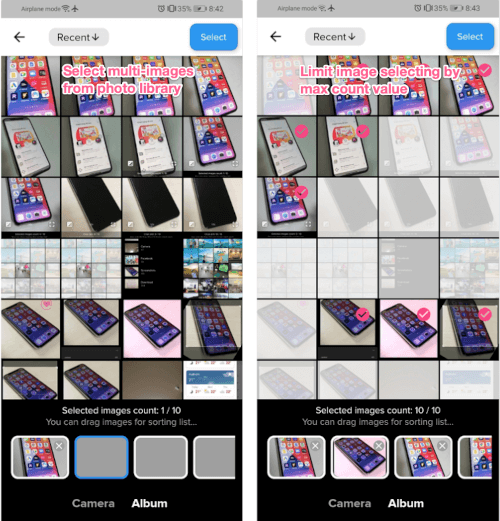
순수한 Dart로 작성된 플러터 플러그인으로, 사용자가 장치 갤러리에서 여러 이미지를 선택하고 편집하거나 카메라를 사용해 새로운 사진을 촬영할 수 있으며, 모든 작업은 하나의 인터페이스 내에서 수행됩니다. 안드로이드와 iOS 모두에서 원활한 이미지 처리를 위해 설계되었으며, 네이티브 코드 없이도 미디어 선택 워크플로우를 단순화합니다. 대량 작업을 지원하며, 유연한 이미지 입력이 필요한 앱에 자연스럽게 통합될 수 있습니다. 소셜 미디어 앱, 프로필 편집기 또는 어떤 리치 미디어 수집 기능이 필요한 애플리케이션에 적합합니다.
사용 사례
갤러리에서 다중 이미지 선택
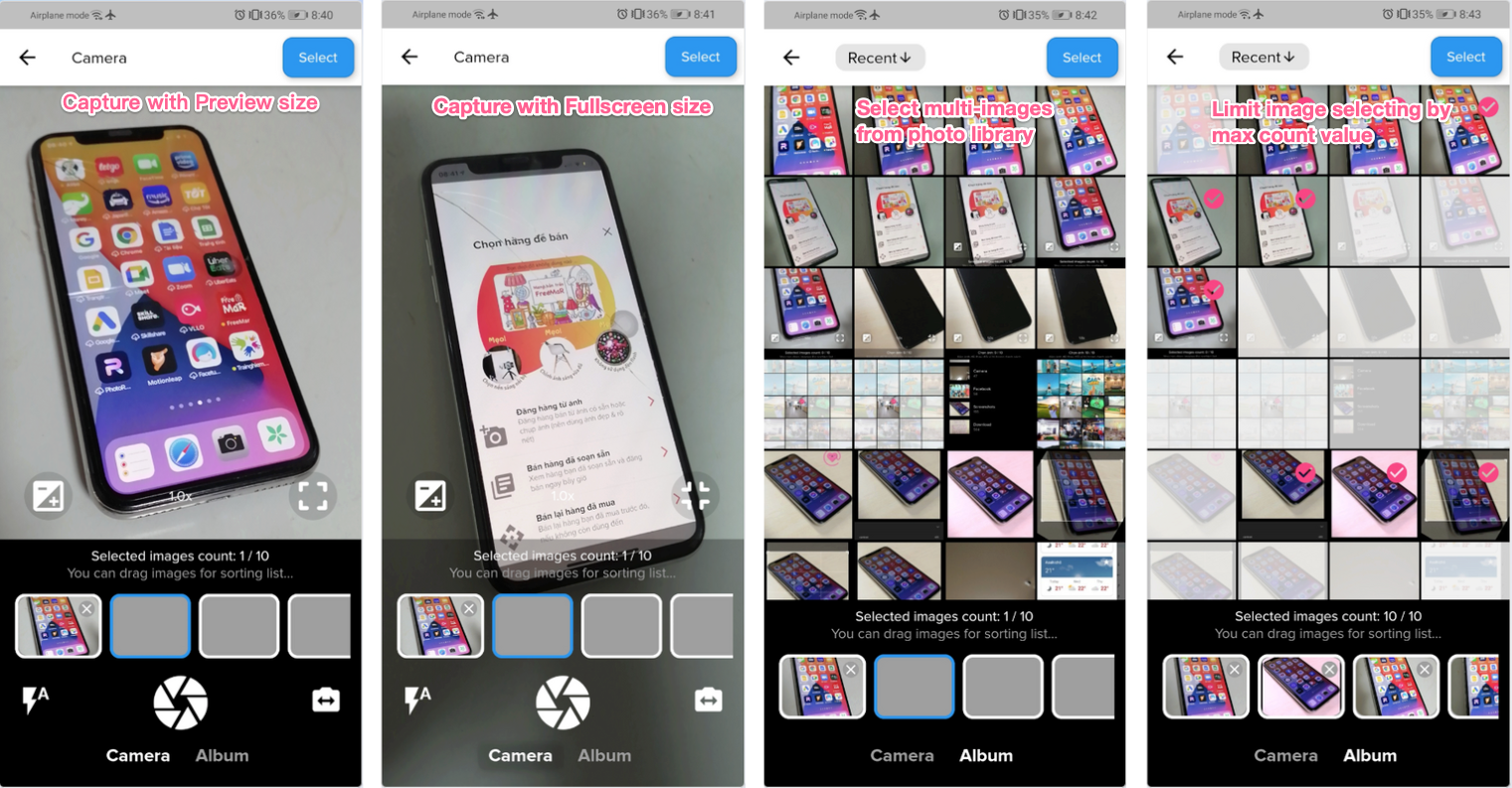
새 캡처용 카메라 통합
배치 이미지 편집
프로필 사진 업로드
콘텐츠 생성 도구
주요 기능
순수 Dart 구현
갤러리와 카메라 모두를 지원합니다
여러 이미지 선택
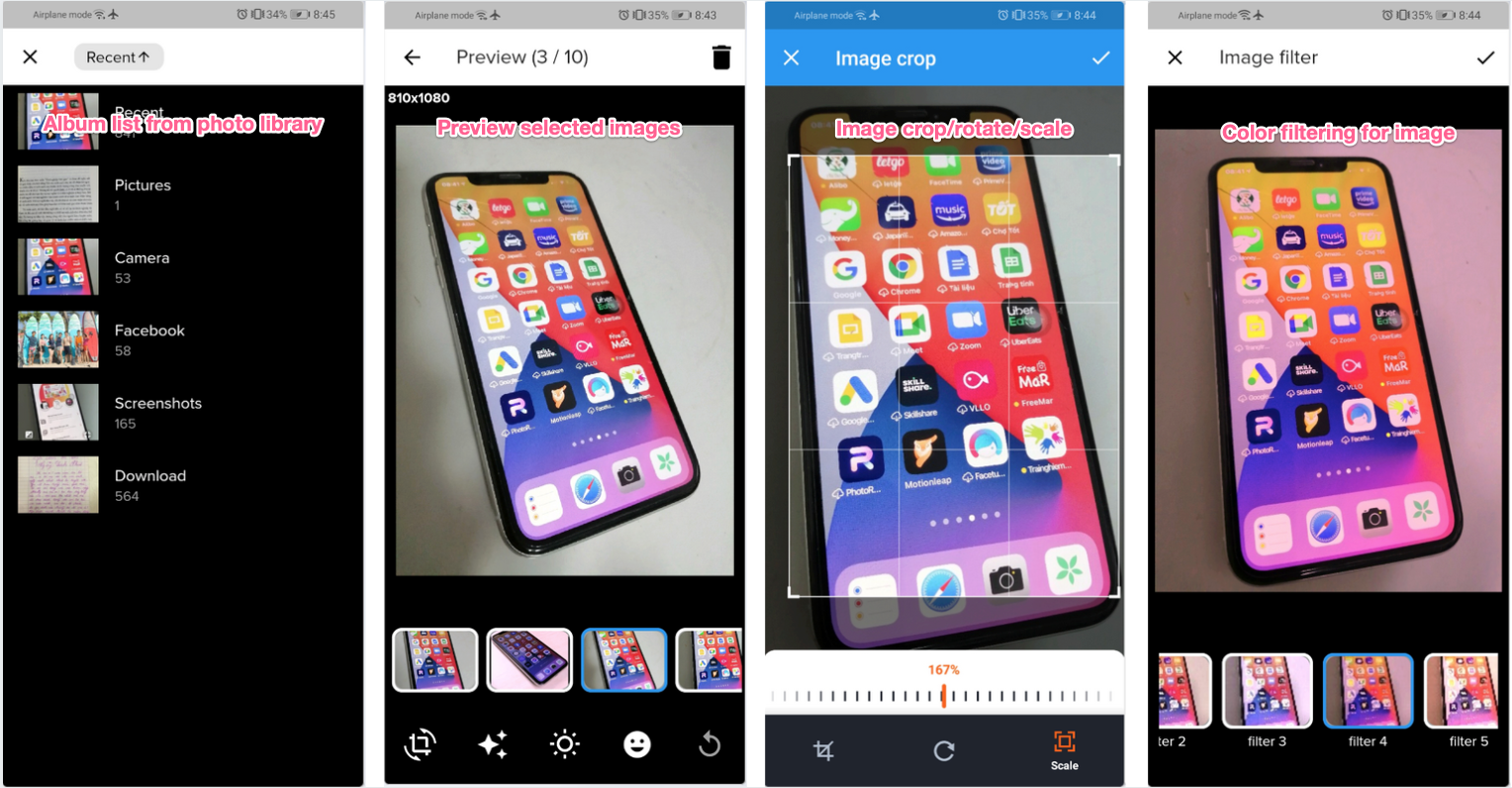
앱 내 이미지 편집
크로스 플랫폼 호환성
적합한 대상
소셜 미디어 애플리케이션
사용자 프로필 관리
전자상거래 제품 업로드
사진 편집 앱
콘텐츠 관리 시스템
고려 사항
플랫폼별 권한이 필요합니다
기본 편집 기능에 제한됨
내장 압축 옵션 없음
UI 커스터마이징을 위해 추가적인 스타일링이 필요할 수 있습니다
고급 편집을 위해 외부 종속성에 의존합니다
원본 README
연결된 소스 저장소의 README 원문 스냅샷입니다. 최신 내용은 저장소에서 확인하세요.
advance_image_picker
Flutter plugin for selecting multiple images from the Android and iOS image library, taking new pictures with the camera, and edit them before using such as rotating, cropping, adding sticker/filters.
This is an advanced version of image_picker plugin.
Key Features
Display live camera preview in a widget
Adjust exposure
Zoom camera preview
Capture photo without saving into device library
Capture with preview size mode & full screen size mode
Select photos from device library by browsing photo albums
Preview selected images
Support button label & text translation
Easy image editing features, such as rotation, cropping, adding sticker/filters
Allow user add external image editors for editing selected images.
Support for displaying object detection & OCR result on selected image view
<key>NSCameraUsageDescription</key>
<string>Can I use the camera please?</string><key>NSMicrophoneUsageDescription</key><string>Can I use the mic please?</string><key>NSPhotoLibraryUsageDescription</key><string>App need your agree, can visit your album</string>
Modify TOCropViewController version in snapshot (ios/Podfile.lock) to 2.6.1
TOCropViewController (2.6.1)
Android
Change the minimum Android sdk version to 21 (or higher), and compile sdk to 31 (or higher) in your android/app/build.gradle file (refer example project).
compileSdkVersion 31
minSdkVersion 21
Change kotlin version to 1.5.21 or later in your android/build.gradle file (refer example project).
ext.kotlin_version = '1.5.21'
Add activity and uses-permissions to your AndroidManifest.xml, just like next.
// Setup image picker configs (global settings for app)var configs = ImagePickerConfigs();
configs.appBarTextColor = Colors.black;
configs.stickerFeatureEnabled = false; // ON/OFF features
configs.translateFunc = (name, value) => Intl.message(value, name: name); // Use intl function// Add plugin's string inside lib/l10n/intl_**.arb of your project to use translation// For example about english messages, declared inside intl_en.arb
{
"app_title": "FreeMar - Share your things",
"image_picker_exit_without_selecting": "Do you want to exit without selecting images?",
"image_picker_select_images_title": "Selected images count",
"image_picker_select_images_guide": "You can drag images for sorting list...",
"image_picker_camera_title": "Camera",
"image_picker_album_title": "Album",
"image_picker_preview_title": "Preview",
"image_picker_confirm_delete": "Do you want to delete this image?",
"image_picker_confirm_reset_changes": "Do you want to clear all changes for this image?",
"image_picker_no_images": "No images...",
"image_picker_image_crop_title": "Image crop",
"image_picker_image_filter_title": "Image filter",
"image_picker_image_edit_title": "Image edit",
"image_picker_select_button_title": "Select",
"image_picker_image_sticker_title": "Image sticker",
"image_picker_image_addtext_title": "Image add text",
"image_picker_image_sticker_guide": "You can click on below icons to add into image, double click to remove it from image",
"image_picker_edit_text": "Edit text",
"suitcase": "Suitcase",
"handbag": "Handbag",
"bottle": "Bottle",
"tie": "Tie",
...
}
// Or you can simply write your own translate function like this// configs.translateFunc = (name, value) => Intl.message(value, name: name);
configs.translateFunc = (name, value) {
switch (name) {
case'image_picker_select_images_title':
return'Le immagini selezionate contano';
case'image_picker_select_images_guide':
return'È possibile trascinare le immagini per lelenco di ordinamento...';
case'image_picker_camera_title':
return'Telecamera';
case'image_picker_album_title':
return'Album';
// ... Declare all your strings heredefault:
return value;
}
}
Sample for adding external image editors.
(You can replace ImageEdit widget by your owned image editor widget, that output file after editing finised)
// Get max 5 imagesList<ImageObject> objects =
awaitNavigator.of(context).push(
PageRouteBuilder(pageBuilder:
(context, animation, __) {
returnImagePicker(maxCount: 5);
}));
if (objects.length > 0) {
setState(() {
imageFiles.addAll(objects
.map((e) => e.modifiedPath)
.toList());
});
}
Credits
This software uses the following open source packages:
camera
photo_manager
photo_view
image
image_cropper
image_editor
flutter_native_image
path_provider
Support
If this plugin was useful to you, helped you to deliver your app, saved you a lot of time, or you just want to support the project, I would be very grateful if you buy me a cup of coffee.