패키지, 저장소 및 앱 카테고리 검색

animated_fab_button_menu 표지
패키지 상세v0.0.2

animated_fab_button_menu

애니메이션 FAB와 스크롤 가능한 메뉴를 구현하기 위한 Flutter 패키지입니다.

AndroidiOSWebmacOSWindowsLinux
30일 다운로드
61
좋아요
27
Pub 점수
150

패키지 설치

flutter pub add animated_fab_button_menu

패키지 개요

공개 정보를 바탕으로 생성한 선택 가이드입니다.

스크롤 가능한 메뉴와 함께 애니메이션된 플로팅 액션 버튼(FAB)을 생성할 수 있는 플러터 패키지입니다. 사용자 인터랙션을 향상시키기 위해 FAB를 부드럽게 사용자 정의 가능한 메뉴로 확장하여 여러 작업에 직관적인 접근을 가능하게 합니다. 메뉴는 스크롤을 지원하므로 화면 공간을 초과하는 옵션 목록에도 적합합니다. 현대적인 UI를 위한 설계로, 일관된 동작을 보장하며 다양한 플랫폼 간에 원활하게 통합됩니다.

사용 사례

  • 모바일 앱 탐색 개선
  • 상호작용형 액션 허브 만들기
  • 다중 기능에 대한 접근성 향상
  • 반응형 인터페이스 설계
  • FAB에 동적 전환 추가하기

주요 기능

  • 부드러운 애니메이션 확장
  • 스크롤 가능한 메뉴 지원
  • 크로스 플랫폼 호환성
  • 사용자 정의 가능한 메뉴 항목
  • 반응형 디자인 통합

적합한 대상

  • 모바일 앱 개발자
  • UI/UX 디자이너
  • 인터랙티브 프로토타입 빌더
  • Flutter 초보자
  • 복잡한 작업 흐름을 가진 앱

고려 사항

  • 사용자 지정을 위해 추가 스타일링이 필요할 수 있습니다
  • 큰 메뉴의 성능 영향
  • FAB 기반 상호작용에 제한됨
  • 스크롤할 수 없는 액션 세트에는 적합하지 않습니다
  • 플랫폼 고유의 제스처 처리에 의존합니다

원본 README

연결된 소스 저장소의 README 원문 스냅샷입니다. 최신 내용은 저장소에서 확인하세요.

Animated FAB Menu

Animated FAB Menu package lets you add an animated floating action button to your Flutter app that open a list of menu items.

Features

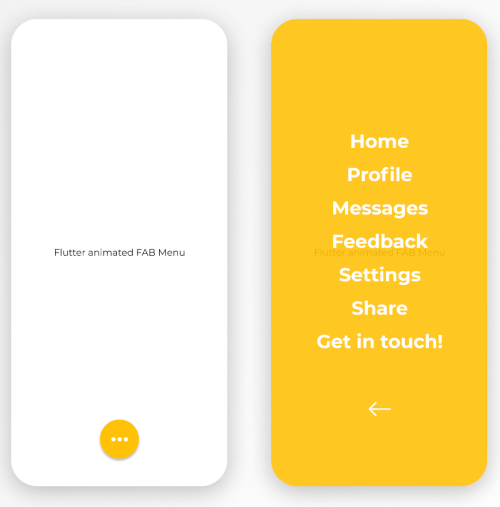
The FabMenu widget is built to be placed in the Scaffold.floatingActionButton argument, replacing the FloatingActionButton widget. Its position is set by the fabAlignment property so you don't need to set it with the Scaffold.floatingActionButtonLocation argument. By default the position is set to bottomCenter, but you can change it by the fabAlignment property to place the button anywhere in the screen. By using the fabIcon and fabBackgroundColorproperties, you can change the icon and the color of the button to whatever you like.

  • Menu

By pressing the floating action button, a page containing a menu list will be opening with some cool animation. This menu contains items that you can specify by the children list property. Every child inside the list takes a title for the item name, style for the text widget of the name, onTap function to provide the logic of the on tap action on each child. On top of that, you have an overlayColor property to change the color of the background opened page, overlayOpacity to change the opacity of the background color and closeMenuButton to choose your own back button widget.

The package will handle the animation by itself.

animated_fab_menu


Getting started

  1. Add the latest version of package to your pubspec.yaml (and run dart pub get):
dependencies:
  animated_fab_button_menu: ^0.0.2
  1. Import the package and use it in your Flutter App.
import 'package:animated_fab_button_menu/animated_fab_button_menu.dart';

Usage

There are a number of properties that you can modify:

  • fabIcon
  • fabBackgroundColor
  • fabAlignment
  • overlayColor (Color of the background menu)
  • overlayOpacity (Opacity of the background menu color)
  • elevation
  • closeMenuButton (Button that close the menu item)
  • children (Items of the menu)
  • title (Name of the child menu)
  • style (Text style for the child menu)
  • onTap (onTap function for the child menu)

Example Usage ( complete with all params ):

class MyHomePage extends StatefulWidget {
  const MyHomePage({Key? key}) : super(key: key);

  @override
  _MyHomePageState createState() => _MyHomePageState();
}

class _MyHomePageState extends State<MyHomePage> {
  @override
  Widget build(BuildContext context) {
    return Scaffold(
      floatingActionButton: FabMenu(
          fabBackgroundColor: Colors.amber,
          elevation: 2.0,
          fabAlignment: Alignment.bottomCenter,
          fabIcon: const Icon(Icons.more_horiz),
          closeMenuButton: const Icon(
            Icons.arrow_back,
            color: Colors.white,
          ),
          overlayOpacity: 0.5,
          overlayColor: Colors.amber,
          children: [
            MenuItem(
              title: 'Home',
              onTap: () {},
              style: const TextStyle(
                  color: Colors.white,
                  fontSize: 24,
                  fontWeight: FontWeight.bold),
            ),
            MenuItem(
              title: 'Profile',
              onTap: () {},
              style: const TextStyle(
                  color: Colors.white,
                  fontSize: 24,
                  fontWeight: FontWeight.bold),
            ),
            MenuItem(
              title: 'Messages',
              onTap: () {},
              style: const TextStyle(
                  color: Colors.white,
                  fontSize: 24,
                  fontWeight: FontWeight.bold),
            ),
            MenuItem(
              title: 'Feedback',
              onTap: () {},
              style: const TextStyle(
                  color: Colors.white,
                  fontSize: 24,
                  fontWeight: FontWeight.bold),
            ),
            MenuItem(
              title: 'Settings',
              onTap: () {},
              style: const TextStyle(
                  color: Colors.white,
                  fontSize: 24,
                  fontWeight: FontWeight.bold),
            ),
            MenuItem(
              title: 'Share',
              onTap: () {},
              style: const TextStyle(
                  color: Colors.white,
                  fontSize: 24,
                  fontWeight: FontWeight.bold),
            ),
            MenuItem(
              title: 'Get in touch!',
              onTap: () {},
              style: const TextStyle(
                  color: Colors.white,
                  fontSize: 24,
                  fontWeight: FontWeight.bold),
            ),
          ]),
      body: const Center(
        child: Text('Flutter animated FAB Menu'),
      ),
    );
  }
}
Here's what it looks like:

https://user-images.githubusercontent.com/68671238/134640734-751456fa-686b-4e77-bc8d-04ba3a324baf.mp4


Next Goals

We are working on some improvements including:

  • [x] Change color and opacity for menu background. Change color and opacity by specifying overlayColor and overlayOpacity properties.
  • [ ] Make the distance between menu items customizable.
  • [ ] Change opening animation with more smooth and user friendly one.

Issues & Feedback

Please file an issue! to send feedback or report a bug. Thank you!

카테고리

소스 저장소

이 패키지를 사용하는 프로젝트

아직 데이터가 없습니다.