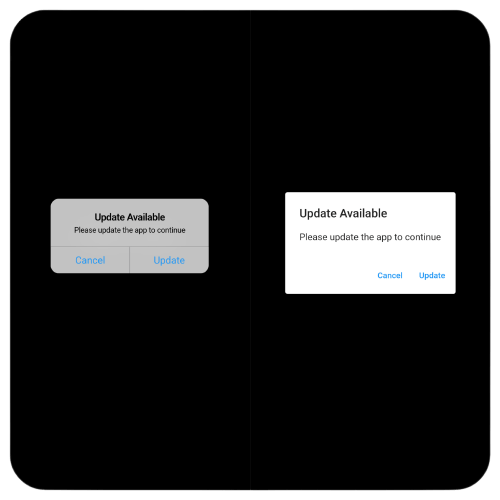
연결된 소스 저장소의 README 원문 스냅샷입니다. 최신 내용은 저장소에서 확인하세요.
App Updater


A comprehensive Flutter package to check for app updates and display platform-native dialogs. Supports iOS, Android, macOS, Windows, and Linux with adaptive UI for each platform.
| Platform |
Dialog Style |
| iOS |
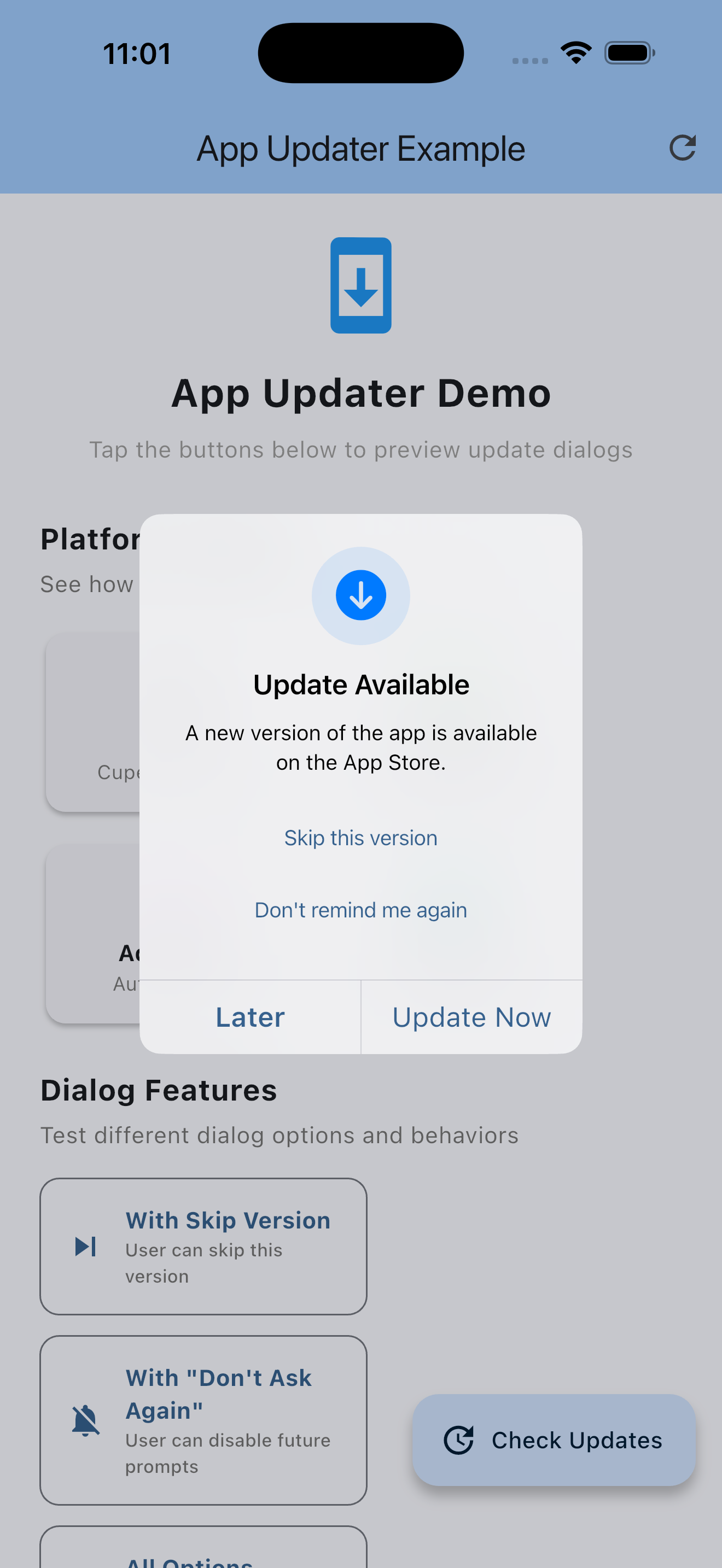 |
| Android |
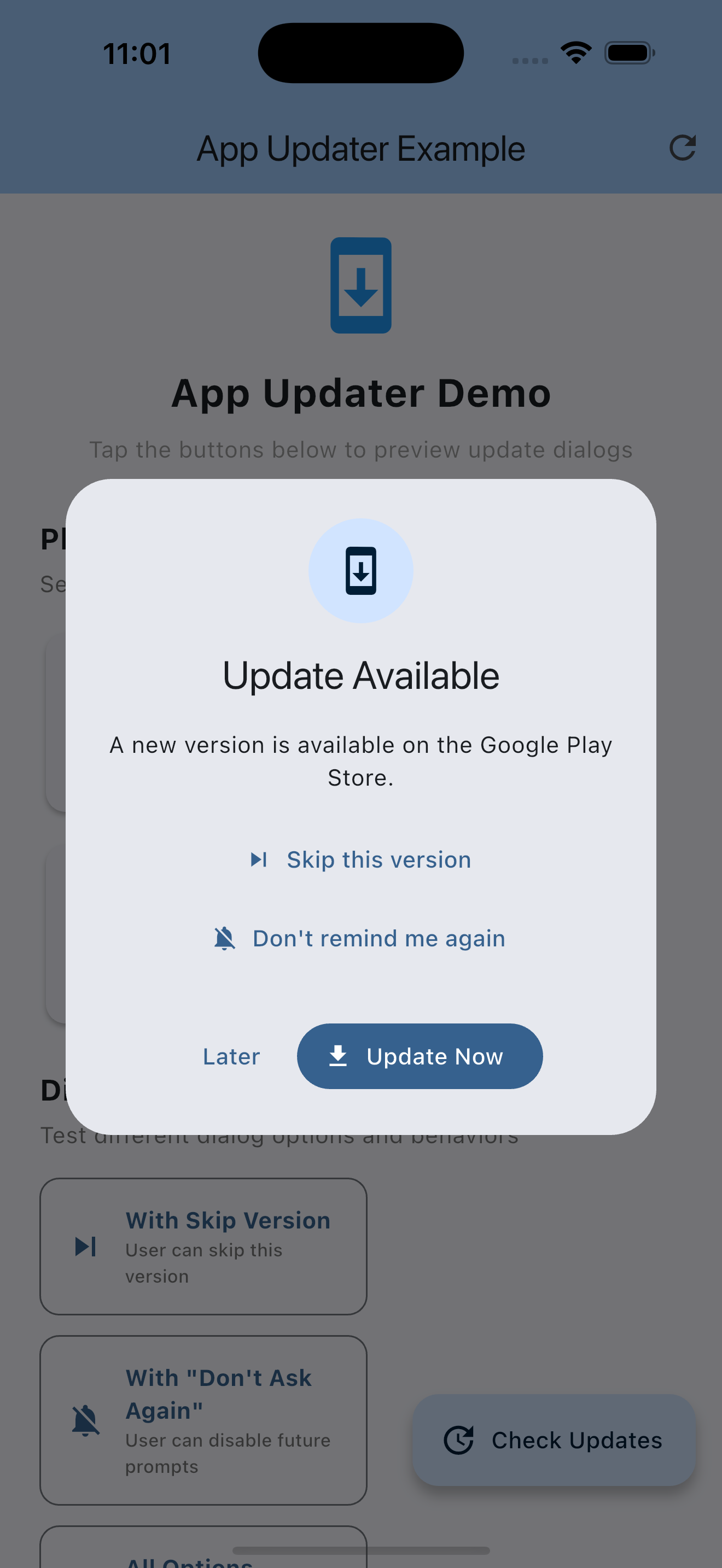 |
| macOS |
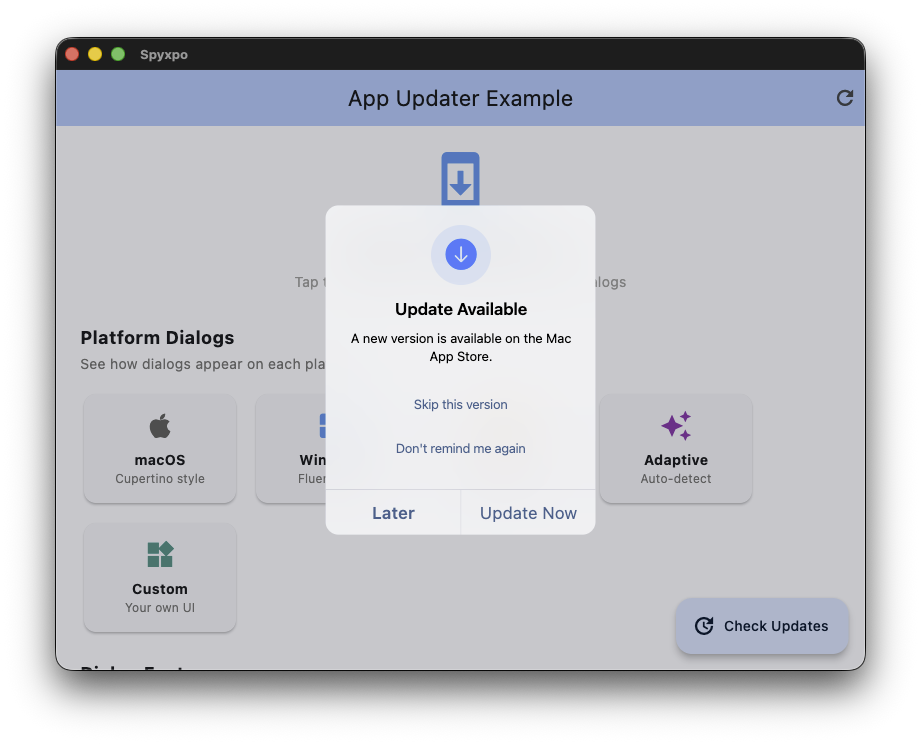 |
| Windows |
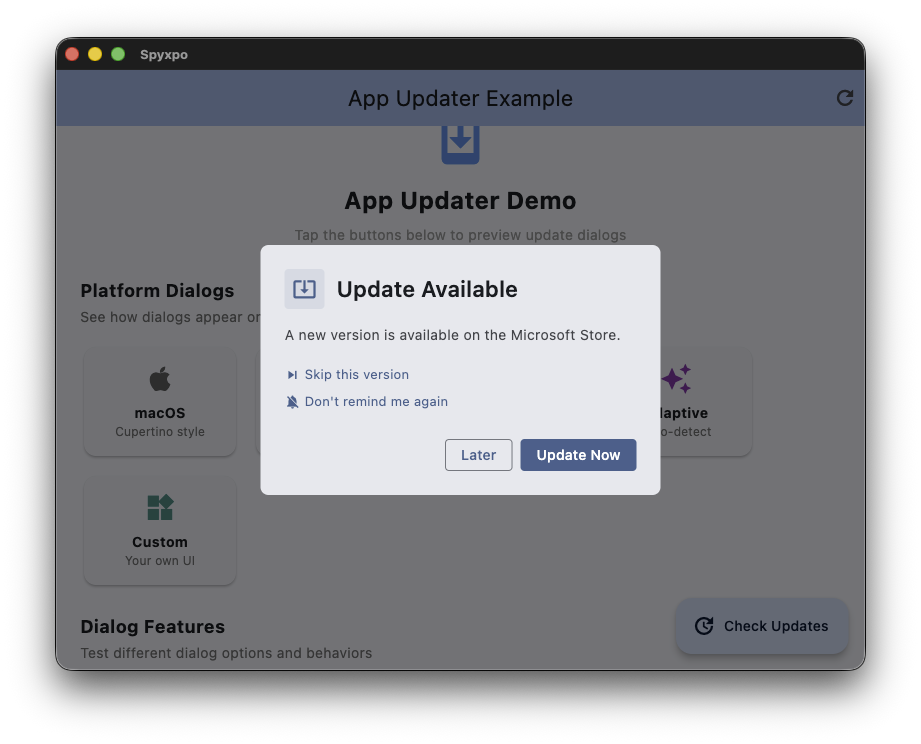 |
| Linux |
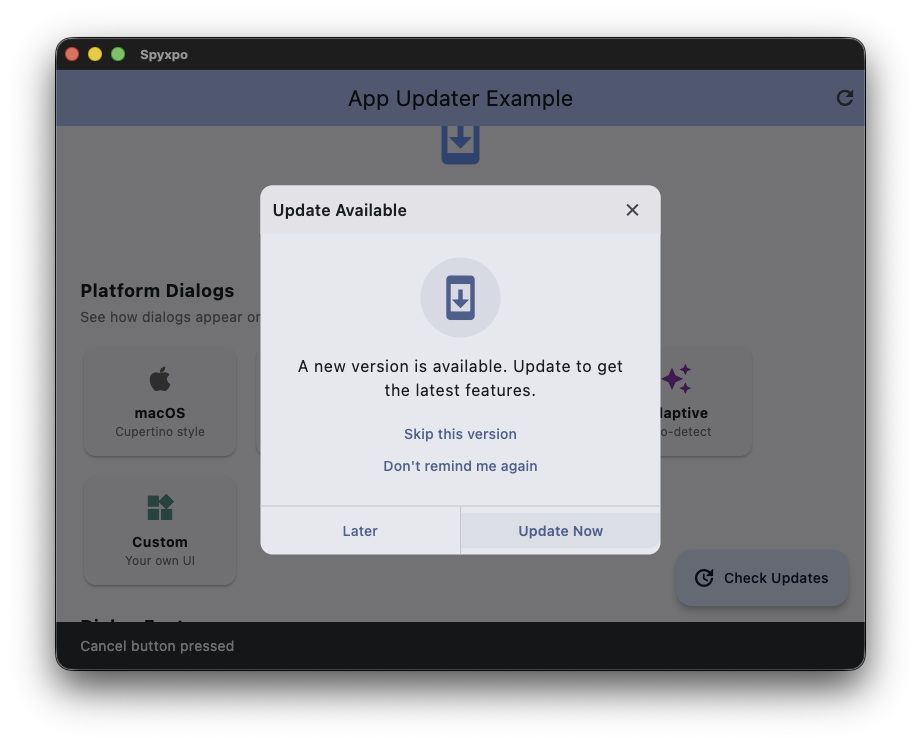 |
Features
Core Features
- Platform-Specific Dialogs: Native UI for each platform (Material, Cupertino, Fluent, Adwaita)
- Persistent Dialogs: Force users to update with non-dismissible dialogs
- Skip Version: Let users skip specific versions
- Do Not Ask Again: Remember user's preference to not show update dialogs
- Custom Endpoints: Support for custom XML/JSON version endpoints
New in v2.1.0
- Private GitHub Repository Support: Use
githubToken or githubHeaders for private repos
New in v2.0.0
- Release Notes Display: Show what's new in each update
- Update Frequency Control: Only check for updates every X days
- Silent/Background Checking: Check updates periodically without blocking UI
- Force Update by Minimum Version: Define minimum required version to force updates
- Analytics/Callbacks: Track update impressions, dismissals, and completions
- TestFlight Support: Support beta updates via TestFlight on iOS
- GitHub Releases Support: Check for updates from GitHub releases
- Firebase Remote Config: Integrate with Firebase for remote version control
- Localization/i18n: Built-in translations for dialog text
- Update Urgency Levels: Critical, high, medium, low update types
- Changelog Fetching: Auto-fetch and display changelogs from stores
Supported Platforms
| Platform |
Store |
Dialog Style |
| iOS |
App Store |
Cupertino |
| Android |
Play Store |
Material Design 3 |
| macOS |
Mac App Store |
Cupertino |
| Windows |
Microsoft Store |
Fluent Design |
| Linux |
Snap Store / Flathub |
Adwaita (GNOME) |
Installation
Add app_updater to your pubspec.yaml:
dependencies:
  app_updater: ^2.1.0
Quick Start
import 'package:app_updater/app_updater.dart';
final appUpdater = AppUpdater.configure(
iosAppId: '123456789',
macAppId: '987654321',
microsoftProductId: '9NBLGGH4NNS1',
snapName: 'my-app',
flathubAppId: 'com.example.myapp',
);
final updateInfo = await appUpdater.checkAndShowUpdateDialog(context);
if (updateInfo.updateAvailable) {
print('New version available: ${updateInfo.latestVersion}');
print('Release notes: ${updateInfo.releaseNotes}');
}
Usage
Basic Usage
final appUpdater = AppUpdater.configure(
iosAppId: '123456789',
);
await appUpdater.checkAndShowUpdateDialog(context);
All Platforms
final appUpdater = AppUpdater.configure(
iosAppId: '123456789',
androidPackageName: 'com.example.app',
macAppId: '987654321',
microsoftProductId: '9NBLGGH4NNS1',
snapName: 'my-app',
flathubAppId: 'com.example.myapp',
linuxStoreType: LinuxStoreType.snap,
);
Dialog Styles
The package provides 5 dialog styles that match each platform's design language:
await appUpdater.showUpdateDialog(
context,
dialogStyle: UpdateDialogStyle.adaptive,
);
Persistent (Forced) Updates
For critical updates that users must install:
await appUpdater.checkAndShowUpdateDialog(
context,
isPersistent: true,
isDismissible: false,
title: 'Critical Update Required',
message: 'Please update to continue using the app.',
);
Skip Version & Do Not Ask Again
Let users control update notifications:
await appUpdater.checkAndShowUpdateDialog(
context,
showSkipVersion: true,
showDoNotAskAgain: true,
);
Managing Preferences
final isSkipped = await UpdatePreferences.isVersionSkipped('2.0.0');
final doNotAsk = await UpdatePreferences.isDoNotAskAgain();
await UpdatePreferences.clearAll();
await UpdatePreferences.clearSkippedVersion();
final impressions = await UpdatePreferences.getUpdateImpressions();
final dismissals = await UpdatePreferences.getUpdateDismissals();
New Features
Release Notes Display
Show what's new in the update dialog:
await appUpdater.checkAndShowUpdateDialog(
context,
showReleaseNotes: true,
);
Update Frequency Control
Prevent checking for updates too frequently:
final appUpdater = AppUpdater.configure(
iosAppId: '123456789',
checkFrequency: Duration(days: 1),
);
final updateInfo = await appUpdater.checkForUpdate();
final updateInfo = await appUpdater.checkForUpdate(respectFrequency: false);
Background/Silent Checking
Check for updates in the background without blocking the UI:
appUpdater.startBackgroundChecking(Duration(hours: 6));
appUpdater.updateStream.listen((updateInfo) {
if (updateInfo.updateAvailable) {
showNotification('Update available: ${updateInfo.latestVersion}');
}
});
appUpdater.stopBackgroundChecking();
@override
void dispose() {
appUpdater.dispose();
super.dispose();
}
Force Update by Minimum Version
Force updates when users are below a minimum version:
final appUpdater = AppUpdater.configure(
iosAppId: '123456789',
minimumVersion: '2.0.0',
);
final updateInfo = await appUpdater.checkForUpdate();
if (updateInfo.requiresForceUpdate) {
await appUpdater.showUpdateDialog(context, isPersistent: true);
}
Update Urgency Levels
Communicate update importance to users:
final updateInfo = await appUpdater.checkForUpdate();
print('Urgency: ${updateInfo.urgency}');
Analytics & Callbacks
Track user interactions with update dialogs:
final appUpdater = AppUpdater.configure(
iosAppId: '123456789',
onAnalyticsEvent: (event) {
analytics.logEvent(
name: event.eventName,
parameters: event.toMap(),
);
},
);
GitHub Releases Support
Check for updates from GitHub releases:
final appUpdater = AppUpdater.configure(
githubOwner: 'mycompany',
githubRepo: 'myapp',
githubIncludePrereleases: false,
);
Private GitHub Repositories
For private repos, just pass your GitHub Personal Access Token:
final appUpdater = AppUpdater.configure(
githubOwner: 'mycompany',
githubRepo: 'private-app',
githubToken: 'ghp_xxxxxxxxxxxxx',
);
For GitHub Enterprise or advanced auth scenarios, use custom headers:
final appUpdater = AppUpdater.configure(
  githubOwner: 'mycompany',
  githubRepo: 'private-app',
  githubHeaders: {
    'Authorization': 'token ghp_xxxxxxxxxxxxx',
    'Accept': 'application/vnd.github+json',
    'X-GitHub-Api-Version': '2022-11-28',
  },
);
Note: If both githubToken and githubHeaders are provided, values in githubHeaders take precedence for overlapping keys (e.g., Authorization).
TestFlight Support (iOS)
Support beta updates via TestFlight:
final appUpdater = AppUpdater.configure(
iosAppId: '123456789',
testFlightEnabled: true,
testFlightUrl: 'https://testflight.apple.com/join/ABC123',
);
await appUpdater.openTestFlight();
Firebase Remote Config Integration
Use Firebase Remote Config for dynamic version control:
final appUpdater = AppUpdater.configure(
firebaseRemoteConfigEnabled: true,
firebaseSettings: FirebaseRemoteConfigSettings(
minimumVersionKey: 'minimum_app_version',
latestVersionKey: 'latest_app_version',
updateUrlKey: 'app_update_url',
releaseNotesKey: 'release_notes',
urgencyKey: 'update_urgency',
mandatoryKey: 'mandatory_update',
),
firebaseConfigFetcher: () async {
await FirebaseRemoteConfig.instance.fetchAndActivate();
return {
'minimum_app_version': FirebaseRemoteConfig.instance.getString('minimum_app_version'),
'latest_app_version': FirebaseRemoteConfig.instance.getString('latest_app_version'),
'app_update_url': FirebaseRemoteConfig.instance.getString('app_update_url'),
'release_notes': FirebaseRemoteConfig.instance.getString('release_notes'),
'update_urgency': FirebaseRemoteConfig.instance.getString('update_urgency'),
'mandatory_update': FirebaseRemoteConfig.instance.getBool('mandatory_update'),
};
},
);
Localization / i18n
Provide translations for all dialog text:
final frenchStrings = UpdateStrings(
updateAvailableTitle: 'Mise à jour disponible',
updateAvailableMessage: 'Une nouvelle version ({latestVersion}) est disponible. Vous avez actuellement la version {currentVersion}.',
updateButton: 'Mettre à jour',
laterButton: 'Plus tard',
skipVersionButton: 'Ignorer cette version',
doNotAskAgainButton: 'Ne plus me rappeler',
criticalUpdateTitle: 'Mise à jour critique requise',
criticalUpdateMessage: 'Cette mise à jour contient des correctifs importants.',
releaseNotesTitle: 'Nouveautés',
loadingText: 'Vérification des mises à jour...',
errorText: 'Impossible de vérifier les mises à jour',
upToDateText: 'Votre application est à jour !',
);
final appUpdater = AppUpdater.configure(
iosAppId: '123456789',
strings: frenchStrings,
);
Custom Update Servers
Custom JSON Endpoint
Host your own version endpoint:
{
  "version": "2.0.0",
  "url": "https://example.com/download",
  "releaseNotes": "- New feature X\n- Bug fix Y",
  "minimumVersion": "1.5.0",
  "urgency": "high",
  "mandatory": false
}
final appUpdater = AppUpdater.configure(
  customJsonUrl: 'https://example.com/version.json',
);
Custom XML Endpoint
<?xml version="1.0" encoding="UTF-8"?>
<app>
  <version>2.0.0</version>
  <url>https://example.com/download</url>
  <releaseNotes>New features and improvements</releaseNotes>
  <minimumVersion>1.5.0</minimumVersion>
  <urgency>high</urgency>
  <mandatory>false</mandatory>
</app>
final appUpdater = AppUpdater.configure(
  customXmlUrl: 'https://example.com/version.xml',
);
Additional Methods
Check Without Dialog
final updateInfo = await appUpdater.checkForUpdate();

print('Current: ${updateInfo.currentVersion}');
print('Latest: ${updateInfo.latestVersion}');
print('Update available: ${updateInfo.updateAvailable}');
print('Store URL: ${updateInfo.updateUrl}');
print('Release notes: ${updateInfo.releaseNotes}');
print('Urgency: ${updateInfo.urgency}');
print('Is mandatory: ${updateInfo.isMandatory}');
print('Requires force update: ${updateInfo.requiresForceUpdate}');
print('Update size: ${updateInfo.formattedUpdateSize}');
Open Store
await appUpdater.openStore();
await openAppStore(
iosAppId: '123456789',
microsoftProductId: '9NBLGGH4NNS1',
);
Callbacks
await appUpdater.checkAndShowUpdateDialog(
  context,
  onNoUpdate: () {
    ScaffoldMessenger.of(context).showSnackBar(
      const SnackBar(content: Text('App is up to date!')),
    );
  },
  onUpdate: () {
    print('User chose to update');
  },
  onCancel: () {
    print('User cancelled');
  },
);
Custom Dialog
await appUpdater.showUpdateDialog(
  context,
  customDialog: AlertDialog(
    title: const Text('Custom Update Dialog'),
    content: const Text('A new version is available!'),
    actions: [
      TextButton(
        onPressed: () => Navigator.pop(context),
        child: const Text('Later'),
      ),
      FilledButton(
        onPressed: () {
          Navigator.pop(context);
          appUpdater.openStore();
        },
        child: const Text('Update'),
      ),
    ],
  ),
);
API Reference
AppUpdater
| Method |
Description |
AppUpdater.configure(...) |
Create instance with individual parameters |
AppUpdater(config) |
Create instance with AppUpdaterConfig |
checkForUpdate() |
Check for updates, returns UpdateInfo |
showUpdateDialog(context, ...) |
Show update dialog |
checkAndShowUpdateDialog(context, ...) |
Check and show dialog if update available |
openStore() |
Open the appropriate app store |
openTestFlight() |
Open TestFlight (iOS only) |
getStoreUrl() |
Get store URL for current platform |
getTestFlightUrl() |
Get TestFlight URL (iOS only) |
startBackgroundChecking(interval) |
Start periodic background checks |
stopBackgroundChecking() |
Stop background checks |
performBackgroundCheck() |
Perform single background check |
dispose() |
Clean up resources |
AppUpdaterConfig
| Parameter |
Type |
Description |
iosAppId |
String? |
iOS App Store app ID |
macAppId |
String? |
macOS App Store app ID |
androidPackageName |
String? |
Android package name (auto-detected) |
microsoftProductId |
String? |
Microsoft Store product ID |
snapName |
String? |
Snap Store package name |
flathubAppId |
String? |
Flathub app ID |
customXmlUrl |
String? |
Custom XML endpoint URL |
customJsonUrl |
String? |
Custom JSON endpoint URL |
linuxStoreType |
LinuxStoreType |
snap or flathub |
githubOwner |
String? |
GitHub repository owner |
githubRepo |
String? |
GitHub repository name |
githubIncludePrereleases |
bool |
Include prereleases (default: false) |
githubToken |
String? |
GitHub PAT for private repos |
githubHeaders |
Map<String, String>? |
Custom HTTP headers for GitHub API |
testFlightEnabled |
bool |
Enable TestFlight (default: false) |
testFlightUrl |
String? |
Custom TestFlight URL |
firebaseRemoteConfigEnabled |
bool |
Enable Firebase (default: false) |
firebaseSettings |
FirebaseRemoteConfigSettings? |
Firebase config keys |
firebaseConfigFetcher |
Function? |
Callback to fetch Firebase values |
checkFrequency |
Duration? |
Minimum time between checks |
minimumVersion |
String? |
Minimum required version |
onAnalyticsEvent |
Function? |
Analytics callback |
strings |
UpdateStrings |
Localized strings |
UpdateDialogStyle
| Style |
Platform |
Description |
adaptive |
All |
Auto-selects based on platform |
material |
Android |
Material Design 3 |
cupertino |
iOS/macOS |
Native Apple design |
fluent |
Windows |
Microsoft Fluent Design |
adwaita |
Linux |
GNOME/Adwaita style |
UpdateUrgency
| Level |
Description |
low |
Minor improvements, can be skipped |
medium |
Regular updates with new features |
high |
Important updates, strongly recommended |
critical |
Security fixes or breaking changes |
UpdateInfo
| Property |
Type |
Description |
currentVersion |
String |
Current app version |
latestVersion |
String? |
Latest available version |
updateUrl |
String? |
Store/download URL |
updateAvailable |
bool |
Whether update is available |
releaseNotes |
String? |
Release notes/changelog |
urgency |
UpdateUrgency |
Update urgency level |
minimumVersion |
String? |
Minimum required version |
isMandatory |
bool |
Whether update is mandatory |
releaseDate |
DateTime? |
Release date |
updateSizeBytes |
int? |
Update size in bytes |
requiresForceUpdate |
bool |
Whether force update is required |
formattedUpdateSize |
String? |
Human-readable size (e.g., "15.2 MB") |
UpdatePreferences
| Method |
Description |
isVersionSkipped(version) |
Check if version is skipped |
skipVersion(version) |
Skip a specific version |
isDoNotAskAgain() |
Check "do not ask again" preference |
setDoNotAskAgain(value) |
Set "do not ask again" preference |
getLastCheckTime() |
Get last update check time |
setLastCheckTime(time) |
Set last update check time |
shouldCheckForUpdate(frequency) |
Check if enough time has passed |
getUpdateImpressions() |
Get dialog impression count |
getUpdateDismissals() |
Get dismissal count |
clearAll() |
Clear all preferences |
clearSkippedVersion() |
Clear skipped version only |
UpdateAnalyticsEvent
| Property |
Type |
Description |
eventName |
String |
Event name |
currentVersion |
String |
Current app version |
latestVersion |
String? |
Latest available version |
urgency |
UpdateUrgency? |
Update urgency |
platform |
String |
Platform name |
timestamp |
DateTime |
Event timestamp |
toMap() |
Map |
Convert to map for analytics |
UpdateStrings
| Property |
Type |
Description |
updateAvailableTitle |
String |
Dialog title |
updateAvailableMessage |
String |
Dialog message (supports placeholders) |
updateButton |
String |
Update button text |
laterButton |
String |
Later button text |
skipVersionButton |
String |
Skip version button text |
doNotAskAgainButton |
String |
Do not ask again button text |
criticalUpdateTitle |
String |
Critical update title |
criticalUpdateMessage |
String |
Critical update message |
releaseNotesTitle |
String |
Release notes section title |
loadingText |
String |
Loading text |
errorText |
String |
Error text |
upToDateText |
String |
Up to date text |
Notes
- Update dialogs won't work on iOS Simulator (no App Store)
- Android package name is auto-detected if not provided
- Custom endpoints take priority over store checks
- Firebase Remote Config takes highest priority when enabled
- GitHub releases are checked before platform stores
- Private GitHub repos require
githubToken or githubHeaders for authentication
- Release notes are automatically fetched from supported sources
- Background checking requires calling
dispose() when done
Credits
Author