패키지, 저장소 및 앱 카테고리 검색

패키지 상세v1.1.1

awesome_shake_widget

Flutter 위젯으로 흔들림 애니메이션과 선택적 진동 효과를 제공하여 잘못된 폼, 주의 유도 및 사용자 상호작용 피드백에 적합합니다.

AndroidiOS
30일 다운로드
1.1천
좋아요
21
Pub 점수
160

패키지 설치

flutter pub add awesome_shake_widget

패키지 개요

공개 정보를 바탕으로 생성한 선택 가이드입니다.

UI 요소에 흔들림 애니메이션과 선택적 진동 피드백을 추가하는 플러터 위젯입니다. 잘못된 폼 입력에 주의를 끌거나 사용자 행동을 유도하거나 상호작용 피드백을 제공하는 데 이상적입니다. 쉽게 통합 가능하며 Android 및 iOS 플랫폼 모두를 지원합니다. 최소한의 설정으로 시각적 및 힘세 반응을 제공하여 사용자 경험을 향상시킵니다. 일반적인 상호작용 시나리오에서 간단함과 효과성을 위해 설계되었습니다.

사용 사례

  • 폼 검증 경고
  • 사용자 입력 프롬프트
  • 인터랙티브 버튼 피드백
  • 오류 상태 알림
  • 온보딩 가이드

주요 기능

  • 흔들림 애니메이션 효과
  • 옵션 진동 지원
  • 크로스 플랫폼 호환성
  • 간단한 API 통합
  • 사용자 정의 애니메이션 지속 시간
  • 반응형 디자인 지원

적합한 대상

  • 인터랙티브 폼을 개발하는 개발자
  • UX 디자이너가 피드백 메커니즘을 향상시키고 있습니다
  • 주의를 끌 만한 신호가 필요한 앱
  • Android 및 iOS를 대상으로 하는 모바일 애플리케이션
  • 직관적인 사용자 상호작용에 중점을 둔 프로젝트

고려 사항

  • 과도하게 사용할 경우 방해가 될 수 있습니다
  • 일부 기기에서는 진동을 사용하려면 권한이 필요합니다
  • 애니메이션 성능은 장치 기능에 따라 달라집니다
  • 접근성에 중요한 컴포넌트에는 적합하지 않습니다
  • UX의 명확성을 유지하기 위해 적절하게 사용하는 것이 좋습니다

원본 README

연결된 소스 저장소의 README 원문 스냅샷입니다. 최신 내용은 저장소에서 확인하세요.

🚀 awesome_shake_widget

A customizable Flutter widget that adds shake animations with haptic and vibration feedback. Perfect for invalid forms, error indicators, or drawing attention to UI components.

Pub Version Platform License


✨ Features

  • Shake any widget on demand
  • Built-in presets: light, medium, heavy
  • Optional vibration (custom or haptic)
  • Fully customizable offset, pattern & intensities
  • Easy to trigger using a GlobalKey

📦 Installation

dependencies:
  awesome_shake_widget: ^1.0.1

Run:

flutter pub get

🧪 Usage

1️⃣ Standard (Shake + Vibration)

By using the built-in presets — light, medium, heavy and custom — you can quickly apply different vibration intensities and patterns, perfectly paired with UI shake animations for a dynamic and responsive user experience.

final shakeKey = GlobalKey<ShakeWidgetState>();

ShakeWidget(
  key: shakeKey,
  preset: ShakePreset.medium,
  child: Text("Tap Me"),
);

// Somewhere else, e.g., on button press:
shakeKey.currentState?.shake();

2️⃣ Shake Only (No Vibration)

If you only want the visual shake effect without vibration, you can set vibrationType to VibrationType.none using the ShakeConfig. To customize the intensity of the shake, adjust the offset value — higher values will produce a stronger visual effect.

ShakeWidget(
  key: shakeKey,
  customConfig: ShakeConfig(
    offset: 20,
    vibrationType: VibrationType.none,
  ),
  child: Icon(Icons.info),
);

3️⃣ Advanced Configuration: Full Control Over Visual and Vibration Effects

You can also create custom vibration patterns by setting vibrationType to VibrationType.custom, and providing your own pattern and intensities. This gives you full control over the vibration behavior.

ShakeWidget(
key: shakeKey,
customConfig: ShakeConfig(
offset: 32,
pattern: [0, 50, 100, 50],
intensities: [255, 0, 255, 0],
vibrationType: VibrationType.custom,
),
child: Text("Custom Shake!"),
);

Trigger it via:

shakeKey.currentState?.shake();

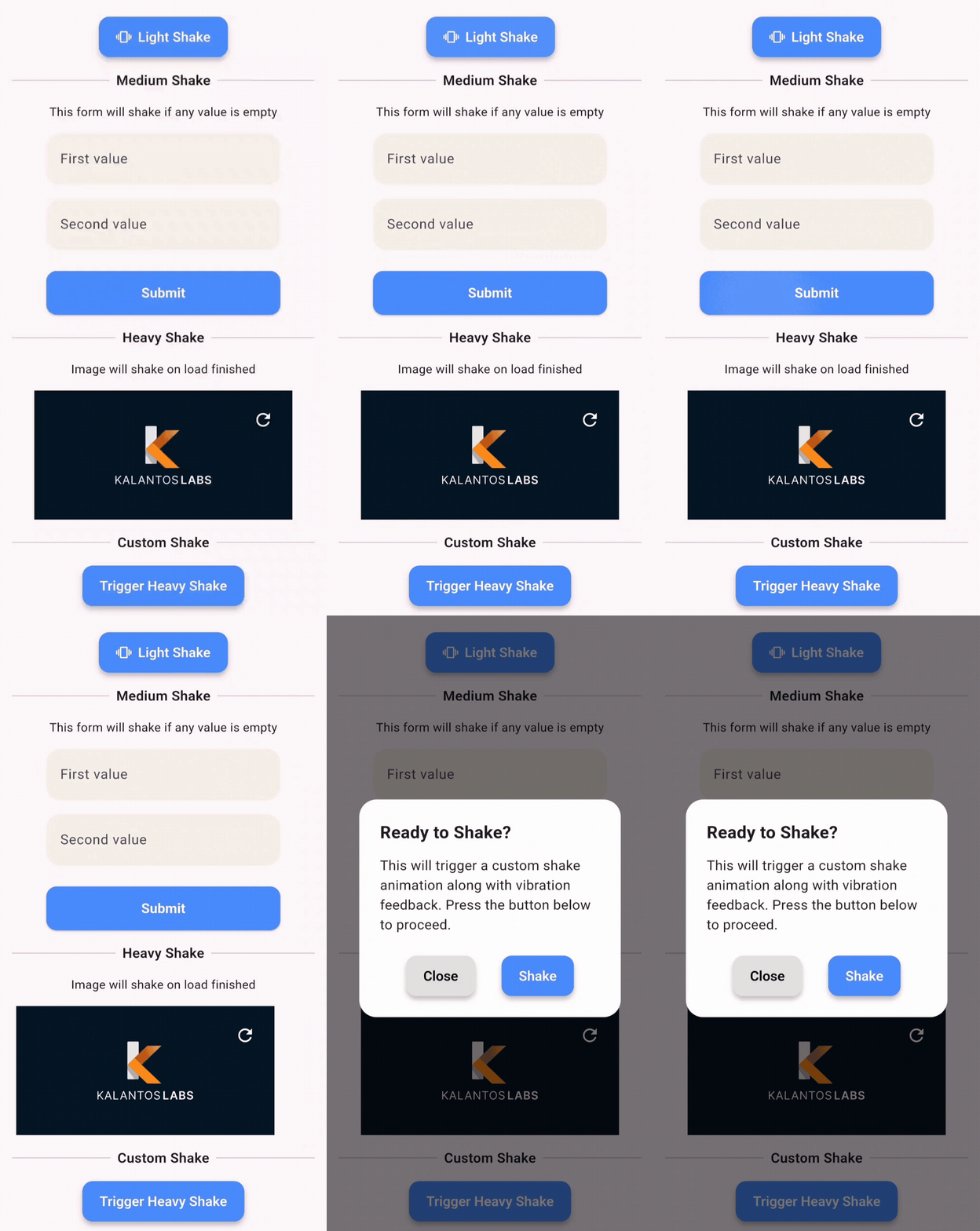
🎥 Demo

This demo shows how you can apply shake animations to:

  • ✅ Buttons
  • 💬 Dialogs
  • 🖼️ Images
  • ✏️ Text fields
  • 📦 Any widget

🧩 API Reference

Enum: ShakePreset
Value Offset Vibration
light 8 Haptic
medium 16 Haptic
heavy 24 Patterned Vibe
custom User-defined Custom

Enum: VibrationType
  • none – no vibration
  • haptic – system haptic feedback
  • custom – vibration with pattern/intensity (Android only)

ShakeConfig
ShakeConfig({
  required double offset,
  List<int>? pattern,
  List<int>? intensities,
  VibrationType vibrationType = VibrationType.haptic,
});

💡 Example App

Clone and run the example:

cd example
flutter run

Example main.dart:

import 'package:flutter/material.dart';
import 'package:awesome_shake_widget/shake_widget.dart';

void main() => runApp(const MyApp());

class MyApp extends StatelessWidget {
  const MyApp({super.key});

  @override
  Widget build(BuildContext context) {
    return MaterialApp(
      home: ShakeDemo(),
    );
  }
}

class ShakeDemo extends StatelessWidget {
  final shakeKey = GlobalKey<ShakeWidgetState>();

  @override
  Widget build(BuildContext context) {
    return Scaffold(
      appBar: AppBar(title: const Text('Shake Demo')),
      body: Center(
        child: Column(
          mainAxisAlignment: MainAxisAlignment.center,
          children: [
            ShakeWidget(
              key: shakeKey,
              preset: ShakePreset.heavy,
              child: const Icon(Icons.warning, size: 64),
            ),
            const SizedBox(height: 32),
            ElevatedButton(
              onPressed: () => shakeKey.currentState?.shake(),
              child: const Text("Shake it!"),
            ),
          ],
        ),
      ),
    );
  }
}

📄 License

MIT © Juanma Del Boca

카테고리

의존성

의존성 목록 1 개

소스 저장소

이 패키지를 사용하는 프로젝트

아직 데이터가 없습니다.