패키지, 저장소 및 앱 카테고리 검색

circular_rotation 표지
패키지 상세v0.0.2

circular_rotation

완전히 사용자 정의 가능한 패키지로 원형으로 사용자 지정 위젯을 설정할 수 있습니다.

AndroidiOSWebmacOSWindowsLinux
30일 다운로드
50
좋아요
39
Pub 점수
150

패키지 설치

flutter pub add circular_rotation

패키지 개요

공개 정보를 바탕으로 생성한 선택 가이드입니다.

CircularRotation은 개발자가 위젯을 원형 레이아웃으로 배열하고 외관 및 동작을 완전히 제어할 수 있도록 해주는 사용자 정의 가능한 Flutter 패키지입니다. 동적 커스터마이제이션을 지원하여 사용자가 커스텀 위젯, 회전 각도, 간격 및 애니메이션 효과를 정의할 수 있습니다. 인터랙티브한 원형 메뉴, 네비게이션 허브 또는 시각적으로 매력적인 UI 컴포넌트를 만들기에 이상적입니다. 이 패키지는 Android, iOS, Web, macOS, Windows, Linux 등 모든 주요 플랫폼에서 작동하며 일관된 성능과 디자인을 보장합니다. 직관적인 API와 부드러운 애니메이션을 통해 우아한 원형 배치로 사용자 경험을 향상시킵니다.

사용 사례

  • 순환 탐색 메뉴 만들기
  • 인터랙티브 위젯 링 디자인
  • 애니메이션 원형 슬라이더 만들기
  • 라디얼 선택 인터페이스 구현
  • 대시보드 위젯 개발
  • 원형 이미지 갤러리 표시

주요 기능

  • 완전히 사용자 정의 가능한 원형 레이아웃
  • 사용자 정의 위젯 지원
  • 부드러운 회전 애니메이션
  • 크로스 플랫폼 호환성
  • 사용자 정의 가능한 간격과 각도
  • pub.dev를 통한 간편한 통합

적합한 대상

  • 독특한 레이아웃을 찾는 UI 디자이너
  • 인터랙티브 대시보드를 구축하는 개발자
  • 반경 탐색이 필요한 앱
  • 시각적 매력에 초점을 맞춘 프로젝트
  • 다중 플랫폼 앱을 위한 플러터 사용 팀

고려 사항

  • 많은 수의 위젯이 성능에 영향을 줄 수 있습니다
  • 최적의 애니메이션 부드러움을 위해 신중한 튜닝이 필요합니다
  • 기본 사용법 외에 문서가 제한적
  • 중간 수준의 위젯 수에 적합
  • 복잡한 계층 구조에는 적합하지 않음

원본 README

연결된 소스 저장소의 README 원문 스냅샷입니다. 최신 내용은 저장소에서 확인하세요.

circular_rotation

circular_rotation version circular_rotation Git Stars MIT License

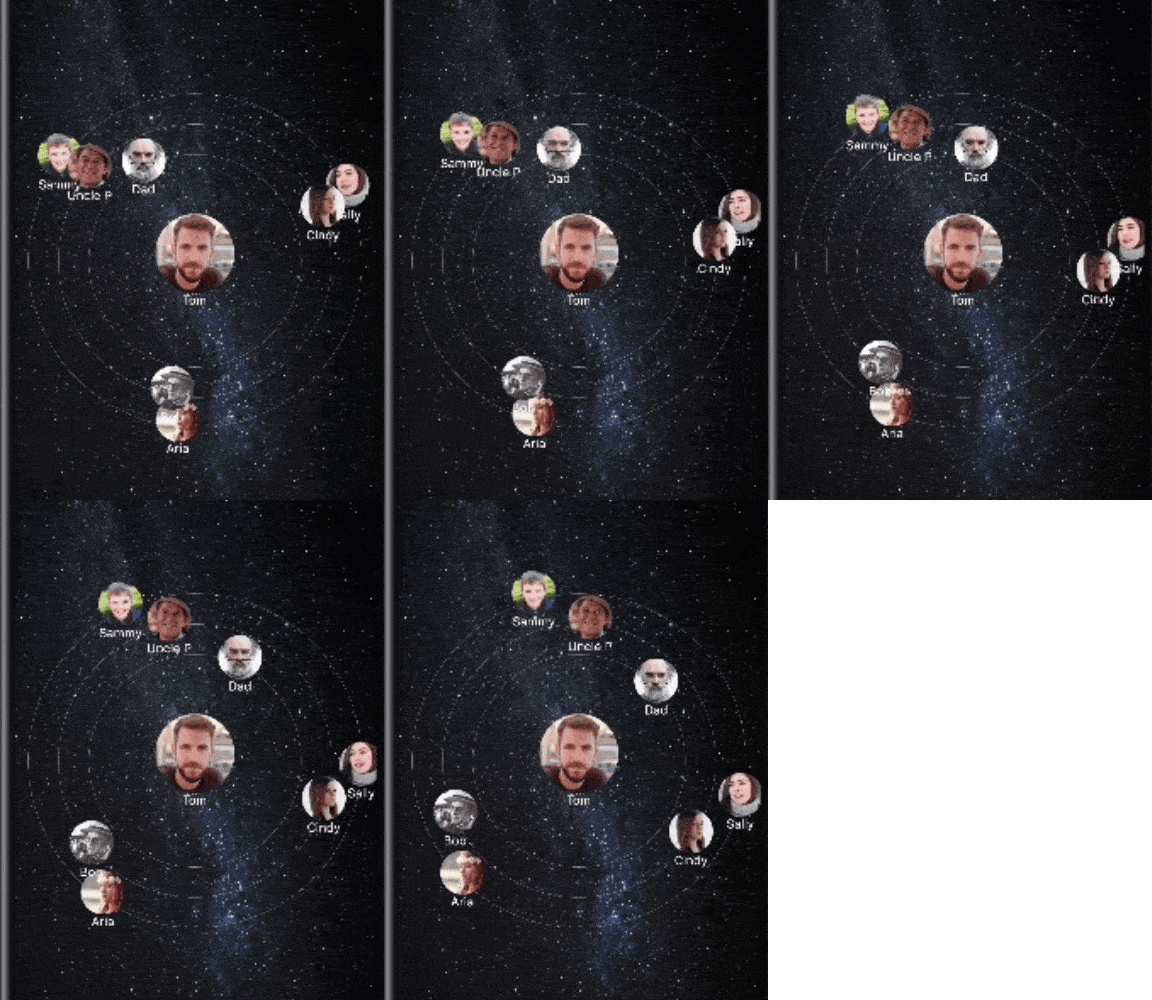
Circular rotation, It is fully customizable package which allow you to set custom widget in circular manner. It has provision for moving like solar system. There is customizable properties like speed of each round, round color, position of circular widget etc.

Circular Rotation

Circular Rotation

Usage

Example
CircularRotation(
    defaultCircleStrokeWidth: 0.2,
    defaultCircleStrokeColor: Colors.white,
    startAnimation: true,
    repeatAnimation: true,
    firstCircleAnimationDuration: 5000,
    secondCircleAnimationDuration: 7000,
    thirdCircleAnimationDuration: 10000,
    centerWidget: Image.asset(
        CENTER_IMAGE,
        width: 96,
        height: 96,
    ),
    firstCircleWidgets: [],
    secondCircleWidgets: [],
    thirdCircleWidgets: [],
)
Parameters
visibleFirstCircle:
  • Visibility of first circle.
  • It contains bool value.
  • true = visible,
  • false = invisible.
visibleSecondCircle:
  • Visibility of second circle.
  • It contains bool value.
  • true = visible,
  • false = invisible.
visibleThirdCircle:
  • Visibility of third circle.
  • It contains bool value.
  • true = visible,
  • false = invisible.
firstCircleRadius:
  • Displays the first circle based on radius.
  • Radius starts from center.
  • It contains the double value.
secondCircleRadius:
  • Displays the second circle based on radius.
  • Radius starts from center.
  • It contains the double value.
thirdCircleRadius:
  • Displays the third circle based on radius.
  • Radius starts from center.
  • It contains the double value.
firstCircleRadians:
  • Displays the first circle widgets based on radians calculation.
  • It contains the double value.
secondCircleRadians:
  • Displays the second circle widgets based on radians calculation.
  • It contains the double value.
thirdCircleRadians:
  • Displays the third circle widgets based on radians calculation.
  • It contains the double value.
firstCircleWidgets:
  • Displays the first circle widgets.
  • It contains the List of Widgets.
secondCircleWidgets:
  • Displays the second circle widgets.
  • It contains the List of Widgets.
thirdCircleWidgets:
  • Displays the third circle widgets.
  • It contains the List of Widgets.
centerWidget:
  • Displays the widget at center of circle.
  • It contains the Widget.
defaultCircleStrokeColor:
  • Change the all circles stroke(line) color.
  • It contains Color value.
  • Default value is Colors.black
firstCircleStrokeColor:
  • Change the first circle stroke(line) color.
  • It contains Color value.
  • Default value is Colors.black
secondCircleStrokeColor:
  • Change the second circle stroke(line) color.
  • It contains Color value.
  • Default value is Colors.black
thirdCircleStrokeColor:
  • Change the third circle stroke(line) color.
  • It contains Color value.
  • Default value is Colors.black
defaultCircleStrokeWidth:
  • Change the all circles stroke(line) width.
  • It contains double value.
  • Default value is 1.0
firstCircleStrokeWidth:
  • Change the first circle stroke(line) width.
  • It contains double value.
  • Default value is 1.0
secondCircleStrokeWidth:
  • Change the second circle stroke(line) width.
  • It contains double value.
  • Default value is 1.0
thirdCircleStrokeWidth:
  • Change the third circle stroke(line) width.
  • It contains double value.
  • Default value is 1.0
startAnimation:
  • Create the animation in Circular Rotation.
  • It contains bool value:
  • true = display the circular widgets with animation
  • false = display the circular widgets without animation
repeatAnimation:
  • Repeat the animation in Circular Rotation.
  • This parameter affects when [startAnimation] is true.
  • It contains bool value.
  • true = repeat the animation.
  • false = show animation only for one time.
defaultCircleAnimationDuration:
  • Set the animation duration in milliseconds for all circles.
  • This parameter affects when [startAnimation] is true.
  • It contains int value.
firstCircleAnimationDuration:
  • Set the animation duration in milliseconds for the first circle.
  • This parameter affects when [startAnimation] is true.
  • It contains int value.
secondCircleAnimationDuration:
  • Set the animation duration in milliseconds for the second circle.
  • This parameter affects when [startAnimation] is true.
  • It contains int value.
thirdCircleAnimationDuration:
  • Set the animation duration in milliseconds for the third circle.
  • This parameter affects when [startAnimation] is true.
  • It contains int value.
curve:
  • [Curves], a collection of common animation easing curves.
  • [CurveTween], which can be used to apply a [Curve] to an [Animation].
  • Default value is Curves.linear

Guideline for contributors

Contribution towards our repository is always welcome, we request contributors to create a pull request to the develop branch only.

Guideline to report an issue/feature request

It would be great for us if the reporter can share the below things to understand the root cause of the issue.

  • Library version
  • Code snippet
  • Logs if applicable
  • Device specification like (Manufacturer, OS version, etc)
  • Screenshot/video with steps to reproduce the issue

LICENSE!

Circular Rotation is MIT-licensed.

Let us know!

We’d be really happy if you send us links to your projects where you use our component. Just send an email to sales@mindinventory.com And do let us know if you have any questions or suggestion regarding our work.

카테고리

소스 저장소

이 패키지를 사용하는 프로젝트

아직 데이터가 없습니다.

