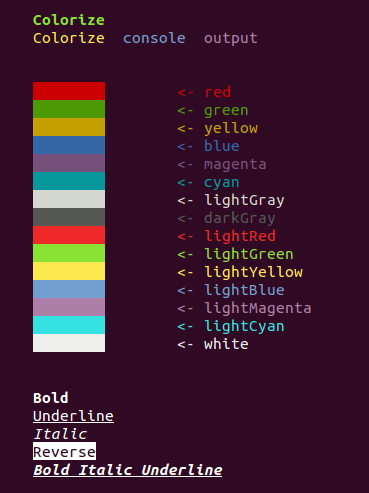
Colorize는 명령줄 애플리케이션의 콘솔 출력에 색상과 스타일을 추가할 수 있도록 해주는 Flutter/Dart 패키지입니다. 다양한 색상, 배경, 스타일(예: 굵게 또는 밑줄)로 텍스트를 터미널에서 직접 출력할 수 있는 간단한 API를 제공합니다. 디버깅, 로깅, CLI 도구의 가독성 향상에 이상적이며, Android, iOS, Web, macOS, Windows, Linux 등 주요 플랫폼에서 작동합니다. 패키지는 가볍고 Dart의 표준 출력과 원활하게 통합됩니다.
사용 사례
CLI 애플리케이션 디버깅
로그 메시지 향상
상호작용형 명령줄 도구 만들기
터미널 출력 가독성 향상
개발자 중심 스크립트 개발
주요 기능
ANSI 색 코드를 지원합니다
간단하고 직관적인 API
크로스 플랫폼 호환성
사용자 정의 텍스트 스타일
stdout 및 stderr와 함께 작동
적합한 대상
CLI 도구 개발자
콘솔 앱을 개발 중인 Dart 개발자
디버그 출력 시각화를 개선하는 팀
터미널 상호작용을 포함한 교육 프로젝트
고려 사항
UI 렌더링을 위한 것이 아님
색상 출력은 터미널 에뮬레이터에 따라 달라질 수 있습니다
콘솔 환경에만 제한됨
비-ANSI 터미널을 지원하지 않습니다
일부 경우에서는 이스케이프 시퀀스를 수동으로 처리해야 합니다
원본 README
연결된 소스 저장소의 README 원문 스냅샷입니다. 최신 내용은 저장소에서 확인하세요.
Colorize
Colorize console output in dart console apps!
Install
Add dependency to your pubspec.yaml:
colorize:any
Run
pub get
Usage
Import package:
import'package:colorize/colorize.dart';
You have two way to colorize your string:
use class Colorize
use top-level function color()
Use Colorize
For colorize string with Colorize class you should create object of type Colorize:
Colorize string = newColorize("This is my string!");
Then you can call methods of Colorize.
Text color
default()
black()
red()
green()
yellow()
blue()
magenta()
cyan()
lightGray()
darkGray()
lightRed()
lightGreen()
lightYellow()
lightBlue()
lightMagenta()
lightCyan()
white()
Background color
bgDefault()
bgBlack()
bgRed()
bgGreen()
bgYellow()
bgBlue()
bgMagenta()
bgCyan()
bgLightGray()
bgDarkGray()
bgLightRed()
bgLightGreen()
bgLightYellow()
bgLightBlue()
bgLightMagenta()
bgLightCyan()
bgWhite()
Formatting
reset()
bold()
dark()
italic()
underline()
blink()
reverse()
concealed()
After apply styles to string you can print it to console:
print(string);
Use top-level function color()
Top-level function color apply one required parameter - String text. It is text, that would be print
on console.
Also top-level function color has seven named parameters:
Styles front - name of front color (you can also use the constants of class Styles). Default value is ''.
Styles back: name of background color (you can also use the constants of class Styles). Default value is ''.