패키지, 저장소 및 앱 카테고리 검색

패키지 상세v1.0.2

cube_transition

PageView 및 PageRoute 전환을 위한 멋진 3D 큐브 효과입니다.

30일 다운로드
47
좋아요
70
Pub 점수
40

패키지 설치

flutter pub add cube_transition

패키지 개요

공개 정보를 바탕으로 생성한 선택 가이드입니다.

CubeTransition은 PageView 및 PageRoute 전환을 위한 부드러운 3D 큐브 애니메이션 효과를 제공하는 Flutter 패키지입니다. 화면 또는 페이지 간 탐색 시 깊이감과 시각적 매력을 더함으로써 사용자 경험을 향상시킵니다. 이 패키지는 Flutter의 렌더링 기능을 활용하여 실제 큐브가 3차원 공간에서 회전하는 것처럼 보이는 몰입형 카드식 뒤집기 애니메이션을 생성합니다. 복잡한 구현 없이도 현대적이고 매력적인 전환 효과를 원하는 앱에 적합합니다. 기존의 Flutter 네비게이션 패턴과 원활하게 통합됩니다.

사용 사례

  • PageView 페이지 전환
  • PageRoute 탐색 효과
  • 인터랙티브 앱 온보딩
  • 탭 전환 시 시각적 피드백
  • 모바일 앱의 UI 완성도 향상

주요 기능

  • 3D 큐브 회전 애니메이션
  • 부드럽고 사용자 정의 가능한 전환
  • PageView 및 PageRoute와 호환됨
  • 경량이며 통합이 쉬움
  • 방향 전환을 지원합니다

적합한 대상

  • 현대적인 UI 애니메이션을 찾는 개발자
  • 상호작용형 탐색을 갖춘 앱
  • 디자인 중심의 Flutter 프로젝트
  • 사용자 참여를 강조하는 모바일 앱

고려 사항

  • 3D 큐브 스타일만 가능
  • 저사양 기기에서 성능에 영향을 미칠 수 있습니다
  • 큐브 크기 또는 텍스처에 대한 내장된 사용자 정의 없음
  • 전환 상태를 수동으로 처리해야 합니다
  • 비상호작용 또는 최소한의 UI 디자인에는 적합하지 않습니다

원본 README

연결된 소스 저장소의 README 원문 스냅샷입니다. 최신 내용은 저장소에서 확인하세요.

Cube Transition

pub package

A 3D Cube transition for your PageView and PageRoute.

Aeyrium Inc. is a provider of innovative software solutions for the business and commercial aviation

Features

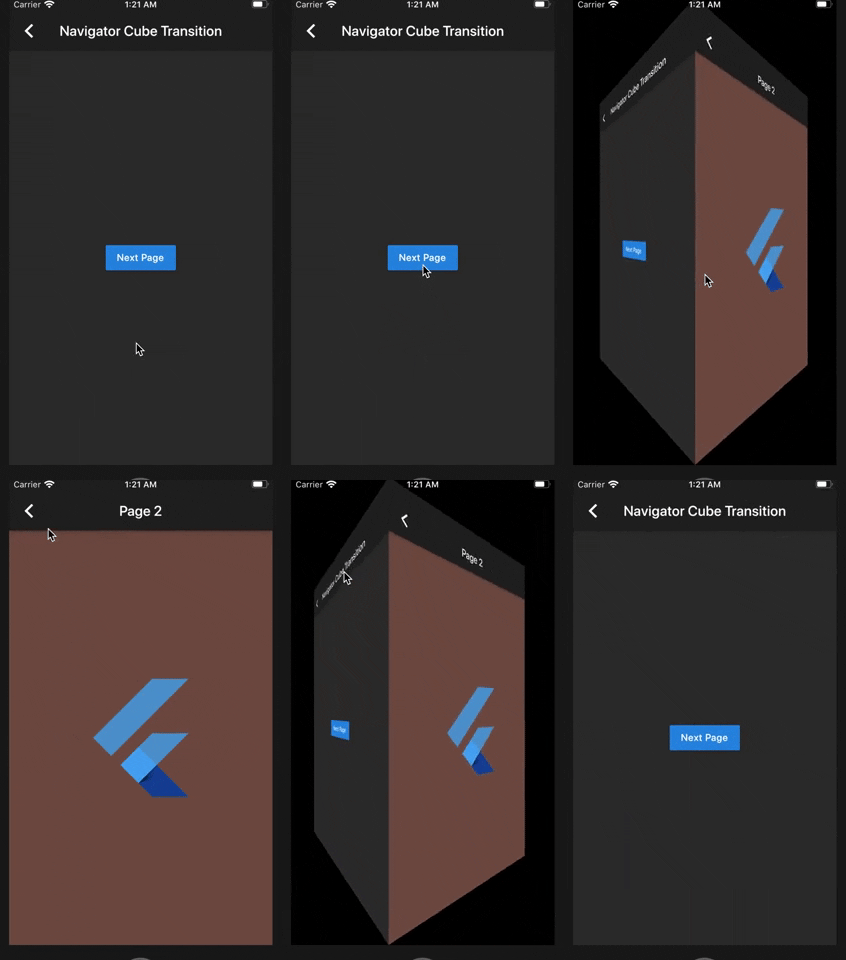
  • Use the cube transition between the navigation of your pages.
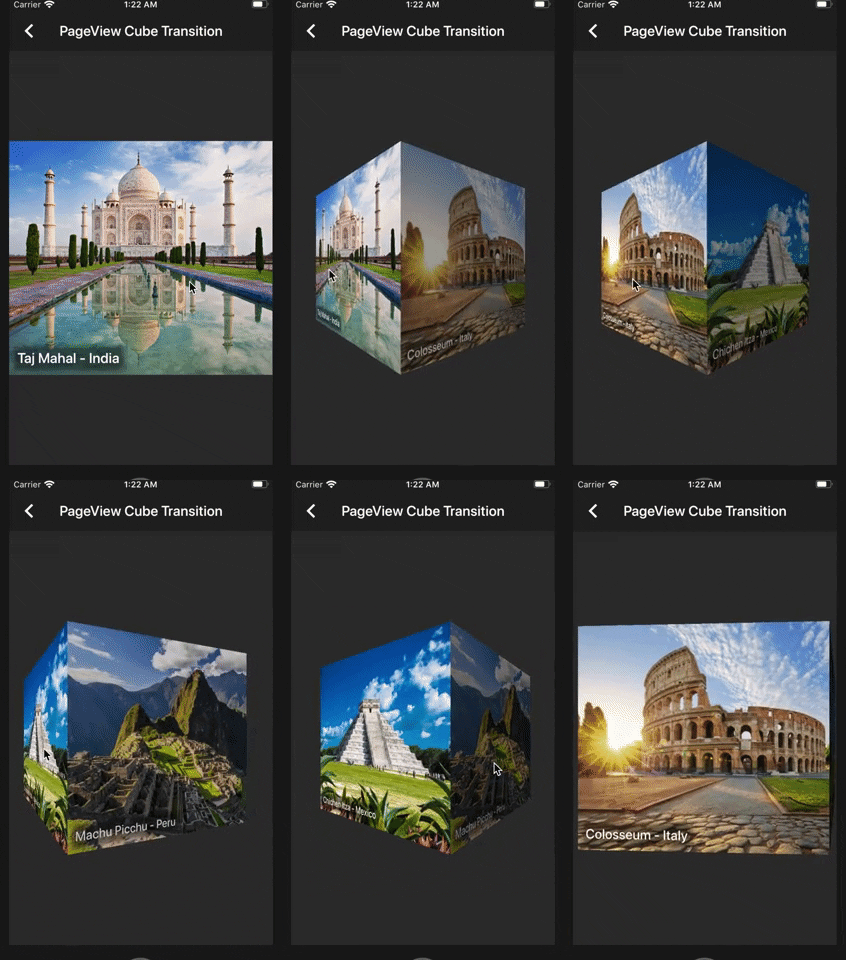
  • Add cube transitions to your PageView.
  • Add custom transformation in your items of your PageView.

Getting started

You should ensure that you add the dependency in your flutter project.

dependencies:
  cube_transition: "^1.0.0"

You should then run flutter packages upgrade or update your packages in IntelliJ.

Import the package:

import 'package:cube_transition/cube_transition.dart';

Example Project

There is a example project in the example folder. Check it out. Otherwise, keep reading to get up and running.

Usage

Navigator Cube Transition

class Sample1 extends StatelessWidget {
  @override
  Widget build(BuildContext context) {
    return Scaffold(
      appBar: AppBar(
        title: Text('Navigator Cube Transition'),
      ),
      body: Center(
        child: RaisedButton(
          child: Text('Next Page'),
          onPressed: () {
            Navigator.of(context).push(
              CubePageRoute(
                enterPage: Sample1NextPage(),
                exitPage: this,
                duration: const Duration(milliseconds: 900),
              ),
            );
          },
        ),
      ),
    );
  }
}

PageView Cube Transition (default)

class Sample2 extends StatelessWidget {
  @override
  Widget build(BuildContext context) {
    final height = MediaQuery.of(context).size.height / 2;
    return Scaffold(
      appBar: AppBar(
        title: Text('PageView Cube Transition'),
      ),
      body: Center(
        child: SizedBox(
          height: height,
          child: CubePageView(
            children: places
                .map(
                  (item) =>  Image.network(
                        item.url,
                        height: height,
                        fit: BoxFit.cover,
                      ),
                )
                .toList(),
          ),
        ),
      ),
    );
  }
}

PageView Cube Transition Custom (If you want more control over the items inside the CubePageView)

class Sample3 extends StatelessWidget {
  @override
  Widget build(BuildContext context) {
    final height = MediaQuery.of(context).size.height / 2;
    return Scaffold(
      appBar: AppBar(
        title: Text('Custom Cube Transition'),
      ),
      body: Center(
        child: SizedBox(
          height: height,
          child: CubePageView.builder(
            itemCount: places.length,
            itemBuilder: (context, index, notifier) {
              final item = places[index];
              final transform = Matrix4.identity();
              final t = (index - notifier).abs();
              final scale = lerpDouble(1.5, 0, t);
              transform.scale(scale, scale);
              return CubeWidget(
                index: index,
                pageNotifier: notifier,
                child: Stack(
                  children: [
                    Image.network(
                      item.url,
                      height: height,
                      fit: BoxFit.cover,
                    ),
                    Transform(
                      alignment: Alignment.center,
                      transform: transform,
                      child: Center(
                        child: Padding(
                          padding: const EdgeInsets.all(12.0),
                          child: Container(
                            decoration: BoxDecoration(boxShadow: [
                              BoxShadow(
                                color: Colors.black45,
                                spreadRadius: 5,
                                blurRadius: 5,
                              ),
                            ]),
                            child: Text(
                              item.name.split('-').join('\n'),
                              textAlign: TextAlign.center,
                              style: Theme.of(context).textTheme.title,
                            ),
                          ),
                        ),
                      ),
                    ),
                  ],
                ),
              );
            },
          ),
        ),
      ),
    );
  }
}

Copyright Aeyrium Inc

You can follow me on twitter @diegoveloper

카테고리

소스 저장소

이 패키지를 사용하는 프로젝트

아직 데이터가 없습니다.