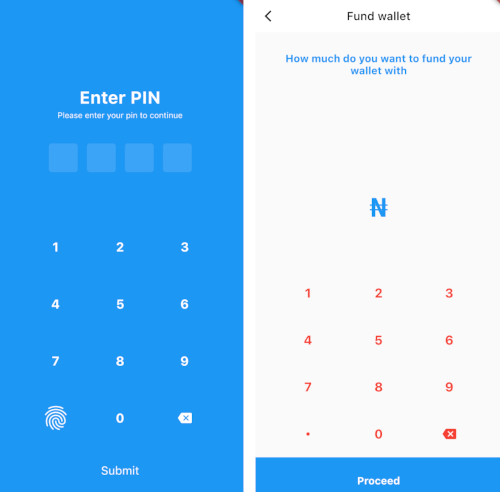
모바일 및 데스크톱 애플리케이션용 사용자 지정 가능한 핀 입력 화면과 맞춤형 키보드를 구현할 수 있도록 해주는 플러터 패키지입니다. PIN, OTP, 비밀번호에 대한 안전한 입력 처리를 지원하며 디자인과 동작에서 유연성을 제공합니다. 이 패키지는 안드로이드, iOS, 웹, 맥OS, 윈도우, 리눅스에 원활하게 통합되어 숫자 또는 사용자 정의 입력이 필요한 인증 흐름에 이상적입니다. 스타일링, 검증 및 콜백 처리를 위한 깔끔한 API를 제공합니다.
사용 사례
PIN 코드를 사용한 사용자 인증
일회용 비밀번호 (OTP) 입력
보안 비밀번호 입력 필드
양식용 사용자 정의 키보드 레이아웃
다중 플랫폼 앱 일관성
주요 기능
사용자 정의 키보드 레이아웃
크로스 플랫폼 지원
보안 입력 처리
사용자 정의 핀 길이
변경 및 완료 콜백
기존 UI와의 간편한 통합
적합한 대상
인증 흐름을 구축하는 개발자
보안 숫자 입력이 필요한 앱
다중 플랫폼을 대상으로 하는 프로젝트
재사용 가능한 핀 컴포넌트를 원하는 팀
사용자 경험 중심의 폼 구현
고려 사항
보안 최선의 실천 방법을 수동으로 처리해야 합니다
길이를 넘어서는 내장 검증은 제한적
복잡한 디자인을 위해 추가 스타일링이 필요할 수 있습니다
비숫자 입력에 최적화되지 않음
플랫폼 고유의 렌더링 동작에 따라 달라집니다
원본 README
연결된 소스 저장소의 README 원문 스냅샷입니다. 최신 내용은 저장소에서 확인하세요.
🔐 custom pin screen
A flutter package to add screens with custom keyboards and pins to your mobile application.
Column(
children: [
constPadding(
padding: EdgeInsets.symmetric(
horizontal: 35.0,
vertical: 35.0,
),
child: Text(
"How much do you want to fund your wallet with",
textAlign: TextAlign.center,
style: TextStyle(
color: Colors.blue,
fontWeight: FontWeight.w700,
fontSize: 18,
),
),
),
Expanded(
child: CustomAppKeyBoard(
onChanged: (v) {
if (kDebugMode) {
print(v);
}
},
onbuttonClick: () {
if (kDebugMode) {
print('clicked');
}
},
maxLength: 4,
submitLabel: constText(
'Proceed',
style: TextStyle(
color: Colors.white,
fontWeight: FontWeight.w700,
fontSize: 18,
),
),
// ),
))
],
)
For more info, please, refer to the main.dart in the example.
📸 ScreenShots
🐛 Bugs/Requests
If you encounter any problems feel free to open an issue. If you feel the library is
missing a feature, please raise a ticket on Github and I'll look into it.
Pull request are also welcome.
❗️ Note
This project is a starting point for a Flutter
plug-in package,
a specialized package that includes platform-specific implementation code for
Android and/or iOS.
For help getting started with Flutter, view our
online documentation, which offers tutorials,
samples, guidance on mobile development, and a full API reference.