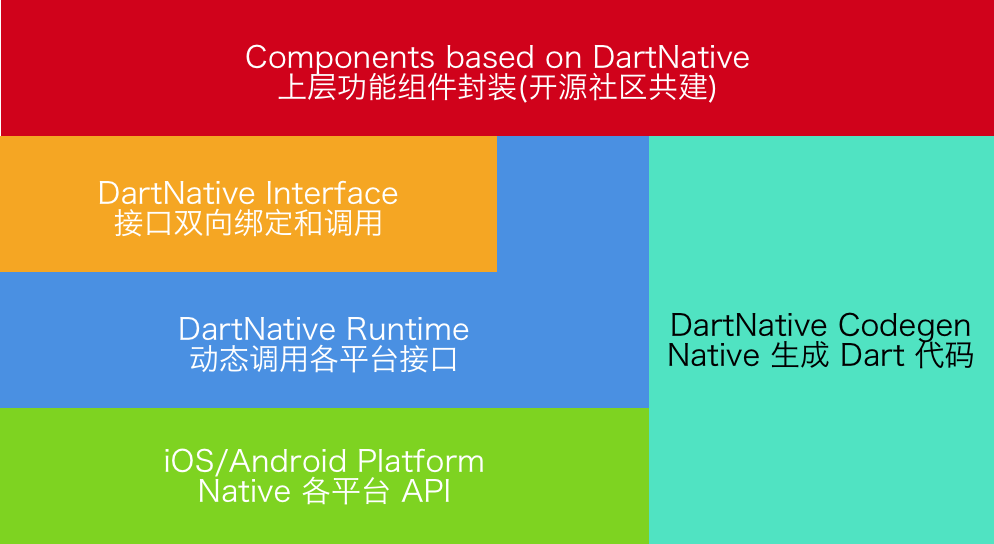
Dart_Native는 개발자가 Dart로 직접 네이티브 모바일 및 데스크톱 애플리케이션을 작성할 수 있게 해주며, 플랫폼별 코드나 성능 부담이 큰 인터옵 채널의 필요성을 제거합니다. Dart의 강력한 타입과 현대적인 구문을 활용하여 안드로이드, iOS, macOS에서 네이티브 API에 원활하게 접근할 수 있습니다. 이 패키지는 고수준 Dart 개발과 저수준 시스템 기능 사이의 격차를 메우며, 다양한 플랫폼 간 통합된 워크플로우를 제공합니다. 단일 코드베이스를 유지하면서도 네이티브 성능과 장치 기능에 접근하고자 하는 팀에게 이상적입니다.
사용 사례
크로스플랫폼 앱 개발
Dart에서 네이티브 API 접근
플랫폼별 코드 제거
고성능 모바일 앱
다중 플랫폼용 통합 코드베이스
주요 기능
Dart에서 직접 네이티브 코드 작성
Android, iOS 및 macOS 지원
저성능 채널에 의존하지 않음
네이티브 API와의 원활한 통합
다중 플랫폼용 단일 코드베이스
적합한 대상
모바일/데스크톱 앱용으로 Dart를 사용하는 개발자
네이티브 언어의 복잡성 회피하는 팀
네이티브 성능을 필요로 하는 프로젝트
크로스플랫폼 애플리케이션 개발
반복 코드와 상호 운용 오버헤드를 줄이려는 사람
고려 사항
기존 네이티브 도구에 비해 생태계가 제한적
초기 단계 채택은 더 깊이 있는 디버깅을 필요로 할 수 있습니다
네이티브 플랫폼 개념을 이해해야 합니다
아직 모든 특수한 네이티브 기능을 지원하지 않을 수 있습니다
원격 통합 패턴에 익숙하지 않은 개발자를 위한 학습 곡선
원본 README
연결된 소스 저장소의 README 원문 스냅샷입니다. 최신 내용은 저장소에서 확인하세요.
DartNative
DartNative operates as a bridge to communicate between Dart and native APIs.
Replaces the low-performing Flutter channel with faster and more concise code.
Features
Dynamic synchronous & asynchronous channeling
DartNative calls any native API dynamically. It supports both synchronous and asynchronous channeling.
Direct call between multi-language interfaces
Serialization of parameters and return values like Flutter Channel is no longer required. DartNative provides direct calls and automatic object marshalling between language interfaces.
Dart finalizer
Dart finalizer is only supported above Flutter 3(Dart 2.17), but with DartNative it is available in Dart Flutter 2.2.0(Dart 2.13.0) and up.
Autogenerate succinct bridging code
DartNative supports automatic type conversion so its bridging code is shorter & simpler than the Flutter channel.
The design and vision of this package:
Requirements
DartNative Version
Flutter Requirements
Codegen Version
0.4.x - 0.7.x
Flutter 2.2.0 (Dart 2.13.0)
2.x
0.3.x
Flutter 1.20.0 (Dart 2.9.1)
1.2.x
0.2.x
Flutter 1.12.13 (Dart 2.7)
1.x
Supported Platforms
iOS & macOS & Android
Usage
Basic usage: Interface binding
Add dart_native to dependencies and build_runner to dev_dependencies. Then you can write code. Here are some examples:
Dart calls Native
Dart code:
finalinterface = Interface("MyFirstInterface");
// Exampleforstringtype.
StringhelloWorld() {
returninterface.invokeMethodSync('hello', args: ['world']);
}
// Example for num type.Future<int> sum(int a, int b) {
returninterface.invokeMethod('sum', args: [a, b]);
}
// load libdart_native.so
DartNativePlugin.loadSo();

@InterfaceEntry(name = "MyFirstInterface")
public class InterfaceDemo extends DartNativeInterface {

    @InterfaceMethod(name = "hello")
    public String hello(String str) {
        return "hello " + str;
    }

    @InterfaceMethod(name = "sum")
    public int sum(int a, int b) {
        return a + b;
    }
}
NOTE: If your so path is custom, you need pass specific path.
invokeMethod("totalCost", new Object[]{0.123456789, 10, Arrays.asList("hello", "world")},
             new DartNativeResult() {
                @Override
                public void onResult(@Nullable Object result) {
                    Map retMap = (Map) result;
                    // do something
                }

                @Override
                public void error(@Nullable String errorMessage) {
                    // do something
                }
              }
);
Dart finalizer
final foo = Bar(); // A custom instance.
unitTest.addFinalizer(() { // register a finalizer callback.print('The instance of \'foo\' has been destroyed!'); // When `foo` is destroyed by GC, this line of code will be executed.
});
Data types support
Dart
Objective-C
Swift
Java
null
nil
nil
null
bool
BOOL
Bool
bool
int
NSInteger
Int
int
double
double
Double
double
String
NSString
String
String
List
NSArray
Array
List, ArrayList
Map
NSDictionary
Dictionary
Map, HashMap
Set
NSSet
Set
Set, HashSet
Function
Block
Closure
Promise
Pointer
void *
UnsafeMutableRawPointer
-
NativeByte
NSData
Data
DirectByteBuffer
NativeObject
NSObject
NSObject
Object
Advanced usage: Invoke methods dynamically
Step 1: Add dart_native to dependencies and build_runner to dev_dependencies.
Step 2: Generate Dart wrapper code with @dartnative/codegen or write Dart code manually.
Step 3: Generate code for automatic type conversion using dart_native_gen with the following steps (3.1-3.3):
3.2 Annotate your own entry (such asmain()) with @nativeRoot.
@nativeRootvoidmain() {
runApp(App());
}
3.3 Run
flutter packages pub run build_runner build --delete-conflicting-outputs
to generate files into your source directory.
Note: we recommend running clean first:
flutter packages pub run build_runner clean
Step 4: Call autogenerated function in <generated-name>.dn.dart in 3.3. The function name is determined by name in pubspec.yaml.
@nativeRootvoidmain() {
// Function name is generated by name in pubspec.yaml.runDartNativeExample();
runApp(App());
}
Step 5: Then you can write code. Here are some examples:
5.1 iOS:
Dart code (generated):
// new Objective-C object.RuntimeStub stub = RuntimeStub();
// Dart function will be converted to Objective-C block.
stub.fooBlock((NSObject a) {
print('hello block! ${a.toString()}');
return101;
});
// support built-in structs.CGRect rect = stub.fooCGRect(CGRect(4, 3, 2, 1));
print(rect);