패키지, 저장소 및 앱 카테고리 검색

패키지 상세v1.0.1

dashed_container

Flutter용 점선 컨테이너 플러그인으로 위젯에 점선을 쉽게 적용할 수 있습니다.

30일 다운로드
79
좋아요
15
Pub 점수
25

패키지 설치

flutter pub add dashed_container

패키지 개요

공개 정보를 바탕으로 생성한 선택 가이드입니다.

dashed_container 패키지는 위젯 주변에 점선 테두리를 쉽게 만들 수 있도록 도와주는 플러터 플러그인입니다. 점선 길이, 간격, 색상, 선 두께 등 사용자 정의 가능한 점선 스타일을 제공하는 사용하기 쉬운 컨테이너를 포함합니다. 폼 필드, 카드, 장식용 외곽선과 같이 시각적 구분이나 강조가 필요한 UI 요소에 이상적입니다. 이 패키지는 복잡한 사용자 정의 페인팅 코드 없이 부드럽고 확장 가능한 점선을 렌더링하기 위해 플러터의 페인팅 시스템을 활용합니다. 간단한 pub 종속성으로 기존 플러터 프로젝트에 원활하게 통합할 수 있습니다.

사용 사례

  • UI 컴포넌트에 점선 테두리 추가
  • 폼 필드 하이라이트 만들기
  • 장식적인 카드 외곽선 디자인
  • 레이아웃 내 시각적 분리
  • 테두리 미적 요소 맞춤 설정

주요 기능

  • 점선 테두리용 간단한 API
  • 사용자 정의 가능한 점선 길이 및 간격
  • 사용자 정의 색상 및 선 두께 지원
  • 경량이고 효율적
  • 내부의 어떤 위젯과도 함께 작동

적합한 대상

  • 시각적 다양성을 찾는 UI 디자이너
  • 양식 또는 카드를 구축하는 개발자
  • 경량 장식이 필요한 프로젝트
  • Flutter 초보자가 사용자 지정 테두리를 탐색하고 있습니다
  • 현대적이고 미니멀리스트 디자인의 앱

고려 사항

  • 경계 장식에만 제한됨
  • 대시형 채우기 지원 없음
  • 복잡한 클리핑을 처리하지 않습니다
  • 간단한 사각형 형태에 가장 적합
  • 복잡한 레이아웃에서는 수동 정렬이 필요할 수 있습니다

원본 README

연결된 소스 저장소의 README 원문 스냅샷입니다. 최신 내용은 저장소에서 확인하세요.

dashed_container

A Dashed Container plugin for Flutter, easy to implement dashed line for your widgets

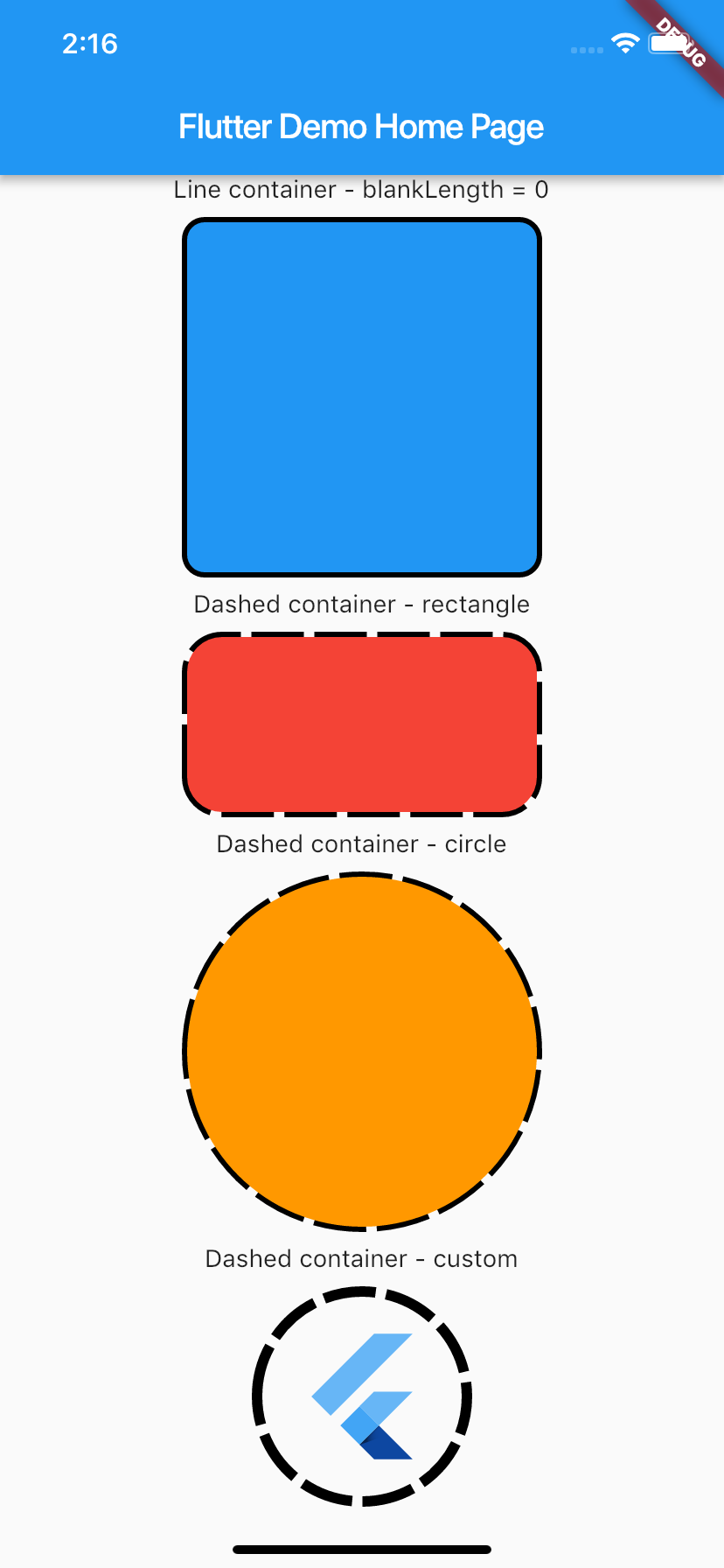
Demo

Demo:

Usage

To use plugin, just import package import 'package:dashed_container/dashed_container.dart';

Example

You can check example directory to know how to use it like the demo image.

    import 'package:flutter/material.dart';
    import 'package:dashed_container/dashed_container.dart';

    void main() => runApp(MyApp());

    class MyApp extends StatelessWidget {
      @override
      Widget build(BuildContext context) {
        return MaterialApp(
          title: 'Flutter Demo',
          theme: ThemeData(
            primarySwatch: Colors.blue,
          ),
          home: MyHomePage(title: 'Flutter Demo Home Page'),
        );
      }
    }

    class MyHomePage extends StatefulWidget {
      MyHomePage({Key key, this.title}) : super(key: key);

      final String title;

      @override
      _MyHomePageState createState() => _MyHomePageState();
    }

    class _MyHomePageState extends State<MyHomePage> {
      @override
      Widget build(BuildContext context) {
        return Scaffold(
          appBar: AppBar(title: Text(widget.title)),
          body: SingleChildScrollView(
            child: Center(
              child: Column(
                mainAxisSize: MainAxisSize.max,
                crossAxisAlignment: CrossAxisAlignment.center,
                mainAxisAlignment: MainAxisAlignment.center,
                children: <Widget>[
                  Text('Line container - blankLength = 0'),
                  _buildSpace(),
                  DashedContainer(
                    child: Container(
                      height: 200.0,
                      width: 200.0,
                      decoration: BoxDecoration(color: Colors.blue, borderRadius: BorderRadius.circular(10.0)),
                    ),
                    dashColor: Colors.black,
                    borderRadius: 10.0,
                    dashedLength: 30.0,
                    blankLength: 0.0,
                    strokeWidth: 6.0,
                  ),
                  _buildSpace(),
                  Text('Dashed container - rectangle'),
                  _buildSpace(),
                  DashedContainer(
                    child: Container(
                      height: 100.0,
                      width: 200.0,
                      decoration: BoxDecoration(color: Colors.red, borderRadius: BorderRadius.circular(20.0)),
                    ),
                    dashColor: Colors.black,
                    borderRadius: 20.0,
                    dashedLength: 30.0,
                    blankLength: 6.0,
                    strokeWidth: 6.0,
                  ),
                  _buildSpace(),
                  Text('Dashed container - circle'),
                  _buildSpace(),
                  DashedContainer(
                    child: Container(
                      height: 200.0,
                      width: 200.0,
                      decoration: BoxDecoration(color: Colors.orange, shape: BoxShape.circle),
                    ),
                    dashColor: Colors.black,
                    boxShape: BoxShape.circle,
                    dashedLength: 30.0,
                    blankLength: 6.0,
                    strokeWidth: 6.0,
                  ),
                  _buildSpace(),
                  Text('Dashed container - custom'),
                  _buildSpace(),
                  DashedContainer(
                    child: Padding(
                      padding: const EdgeInsets.all(20.0),
                      child: FlutterLogo(
                        size: 80,
                      ),
                    ),
                    dashColor: Colors.black,
                    boxShape: BoxShape.circle,
                    dashedLength: 30.0,
                    blankLength: 6.0,
                    strokeWidth: 6.0,
                  ),
                  _buildSpace(),
                ],
              ),
            ),
          ),
        );
      }

      Widget _buildSpace() {
        return SizedBox(height: 10.0);
      }
    }

카테고리

소스 저장소

이 패키지를 사용하는 프로젝트

아직 데이터가 없습니다.