패키지, 저장소 및 앱 카테고리 검색

detectable_text_field 표지
패키지 상세v3.0.2

detectable_text_field

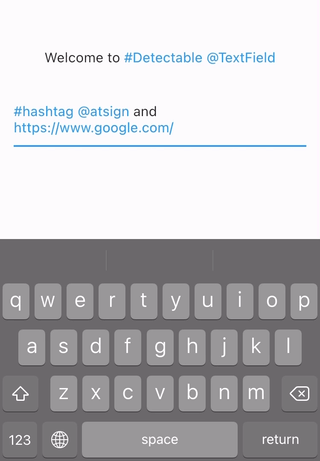
감지 기능이 있는 TextField입니다. 해시태그, @기호, URL 또는 원하는 모든 것을 감지할 수 있습니다. 트위터와 유사한 앱을 개발하는 데 도움이 됩니다. hashtagable의 개선된 버전입니다.

AndroidiOSWebmacOSWindowsLinux
30일 다운로드
3.5천
좋아요
165
Pub 점수
130

패키지 설치

flutter pub add detectable_text_field

패키지 개요

공개 정보를 바탕으로 생성한 선택 가이드입니다.

실시간으로 해시태그, @멘션, URL 및 사용자 정의 정규 표현식 패턴을 감지하고 강조하는 플러터 텍스트 필드입니다. 트위터와 유사한 소셜 미디어 앱 개발을 위해 설계되었으며, 상호작용 가능한 텍스트 파싱을 통해 사용자 입력을 향상시킵니다. 이 패키지는 전신인 hashtagable의 기능을 더욱 세련되게 개선하여 더 큰 유연성과 맞춤 설정 가능성을 제공합니다. Android, iOS, Web, macOS, Windows, Linux 등 다양한 플랫폼을 지원하여 크로스플랫폼 리치 텍스트 애플리케이션에 이상적입니다.

사용 사례

  • 소셜 미디어 앱 개발
  • 실시간 텍스트 패턴 감지
  • 트위터와 유사한 입력 필드
  • 사용자 정의 텍스트 강조
  • 메시징 앱에서의 리치 텍스트 편집
  • 인터랙티브 URL 및 태그 인식

주요 기능

  • 사용자 정의 정규 표현식 패턴 감지를 지원
  • 실시간 텍스트 분석
  • 사용자 정의 가능한 하이라이트 스타일
  • 크로스 플랫폼 호환성
  • 기존 TextField와의 간편한 통합
  • 추가 패턴 유형을 위한 확장 가능

적합한 대상

  • 소셜 네트워킹 앱을 개발하는 개발자
  • 동적 텍스트 형식 지정이 필요한 앱
  • 풍부한 텍스트 입력 컴포넌트를 생성하는 팀
  • 다중 플랫폼을 대상으로 하는 Flutter 개발자
  • 고급 텍스트 필드 동작을 원하는 사용자

고려 사항

  • 사용자 정의 패턴을 위해 정규 표현식을 신중하게 구성해야 합니다
  • 복잡한 패턴과 함께 성능에 영향을 미칠 수 있습니다
  • 기본 사용법 외에 문서가 제한적
  • 매우 긴 텍스트 입력에 최적화되지 않음
  • 업데이트를 위해 외부 GitHub 저장소에 의존합니다

원본 README

연결된 소스 저장소의 README 원문 스냅샷입니다. 최신 내용은 저장소에서 확인하세요.

detectable_text_field

All Contributors

pub package License: MIT

Text widgets with detection features. You can detect hashtags, at sign, url, or anything you want. Helps you develop Twitter like app.

Refinement of hashtagable.

final

Usage

DetectableTextField
    DetectableTextField(
      detectionRegExp: detectionRegExp(),
      detectedStyle: TextStyle(
        fontSize: 20,
        color: Colors.blue,
      ),
    )
  • detectionRegExp decides the text to detect.
  • detectedStyle is the textStyle for detected text.
DetectableTextEditingController

DetectableTextEditingController allows you to listen to the typingDetection. Ideal for features like live hashtag or mention detection.


    final controller = DetectableTextEditingController(
      regExp: detectionRegExp(),
    );
    
    @override
    void initState() {
      super.initState();
      controller.addListener(() {
        setState(() {});
      });
    }
    
    @override
    Widget build(BuildContext context) {
      return Column(
        mainAxisSize: MainAxisSize.min,
        mainAxisAlignment: MainAxisAlignment.center,
        children: <Widget>[
          Text(
            'Typing detection: ${controller.typingDetection}',
          ),
          DetectableTextField(
            controller: controller,
          ),
        ],
      );
    }

DetectableTextEditingController extends TextEditingController, so you can use it with TextField, TextFormField or any other widgets that accept TextEditingController.

If you use flutter_hooks, useDetectableTextEditingController is also available.

DetectableText

If you want to use detection feature in the text only to display, use DetectableText.

    DetectableText(
      text: "#HashTag and @AtSign and https://pub.dev/packages/detectable_text_field",
      detectionRegExp: detectionRegExp(),
      detectedStyle: TextStyle(
        fontSize: 20,
        color: Colors.blue,
      ),
      basicStyle: TextStyle(
        fontSize: 20,
      ),
      onTap: (tappedText){
        print(tappedText);
      },
    )

Usage of the arguments like detectionRegExp are same as the ones in DetectableTextField.

The argument onTap(String) is called when user tapped a detected text.

detectionRegExp()

The widgets and methods in this package is expected to be used with RegExp.

The function detectionRegExp() returns sample regExp depending on the boolean arguments: hashtag , atSign, and url.They are all true by default.

If you see the API reference , you will see the function just returns the sample regular expressions below. You can use them directly if you want.

sample regExp hashtag atSign url
hashTagRegExp ○ × ×
atSignRegExp × ○ ×
urlRegExp × × ○
hashTagAtSignRegExp ○ ○ ×
hashTagUrlRegExp ○ × ○
AtSignUrlRegExp × ○ ○
hashTagAtSignUrlRegExp ○ ○ ○
  • The detection rules are almost same as X(formally twitter).
    1. It needs space before # or @.
    2. It stops # and @ detection if there's emoji or symbol.
  • The examples currently support six languages: English, Japanese, Korean, Spanish, Arabic, and Thai.
Customize with useful functions
  • Check if there are detections
  print(isDetected("Hello #World", hashTagRegExp));
// true

  print(isDetected("Hello World", hashTagRegExp));
// false

  • Extract detections from text

  final List<String> detections = extractDetections(
    "#Hello World #Flutter Dart #Thank you", 
    hashTagRegExp,
  );
  // ["#Hello", "#Flutter", "#Thank"]

If you have any requests or questions, please feel free to ask on github.

Contributors ✨

Thanks goes to these wonderful people (emoji key):

Santa Takahashi
Santa Takahashi

💻
Paresh Patil
Paresh Patil

💻
Joseph Muller
Joseph Muller

💻
Esteve Aguilera
Esteve Aguilera

💻
MATTYGILO
MATTYGILO

💻
Abdullahi A. Addow
Abdullahi A. Addow

💻
Social Jawn
Social Jawn

💻
xuxiaowei13
xuxiaowei13

💻
debuggerx01
debuggerx01

💻
furukaze-akane
furukaze-akane

💻
drown0315
drown0315

💻

This project follows the all-contributors specification. Contributions of any kind welcome!

카테고리

의존성

의존성 목록 1 개

소스 저장소

이 패키지를 사용하는 프로젝트

아직 데이터가 없습니다.