패키지, 저장소 및 앱 카테고리 검색

external_path_ios_mac 표지
패키지 상세v0.0.8

external_path_ios_mac

iOS 및 macOS 장치에서 디렉터리 경로를 검색하기 위한 Flutter 패키지로, 플랫폼 간 파일 액세스 및 관리를 보장합니다.

iOSmacOS
30일 다운로드
271
좋아요
3
Pub 점수
160

패키지 설치

flutter pub add external_path_ios_mac

패키지 개요

공개 정보를 바탕으로 생성한 선택 가이드입니다.

iOS 및 macOS 장치에서 표준화된 디렉터리 경로를 검색하도록 설계된 플러터 패키지로, 두 플랫폼 간 일관된 파일 액세스 및 관리를 가능하게 합니다. 문서, 다운로드, 캐시와 같은 외부 저장 위치 처리를 신뢰할 수 있는 경로 해결을 통해 단순화합니다. 플랫폼별 코드 없이 크로스플랫폼 파일 시스템 상호작용이 필요한 앱에 특히 유용합니다. 단순성과 신뢰성을 중심으로 설계되어 개발자가 통합적인 방식으로 파일 작업을 효율적으로 관리할 수 있도록 보장합니다.

사용 사례

  • 사용자 문서 디렉터리에 액세스
  • 앱 캐시 파일 관리
  • 다운로드 폴더 처리
  • 다중 플랫폼 파일 경로 해결
  • 외부 스토리지와의 통합

주요 기능

  • 플랫폼에 관계없는 경로 검색
  • iOS 및 macOS 지원
  • 일반적인 디렉터리용 간단한 API
  • 신뢰할 수 있는 경로 해결
  • 추가 권한이 필요하지 않습니다

적합한 대상

  • 파일 중심 애플리케이션
  • 크로스 플랫폼 플러터 앱
  • 외부 저장소 접근이 필요한 앱
  • 네이티브 코드를 피하는 개발자
  • 일관된 파일 경로가 필요한 프로젝트

고려 사항

  • iOS 및 macOS에 한정
  • 파일 생성 또는 삭제를 처리하지 않습니다
  • 플랫폼 고유의 디렉터리 의미를 이해해야 합니다
  • 안드로이드 또는 윈도우용으로 적합하지 않습니다
  • 경로 상수의 올바른 사용에 의존함

원본 README

연결된 소스 저장소의 README 원문 스냅샷입니다. 최신 내용은 저장소에서 확인하세요.

external_path_ios_mac

A Flutter package for retrieving directory paths on iOS and macOS devices, ensuring file access and management across platforms.

Platform support: iOS ✓ | macOS ✓


Getting Started

Add the dependency to your pubspec.yaml file:

dependencies:
  external_path_ios_mac: ^0.0.8

Alternatively, you can use the Git repository:

dependencies:
  external_path_ios_mac:
    git:
      url: https://github.com/SwanFlutter/external_path_ios_mac.git


How to Use

Import the package in your Dart file:

import 'package:external_path_ios_mac/external_path_ios_mac.dart';

Supported Directories

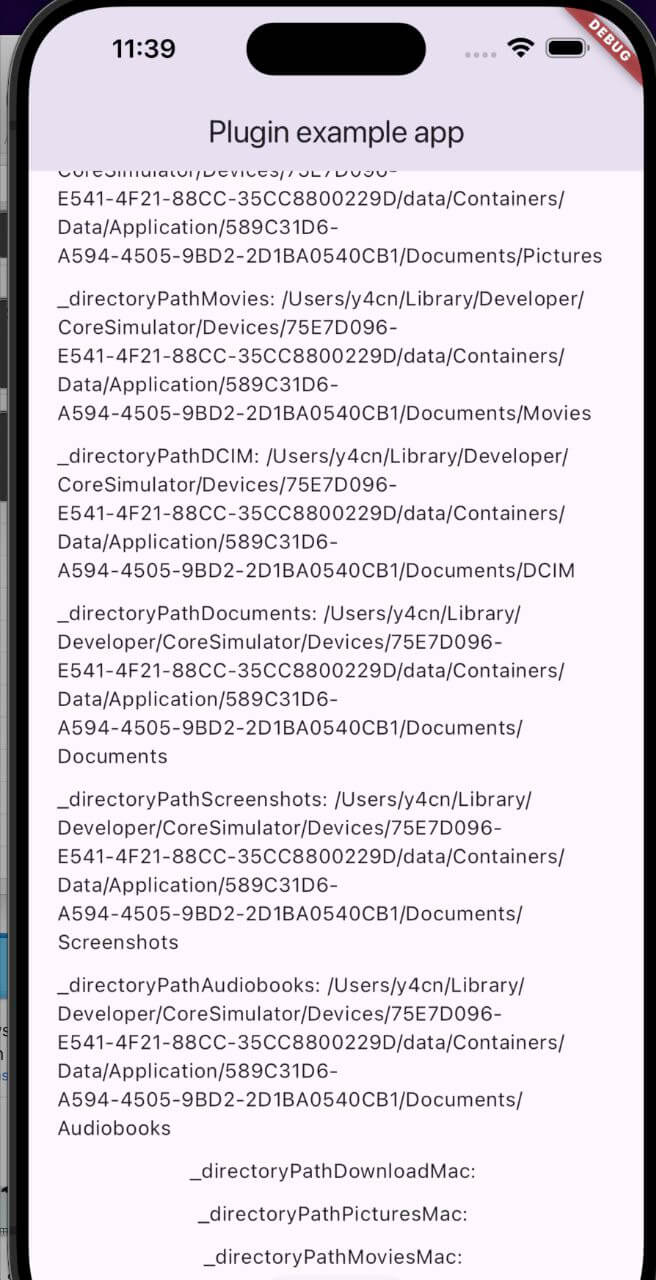
iOS Directories
Directory Type Description
DirectoryType.downloads Path to the Downloads directory.
DirectoryType.music Path to the Music directory.
DirectoryType.podcasts Path to the Podcasts directory.
DirectoryType.ringtones Path to the Ringtones directory.
DirectoryType.alarms Path to the Alarms directory.
DirectoryType.notifications Path to the Notifications directory.
DirectoryType.pictures Path to the Pictures directory.
DirectoryType.movies Path to the Movies directory.
DirectoryType.dcim Path to the DCIM directory.
DirectoryType.documents Path to the Documents directory.
DirectoryType.screenshots Path to the Screenshots directory.
DirectoryType.audiobooks Path to the Audiobooks directory.
macOS Directories
Directory Type Description
MacDirectoryType.downloads Path to the Downloads directory.
MacDirectoryType.pictures Path to the Pictures directory.
MacDirectoryType.movies Path to the Movies directory.

Example Usage

Retrieving Directory Paths on iOS
final externalPath = ExternalPathIosMac();

// Downloads directory
final downloadsPath = await externalPath.getDirectoryPath(
  directory: DirectoryType.downloads,
);

// Music directory
final musicPath = await externalPath.getDirectoryPath(
  directory: DirectoryType.music,
);

// Documents directory
final documentsPath = await externalPath.getDirectoryPath(
  directory: DirectoryType.documents,
);

// DCIM directory
final dcimPath = await externalPath.getDirectoryPath(
  directory: DirectoryType.dcim,
);
Retrieving Directory Paths on macOS
final externalPath = ExternalPathIosMac();

// Downloads directory
final downloadsPathMac = await externalPath.getDirectoryPathMacOs(
  directory: MacDirectoryType.downloads,
);

// Pictures directory
final picturesPathMac = await externalPath.getDirectoryPathMacOs(
  directory: MacDirectoryType.pictures,
);

// Movies directory
final moviesPathMac = await externalPath.getDirectoryPathMacOs(
  directory: MacDirectoryType.movies,
);
Retrieving Platform Version
final platformVersion = await externalPath.getPlatformVersion();
print('Platform Version: $platformVersion');
Retrieving Root Installation Path
final externalPath = ExternalPathIosMac();

try {
  final rootPath = await externalPath.getRootInstallationPath();
  print('Root installation path: $rootPath');
} catch (e) {
  print('Error: $e');
}

On iOS, returns the main bundle path. On macOS, returns the application's installation directory.


Full Example

import 'package:flutter/material.dart';
import 'dart:io';
import 'package:external_path_ios_mac/external_path_ios_mac.dart';

class MyApp extends StatefulWidget {
  const MyApp({super.key});

  @override
  State<MyApp> createState() => _MyAppState();
}

class _MyAppState extends State<MyApp> {
  final _externalPath = ExternalPathIosMac();

  String _platformVersion = '';
  String _downloadsPath = '';
  String _musicPath = '';
  String _documentsPath = '';
  String _downloadsPathMac = '';
  String _picturesPathMac = '';

  @override
  void initState() {
    super.initState();
    _initPlatformState();
  }

  Future<void> _initPlatformState() async {
    final platformVersion = await _externalPath.getPlatformVersion();

    // iOS paths
    final downloadsPath = await _externalPath.getDirectoryPath(
      directory: DirectoryType.downloads,
    );
    final musicPath = await _externalPath.getDirectoryPath(
      directory: DirectoryType.music,
    );
    final documentsPath = await _externalPath.getDirectoryPath(
      directory: DirectoryType.documents,
    );

    // macOS paths
    final downloadsPathMac = await _externalPath.getDirectoryPathMacOs(
      directory: MacDirectoryType.downloads,
    );
    final picturesPathMac = await _externalPath.getDirectoryPathMacOs(
      directory: MacDirectoryType.pictures,
    );

    setState(() {
      _platformVersion = platformVersion ?? 'Unknown';
      _downloadsPath = downloadsPath ?? 'Unknown';
      _musicPath = musicPath ?? 'Unknown';
      _documentsPath = documentsPath ?? 'Unknown';
      _downloadsPathMac = downloadsPathMac ?? 'Unknown';
      _picturesPathMac = picturesPathMac ?? 'Unknown';
    });
  }

  Future<void> _saveFile(String path, String fileName) async {
    if (path != 'Unknown') {
      final file = File('$path/$fileName');
      await file.writeAsString('Sample content');
      print('File saved to $path/$fileName');
    }
  }

  @override
  Widget build(BuildContext context) {
    return MaterialApp(
      home: Scaffold(
        appBar: AppBar(title: const Text('Directory Paths Example')),
        body: Center(
          child: Column(
            mainAxisAlignment: MainAxisAlignment.center,
            children: [
              Text('Platform: $_platformVersion'),
              const SizedBox(height: 16),
              Text('iOS Downloads: $_downloadsPath'),
              Text('iOS Music: $_musicPath'),
              Text('iOS Documents: $_documentsPath'),
              const SizedBox(height: 16),
              Text('macOS Downloads: $_downloadsPathMac'),
              Text('macOS Pictures: $_picturesPathMac'),
              const SizedBox(height: 16),
              ElevatedButton(
                onPressed: () => _saveFile(_downloadsPath, 'example.txt'),
                child: const Text('Save File to Downloads'),
              ),
            ],
          ),
        ),
      ),
    );
  }
}

Platform-Specific Setup

iOS

Add the following keys to your Info.plist if your app accesses photos or camera:

<key>NSPhotoLibraryUsageDescription</key>
<string>We need access to your photo library.</string>
<key>NSCameraUsageDescription</key>
<string>We need access to your camera.</string>
macOS

Add the following entitlement to macos/Runner/DebugProfile.entitlements and macos/Runner/Release.entitlements:

<key>com.apple.security.files.user-selected.read-only</key>
<true/>

Swift Package Manager

This package supports Swift Package Manager (SPM) for both iOS and macOS, compatible with Flutter 3.44+. CocoaPods is also supported for backwards compatibility.


Additional Information

For issues, questions, or suggestions, contact us at [swan.dev1993@gmail.com](mailto:swan.dev1993@gmail.com) or visit our GitHub repository.

카테고리

의존성

의존성 목록 1 개

  • plugin_platform_interface^2.1.8

소스 저장소

이 패키지를 사용하는 프로젝트

아직 데이터가 없습니다.