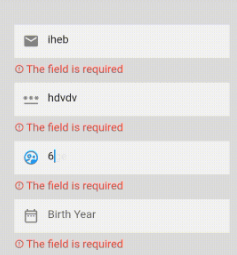
EzValidator는 Flutter용 가볍고 직관적인 검증 패키지로, 필드 및 객체 스키마 검증을 간소화합니다. Yup과 Zod에서 영감을 받아 최소한의 반복 코드로 검증 규칙을 정의할 수 있는 깔끔하고 표현력이 풍부한 API를 제공합니다. 동기 및 비동기 검증을 지원하여 폼, 사용자 입력, 여러 플랫폼 간 데이터 무결성 검사에 이상적입니다. 내장된 검증기와 쉽게 사용자 정의할 수 있는 기능으로 EzValidator는 Flutter 앱에서 폼 처리를 간편하게 만듭니다.
사용 사례
폼 입력 검증
사용자 등록 흐름
데이터 모델 검증
폼에서의 실시간 피드백
API 요청 본문 검증
주요 기능
간단하고 읽기 쉬운 구문
비동기 검증을 지원합니다
내장 검증기
스키마 기반 검증
확장 가능한 오류 메시지
크로스 플랫폼 호환성
적합한 대상
초보자에서 중급자까지의 Flutter 개발자
강력한 폼 검증이 필요한 앱
반응형 또는 상태 관리 패턴을 사용하는 프로젝트
개발자 경험을 우선시하는 팀
고려 사항
기본 검증 요구 사항에 국한됨(복잡한 사용자 정의 로직은 기본적으로 제공되지 않음)
고급 사용 사례를 위해 추가 설정이 필요할 수 있습니다
에지 케이스에 대한 설명이 더 자세했으면 좋겠습니다
원본 README
연결된 소스 저장소의 README 원문 스냅샷입니다. 최신 내용은 저장소에서 확인하세요.
Ez Validator
EzValidator offers a dead-simple approach to field and object schema validation tailored for Flutter. Inspired by the intuitive API of Yup, EzValidator simplifies the process of defining and enforcing data schemas within your Flutter applications.
Key Features of EzValidator
Flutter Schema Builder: Seamlessly integrate EzValidator into your Flutter projects to build and manage data validation schemas.
Versatile Validation: Whether you need to validate individual fields or entire objects, EzValidator is designed to handle both with ease.
Installing
Add EzValidator to your pubspec:
dependencies:ez_validator:any# or the latest version on Pub
Getting Started
To begin with EzValidator, define a schema object that represents the structure and validation rules for your data. Below is an example demonstrating how to create a schema for user data, including validations for email, password, and date fields.
Defining a Schema
Create a schema using EzSchema.shape where each field in the data object is associated with an EzValidator specifying its validation rules:
If there are validation errors, errors will contain a map of field names to error messages. For example:
{
  "password": "Minimum six characters, at least one letter, one number and one special character",
  "age": "The field must be greater than or equal to 18"
}
If the data object is valid according to the schema, errors will be an empty map ({}).
Additionally, use the validateSync method to validate data and simultaneously retrieve the processed data along with any errors:
If there are validation errors, the errors map will contain field names and their corresponding error messages.
If the data object passes all validations, errors will be an empty map ({}).
The data map returned by validateSync contains the processed data, which may include default values set by the schema.
Custom Validation with addMethod
EzValidator also supports custom validation rules through the addMethod function. This feature allows you to define your own validation logic, making EzValidator highly adaptable to various unique use cases.
Using addMethod for Custom Validation
You can use addMethod to add custom validation functions to your validator. Each function should take the value to be validated as an argument and return null if the value passes the validation or an error message if it fails.
Here's an example of using addMethod to validate a JSON structure:
final checkJson = EzValidator<Map<String, dynamic>>()
    .addMethod((v) => v?['foo'] == 'bar' ? null : 'Foo should be bar')
    .addMethod((v) => v?['bar'] == 'Flutter' ? null : 'Bar should be Flutter')
    .addMethod((v) => v?['items'][0] == 'a' ? null : 'First item should be a')
    .build();

final errors = checkJson({
  'foo': 'bar',
  'bar': 'Flutter',
  'items': ['a', 'b', 'c']
});

print(errors); // Outputs the validation errors, if any
If any of these checks fail, the corresponding error message is returned.
Flexibility of Custom Validation
The addMethod function opens up endless possibilities for custom validation logic, allowing EzValidator to be tailored to your specific validation needs.
Direct Use in Flutter Widgets
EzValidator is designed to integrate smoothly with Flutter widgets, providing a straightforward way to add validation to user inputs. One common use case is within forms, where you can directly use EzValidator in form fields such as TextFormField.
Example: Email Validation in a TextFormField
Here's an example of how to apply EzValidator for email validation in a TextFormField:
If the input fails these validations, the corresponding error message is displayed under the TextFormField.
Validation Methods
EzValidator offers a wide range of validation methods to suit different data types and validation scenarios. Below is a breakdown of these methods:
General/Common Validations
.required([String? message]): Ensures that the value is not null or empty. This is a fundamental validation to check for the presence of a value.
.isType(Type type, [String? message]): Validates that the value matches the specified type. This method is useful for type checking in more dynamic contexts.
.minLength(int minLength, [String? message]): Checks that the length of the value (String, List, or Map) is not less than the specified minLength.
.maxLength(int maxLength, [String? message]): Ensures that the length of the value (String, List, or Map) does not exceed the specified maxLength.
.addMethod(bool Function(T? v) validWhen, [String? message]): Allows for the addition of custom validation logic. If the provided function validWhen returns false, the custom error message is returned.
.when(ValidationCallback<T> validator): Provides conditional validation based on the value of another field in the schema. The method accepts a ref, which refers to another field in the schema, and a validator, which is a function that executes the validation logic. The validator function should return null if the validation passes or a custom error message if it fails. This method is particularly useful for scenarios where the validation of one field depends on the value of another field, such as confirming a password.
.dependsOn({required bool Function(Map<dynamic, dynamic>? ref) condition, required EzValidator<T> then, EzValidator<T>? orElse}): Enables conditional validation based on the state of other fields within the same schema. This method requires a condition function, which evaluates the schema's current values and decides which validation to apply based on its return value. If the condition is true, the validation defined in then is applied; otherwise, the validation in orElse (if provided) is applied. This is especially useful for cases where the requirement for a field is dependent on another field's value, offering a flexible way to implement complex validation logic within your schema.
.transform(T Function(T) transformFunction): Applies a transformation function to the field's value before any validation is performed. The method takes a transformFunction which receives the current field value and returns a transformed value. This method is useful for preprocessing the data, such as trimming strings, converting types, or formatting values, before applying the validation rules.
.arrayOf<EzValidator<T>>(EzValidator<T> itemValidator): when you have a list of items that need to be individually validated. This method is ideal for scenarios like validating a list of user inputs, where each input must pass certain validation criteria.
.schema<EzSchema>(EzSchema schema): is ideal for nested or complex data structures where multiple fields need to be validated in relation to each other. It's particularly useful in cases where you need to enforce a specific data format, such as validating JSON objects, complex forms, or data models.
.union(List<EzValidator> validators): Used for composing "OR" types by combining multiple validators into a union
String Validations
.email([String? message]): Validates if the value is a valid email address.
.phone([String? message]): Validates if the value is a valid phone number.
.ip([String? message]): Validates if the value is a correct IPv4 address.
.ipv6([String? message]): Validates if the value is a correct IPv6 address.
.url([String? message]): Validates if the value is a valid URL address.
.uuid([String? message]): Validates if the value is a valid UUID.
.lowerCase([String? message]): Checks if the value is in lowercase.
.upperCase([String? message]): Checks if the value is in uppercase.
.matches(RegExp reg, [String? message]): Validates if the value matches the provided regular expression pattern.
Numerical Validations
.min(num min, [String? message]): Validates if the numeric value is greater than or equal to min.
.max(num max, [String? message]): Validates if the numeric value is less than or equal to max.
.positive([String? message]): Validates if the numeric value is positive.
.negative([String? message]): Validates if the numeric value is negative.
.number([String? message]): Checks if the value is a number.
.isInt([String? message]): Checks if the value is an integer.
.isDouble([String? message]): Checks if the value is a double. Also validates integers, as they can be implicitly converted to doubles.
.notNumber([String? message]): Checks if the value is not a number.
Date Validations
.date([String? message]): Checks if the value is a valid date. If the value is a DateTime object or can be parsed into a DateTime, the validation passes.
.minDate(DateTime date, [String? message]): Ensures the date value is not earlier than the specified minimum date. If the value is a DateTime object and is equal to or after the provided date, the validation passes.
.maxDate(DateTime date, [String? message]): Ensures the date value is not later than the specified maximum date. If the value is a DateTime object and is equal to or before the provided date, the validation passes.
Boolean Validation
.boolean([String? message]): Validates whether the value is a boolean (true or false). This method checks the data type of the value and ensures it is strictly a boolean.
List (Array) Validations
.listOf(Type type, [String? message]): Validates that each element in the list is of the specified type. It iterates through the list and checks if each item matches the given type.
.oneOf(List<T> items, [String? message]): Checks if the value is one of the specified items in the list. It is useful for ensuring a value is among a predefined set of options.
.notOneOf(List<T> items, [String? message]): Ensures that the value is not one of the specified items in the list. This is the opposite of .oneOf and is used to exclude certain values.
Using Custom Locales with EzValidator
EzValidator allows the integration of custom locales, facilitating localization of error messages. Below is an example of creating an Arabic locale (ArLocale) and applying it in EzValidator.
Creating ArLocale
Define the Custom Locale: Implement the EzLocale interface to create ArLocale with Arabic error messages.
classArLocaleimplementsEzLocale{
constArLocale();
// Implement all required methods with Arabic error messages@overrideStringminLength(String v, int n, [String? label]) =>
'${label ?? 'الحقل'} يجب أن يحتوي على الأقل $n أحرف';
// ... other method implementations ...@overrideStringrequired([String? label]) => '${label ?? 'الحقل'} مطلوب';
// Example implementation for a valid email@overrideStringemail(String v, [String? label]) =>
'${label ?? 'الحقل'} ليس بريدًا إلكترونيًا صحيحًا';
// ... further implementations for other methods ...
}
Set the Locale in EzValidator: Configure EzValidator to use the ArLocale.
EzValidator.setLocale(constArLocale());
Use Validators as Usual: Now, the validation error messages will be in Arabic.
Nested Validation Example with EzValidator
EzValidator not only handles simple validations but also excels in managing complex, nested data structures. This is particularly useful when dealing with intricate data models, like user profiles with multiple layers of details. Here’s an example of how you can define a nested validation schema using EzValidator:
final (data, errors) = userProfileSchema.validateSync({
'firstName': 'John',
'lastName': 'Doe',
'email': 'john.doe@example.com',
'age': 30,
'contactDetails': {
'mobile': '+12345678901',
},
'address': {
'street': '123 Main St',
'city': 'Anytown',
'state': 'Anystate',
'zipCode': 12345,
'country': { }, // I will not define the country
},
'employment': {
'current': 'Current Company',
'previous': {
'companyName': 'Previous Company',
'position': 'Previous Position',
'years': 5,
},
},
});
print(data);
// Result of displayed data will contain country with default values// {// firstName: John,// lastName: Doe,// email: john.doe@example.com,// age: 30,// contactDetails: { mobile: +12345678901, landline: null },// address:// {// street: 123 Main St,// city: Anytown,// state: Anystate,// zipCode: 12345,// country:// { name: TUNISIA, code: null, continent: { name: null, code: null } },// },// employment:// {// current: Current Company,// previous:// {// companyName: Previous Company,// position: Previous Position,// years: 5,// },// },// }//print(errors)
// {address: {country: {code: The field is required, continent: {name: The field is required, code: The field is required}}}}
Example Usage of .when and .transform and .dependsOn and .union
This example demonstrates how to use the .when and .transform methods in EzValidator to perform conditional validations and pre-validate data transformations.
finalEzSchema schema = EzSchema.shape({
// Use .transform to trim whitespace before validating the name"name": EzValidator<String>()
.transform((value) => value.trim())
.minLength(3, "Name must be at least 3 characters long."),
// Use .when to validate confirmPassword based on the password field"password": EzValidator<String>()
.minLength(8, "Password must be at least 8 characters long."),
'confirmPassword': EzValidator<String>().when(
(confirmValue, [ref]) => confirmValue == ref?['password']
? null
: 'Password does not match',
),
});
var result = schema.validateSync({
"name": " John ",
"password": "password123",
"confirmPassword": "password123",
});
print(result); // Should be empty if no validation errors
/// Use .dependsOn to dynamically adjust field validation based on another field's value.finalEzSchema carValidationSchema = EzSchema.shape({
"car_type": EzValidator<CarType>(defaultValue: CarType.suv).required(),
"passangers_number": EzValidator<int>().dependsOn(
condition: (ref) => ref!["car_type"] == CarType.suv,
then: EzValidator<int>().required().max(6, 'Max 6 passangers'),
orElse: EzValidator<int>().required().max(4, 'Max 4 passangers'),
),
});
final errors = carValidationSchema.catchErrors({
"car_type": CarType.suv,
"passangers_number": 7,
});
print(errors); // {'passangers_number' : 'Max 6 passangers'}
/// Use .union to compose "OR" types.final schema = EzSchema.shape({
'mixedField': EzValidator().union([
EzValidator<String>().isType(String),
EzValidator<num>().isType(num)
])
});
schema.catchErrors({'mixedField': 'test'}) // passed
schema.catchErrors({'mixedField': true}) // not passed
Getting Transformed Values
final validator = EzValidator<String>()
.transform((value) => value.trim())
.minLength(3)
.build(applyTransform: true);
final result = validator(" hello ");
// result = "hello" (transformed value)final error = validator(" a ");
// error = "Input must be at least 3 characters..." (error message)
This example shows how to use .arrayOf for validating a list of items and .schema for validating nested objects within a schema.
// Define a schema for individual student validationfinalEzSchema studentSchema = EzSchema.shape({
"name": EzValidator<String>().required(),
"age": EzValidator<int>().min(18, "Students must be at least 18 years old."),
});
// Validator for validating a list of studentsfinalEzValidator<List<Map<String, dynamic>>> studentsListValidator =
EzValidator<List<Map<String, dynamic>>>()
.required()
.arrayOf<Map<String, dynamic>>(
EzValidator<Map<String, dynamic>>().schema(studentSchema),
);
// Define a schema for a classroom, which includes a list of studentsfinalEzSchema classroomSchema = EzSchema.shape({
"className": EzValidator<String>().required(),
"students": studentsListValidator,
});
var result = classroomSchema.validateSync({
"className": "Advanced Mathematics",
"students": [
{"name": "John Doe", "age": 20},
{"name": "Jane Smith", "age": 17}, // ---> This will cause a validation error
],
});
print(result.$2); // {students: {"age":"Students must be at least 18 years old."}}
Example Usage of noUnknown in the .schema
finalEzSchema strictSchema = EzSchema.shape(
{
'email': EzValidator<String>().required().email(),
'password': EzValidator<String>().required(),
'username': EzValidator<String>().required(),
},
noUnknown: true, // Disallow unknown fields
fillSchema: false, // Do not fill missing fields
);
finalMap<String, dynamic> dataWithUnknown = {
'email': 'test@email.com',
'password': 'password',
'age': 30, // Unknown field
};
final (_, errors) = strictSchema.validateSync(dataWithUnknown);
print(errors) // {age: is not defined in the schema}