패키지, 저장소 및 앱 카테고리 검색

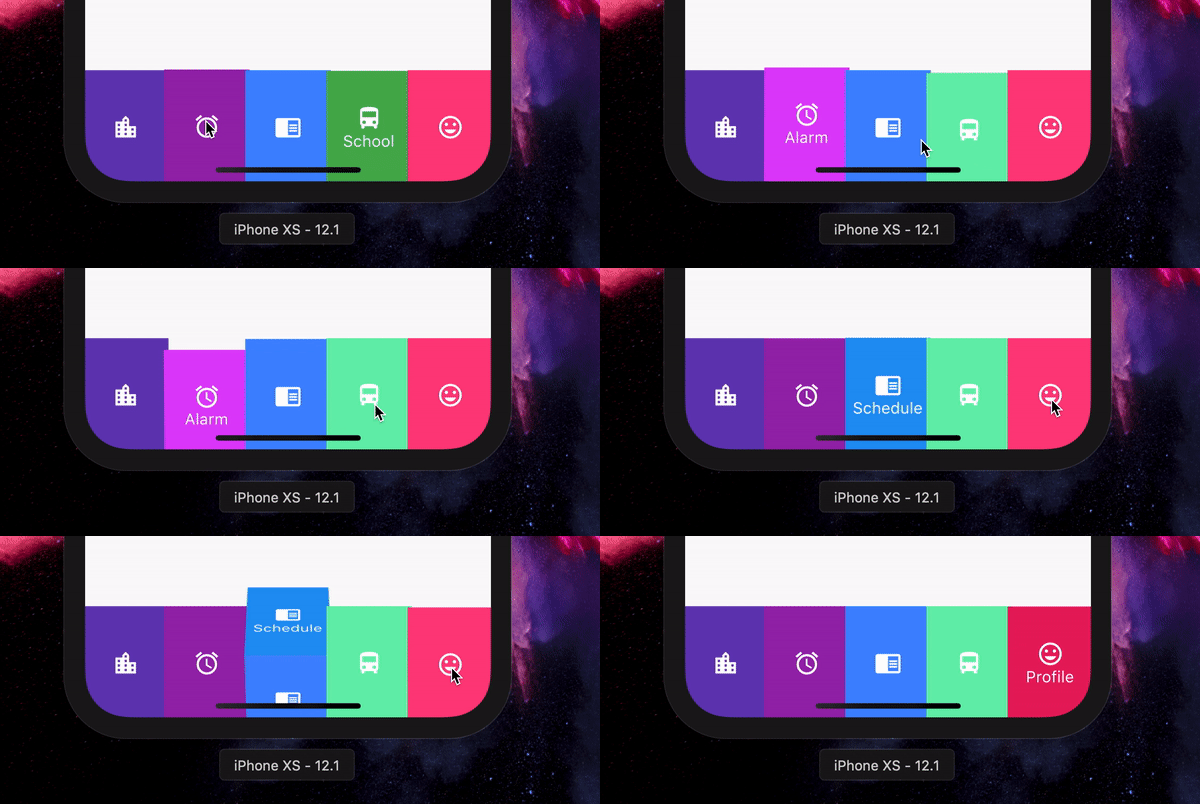
flip_box_bar_plus 표지
패키지 상세v1.0.0

flip_box_bar_plus

Dannniel의 Dribbble 디자인에서 영감을 받은 3D BottomNavigationBar

AndroidiOSWebmacOSWindowsLinux
30일 다운로드
38
좋아요
34
Pub 점수
140

패키지 설치

flutter pub add flip_box_bar_plus

패키지 개요

공개 정보를 바탕으로 생성한 선택 가이드입니다.

FlipBoxBarPlus는 Flutter용 3D 영감의 하단 탐색 바로, Dannniel이 Dribbble에서 제안한 개념에서 영감을 받았습니다. 사용자 상호작용과 시각적 매력을 높이는 동적인 플립 애니메이션 효과를 제공합니다. Android, iOS, Web, macOS, Windows, Linux 등 다양한 플랫폼을 지원하여 매우 유연하며, 부드러운 전환과 사용자 정의 가능한 스타일링으로 현대적인 앱 인터페이스에 재미있고 전문적인 느낌을 더할 수 있습니다. pub.dev를 통해 쉽게 통합 가능하며 오픈소스이므로 커뮤니티 기여를 장려합니다.

사용 사례

  • 현대적인 모바일 앱 인터페이스
  • 인터랙티브 UI 요소
  • 크로스 플랫폼 애플리케이션
  • 디자인 중심의 대시보드
  • 애니메이션 네비게이션 바

주요 기능

  • 3D 플립 애니메이션
  • 크로스 플랫폼 호환성
  • 사용자 정의 가능한 외관
  • 부드러운 전환 효과
  • 오픈소스이며 커뮤니티 주도

적합한 대상

  • 애니메이션 탐색을 찾는 개발자
  • 디자인에 민감한 앱 제작자
  • 인터랙티브 UI를 갖춘 플러터 프로젝트
  • 다양한 운영 체제를 대상으로 하는 앱
  • 창의적이고 시각적으로 매력적인 앱

고려 사항

  • 저사양 기기에서 성능에 영향을 줄 수 있습니다
  • 최적의 애니메이션 속도를 위해 신중한 튜닝이 필요합니다
  • 핵심 기능을 넘어서는 사용자 정의 제한
  • 최소한의 탐색 항목을 가진 앱에 가장 적합
  • 접근성 중심 애플리케이션에는 권장되지 않습니다

원본 README

연결된 소스 저장소의 README 원문 스냅샷입니다. 최신 내용은 저장소에서 확인하세요.

Flip_box_bar_plus

Forked from Flip_box_bar, added support for vertical position

Installation Guide

A 3D BottomNavigationBar inspired by Dribbble design by Dannniel.

Demo

Example Use

      // In Scaffold
      int selectedIndex = 0;
      
      FlipBoxBarPlus(
              selectedIndex: index,
              items: [
                FlipBarItem(icon: Icon(Icons.map), text: Text("Map"), frontColor: Colors.blue, backColor: Colors.blueAccent),
                FlipBarItem(icon: Icon(Icons.add), text: Text("Add"), frontColor: Colors.cyan, backColor: Colors.cyanAccent),
                FlipBarItem(icon: Icon(Icons.chrome_reader_mode), text: Text("Read"), frontColor: Colors.orange, backColor: Colors.orangeAccent),
                FlipBarItem(icon: Icon(Icons.print), text: Text("Print"), frontColor: Colors.purple, backColor: Colors.purpleAccent),
                FlipBarItem(icon: Icon(Icons.print), text: Text("Print"), frontColor: Colors.pink, backColor: Colors.pinkAccent),
              ],
              onIndexChanged: (newIndex) {
                setState() {
                    selectedIndex = newIndex;
                }
              },
            ),

For vertical position set isVerticalBar = true

Properties

List<FlipBarItem> items;

The items to be displayed in the NavBar.

Duration animationDuration;

The duration of the animation of the box flip.

ValueChanged<int> onIndexChanged;

Callback for getting value of item selection.

int initialIndex;

The initial selected index of the NavBar.

double navBarHeight;

The height of the NavBar when it is in bottom nav position.

bool isVerticalBar;

Set the navigation bar as vertical.

double navBarWidth;

The width of the NavBar when it is in vertical position.

카테고리

소스 저장소

이 패키지를 사용하는 프로젝트

아직 데이터가 없습니다.