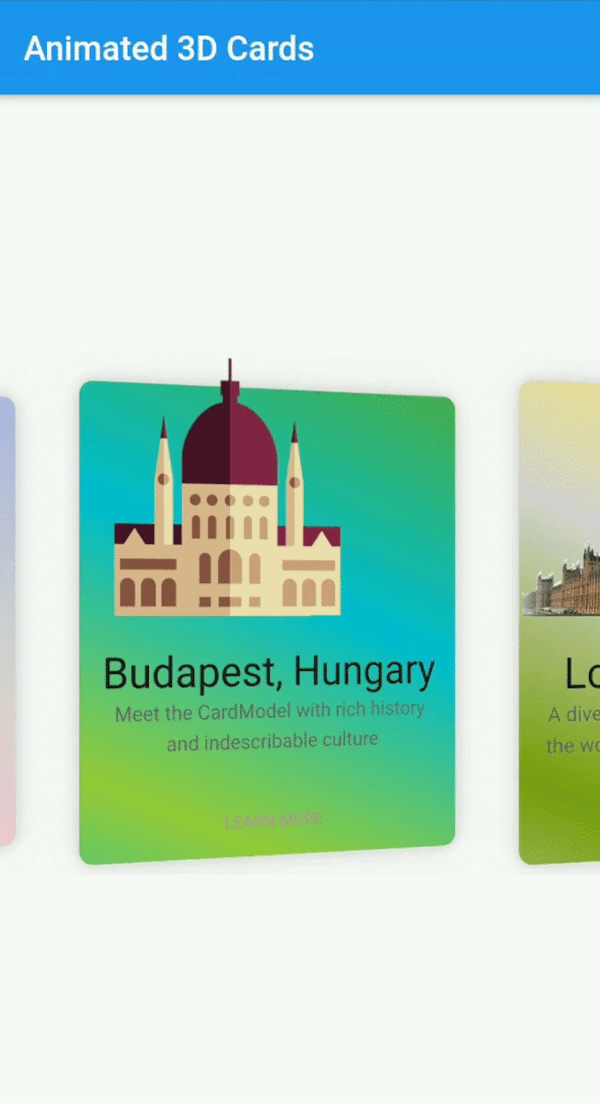
Flutter Animated Cards는 3D 애니메이션을 갖춘 시각적으로 매력적인 카드를 만들기 위한 사용자 정의 가능한 위젯으로, 안드로이드 및 iOS에서 사용자 상호작용을 향상시키기 위해 설계되었습니다. 부드러운 전환과 동적 효과를 지원하여 현대 앱 인터페이스에 이상적입니다. 이 패키지는 가볍고 쉽게 통합할 수 있으며, 개발자가 디자인과 행동에 유연성을 제공합니다. 애니메이션 품질과 크로스플랫폼 호환성에 중점을 두어 카드 기반 레이아웃에 깊이와 상호작용을 더합니다.
사용 사례
인터랙티브 제품 전시
애니메이션 탐색 카드
게임화된 UI 요소
동적 콘텐츠 캐러셀
온보딩 화면
주요 기능
3D 카드 애니메이션
완전히 사용자 정의 가능한 외관
크로스 플랫폼 지원 (Android 및 iOS)
부드러운 전환 효과
pub를 통한 간편한 통합
반응형 디자인 처리
적합한 대상
시각적 매력을 추구하는 UI 디자이너
인터랙티브 대시보드를 구축하는 개발자
매력적인 온보딩 경험을 필요로 하는 앱
제품 카드를 갖춘 전자상거래 앱
애니메이션 인터페이스 프로토타이핑
고려 사항
저사양 기기에서 성능에 영향을 줄 수 있습니다
복잡한 애니메이션을 위해 신중한 최적화가 필요합니다
기본 사용법 외에 문서가 제한적
정적 또는 미니멀리스트 디자인에 적합하지 않습니다
중간 수준의 애니메이션 복잡도와 함께 사용하는 것이 가장 좋습니다
원본 README
연결된 소스 저장소의 README 원문 스냅샷입니다. 최신 내용은 저장소에서 확인하세요.
flutter_animated_cards
A Fully customizable animated cards widget that has feature of 3D animation and much more. This widget works on both Android & iOS.
Installation
Add following dependency in pubspec.yaml file. And add this import to your file.
// Add AnimatedCards to the widget tree
child: FlutterAnimatedCards(
list: _cardList,
model: _cardModel,
),
Card Model
classCardModel{
finalString title; /// requiredfinalString imagePath; /// required i.e "assets/images/image.png"finalString description; /// (Optional)finalColor color; /// (Optional) add this parameter if you want to have different color on each cardfinalList<Color> colorList; /// (Optional) add this parameter if you want to apply different gradient on each card
}
FlutterAnimatedCards made through model class
If you add Color parameter in your model class and assign each list item a new different color then your widget look like this.
Cards with ModelColor
Cards with Model Gradient
1-
   CardModel(
           title: 'Colors, Vibrant',
           description:'Gardening is how I relax. It\'s another form of creating and playing with colors.',
           color: Color(0xfff9d9e2),  // add color of your choice, add different colors in every list item
           imagePath: "assets/images/colors.png"),

2-
   CardModel(
          title: 'Budapest, Hungary',
          description:'Meet the CardModel with rich history and indescribable culture',
          colorList: [Color(0xFF4CAF50),  // add gradient of your choice, add different gradient in every list item
            Color(0xFF00BCD4),
            Color(0xFF99ca3d)],
          imagePath: "assets/images/city_image.png"),
FlutterAnimatedCards without passing any color in model class
This is another way to give colors or gradient to your card. Now you need to add 'cardWithSingleColor' or 'cardWithGradientColors' as shown below
Cards with Single Color
Cards with Single Gradient
1-
child: FlutterAnimatedCards(
list: _cardList,
model: _cardModel,
cardWithSingleColor: Color(0xfff9d9e2), // you are not asked to add this parameter, but you can this if you want to display your cards withany other single color. By default cards will appear as it is shown in Screenshot
),
2-
child: FlutterAnimatedCards(
list: _cardList,
model: _cardModel,
cardWithGradientColors: [Color(0xffacb6e5), // this parameter is needs to be added to add gradient, there is no default gradient available in lib
Color(0xFFD5D2D2),
Color(0xFFfbc7d4)],
),
Custom Usage
There are several options that allow for more control:
Properties
Description
model
This is the required parameter. You need to pass a model class somehow similar to the one shown in example, you can add more arguments in your class but 'name', 'description', 'image' is necessary
list
This is also the required parameter. You need to pass a list of your model class, this list can not be null or empty
cardHeight
set card height according to your requirement.
cardWidth
set card width according to your requirement.
isRotatingCards
by default it's 'true', you can set it 'false' if you don't want to add 3D rotation in your cards.
cardWithSingleColor
if you want to give all your cards one single color, use this property. You can also give each card a different color through model class
cardWithGradientColors
it takes List as a parameter, this property allows you to apply the same gradient on all of your cards. You can also give each card a different gradient through model class
moreText
by default I have set it to 'LEARN MORE', but you can change it to any text according to your choice.
onMoreBtnPressed
this is a click event, currently it performs nothing you can use it according to your choice.