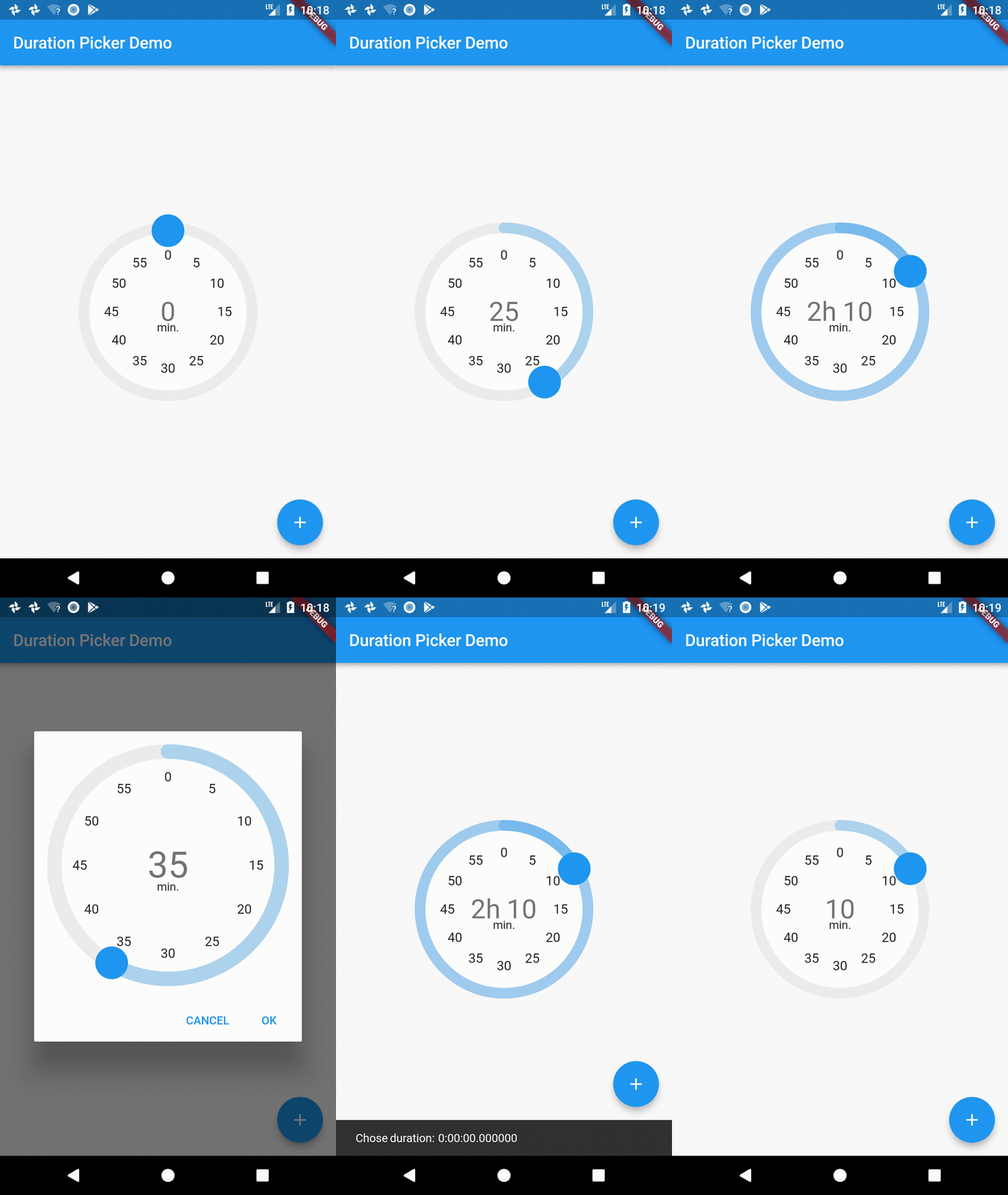
Material Time Picker를 모델로 삼은 지속 시간 선택을 위한 Flutter 위젯입니다. 시, 분, 초와 같은 시간 간격을 선택할 수 있는 직관적인 인터페이스를 제공하여 타이머, 워크아웃 앱 또는 스케줄링 도구와 같은 지속 시간 입력이 필요한 애플리케이션에 적합합니다. 사용자 정의 가능한 단계 증가를 지원하며, 플랫폼 간 일관된 사용자 경험을 제공하기 위해 Material Design 원칙에 따라 구현되었습니다.
사용 사례
타이머 지속 시간 설정
운동 세션 길이 구성
지속 시간이 있는 이벤트 예약
작업 시간 예측 입력
카운트다운 타이머 만들기
주요 기능
Material Design 스타일의 사용자 인터페이스
사용자 정의 가능한 시간 단계 증가량
시간, 분, 초를 지원합니다
기존 양식과의 간단한 통합
반응형이고 접근성 있는 레이아웃
적합한 대상
기간 선택이 필요한 앱
시간 간격이 필요한 폼 입력
Material 디자인을 사용하는 모바일 애플리케이션
경량 시간 선택기 찾는 개발자
최소 종속성의 프로젝트
고려 사항
플랫폼별 사용자 지정 옵션이 목록에 없습니다
고급 기능 없이 기본 기간 입력에만 제한됨
AM/PM 또는 날짜 구성 요소를 지원하지 않습니다
검증에 대한 수동 처리가 필요합니다
내장된 로컬라이제이션 지원에 대한 언급 없음
원본 README
연결된 소스 저장소의 README 원문 스냅샷입니다. 최신 내용은 저장소에서 확인하세요.
Duration Picker for flutter
A little widget for picking durations. Heavily inspired from the Material Design time picker widget.
This repo is unmaintained, please check out the fork here: https://github.com/juliansteenbakker/duration_picker
Example Usage:
dependencies:flutter_duration_picker:"^1.0.0"
import'package:flutter/material.dart';
import'package:flutter_duration_picker/flutter_duration_picker.dart';
voidmain() => runApp(newMyApp());
classMyAppextendsStatelessWidget{
@overrideWidgetbuild(BuildContext context) {
returnnewMaterialApp(
title: 'Duration Picker Demo',
theme: newThemeData(
primarySwatch: Colors.blue,
),
home: newMyHomePage(title: 'Duration Picker Demo'),
);
}
}
classMyHomePageextendsStatefulWidget{
MyHomePage({Key key, this.title}) : super(key: key);
finalString title;
@override_MyHomePageStatecreateState() => new_MyHomePageState();
}
class_MyHomePageStateextendsState<MyHomePage> {
Duration _duration = Duration(hours: 0, minutes: 0);
@overrideWidgetbuild(BuildContext context) {
returnnewScaffold(
appBar: newAppBar(
title: newText(widget.title),
),
body: newCenter(
child: newColumn(
mainAxisAlignment: MainAxisAlignment.center,
children: <Widget>[
newExpanded(
// Use it from the context of a stateful widget, passing in// and saving the duration as a state variable.
child: DurationPicker(
duration: _duration,
onChange: (val) {
this.setState(() => _duration = val);
},
snapToMins: 5.0,
))
],
),
),
floatingActionButton: Builder(
builder: (BuildContext context) => newFloatingActionButton(
onPressed: () async {
// Use it as a dialog, passing in an optional initial time// and returning a promise that resolves to the duration// chosen when the dialog is accepted. Null when cancelled.Duration resultingDuration = awaitshowDurationPicker(
context: context,
initialTime: newDuration(minutes: 30),
);
Scaffold.of(context).showSnackBar(newSnackBar(
content: newText("Chose duration: $resultingDuration")));
},
tooltip: 'Popup Duration Picker',
child: newIcon(Icons.add),
)),
);
}
}