패키지, 저장소 및 앱 카테고리 검색

footer 표지
패키지 상세v0.0.4

footer

Android 및 iOS 앱용으로 사용자 정의 가능한 푸터를 만들 수 있도록 도와주는 새로운 Flutter 패키지입니다.

AndroidiOSWebmacOSWindowsLinux
30일 다운로드
1.9천
좋아요
35
Pub 점수
140

패키지 설치

flutter pub add footer

패키지 개요

공개 정보를 바탕으로 생성한 선택 가이드입니다.

footer 패키지는 안드로이드, iOS, 웹, macOS, Windows, 리눅스 앱에서 일관되고 반응형 풋터를 만들기 위한 사용자 정의 가능한 플러터 솔루션입니다. 내장된 스타일, 애니메이션 및 레이아웃 유연성을 통해 하단 탐색 또는 콘텐츠 섹션 구현을 간소화합니다. 봉쇄 코드 없이 통합된 풋터 경험을 원하는 개발자를 위해 설계되었으며, 동적 콘텐츠와 적응형 디자인을 지원합니다. 이 패키지는 pub.dev를 통해 기존 플러터 프로젝트에 원활하게 통합됩니다.

사용 사례

  • 일관된 하단 네비게이션 바 추가
  • 동적 콘텐츠를 사용하여 사용자 지정 앱 풋터 만들기
  • 다양한 플랫폼에서 반응형 레이아웃 구현
  • 인터랙티브한 하단 패널 설계
  • 재사용 가능한 푸터 컴포넌트 만들기
  • 디바이스 간 UI 일관성 향상

주요 기능

  • 크로스 플랫폼 호환성
  • 사용자 정의 가능한 외관 및 동작
  • 내장 애니메이션 및 전환
  • 동적 콘텐츠 지원
  • Flutter 프로젝트와의 간편한 통합
  • 모든 화면 크기에 대응하는 반응형 디자인

적합한 대상

  • 다중 플랫폼 앱을 개발하는 Flutter 개발자
  • 기기 간에 일관된 UI가 필요한 팀
  • 푸터에 대한 반복 코드를 줄이려는 개발자
  • Flutter 프로젝트에서 협업하는 UI/UX 디자이너
  • 조정 가능한 하단 패널이 필요한 프로젝트

고려 사항

  • 복잡한 레이아웃을 위해 추가 스타일링이 필요할 수 있습니다
  • 기본 사용법 외에 문서가 제한적
  • 중량 애니메이션과 함께 가능한 성능 영향
  • 푸터 콘텐츠 내 매우 큰 데이터 세트에 최적화되지 않음
  • Flutter 버전 호환성에 의존합니다

원본 README

연결된 소스 저장소의 README 원문 스냅샷입니다. 최신 내용은 저장소에서 확인하세요.

Flutter Footer Widget

The released package here on pubstore A new Flutter package which helps developers in creating Customisable Footer for both Android and IOS Apps.

Show some :heart: and :star: the repo to support the project

Support my work and fuel the next open source project! 🙌 ☕ Buy Me a Coffee: https://buymeacoffee.com/stackdev.io

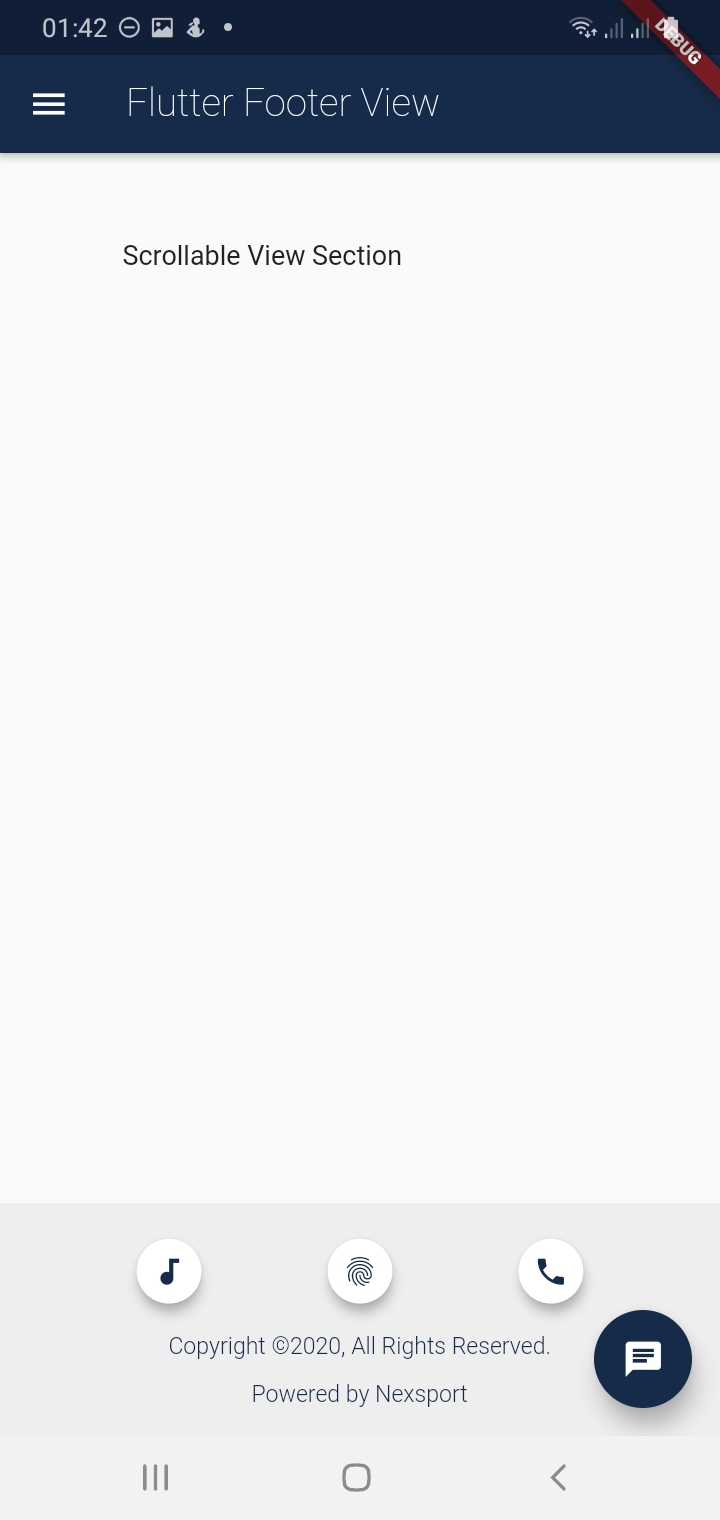
Screenshots

Getting Started

Usage

Example

To use this package :

    dependencies:
     flutter:
       sdk:flutter
     footer:
How to Use

The flutter footer uses a component called FooterView. The FooterView Component takes three arguments which are as follows:

    1. children : this is a Scrollable List of Widgets
    1. footer : Takes a Footer Component that takes a Customizable Widget e.g a Container Widget
    1. flex : This takes an interger from 1-10. This flex the footer space of the screen with 2 being the default.
  • NB: The children and footer parameters are mandatory. See Example

FooterView(
  children: <Widget>[
    ...                      //this is a Scrollable List of Widgets
  ],
  footer : Footer(           //this takes the Footer Component which has 4 arguments with one being mandatory ie the child
    child:  Container(),     //This take a Cusstomisable Widget eg Container, Column e.t.c
    ...                      //See Description Below for the other arguments of the Footer Component
  ),
  flex: 2                    //this take an interger that ranges from 1-10 with 2 being the default for the Footer Area
)

The Footer Component takes four arguments with one being Mandatory ie child Widget ,see Fig below.

Footer(
  child: Container(),  //The child Widget is mandatory takes any Customisable Widget for the footer
  backgroundColor : Colors.grey.shade200  // defines the background Colors of the Footer with default Colors.grey.shade200
  padding: EdgeInsets.all(5.0),// Takes EdgeInsetsGeometry with default being EdgeInsets.all(5.0)
  alignment: Alignment.bottomCenter //this is of type Aligment with default being Alignment.bottomCenter
)

Imports

After installing the footer package remember the imports

import 'package:footer/footer.dart';
import 'package:footer/footer_view.dart';

Simple Example

In this Example i will show you how you can simply use the FooterView Widget inside a Scaffold body.

  • Note that when the children list is not overflowing the Footer will be fixed right at the bottom of the Page.
  • If there is overflow the whole page will become scrollable and the footer wont be fixed . See gif image below.
import 'package:footer/footer.dart';
import 'package:footer/footer_view.dart';


@override
  Widget build(BuildContext context) {
    return Scaffold(
      appBar:AppBar(
        title: new Text('Footer View Example')
      ),
      body: new FooterView(
        children:<Widget>[
          new Padding(
            padding: new EdgeInsets.only(top:200.0),
            child: Center(
              child: new Text('Scrollable View'),
            ),
          ),
        ],
        footer: new Footer(
          child: Text('I am a Customizable footer!!'),
          padding: EdgeInsets.all(10.0),
        ),
        flex: 1, //default flex is 2
      ),
    );
  }

Below is a Full Example

import 'package:flutter/material.dart';
import 'package:footer/footer.dart';
import 'package:footer/footer_view.dart';
void main() {
  runApp(MyApp());
}

class MyApp extends StatelessWidget {
  // This widget is the root of your application.
  static Map<int, Color> color = {
    50:Color.fromRGBO(4, 131, 184, .1),
    100:Color.fromRGBO(4, 131, 184, .2),
    200:Color.fromRGBO(4, 131, 184, .3),
    300:Color.fromRGBO(4, 131, 184, .4),
    400:Color.fromRGBO(4, 131, 184, .5),
    500:Color.fromRGBO(4, 131, 184, .6),
    600:Color.fromRGBO(4, 131, 184, .7),
    700:Color.fromRGBO(4, 131, 184, .8),
    800:Color.fromRGBO(4, 131, 184, .9),
    900:Color.fromRGBO(4, 131, 184, 1),
  };
  //MaterialColor myColor = MaterialColor(0xFF162A49, color);
  
  @override
  Widget build(BuildContext context) {
    return MaterialApp(
      title: 'Flutter Footer',
      theme: ThemeData(
        primarySwatch: MaterialColor(0xFF162A49, color),
        visualDensity: VisualDensity.adaptivePlatformDensity,
      ),
      home: FooterPage(),
    );
  }
}

class FooterPage extends StatefulWidget {
  @override
  FooterPageState createState() {
    return new FooterPageState();
  }
}

class FooterPageState extends State<FooterPage> {

  @override
  Widget build(BuildContext context) {
    return Scaffold(
      appBar: AppBar(
        title: new  Text('Flutter Footer View',style: TextStyle(fontWeight:FontWeight.w200),)
      ),
      drawer: new Drawer(),
      body: FooterView(
          children: <Widget>[
            new Column(
              crossAxisAlignment: CrossAxisAlignment.start,
              children: <Widget>[
                new Padding(
                  padding: EdgeInsets.only(top:50,left: 70),
                    child: new Text('Scrollable View Section'),
                )
              ],
            ),
          ],
          footer: new Footer(
              child: new Column(
                crossAxisAlignment: CrossAxisAlignment.center,
                mainAxisAlignment: MainAxisAlignment.spaceAround,
                children:<Widget>[
                  new Center(
                    child:new Row(
                      mainAxisAlignment: MainAxisAlignment.spaceEvenly,
                      children: <Widget>[
                        new Container(
                          height: 45.0,
                          width: 45.0,
                          child: Center(
                            child:Card(
                              elevation: 5.0,
                              shape: RoundedRectangleBorder(
                                borderRadius: BorderRadius.circular(25.0), // half of height and width of Image
                              ),
                              child: IconButton(
                                icon: new Icon(Icons.audiotrack,size: 20.0,),
                                color: Color(0xFF162A49),
                                onPressed: () {},
                              ),
                            ),
                          )
                        ),
                        new Container(
                          height: 45.0,
                          width: 45.0,
                          child: Center(
                            child:Card(
                              elevation: 5.0,
                              shape: RoundedRectangleBorder(
                                borderRadius: BorderRadius.circular(25.0), // half of height and width of Image
                              ),
                              child: IconButton(
                                icon: new Icon(Icons.fingerprint,size: 20.0,),
                                color: Color(0xFF162A49),
                                onPressed: () {},
                              ),
                            ),
                          )
                        ),
                        new Container(
                          height: 45.0,
                          width: 45.0,
                          child: Center(
                            child:Card(
                              elevation: 5.0,
                              shape: RoundedRectangleBorder(
                                borderRadius: BorderRadius.circular(25.0), // half of height and width of Image
                              ),
                              child: IconButton(
                                icon: new Icon(Icons.call,size: 20.0,),
                                color: Color(0xFF162A49),
                                onPressed: () {},
                              ),
                            ),
                          )
                        ),
                      ],
                    ),
                  ),

                  Text('Copyright ©2020, All Rights Reserved.',style: TextStyle(fontWeight:FontWeight.w300, fontSize: 12.0, color: Color(0xFF162A49)),),
                  Text('Powered by Nexsport',style: TextStyle(fontWeight:FontWeight.w300, fontSize: 12.0,color: Color(0xFF162A49)),),
                ]
              ),
              padding: EdgeInsets.all(5.0),
            
          )
      ),
      floatingActionButton: new FloatingActionButton(
              elevation: 10.0,
              child: new Icon(Icons.chat),
              backgroundColor: Color(0xFF162A49),
              onPressed: (){
              }
      ),
    );
  }
}

Scrollable FooterView

Pull Requests

I Welcome and i encourage all Pull Requests

Created and Maintained by

  • Author: Tafadzwa Lameck Nyamukapa :
  • Email: [tafadzwalnyamukapa@gmail.com]
  • Open for any colleboration and Remote Work!!
  • Happy Fluttering!!
License
MIT License

Copyright (c) 2020 Tafadzwa Lameck Nyamukapa

Permission is hereby granted, free of charge, to any person obtaining a copy
of this software and associated documentation files (the "Software"), to deal
in the Software without restriction, including without limitation the rights
to use, copy, modify, merge, publish, distribute, sublicense, and/or sell
copies of the Software, and to permit persons to whom the Software is
furnished to do so, subject to the following conditions:

The above copyright notice and this permission notice shall be included in all
copies or substantial portions of the Software.

THE SOFTWARE IS PROVIDED "AS IS", WITHOUT WARRANTY OF ANY KIND, EXPRESS OR
IMPLIED, INCLUDING BUT NOT LIMITED TO THE WARRANTIES OF MERCHANTABILITY,
FITNESS FOR A PARTICULAR PURPOSE AND NONINFRINGEMENT. IN NO EVENT SHALL THE
AUTHORS OR COPYRIGHT HOLDERS BE LIABLE FOR ANY CLAIM, DAMAGES OR OTHER
LIABILITY, WHETHER IN AN ACTION OF CONTRACT, TORT OR OTHERWISE, ARISING FROM,
OUT OF OR IN CONNECTION WITH THE SOFTWARE OR THE USE OR OTHER DEALINGS IN THE
SOFTWARE.


This project is a starting point for a Dart package, a library module containing code that can be shared easily across multiple Flutter or Dart projects.

카테고리

소스 저장소

이 패키지를 사용하는 프로젝트

아직 데이터가 없습니다.