패키지, 저장소 및 앱 카테고리 검색

live_text 표지
패키지 상세v0.0.7

live_text

UI에서 텍스트 위젯을 업데이트하는 가장 쉬운 방법을 제공하는 플러터 패키지입니다.

AndroidiOSWebmacOSWindowsLinux
30일 다운로드
19
좋아요
26
Pub 점수
140

패키지 설치

flutter pub add live_text

패키지 개요

공개 정보를 바탕으로 생성한 선택 가이드입니다.

LiveText는 UI에서 동적 텍스트 업데이트를 간소화하기 위해 설계된 Flutter 패키지입니다. 최소한의 코드로 실시간이고 부드러운 텍스트 변경을 가능하게 하며, 애니메이션, 카운터 또는 반응형 텍스트 렌더링이 필요한 모든 시나리오에 적합합니다. 사용이 용이하도록 설계되어 Android, iOS, Web, macOS, Windows, Linux 등 모든 주요 플랫폼과 원활하게 통합됩니다. 성능과 단순성에 중점을 두어 복잡한 설정 없이 효율적인 텍스트 조작을 원하는 개발자에게 완벽한 선택입니다. 가벼운 구조로 빠른 렌더링과 낮은 오버헤드를 보장합니다.

사용 사례

  • 실시간 카운터
  • 애니메이션 텍스트 전환
  • 동적 레이블 업데이트
  • 인터랙티브 UI 요소
  • 실시간 데이터 표시

주요 기능

  • 간단한 API
  • 크로스 플랫폼 지원
  • 부드러운 텍스트 업데이트
  • 낮은 메모리 사용량
  • 최소한의 보일러플레이트
  • 내장 애니메이션 처리

적합한 대상

  • 초보자 플러터 개발자
  • 동적 텍스트를 가진 앱
  • 텍스트를 포함하는 애니메이션
  • 성능에 민감한 애플리케이션
  • 빠른 UI 개선

고려 사항

  • 텍스트만 업데이트 가능
  • 복잡한 위젯에 적합하지 않음
  • 추가 스타일링이 필요할 수 있습니다
  • 간단한 텍스트 시나리오에 가장 적합
  • 내장된 텍스트 형식 지정 옵션이 없음

원본 README

연결된 소스 저장소의 README 원문 스냅샷입니다. 최신 내용은 저장소에서 확인하세요.

Buy Me A Coffee

pub package

:star: Updating Text widget made simple :star:

Have you stumble upon a situations where you simply need to update UI text without dealing with state management techniques? If so, this package is a perfect fit for you.

Features

  • [X] Updates text without any hassle.
  • [X] Provides call back with old and new value of your text widget.
  • [X] Reset to initial value whenever you want.

Getting started

Add live_text to your pubspec.yaml file and start making your text live.

Installation

Just add live_text as a dependency in your pubspec.yaml file.

dependencies:
  live_text: <Latest Version>

Usage

  import 'package:live_text/live_text.dart';

Simple counter example.

  • Create LiveTextController instance
    LiveTextController counterLiveTextController = LiveTextController(initialValue: "0");
    
  • Create LiveText widget and provide LiveTextController that we just created
     LiveText(
                style: Theme.of(context).textTheme.headlineMedium,
                liveTextController: counterLiveTextController,
              ),
    
  • Now provide following call backs on increase and decrease button
      void _incrementCounter() {
    counterLiveTextController.setValue =
        (int.parse(counterLiveTextController.getValue) + 1).toString();
    }
    
     void _decrementCounter() {
      counterLiveTextController.setValue =
          (int.parse(counterLiveTextController.getValue) - 1).toString();
    }
    

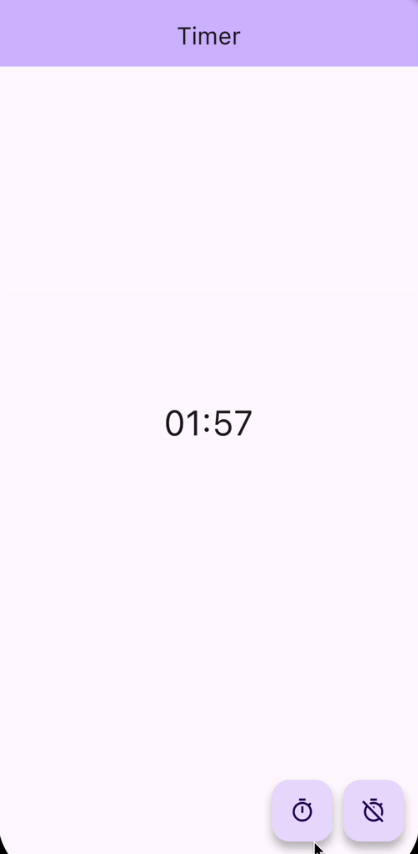
Timer example.

  • Following is the full example code for Timer app using live_text
import 'dart:async';

import 'package:flutter/material.dart';
import 'package:live_text/live_text.dart';

class TimerExample extends StatelessWidget {
  TimerExample({super.key});

  late LiveTextController timerLiveTextController = LiveTextController(
      initialValue: "00:00",
      onValueChanged: (String oldValue, String newValue) {
        print("Timer");

        print("Old Value $oldValue");
        print("New Value $newValue");
      });

  Timer? timer;

  void _toggleTimer() {
    if (timer == null) {
      DateTime futureTime = DateTime.now().add(const Duration(seconds: 120));

      timer ??= Timer.periodic(const Duration(milliseconds: 100), (_) {
        DateTime latestTime = DateTime.now();
        if (latestTime.isBefore(futureTime)) {
          timerLiveTextController.setValue =
              formatHHMMSS(futureTime.difference(latestTime).inSeconds);
        } else {
          _clearTimer();
        }
      });
    } else {
      _clearTimer();
    }
  }

  void _clearTimer() {
    timer?.cancel();
    timer = null;
    timerLiveTextController.resetValue();
  }

  String formatHHMMSS(int seconds) {
    final hours = (seconds / 3600).truncate();
    seconds = (seconds % 3600).truncate();
    final minutes = (seconds / 60).truncate();

    final hoursStr = (hours).toString().padLeft(2, '0');
    final minutesStr = (minutes).toString().padLeft(2, '0');
    final secondsStr = (seconds % 60).toString().padLeft(2, '0');

    if (hours == 0) {
      return '$minutesStr:$secondsStr';
    }

    return '$hoursStr:$minutesStr:$secondsStr';
  }

  @override
  Widget build(BuildContext context) {
    return Scaffold(
      appBar: AppBar(
        backgroundColor: Theme.of(context).colorScheme.inversePrimary,
        title: const Text("Timer"),
      ),
      body: SafeArea(
        child: Center(
          child: Column(
            children: <Widget>[
              const Spacer(),
              LiveText(
                style: Theme.of(context).textTheme.headlineLarge,
                liveTextController: timerLiveTextController,
              ),
              const Spacer(),
              Padding(
                padding: const EdgeInsets.symmetric(horizontal: 16.0),
                child: Row(
                  children: [
                    const Spacer(),
                    FloatingActionButton(
                      onPressed: _toggleTimer,
                      tooltip: 'Start Timer',
                      child: const Icon(Icons.timer_outlined),
                    ),
                    const SizedBox(width: 10),
                    FloatingActionButton(
                      onPressed: _clearTimer,
                      tooltip: 'Start Timer',
                      child: const Icon(Icons.timer_off_outlined),
                    ),
                  ],
                ),
              ),
            ],
          ),
        ),
      ),
    );
  }
}

Additional information

We will be more than happy for your contributions.
Please contribute to live_text this github repo.

카테고리

소스 저장소

이 패키지를 사용하는 프로젝트

아직 데이터가 없습니다.